
- GWT Google 圖表教程
- GWT Google 圖表 - 主頁
- GWT Google 圖表 - 概覽
- 環境設定
- 配置語法
- GWT Google 圖表 - 區域圖表
- GWT Google 圖表 - 條形圖
- GWT Google 圖表 - 氣泡圖
- GWT Google 圖表 - 蠟燭圖
- GWT Google 圖表 - 柱狀圖
- GWT Google 圖表 - 組合
- GWT Google 圖表 - 直方圖
- GWT Google 圖表 - 折線圖
- GWT Google 圖表 - 地圖
- GWT Google 圖表 - 組織
- GWT Google 圖表 - 餅圖
- GWT Google 圖表 - Sankey 圖表
- GWT Google 圖表 - 散點圖
- GWT Google 圖表 - 分段區域
- GWT Google 圖表 - 表格圖表
- GWT Google 圖表 - 樹狀圖圖表
- GWT Google 圖表資源
- GWT Google 圖表 - 快速指南
- GWT Google 圖表 - 資源
- GWT Google 圖表 - 討論
使用緯度/經度的地圖
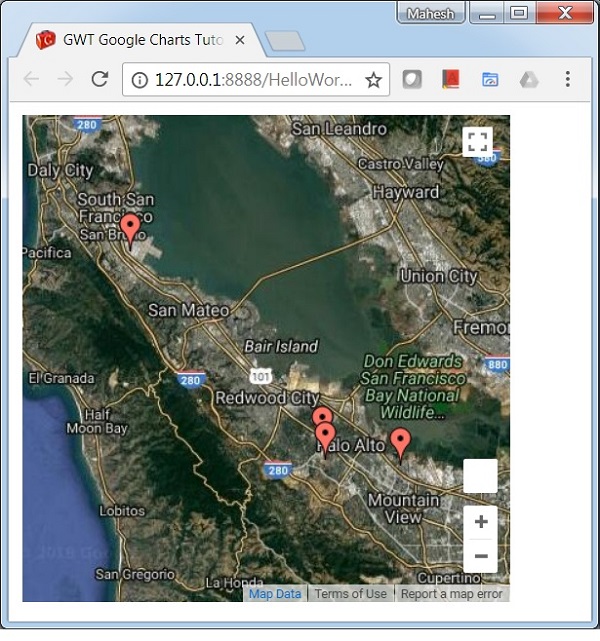
以下是使用緯度/經度的地圖示例。
我們已經在 Google 圖表配置語法 章節中看到了用於繪製圖表所需的配置。現在,我們來看一個使用緯度/經度的地圖示例。
示例
HelloWorld.java
package com.tutorialspoint.client;

import com.google.gwt.core.client.EntryPoint;
import com.google.gwt.user.client.ui.RootPanel;

import com.googlecode.gwt.charts.client.ChartLoader;
import com.googlecode.gwt.charts.client.ChartPackage;
import com.googlecode.gwt.charts.client.ColumnType;
import com.googlecode.gwt.charts.client.DataTable;
import com.googlecode.gwt.charts.client.map.Map;
import com.googlecode.gwt.charts.client.map.MapOptions;

public class HelloWorld implements EntryPoint {
   private Map chart;

   private void initialize() {
      ChartLoader chartLoader = new ChartLoader(ChartPackage.MAP);
      chartLoader.loadApi(new Runnable() {
         public void run() {
            // Create and attach the chart
            chart = new Map();
            RootPanel.get().add(chart);
            draw();
         }
      });
   }
   private void draw() {
      // Prepare the data
      DataTable data = DataTable.create();
      data.addColumn(ColumnType.NUMBER , "Latitude");
      data.addColumn(ColumnType.NUMBER, "Longitude");
      data.addColumn(ColumnType.STRING, "Name");

      data.addRow(37.4232, -122.0853, "Work");
      data.addRow(37.4289, -122.1697, "University");
      data.addRow(37.6153, -122.3900, "Airport");
      data.addRow(37.4422, -122.1731, "Shopping");

      // Set options
      MapOptions options = MapOptions.create();
      options.setShowTip(true);

      // Draw the chart
      chart.draw(data,options);
      chart.setWidth("400px");
      chart.setHeight("400px");
   }
   public void onModuleLoad() {
      initialize();
   }
}
結果
驗證結果。
gwt_googlecharts_maps.htm
廣告