
- Java 資料結構與演算法 教程
- Java 資料結構與演算法 - 首頁
- Java 資料結構與演算法 - 概述
- Java 資料結構與演算法 - 環境搭建
- Java 資料結構與演算法 - 演算法
- Java 資料結構與演算法 - 資料結構
- Java 資料結構與演算法 - 陣列
- Java 資料結構與演算法 - 連結串列
- Java 資料結構與演算法 - 雙向連結串列
- Java 資料結構與演算法 - 迴圈連結串列
- Java 資料結構與演算法 - 棧
- 資料結構與演算法 - 表示式解析
- Java 資料結構與演算法 - 佇列
- Java 資料結構與演算法 - 優先佇列
- Java 資料結構與演算法 - 樹
- Java 資料結構與演算法 - 雜湊表
- Java 資料結構與演算法 - 堆
- Java 資料結構與演算法 - 圖
- Java 資料結構與演算法 - 搜尋技術
- Java 資料結構與演算法 - 排序技術
- Java 資料結構與演算法 - 遞迴
- Java 資料結構與演算法 - 有用資源
- Java 資料結構與演算法 - 快速指南
- Java 資料結構與演算法 - 有用資源
- Java 資料結構與演算法 - 討論
Java 資料結構與演算法 - 快速指南
Java 資料結構與演算法 - 概述
什麼是資料結構?
資料結構是以一種有效的方式組織資料的方法。以下術語是資料結構的基礎術語。
介面 - 每個資料結構都有一個介面。介面表示資料結構支援的一組操作。介面只提供支援的操作列表、它們可以接受的引數型別以及這些操作的返回型別。
實現 - 實現提供資料結構的內部表示。實現還提供資料結構操作中使用的演算法的定義。
資料結構的特性
正確性 - 資料結構的實現應該正確地實現其介面。
時間複雜度 - 資料結構操作的執行時間或執行時間必須儘可能短。
空間複雜度 - 資料結構操作的記憶體使用量應儘可能少。
資料結構的必要性
隨著應用程式變得越來越複雜和資料豐富,如今應用程式面臨三個常見問題。
資料搜尋 - 考慮一家商店有 100 萬 (106) 件商品的庫存。如果應用程式要搜尋一件商品,則每次都必須在 100 萬 (106) 件商品中搜索商品,從而減慢搜尋速度。隨著資料增長,搜尋會變得更慢。
處理器速度 - 儘管處理器速度非常高,但如果資料增長到數十億條記錄,則會受到限制。
多個請求 - 由於數千個使用者可以同時在 Web 伺服器上搜索資料,即使是非常快速的伺服器在搜尋資料時也會失敗。
為了解決上述問題,資料結構可以提供幫助。資料可以以這樣一種方式組織在資料結構中,使得可能不需要搜尋所有專案,並且可以幾乎立即搜尋所需的資料。
執行時間情況
通常使用三種情況來相對地比較各種資料結構的執行時間。
最壞情況 - 這是特定資料結構操作可能花費的最長時間的情況。如果操作的最壞情況時間為 ƒ(n),則此操作不會花費超過 ƒ(n) 時間,其中 ƒ(n) 表示 n 的函式。
平均情況 - 這表示資料結構操作的平均執行時間的情況。如果操作執行時間為 ƒ(n),則 m 個操作將花費 mƒ(n) 時間。
最佳情況 - 這表示資料結構操作可能的最小執行時間的情況。如果操作執行時間為 ƒ(n),則實際操作可能花費的時間為隨機數,其最大值為 ƒ(n)。
Java 資料結構與演算法 - 環境搭建
本地環境搭建
如果您仍然希望為 Java 程式語言設定環境,那麼本節將指導您如何在計算機上下載和設定 Java。請按照以下步驟設定環境。
Java SE 可從以下連結免費獲得 下載 Java。因此,您可以根據您的作業系統下載一個版本。
按照說明下載 java 並執行 .exe 檔案以在您的計算機上安裝 Java。在您的計算機上安裝 Java 後,您需要設定環境變數以指向正確的安裝目錄。
為 Windows 2000/XP 設定路徑
假設您已將 Java 安裝在 c:\Program Files\java\jdk 目錄中
右鍵單擊“我的電腦”,然後選擇“屬性”。
在“高階”選項卡下單擊“環境變數”按鈕。
現在更改“Path”變數,使其還包含 Java 可執行檔案的路徑。例如,如果路徑當前設定為“C:\WINDOWS\SYSTEM32”,則將路徑更改為“C:\WINDOWS\SYSTEM32;c:\Program Files\java\jdk\bin”。
為 Windows 95/98/ME 設定路徑
假設您已將 Java 安裝在 c:\Program Files\java\jdk 目錄中 -
編輯“C:\autoexec.bat”檔案,並在末尾新增以下行
“SET PATH=%PATH%;C:\Program Files\java\jdk\bin”
為 Linux、UNIX、Solaris、FreeBSD 設定路徑
環境變數 PATH 應設定為指向已安裝 java 二進位制檔案的目錄。如果您遇到問題,請參考您的 shell 文件。
例如,如果您使用 bash 作為您的 shell,則您將在您的“.bashrc”的末尾新增以下行:export PATH=/path/to/java:$PATH
常用的 Java 編輯器
要編寫 Java 程式,您需要一個文字編輯器。市場上還有更復雜的 IDE。但就目前而言,您可以考慮以下其中一種
記事本 -在 Windows 機器上,您可以使用任何簡單的文字編輯器,如記事本(本教程推薦)、TextPad。
Netbeans -是一個開源且免費的 Java IDE,可以從 https://www.netbeans.org/index.html 下載。
Eclipse -也是一個由 Eclipse 開源社群開發的 Java IDE,可以從 https://www.eclipse.org/ 下載。
接下來是什麼?
下一章將教您如何編寫和執行您的第一個 Java 程式以及開發應用程式所需的一些重要的基本 Java 語法。
Java 資料結構與演算法 - 演算法
演算法概念
演算法是一個逐步的過程,它定義了一組指令,這些指令以一定的順序執行以獲得所需的輸出。就資料結構而言,演算法的類別如下。
搜尋 - 用於在資料結構中搜索專案的演算法。
排序 - 用於按特定順序排序專案的演算法
插入 - 用於將專案插入資料結構的演算法
更新 - 用於更新資料結構中現有專案的演算法
刪除 - 用於從資料結構中刪除現有專案的演算法
演算法分析
演算法分析處理資料結構的各種操作的執行時間或執行時間。操作的執行時間可以定義為每個操作執行的計算機指令數。由於任何操作的確切執行時間因計算機而異,我們通常將任何操作的執行時間分析為 n 的某個函式,其中 n 是資料結構中該操作處理的專案數。
漸近分析
漸近分析是指使用數學計算單位計算任何操作的執行時間。例如,一個操作的執行時間計算為 *f*(n),另一個操作的執行時間計算為 *g*(n2)。這意味著第一個操作的執行時間將隨著 n 的增加而線性增加,而第二個操作的執行時間將隨著 n 的增加而呈指數增加。同樣,如果 n 足夠小,則兩個操作的執行時間幾乎相同。
漸近符號
以下是計算演算法執行時間複雜度時常用的漸近符號。
Ο 符號
Ω 符號
θ 符號
大 O 符號,Ο
Ο(n) 是表達演算法執行時間上限的形式化方法。它衡量最壞情況下的時間複雜度或演算法可能完成所需的最長時間。例如,對於函式 *f*(n)大 O 符號用於簡化函式。例如,我們可以用 Ο(*f*(nlogn)) 代替特定的函式方程 7nlogn + n - 1。考慮以下情況
它表明 *f*(n) = 7nlogn + n - 1 位於使用常數 c = 8 和 n0 = 2 的 *O*(nlogn) 輸出範圍內。
Omega 符號,Ω
Ω(n) 是表達演算法執行時間下限的形式化方法。它衡量最佳情況下的時間複雜度或演算法可能完成所需的最短時間。
例如,對於函式 *f*(n)
Theta 符號,θ
θ(n) 是表達演算法執行時間下限和上限的形式化方法。它表示如下。
Java 資料結構與演算法 - 資料結構
資料結構是以一種有效的方式組織資料的方法。以下術語是資料結構的基本術語。
資料定義
資料定義定義了具有以下特徵的特定資料。
原子性 - 定義應定義單個概念
可跟蹤性 - 定義應該能夠對映到某些資料元素。
準確性 - 定義應明確無誤。
清晰簡潔 - 定義應該易於理解。
資料物件
資料物件表示具有資料的物件。
資料型別
資料型別是分類各種型別的資料(例如整數、字串等)的方法,它決定了可以與相應型別的資料一起使用的值以及可以對相應型別的資料執行的操作。資料型別分為兩種 -
內建資料型別
派生資料型別
內建資料型別
語言對那些具有內建支援的資料型別稱為內建資料型別。例如,大多數語言提供以下內建資料型別。
整數
布林值 (true, false)
浮點數 (十進位制數)
字元和字串
派生資料型別
那些資料型別因為可以以一種或另一種方式實現而與實現無關,被稱為派生資料型別。這些資料型別通常由組合的基本資料型別或內建資料型別以及對它們的關聯操作構建而成。例如:
列表
陣列
棧
佇列
Java中的資料結構 - 陣列
陣列基礎
陣列是一個容器,可以容納固定數量的項,並且這些項的型別必須相同。大多數資料結構都利用陣列來實現其演算法。以下是理解陣列概念的重要術語:
元素 - 儲存在陣列中的每一項都稱為元素。
索引 - 陣列中每個元素的位置都有一個數值索引,用於標識該元素。
陣列表示
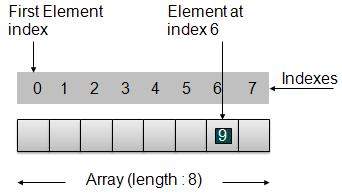
根據上圖所示,需要考慮以下要點:
索引從0開始。
陣列長度為8,這意味著它可以儲存8個元素。
每個元素都可以透過其索引訪問。例如,我們可以獲取索引為6的元素,值為9。
基本操作
以下是陣列支援的基本操作:
插入 - 在給定索引處新增元素。
刪除 - 刪除給定索引處的元素。
搜尋 - 使用給定索引或值搜尋元素。
更新 - 更新給定索引處的元素。
在Java中,當陣列初始化為特定大小時,它會按照以下順序為其元素分配預設值:
| 資料型別 | 預設值 |
|---|---|
| byte | 0 |
| short | 0 |
| int | 0 |
| long | 0L |
| float | 0.0f |
| double | 0.0d |
| char | '\u0000' |
| boolean | false |
| Object | null |
演示
package com.tutorialspoint.array;

public class ArrayDemo {
   public static void main(String[] args){

      // Declare an array
      int intArray[];

      // Initialize an array of 8 int
      // set aside memory of 8 int
      intArray = new int[8];

      System.out.println("Array before adding data.");

      // Display elements of an array.
      display(intArray);

      // Operation : Insertion
      // Add elements in the array
      for(int i = 0; i< intArray.length; i++)
      {
         // place value of i at index i.
         System.out.println("Adding "+i+" at index "+i);
         intArray[i] = i;
      }
      System.out.println();

      System.out.println("Array after adding data.");
      display(intArray);

      // Operation : Insertion
      // Element at any location can be updated directly
      int index = 5;
      intArray[index] = 10;

      System.out.println("Array after updating element at index " + index);
      display(intArray);

      // Operation : Search using index
      // Search an element using index.
      System.out.println("Data at index " + index + ": "+ intArray[index]);

      // Operation : Search using value
      // Search an element using value.
      int value = 4;
      for(int i = 0; i< intArray.length; i++)
      {
         if(intArray[i] == value ){
            System.out.println(value + " Found at index "+i);
            break;
         }
      }
      System.out.println("Data at index " + index + ": "+ intArray[index]);
   }

   private static void display(int[] intArray){
      System.out.print("Array : [");
      for(int i = 0; i< intArray.length; i++)
      {
         // display value of element at index i.
         System.out.print(" "+intArray[i]);
      }
      System.out.println(" ]");
      System.out.println();
   }
}
如果我們編譯並執行上述程式,則會產生以下結果:
Array before adding data.
Array : [ 0 0 0 0 0 0 0 0 ]

Adding 0 at index 0
Adding 1 at index 1
Adding 2 at index 2
Adding 3 at index 3
Adding 4 at index 4
Adding 5 at index 5
Adding 6 at index 6
Adding 7 at index 7

Array after adding data.
Array : [ 0 1 2 3 4 5 6 7 ]

Array after updating element at index 5
Array : [ 0 1 2 3 4 10 6 7 ]

Data at index 5: 10
4 Found at index: 4
Java 資料結構與演算法 - 連結串列
連結串列基礎
連結串列是由包含項的連結組成的序列。每個連結都包含到另一個連結的連線。連結串列是繼陣列之後第二常用的資料結構。以下是理解連結串列概念的重要術語:
連結 - 連結串列的每個連結都可以儲存稱為元素的資料。
下一個 - 連結串列的每個連結都包含指向下一個連結的連結,稱為“下一個”。
連結串列 - 連結串列包含指向第一個連結的連線連結,稱為“第一個”。
連結串列表示

根據上圖所示,需要考慮以下要點:
連結串列包含一個稱為first的連結元素。
每個連結都包含一個或多個數據欄位和一個稱為next的連結欄位。
每個連結都使用其next連結與其下一個連結連結。
最後一個連結包含一個值為null的連結,以標記列表的結尾。
連結串列的型別
以下是連結串列的各種型別:
單鏈表 - 專案導航僅向前。
雙向連結串列 - 專案可以向前和向後導航。
迴圈連結串列 - 最後一項包含下一個元素的第一個元素的連結,第一個元素包含上一個元素的最後一個元素的連結。
基本操作
以下是列表支援的基本操作:
插入 - 在列表開頭新增元素。
刪除 - 刪除列表開頭的元素。
顯示 - 顯示完整列表。
搜尋 - 使用給定鍵搜尋元素。
刪除 - 使用給定鍵刪除元素。
插入操作
插入是一個三步過程:
建立一個包含提供的資料的新連結。
將新連結指向舊的第一個連結。
將第一個連結指向此新連結。

//insert link at the first location
public void insertFirst(int key, int data){
   //create a link
   Link link = new Link(key,data);
   //point it to old first node
   link.next = first;
   //point first to new first node
   first = link;
}
刪除操作
刪除是一個兩步過程:
獲取第一個連結指向的連結作為臨時連結。
將第一個連結指向臨時連結的下一個連結。

//delete first item
public Link deleteFirst(){
   //save reference to first link
   Link tempLink = first;
   //mark next to first link as first
   first = first.next;
   //return the deleted link
   return tempLink;
}
導航操作
導航是一個遞迴步驟過程,是許多操作(如搜尋、刪除等)的基礎。
獲取第一個連結指向的連結作為當前連結。
檢查當前連結是否不為null並顯示它。
將當前連結指向當前連結的下一個連結並移動到上述步驟。

注意
//display the list
public void display(){
   //start from the beginning
   Link current = first;
   //navigate till the end of the list
   System.out.print("[ ");
   while(current != null){
      //print data
      current.display();
      //move to next item
      current = current.next;
      System.out.print(" ");
   }
   System.out.print(" ]");
}
高階操作
以下是為列表指定的高階操作:
排序 - 基於特定順序對列表進行排序。
反轉 - 反轉連結串列。
連線 - 連線兩個列表。
排序操作
我們使用氣泡排序來排序列表。
public void sort(){

   int i, j, k, tempKey, tempData ;
   Link current,next;
   int size = length();
   k = size ;
   for ( i = 0 ; i < size - 1 ; i++, k-- ) {
      current = first ;
      next = first.next ;
      for ( j = 1 ; j < k ; j++ ) {
         if ( current.data > next.data ) {
            tempData = current.data ;
            current.data = next.data;
            next.data = tempData ;

            tempKey = current.key;
            current.key = next.key;
            next.key = tempKey;
         }
         current = current.next;
         next = next.next;
      }
   }
}
反轉操作
以下程式碼演示了反轉單鏈表。
public LinkedList reverse() {
   LinkedList reversedlist = new LinkedList();
   Link nextLink = null;
   reversedlist.insertFirst(first.key, first.data);

   Link currentLink = first;
   // Until no more data in list,
   // insert current link before first and move ahead.
   while(currentLink.next != null){
      nextLink = currentLink.next;
      // Insert at start of new list.
      reversedlist.insertFirst(nextLink.key, nextLink.data);
      //advance to next node
      currentLink = currentLink.next;
   }
   return reversedlist;
}
連線操作
以下程式碼演示了反轉單鏈表。
public void concatenate(LinkedList list){
   if(first == null){
      first = list.first;
   }
   if(list.first == null){
      return;
   }
   Link temp = first;
   while(temp.next !=null) {
      temp = temp.next;
   }
   temp.next = list.first;
}
演示
Link.javapackage com.tutorialspoint.list;
public class Link {
public int key;
public int data;
public Link next;
public Link(int key, int data){
this.key = key;
this.data = data;
}
public void display(){
System.out.print("{"+key+","+data+"}");
}
}
LinkedList.java
package com.tutorialspoint.list;

public class LinkedList {
   //this link always point to first Link
   //in the Linked List
   private Link first;

   // create an empty linked list
   public LinkedList(){
      first = null;
   }

   //insert link at the first location
   public void insertFirst(int key, int data){
      //create a link
      Link link = new Link(key,data);
      //point it to old first node
      link.next = first;
      //point first to new first node
      first = link;
   }

   //delete first item
   public Link deleteFirst(){
      //save reference to first link
      Link tempLink = first;
      //mark next to first link as first
      first = first.next;
      //return the deleted link
      return tempLink;
   }

   //display the list
   public void display(){
      //start from the beginning
      Link current = first;
      //navigate till the end of the list
      System.out.print("[ ");
      while(current != null){
         //print data
         current.display();
         //move to next item
         current = current.next;
         System.out.print(" ");
      }
      System.out.print(" ]");
   }

   //find a link with given key
   public Link find(int key){
      //start from the first link
      Link current = first;

      //if list is empty
      if(first == null){
         return null;
      }
      //navigate through list
      while(current.key != key){
         //if it is last node
         if(current.next == null){
            return null;
         }else{
            //go to next link
            current = current.next;
         }
      }
      //if data found, return the current Link
      return current;
   }

   //delete a link with given key
   public Link delete(int key){
      //start from the first link
      Link current = first;
      Link previous = null;
      //if list is empty
      if(first == null){
         return null;
      }

      //navigate through list
      while(current.key != key){
         //if it is last node
         if(current.next == null){
            return null;
         }else{
            //store reference to current link
            previous = current;
            //move to next link
            current = current.next;
         }
      }

      //found a match, update the link
      if(current == first) {
         //change first to point to next link
         first = first.next;
      }else {
         //bypass the current link
         previous.next = current.next;
      }
      return current;
   }


   //is list empty
   public boolean isEmpty(){
      return first == null;
   }

   public int length(){
      int length = 0;
      for(Link current = first; current!=null;
         current = current.next){
         length++;
      }
      return length;
   }

   public void sort(){
      int i, j, k, tempKey, tempData ;
      Link current,next;
      int size = length();
      k = size ;
      for ( i = 0 ; i < size - 1 ; i++, k-- ) {
         current = first ;
         next = first.next ;
         for ( j = 1 ; j < k ; j++ ) {
            if ( current.data > next.data ) {
               tempData = current.data ;
               current.data = next.data;
               next.data = tempData ;

	           tempKey = current.key;
	           current.key = next.key;
	           next.key = tempKey;
            }
            current = current.next;
           next = next.next;
         }
      }
   }

   public LinkedList reverse() {
      LinkedList reversedlist = new LinkedList();
      Link nextLink = null;
      reversedlist.insertFirst(first.key, first.data);

      Link currentLink = first;
      // Until no more data in list,
      // insert current link before first and move ahead.
      while(currentLink.next != null){
         nextLink = currentLink.next;
         // Insert at start of new list.
         reversedlist.insertFirst(nextLink.key, nextLink.data);
         //advance to next node
         currentLink = currentLink.next;
      }
      return reversedlist;
   }

   public void concatenate(LinkedList list){
      if(first == null){
         first = list.first;
      }
      if(list.first == null){
         return;
      }
      Link temp = first;

      while(temp.next !=null) {
         temp = temp.next;
      }
      temp.next = list.first;
   }
}
LinkedListDemo.java
package com.tutorialspoint.list;

public class LinkedListDemo {
   public static void main(String args[]){
      LinkedList list = new LinkedList();

      list.insertFirst(1, 10);
      list.insertFirst(2, 20);
      list.insertFirst(3, 30);
      list.insertFirst(4, 1);
      list.insertFirst(5, 40);
      list.insertFirst(6, 56);

      System.out.print("\nOriginal List: ");
      list.display();
      System.out.println("");
      while(!list.isEmpty()){
         Link temp = list.deleteFirst();
         System.out.print("Deleted value:");
         temp.display();
         System.out.println("");
      }
      System.out.print("List after deleting all items: ");
      list.display();
      System.out.println("");
      list.insertFirst(1, 10);
      list.insertFirst(2, 20);
      list.insertFirst(3, 30);
      list.insertFirst(4, 1);
      list.insertFirst(5, 40);
      list.insertFirst(6, 56);

      System.out.print("Restored List: ");
      list.display();
      System.out.println("");

      Link foundLink = list.find(4);
      if(foundLink != null){
        System.out.print("Element found: ");
         foundLink.display();
         System.out.println("");
      }else{
         System.out.println("Element not found.");
      }

      list.delete(4);
      System.out.print("List after deleting an item: ");
      list.display();
      System.out.println("");
      foundLink = list.find(4);
      if(foundLink != null){
         System.out.print("Element found: ");
         foundLink.display();
         System.out.println("");
      }else{
         System.out.print("Element not found. {4,1}");
      }
      System.out.println("");
      list.sort();
      System.out.print("List after sorting the data: ");
      list.display();
      System.out.println("");
      System.out.print("Reverse of the list: ");
      LinkedList list1 = list.reverse();
      list1.display();
      System.out.println("");

      LinkedList list2 = new LinkedList();

      list2.insertFirst(9, 50);
      list2.insertFirst(8, 40);
      list2.insertFirst(7, 20);

      list.concatenate(list2);
      System.out.print("List after concatenation: ");
      list.display();
      System.out.println("");
   }
}
如果我們編譯並執行上述程式,則會產生以下結果:
Original List: [ {6,56} {5,40} {4,1} {3,30} {2,20} {1,10}  ]
Deleted value:{6,56}
Deleted value:{5,40}
Deleted value:{4,1}
Deleted value:{3,30}
Deleted value:{2,20}
Deleted value:{1,10}
List after deleting all items: [  ]
Restored List: [ {6,56} {5,40} {4,1} {3,30} {2,20} {1,10}  ]
Element found: {4,1}
List after deleting an item: [ {6,56} {5,40} {3,30} {2,20} {1,10}  ]
Element not found. {4,1}
List after sorting the data: [ {1,10} {2,20} {3,30} {5,40} {6,56}  ]
Reverse of the list: [ {6,56} {5,40} {3,30} {2,20} {1,10}  ]
List after concatenation: [ {1,10} {2,20} {3,30} {5,40} {6,56} {7,20} {8,40} {9,50}  ]
Java 資料結構與演算法 - 雙向連結串列
雙向連結串列基礎
雙向連結串列是連結串列的一種變體,與單鏈表相比,它可以輕鬆地向前和向後兩種方式進行導航。以下是理解雙向連結串列概念的重要術語:
連結 - 連結串列的每個連結都可以儲存稱為元素的資料。
下一個 - 連結串列的每個連結都包含指向下一個連結的連結,稱為“下一個”。
前一個 - 連結串列的每個連結都包含指向前一個連結的連結,稱為“前一個”。
連結串列 - 連結串列包含指向第一個連結的連線連結(稱為“第一個”)和指向最後一個連結的連結(稱為“最後一個”)。
雙向連結串列表示
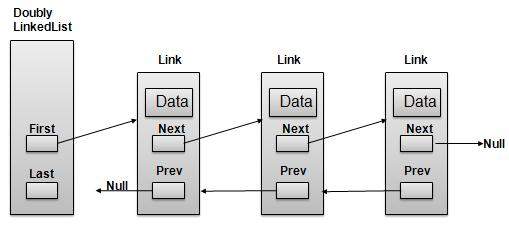
根據上圖所示,需要考慮以下要點:
雙向連結串列包含一個稱為first和last的連結元素。
每個連結都包含一個或多個數據欄位和一個稱為next的連結欄位。
每個連結都使用其next連結與其下一個連結連結。
每個連結都使用其prev連結與其前一個連結連結。
最後一個連結包含一個值為null的連結,以標記列表的結尾。
基本操作
以下是列表支援的基本操作:
插入 - 在列表開頭新增元素。
刪除 - 刪除列表開頭的元素。
插入末尾 - 在列表末尾新增元素。
刪除末尾 - 從列表末尾刪除元素。
插入到之後 - 在列表項之後新增元素。
刪除 - 使用鍵從列表中刪除元素。
向前顯示 - 以向前的方式顯示完整列表。
向後顯示 - 以向後的方式顯示完整列表。
插入操作
以下程式碼演示了在雙向連結串列開頭進行插入操作。
//insert link at the first location
public void insertFirst(int key, int data){
   //create a link
   Link link = new Link(key,data);

   if(isEmpty()){
      //make it the last link
      last = link;
   }else {
      //update first prev link
      first.prev = link;
   }

   //point it to old first link
   link.next = first;
   //point first to new first link
   first = link;
}
刪除操作
以下程式碼演示了在雙向連結串列開頭進行刪除操作。
//delete link at the first location
public Link deleteFirst(){
   //save reference to first link
   Link tempLink = first;
   //if only one link
   if(first.next == null){
      last = null;
   }else {
      first.next.prev = null;
   }
   first = first.next;
   //return the deleted link
   return tempLink;
}
在末尾插入操作
以下程式碼演示了在雙向連結串列的最後位置進行插入操作。
//insert link at the last location
public void insertLast(int key, int data){
   //create a link
   Link link = new Link(key,data);

   if(isEmpty()){
      //make it the last link
      last = link;
   }else {
      //make link a new last link
      last.next = link;
      //mark old last node as prev of new link
      link.prev = last;
   }

   //point last to new last node
   last = link;
}
演示
Link.java
package com.tutorialspoint.list;

public class Link {
   public int key;
   public int data;
   public Link next;
   public Link prev;

   public Link(int key, int data){
      this.key = key;
      this.data = data;
   }

   public void display(){
      System.out.print("{"+key+","+data+"}");
   }
}
DoublyLinkedList.java
package com.tutorialspoint.list;

public class DoublyLinkedList {

   //this link always point to first Link
   private Link first;
   //this link always point to last Link
   private Link last;

   // create an empty linked list
   public DoublyLinkedList(){
      first = null;
      last = null;
   }

   //is list empty
   public boolean isEmpty(){
      return first == null;
   }

   //insert link at the first location
   public void insertFirst(int key, int data){
      //create a link
      Link link = new Link(key,data);

      if(isEmpty()){
         //make it the last link
         last = link;
      }else {
         //update first prev link
         first.prev = link;
      }

      //point it to old first link
      link.next = first;
      //point first to new first link
      first = link;
   }

   //insert link at the last location
   public void insertLast(int key, int data){
      //create a link
      Link link = new Link(key,data);

      if(isEmpty()){
         //make it the last link
         last = link;
      }else {
         //make link a new last link
         last.next = link;
         //mark old last node as prev of new link
         link.prev = last;
      }

      //point last to new last node
      last = link;
   }

   //delete link at the first location
   public Link deleteFirst(){
      //save reference to first link
      Link tempLink = first;
      //if only one link
      if(first.next == null){
         last = null;
      }else {
         first.next.prev = null;
      }
      first = first.next;
      //return the deleted link
      return tempLink;
   }

   //delete link at the last location
   public Link deleteLast(){
      //save reference to last link
      Link tempLink = last;
      //if only one link
      if(first.next == null){
         first = null;
      }else {
         last.prev.next = null;
      }
      last = last.prev;
      //return the deleted link
      return tempLink;
   }

   //display the list in from first to last
   public void displayForward(){
      //start from the beginning
      Link current = first;
      //navigate till the end of the list
      System.out.print("[ ");
      while(current != null){
         //print data
         current.display();
         //move to next item
         current = current.next;
         System.out.print(" ");
      }
      System.out.print(" ]");
   }

   //display the list from last to first
   public void displayBackward(){
      //start from the last
      Link current = last;
      //navigate till the start of the list
      System.out.print("[ ");
      while(current != null){
         //print data
         current.display();
         //move to next item
         current = current.prev;
         System.out.print(" ");
      }
      System.out.print(" ]");
   }

   //delete a link with given key
   public Link delete(int key){
      //start from the first link
      Link current = first;
      //if list is empty
      if(first == null){
         return null;
      }

      //navigate through list
      while(current.key != key){
      //if it is last node
      if(current.next == null){
            return null;
         }else{
            //move to next link
            current = current.next;
         }
      }

      //found a match, update the link
      if(current == first) {
         //change first to point to next link
            first = current.next;
         }else {
            //bypass the current link
            current.prev.next = current.next;
         }

         if(current == last){
            //change last to point to prev link
            last = current.prev;
         }else {
            current.next.prev = current.prev;
         }
         return current;
      }

   public boolean insertAfter(int key, int newKey, int data){
      //start from the first link
      Link current = first;
      //if list is empty
      if(first == null){
         return false;
      }

      //navigate through list
      while(current.key != key){
         //if it is last node
         if(current.next == null){
            return false;
         }else{
            //move to next link
            current = current.next;
         }
      }

      Link newLink = new Link(newKey,data);
      if(current==last) {
         newLink.next = null;
         last = newLink;
      }
      else {
         newLink.next = current.next;
         current.next.prev = newLink;
      }
      newLink.prev = current;
      current.next = newLink;
      return true;
   }
}
DoublyLinkedListDemo.java
package com.tutorialspoint.list;

public class DoublyLinkedListDemo {
    public static void main(String args[]){
        DoublyLinkedList list = new DoublyLinkedList();

        list.insertFirst(1, 10);
        list.insertFirst(2, 20);
        list.insertFirst(3, 30);

        list.insertLast(4, 1);
        list.insertLast(5, 40);
        list.insertLast(6, 56);

        System.out.print("\nList (First to Last): ");
        list.displayForward();
        System.out.println("");
        System.out.print("\nList (Last to first): ");
        list.displayBackward();

        System.out.print("\nList , after deleting first record: ");
        list.deleteFirst();
        list.displayForward();

        System.out.print("\nList , after deleting last record: ");
        list.deleteLast();
        list.displayForward();

        System.out.print("\nList , insert after key(4) : ");
        list.insertAfter(4,7, 13);
        list.displayForward();

        System.out.print("\nList  , after delete key(4) : ");
        list.delete(4);
        list.displayForward();

    }
}
如果我們編譯並執行上述程式,則會產生以下結果:
List (First to Last): [ {3,30} {2,20} {1,10} {4,1} {5,40} {6,56}  ]

List (Last to first): [ {6,56} {5,40} {4,1} {1,10} {2,20} {3,30}  ]
List (First to Last) after deleting first record: [ {2,20} {1,10} {4,1} {5,40} {6,56}  ]
List  (First to Last) after deleting last record: [ {2,20} {1,10} {4,1} {5,40}  ]
List  (First to Last) insert after key(4) : [ {2,20} {1,10} {4,1} {7,13} {5,40}  ]
List  (First to Last) after delete key(4) : [ {2,20} {1,10} {7,13} {5,40}  ]
Java 資料結構與演算法 - 迴圈連結串列
迴圈連結串列基礎
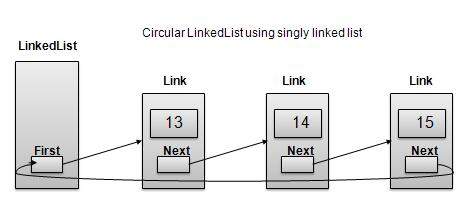
迴圈連結串列是連結串列的一種變體,其中第一個元素指向最後一個元素,最後一個元素指向第一個元素。單鏈表和雙向連結串列都可以製成迴圈連結串列。
單鏈表作為迴圈連結串列
雙向連結串列作為迴圈連結串列
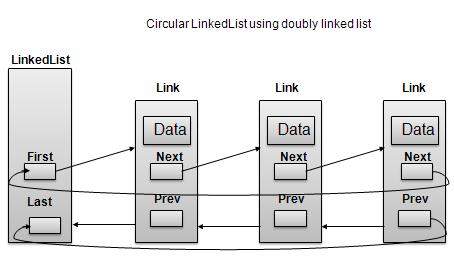
根據上圖所示,需要考慮以下要點:
在單鏈表和雙向連結串列這兩種情況下,最後一個連結的next都指向列表的第一個連結。
在雙向連結串列的情況下,第一個連結的prev指向列表的最後一個。
基本操作
以下是迴圈列表支援的重要操作:
插入 - 在列表開頭插入元素。
刪除 - 從列表開頭刪除元素。
顯示 - 顯示列表。
長度操作
以下程式碼演示了基於單鏈表的迴圈連結串列中的插入操作。
//insert link at the first location
public void insertFirst(int key, int data){
   //create a link
   Link link = new Link(key,data);
   if (isEmpty()) {
      first  = link;
      first.next = first;
   }
   else{
      //point it to old first node
      link.next = first;
      //point first to new first node
      first = link;
   }
}
刪除操作
以下程式碼演示了基於單鏈表的迴圈連結串列中的刪除操作。
//delete link at the first location
public Link deleteFirst(){
   //save reference to first link
   Link tempLink = first;
   //if only one link
   if(first.next == null){
      last = null;
   }else {
      first.next.prev = null;
   }
   first = first.next;
   //return the deleted link
   return tempLink;
}
顯示列表操作
以下程式碼演示了迴圈連結串列中的顯示列表操作。
public void display(){
   //start from the beginning
   Link current = first;
   //navigate till the end of the list
   System.out.print("[ ");
   if(first != null){
      while(current.next != current){
         //print data
         current.display();
         //move to next item
         current = current.next;
         System.out.print(" ");
      }
   }
   System.out.print(" ]");
}
演示
Link.java
package com.tutorialspoint.list;

public class CircularLinkedList {
   //this link always point to first Link
   private Link first;

   // create an empty linked list
   public CircularLinkedList(){
      first = null;
   }

   public boolean isEmpty(){
      return first == null;
   }

   public int length(){
      int length = 0;

      //if list is empty
      if(first == null){
         return 0;
      }

      Link current = first.next;

      while(current != first){
         length++;
         current = current.next;
      }
      return length;
   }

   //insert link at the first location
   public void insertFirst(int key, int data){
   //create a link
   Link link = new Link(key,data);
      if (isEmpty()) {
         first  = link;
         first.next = first;
      }
      else{
         //point it to old first node
         link.next = first;
         //point first to new first node
         first = link;
      }
   }

   //delete first item
   public Link deleteFirst(){
      //save reference to first link
      Link tempLink = first;
      if(first.next == first){
         first = null;
         return tempLink;
      }

      //mark next to first link as first
      first = first.next;
      //return the deleted link
      return tempLink;
   }

   public void display(){

      //start from the beginning
      Link current = first;
      //navigate till the end of the list
      System.out.print("[ ");
      if(first != null){
         while(current.next != current){
            //print data
            current.display();
            //move to next item
            current = current.next;
            System.out.print(" ");
         }
      }
      System.out.print(" ]");
   }
}
DoublyLinkedListDemo.java
package com.tutorialspoint.list;

public class CircularLinkedListDemo {
   public static void main(String args[]){
      CircularLinkedList list = new CircularLinkedList();

      list.insertFirst(1, 10);
      list.insertFirst(2, 20);
      list.insertFirst(3, 30);
      list.insertFirst(4, 1);
      list.insertFirst(5, 40);
      list.insertFirst(6, 56);

      System.out.print("\nOriginal List: ");
      list.display();
      System.out.println("");
      while(!list.isEmpty()){
         Link temp = list.deleteFirst();
         System.out.print("Deleted value:");
         temp.display();
         System.out.println("");
      }
      System.out.print("List after deleting all items: ");
      list.display();
      System.out.println("");
   }
}
如果我們編譯並執行上述程式,則會產生以下結果:
Original List: [ {6,56} {5,40} {4,1} {3,30} {2,20}  ]
Deleted value:{6,56}
Deleted value:{5,40}
Deleted value:{4,1}
Deleted value:{3,30}
Deleted value:{2,20}
Deleted value:{1,10}
List after deleting all items: [  ]
Java 資料結構與演算法 - 棧
概述
棧是一種資料結構,它只允許對一端的資料進行操作。它只允許訪問最後插入的資料。棧也稱為LIFO(後進先出)資料結構,push和pop操作以這樣一種方式相關聯:只有最後一個push(新增到棧中)的項才能pop(從棧中移除)。
棧表示
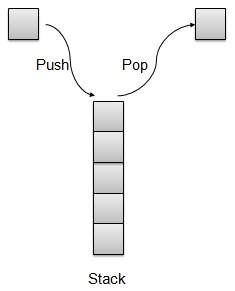
我們將在本文中使用陣列來實現棧。
基本操作
以下是棧的兩個主要操作:
push - 將元素壓入棧頂。
pop - 從棧頂彈出元素。
棧還支援一些其他操作:
peek - 獲取棧頂元素。
isFull - 檢查棧是否已滿。
isEmpty - 檢查棧是否為空。
push操作
每當一個元素被壓入棧時,棧將該元素儲存在儲存區的頂部,並增加頂部索引以備後用。如果儲存區已滿,則通常會顯示錯誤訊息。
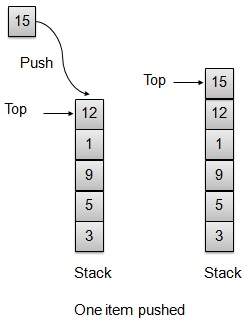
// push item on the top of the stack
public void push(int data) {

   if(!isFull()){
      // increment top by 1 and insert data
      intArray[++top] = data;
   }else{
      System.out.println("Cannot add data. Stack is full.");
   }
}
pop操作
每當要從棧中彈出元素時,棧會從儲存區的頂部檢索元素,並減少頂部索引以備後用。
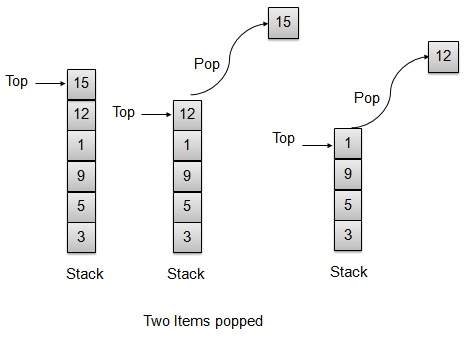
// pop item from the top of the stack
public int pop() {
   // retrieve data and decrement the top by 1
   return intArray[top--];
}
棧實現
Stack.java
package com.tutorialspoint.datastructure;

public class Stack {
   private int size;           // size of the stack
   private int[] intArray;     // stack storage
   private int top;            // top of the stack

   // Constructor
   public Stack(int size){
      this.size = size;
      intArray = new int[size];   //initialize array
      top = -1;                   //stack is initially empty
   }

   // Operation : Push
   // push item on the top of the stack
   public void push(int data) {

      if(!isFull()){
         // increment top by 1 and insert data
         intArray[++top] = data;
      }else{
         System.out.println("Cannot add data. Stack is full.");
      }
   }

   // Operation : Pop
   // pop item from the top of the stack
   public int pop() {
      //retrieve data and decrement the top by 1
      return intArray[top--];
   }

   // Operation : Peek
   // view the data at top of the stack
   public int peek() {
      //retrieve data from the top
      return intArray[top];
   }

   // Operation : isFull
   // return true if stack is full
   public boolean isFull(){
      return (top == size-1);
   }

   // Operation : isEmpty
   // return true if stack is empty
   public boolean isEmpty(){
      return (top == -1);
   }
}
演示程式
StackDemo.java
package com.tutorialspoint.datastructure;

public class StackDemo {
   public static void main (String[] args){

      // make a new stack
      Stack stack = new Stack(10);

      // push items on to the stack
      stack.push(3);
      stack.push(5);
      stack.push(9);
      stack.push(1);
      stack.push(12);
      stack.push(15);

      System.out.println("Element at top of the stack: " + stack.peek());
      System.out.println("Elements: ");

      // print stack data
      while(!stack.isEmpty()){
         int data = stack.pop();
         System.out.println(data);
      }

      System.out.println("Stack full: " + stack.isFull());
      System.out.println("Stack empty: " + stack.isEmpty());
   }
}
如果我們編譯並執行上述程式,則會產生以下結果:
Element at top of the stack: 15
Elements:
15
12
1
9
5
3
Stack full: false
Stack empty: true
Java中的資料結構 - 解析表示式
像2*(3*4)這樣的普通算術表示式對於人類大腦來說更容易解析,但是對於演算法來說,解析這樣的表示式相當困難。為了減輕這種困難,可以使用兩步法透過演算法解析算術表示式。
將提供的算術表示式轉換為字尾表示法。
評估字尾表示法。
中綴表示法
普通的算術表示式遵循中綴表示法,其中運算子位於運算元之間。例如,A+B,其中A是第一個運算元,B是第二個運算元,+是作用於這兩個運算元的運算子。
字尾表示法
字尾表示法與普通的算術表示式或中綴表示法的不同之處在於運算子位於運算元之後。例如,考慮以下示例:
| 序號 | 中綴表示法 | 字尾表示法 |
|---|---|---|
| 1 | A+B | AB+ |
| 2 | (A+B)*C | AB+C* |
| 3 | A*(B+C) | ABC+* |
| 4 | A/B+C/D | AB/CD/+ |
| 5 | (A+B)*(C+D) | AB+CD+* |
| 6 | ((A+B)*C)-D | AB+C*D- |
中綴轉字尾轉換
在研究將中綴轉換為字尾表示法的方法之前,我們需要考慮中綴表示式求值的以下基礎知識。
中綴表示式的求值從左到右開始。
記住優先順序,例如*的優先順序高於+。例如:
2+3*4 = 2+12.
2+3*4 = 14.
使用括號覆蓋優先順序,例如:
(2+3)*4 = 5*4.
(2+3)*4= 20.
現在讓我們手動將簡單的中綴表示式A+B*C轉換為字尾表示式。
| 步驟 | 讀取的字元 | 到目前為止已解析的中綴表示式 | 到目前為止已生成的後續表示式 | 備註 |
|---|---|---|---|---|
| 1 | A | A | A | |
| 2 | + | A+ | A | |
| 3 | B | A+B | AB | |
| 4 | * | A+B* | AB | 不能複製+,因為*的優先順序更高。 |
| 5 | C | A+B*C | ABC | |
| 6 | A+B*C | ABC* | 複製*,因為有兩個運算元B和C | |
| 7 | A+B*C | ABC*+ | 複製+,因為有兩個運算元BC和A |
現在讓我們使用棧將上述中綴表示式A+B*C轉換為字尾表示式。
| 步驟 | 讀取的字元 | 到目前為止已解析的中綴表示式 | 到目前為止已生成的後續表示式 | 棧內容 | 備註 |
|---|---|---|---|---|---|
| 1 | A | A | A | ||
| 2 | + | A+ | A | + | 將+運算子壓入棧中。 |
| 3 | B | A+B | AB | + | |
| 4 | * | A+B* | AB | +* | *運算子的優先順序高於+。將*運算子壓入棧中。否則,+將彈出。 |
| 5 | C | A+B*C | ABC | +* | |
| 6 | A+B*C | ABC* | + | 沒有更多運算元,彈出*運算子。 | |
| 7 | A+B*C | ABC*+ | 彈出+運算子。 |
現在讓我們看另一個例子,使用棧將中綴表示式A*(B+C)轉換為字尾表示式。
| 步驟 | 讀取的字元 | 到目前為止已解析的中綴表示式 | 到目前為止已生成的後續表示式 | 棧內容 | 備註 |
|---|---|---|---|---|---|
| 1 | A | A | A | ||
| 2 | * | A* | A | * | 將*運算子壓入棧中。 |
| 3 | ( | A*( | A | *( | 將(壓入棧中。 |
| 4 | B | A*(B | AB | *( | |
| 5 | + | A*(B+ | AB | *(+ | 將+壓入棧中。 |
| 6 | C | A*(B+C | ABC | *(+ | |
| 7 | ) | A*(B+C) | ABC+ | *( | 彈出+運算子。 |
| 8 | A*(B+C) | ABC+ | * | 彈出(運算子。 | |
| 9 | A*(B+C) | ABC+* | 彈出其餘的運算子。 |
演示程式
現在我們將演示如何使用棧將中綴表示式轉換為字尾表示式,然後計算字尾表示式的值。
Stack.javapackage com.tutorialspoint.expression;
public class Stack {
private int size;
private int[] intArray;
private int top;
//Constructor
public Stack(int size){
this.size = size;
intArray = new int[size];
top = -1;
}
//push item on the top of the stack
public void push(int data) {
if(!isFull()){
//increment top by 1 and insert data
intArray[++top] = data;
}else{
System.out.println("Cannot add data. Stack is full.");
}
}
//pop item from the top of the stack
public int pop() {
//retrieve data and decrement the top by 1
return intArray[top--];
}
//view the data at top of the stack
public int peek() {
//retrieve data from the top
return intArray[top];
}
//return true if stack is full
public boolean isFull(){
return (top == size-1);
}
//return true if stack is empty
public boolean isEmpty(){
return (top == -1);
}
}
InfixToPostFix.java
package com.tutorialspoint.expression;

public class InfixToPostfix {
   private Stack stack;
   private String input = "";
   private String output = "";

   public InfixToPostfix(String input){
      this.input = input;
      stack = new Stack(input.length());
   }

   public String translate(){
      for(int i=0;i<input.length();i++){
         char ch = input.charAt(i);
            switch(ch){
               case '+':
               case '-':
                  gotOperator(ch, 1);
                  break;
               case '*':
               case '/':
                  gotOperator(ch, 2);
                  break;
               case '(':
                  stack.push(ch);
                  break;
               case ')':
                  gotParenthesis(ch);
                  break;
               default:
                  output = output+ch;
                  break;
          }
      }

      while(!stack.isEmpty()){
         output = output + (char)stack.pop();
      }

      return output;
   }

      //got operator from input
      public void gotOperator(char operator, int precedence){
      while(!stack.isEmpty()){
         char prevOperator = (char)stack.pop();
         if(prevOperator == '('){
            stack.push(prevOperator);
            break;
         }else{
            int precedence1;
            if(prevOperator == '+' || prevOperator == '-'){
               precedence1 = 1;
            }else{
               precedence1 = 2;
            }

            if(precedence1 < precedence){
               stack.push(Character.getNumericValue(prevOperator));
               break;
            }else{
               output = output + prevOperator;
            }
         }
      }
      stack.push(operator);
   }

   //got operator from input
   public void gotParenthesis(char parenthesis){
      while(!stack.isEmpty()){
         char ch = (char)stack.pop();
         if(ch == '('){
            break;
         }else{
            output = output + ch;
         }
      }
   }
}
PostFixParser.java
package com.tutorialspoint.expression;

public class PostFixParser {
private Stack stack;
private String input;

public PostFixParser(String postfixExpression){
   input = postfixExpression;
   stack = new Stack(input.length());
}

   public int evaluate(){
      char ch;
      int firstOperand;
      int secondOperand;
      int tempResult;

      for(int i=0;i<input.length();i++){
         ch = input.charAt(i);

         if(ch >= '0' && ch <= '9'){
            stack.push(Character.getNumericValue(ch));
         }else{
            firstOperand = stack.pop();
            secondOperand = stack.pop();
            switch(ch){
               case '+':
                  tempResult = firstOperand + secondOperand;
                  break;
               case '-':
                  tempResult = firstOperand - secondOperand;
                  break;
               case '*':
                  tempResult = firstOperand * secondOperand;
                  break;
               case '/':
                  tempResult = firstOperand / secondOperand;
                  break;
               default:
                  tempResult = 0;
            }
            stack.push(tempResult);
         }
      }
      return stack.pop();
   }
}
PostFixDemo.java
package com.tutorialspoint.expression;

public class PostFixDemo {
   public static void main(String args[]){
      String input = "1*(2+3)";
      InfixToPostfix translator = new InfixToPostfix(input);
      String output = translator.translate();
      System.out.println("Infix expression is: " + input);
      System.out.println("Postfix expression is: " + output);

      PostFixParser parser = new PostFixParser(output);
      System.out.println("Result is: " + parser.evaluate());
   }
}
如果我們編譯並執行上述程式,則會產生以下結果:
Infix expression is: 1*(2+3)
Postfix expression is: 123+*
Result is: 5
Java 資料結構與演算法 - 佇列
概述
佇列是一種類似於棧的資料結構,主要區別在於佇列中第一個插入的元素也是第一個被移除的元素(FIFO - 先進先出),而棧則是基於LIFO(後進先出)原則。
隊列表示

基本操作
插入/入隊 − 將一個元素新增到佇列的尾部。
移除/出隊 − 從佇列的頭部移除一個元素。
在本文中,我們將使用陣列來實現佇列。佇列還支援一些其他的操作:
Peek − 獲取佇列頭部元素。
isFull − 檢查佇列是否已滿。
isEmpty − 檢查佇列是否為空。
插入/入隊操作
每當一個元素插入到佇列中時,佇列會遞增尾部索引以備後用,並將該元素儲存在儲存空間的尾部。如果尾部到達最後一個索引,則會環繞到最底部位置。這種安排稱為環繞,這種佇列稱為迴圈佇列。此方法也稱為入隊操作。

public void insert(int data){
   if(!isFull()){
      if(rear == MAX-1){
         rear = -1;
      }

      intArray[++rear] = data;
      itemCount++;
   }
}
移除/出隊操作
每當需要從佇列中移除一個元素時,佇列會使用頭部索引獲取該元素,然後遞增頭部索引。作為環繞安排的一部分,如果頭部索引大於陣列的最大索引,則將其設定為0。
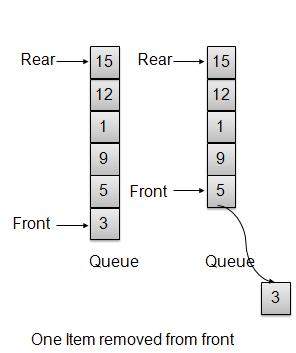
public int remove(){
   int data = intArray[front++];
   if(front == MAX){
      front = 0;
   }
   itemCount--;
   return data;
}
佇列實現
Queue.java
package com.tutorialspoint.datastructure;

public class Queue {

   private final int MAX;
   private int[] intArray;
   private int front;
   private int rear;
   private int itemCount;

   public Queue(int size){
      MAX = size;
      intArray = new int[MAX];
      front = 0;
      rear = -1;
      itemCount = 0;
   }

   public void insert(int data){
      if(!isFull()){
         if(rear == MAX-1){
            rear = -1;
         }

         intArray[++rear] = data;
         itemCount++;
      }
   }

   public int remove(){
      int data = intArray[front++];
      if(front == MAX){
         front = 0;
      }
      itemCount--;
      return data;
   }

   public int peek(){
      return intArray[front];
   }

   public boolean isEmpty(){
      return itemCount == 0;
   }

   public boolean isFull(){
      return itemCount == MAX;
   }

   public int size(){
      return itemCount;
   }
}
演示程式
QueueDemo.java
package com.tutorialspoint.datastructure;

public class QueueDemo {
   public static void main(String[] args){
      Queue queue = new Queue(6);

      //insert 5 items
      queue.insert(3);
      queue.insert(5);
      queue.insert(9);
      queue.insert(1);
      queue.insert(12);

      // front : 0
      // rear  : 4
      // ------------------
      // index : 0 1 2 3 4
      // ------------------
      // queue : 3 5 9 1 12

      queue.insert(15);

      // front : 0
      // rear  : 5
      // ---------------------
      // index : 0 1 2 3 4  5
      // ---------------------
      // queue : 3 5 9 1 12 15

      if(queue.isFull()){
         System.out.println("Queue is full!");
      }


      //remove one item
      int num = queue.remove();
      System.out.println("Element removed: "+num);
      // front : 1
      // rear  : 5
      // -------------------
      // index : 1 2 3 4  5
      // -------------------
      // queue : 5 9 1 12 15

      //insert more items
      queue.insert(16);

      // front : 1
      // rear  : -1
      // ----------------------
      // index : 0  1 2 3 4  5
      // ----------------------
      // queue : 16 5 9 1 12 15

      //As queue is full, elements will not be inserted.
      queue.insert(17);
      queue.insert(18);

      // ----------------------
      // index : 0  1 2 3 4  5
      // ----------------------
      // queue : 16 5 9 1 12 15
      System.out.println("Element at front: "+queue.peek());

      System.out.println("----------------------");
      System.out.println("index : 5 4 3 2  1  0");
      System.out.println("----------------------");
      System.out.print("Queue:  ");
      while(!queue.isEmpty()){
         int n = queue.remove();
         System.out.print(n +" ");
      }
   }
}
如果我們編譯並執行上述程式,則會產生以下結果:
Queue is full!
Element removed: 3
Element at front: 5
----------------------
index : 5 4 3 2  1  0
----------------------
Queue:  5 9 1 12 15 16
Java 資料結構與演算法 - 優先佇列
概述
優先佇列比普通佇列更專業的資料結構。與普通佇列一樣,優先佇列具有相同的方法,但有一個主要區別。在優先佇列中,項按鍵值排序,以便鍵值最低的項位於前端,鍵值最高的項位於後端,反之亦然。因此,我們根據專案的鍵值分配優先順序。值越低,優先順序越高。以下是優先佇列的主要方法。
基本操作
插入/入隊 − 將一個元素新增到佇列的尾部。
移除/出隊 − 從佇列的頭部移除一個元素。
優先隊列表示
在本文中,我們將使用陣列來實現佇列。佇列還支援一些其他的操作:
Peek − 獲取佇列頭部元素。
isFull − 檢查佇列是否已滿。
isEmpty − 檢查佇列是否為空。
插入/入隊操作
每當一個元素插入到佇列中時,優先佇列會根據其順序插入該元素。這裡我們假設資料值越高,優先順序越低。
public void insert(int data){
   int i =0;

   if(!isFull()){
      // if queue is empty, insert the data
      if(itemCount == 0){
         intArray[itemCount++] = data;
      }else{
         // start from the right end of the queue
         for(i = itemCount - 1; i >= 0; i-- ){
            // if data is larger, shift existing item to right end
            if(data > intArray[i]){
               intArray[i+1] = intArray[i];
            }else{
               break;
            }
         }
         // insert the data
         intArray[i+1] = data;
         itemCount++;
      }
   }
}
移除/出隊操作
每當需要從佇列中移除一個元素時,佇列會使用專案計數獲取該元素。移除元素後,專案計數減一。
public int remove(){
    return intArray[--itemCount];
}
優先佇列實現
PriorityQueue.java
package com.tutorialspoint.datastructure;

public class PriorityQueue {
   private final int MAX;
   private int[] intArray;
   private int itemCount;

   public PriorityQueue(int size){
      MAX = size;
      intArray = new int[MAX];
      itemCount = 0;
   }

   public void insert(int data){
      int i =0;

      if(!isFull()){
         // if queue is empty, insert the data
         if(itemCount == 0){
            intArray[itemCount++] = data;
         }else{
            // start from the right end of the queue
            for(i = itemCount - 1; i >= 0; i-- ){
               // if data is larger, shift existing item to right end
               if(data > intArray[i]){
                  intArray[i+1] = intArray[i];
               }else{
                  break;
               }
            }
            // insert the data
            intArray[i+1] = data;
            itemCount++;
         }
      }
   }

   public int remove(){
      return intArray[--itemCount];
   }

   public int peek(){
      return intArray[itemCount - 1];
   }

   public boolean isEmpty(){
      return itemCount == 0;
   }

   public boolean isFull(){
      return itemCount == MAX;
   }

   public int size(){
      return itemCount;
   }
}
演示程式
PriorityQueueDemo.java
package com.tutorialspoint.datastructure;

public class PriorityQueueDemo {
   public static void main(String[] args){
      PriorityQueue queue = new PriorityQueue(6);

      //insert 5 items
      queue.insert(3);
      queue.insert(5);
      queue.insert(9);
      queue.insert(1);
      queue.insert(12);

      // ------------------
      // index : 0  1 2 3 4
      // ------------------
      // queue : 12 9 5 3 1

      queue.insert(15);

      // ---------------------
      // index : 0  1 2 3 4  5
      // ---------------------
      // queue : 15 12 9 5 3 1

      if(queue.isFull()){
         System.out.println("Queue is full!");
      }


      //remove one item
      int num = queue.remove();
      System.out.println("Element removed: "+num);
      // ---------------------
      // index : 0  1  2 3 4
      // ---------------------
      // queue : 15 12 9 5 3

      //insert more items
      queue.insert(16);

      // ----------------------
      // index :  0  1 2 3 4  5
      // ----------------------
      // queue : 16 15 12 9 5 3

      //As queue is full, elements will not be inserted.
      queue.insert(17);
      queue.insert(18);

      // ----------------------
      // index : 0   1  2 3 4 5
      // ----------------------
      // queue : 16 15 12 9 5 3
      System.out.println("Element at front: "+queue.peek());
      System.out.println("----------------------");
      System.out.println("index : 5 4 3 2  1  0");
      System.out.println("----------------------");
      System.out.print("Queue:  ");
      while(!queue.isEmpty()){
         int n = queue.remove();
         System.out.print(n +" ");
      }
   }
}
如果我們編譯並執行上述程式,則會產生以下結果:
Queue is full!
Element removed: 1
Element at front: 3
----------------------
index : 5 4 3 2  1  0
----------------------
Queue:  3 5 9 12 15 16
Java 資料結構與演算法 - 樹
概述
樹表示由邊連線的節點。我們將專門討論二叉樹或二叉搜尋樹。
二叉樹是一種用於資料儲存的特殊資料結構。二叉樹有一個特殊條件,即每個節點最多可以有兩個子節點。二叉樹結合了有序陣列和連結串列的優點,搜尋速度與排序陣列一樣快,插入或刪除操作與連結串列一樣快。
術語
以下是關於樹的一些重要術語。
路徑 − 路徑指的是沿著樹的邊的一系列節點。
根 − 樹頂部的節點稱為根節點。每棵樹只有一個根節點,並且從根節點到任何節點都只有一條路徑。
父節點 − 除根節點外的任何節點都有一條向上連線到稱為父節點的節點的邊。
子節點 − 下面連線到給定節點並透過其向下邊連線的節點稱為其子節點。
葉子節點 − 沒有子節點的節點稱為葉子節點。
子樹 − 子樹表示節點的後代。
訪問 − 訪問指的是當控制權在節點上時檢查節點的值。
遍歷 − 遍歷意味著以特定順序透過節點。
層級 − 節點的層級表示節點的代數。如果根節點在第0層,則其子節點在第1層,其孫節點在第2層,依此類推。
鍵 − 鍵表示節點的值,基於該值將進行節點的搜尋操作。
二叉搜尋樹表現出特殊的行為。節點的左子節點的值必須小於其父節點的值,而節點的右子節點的值必須大於其父節點的值。
二叉搜尋樹表示
我們將使用節點物件來實現樹,並透過引用將它們連線起來。
基本操作
以下是樹的基本主要操作:
搜尋 − 在樹中搜索一個元素。
插入 − 在樹中插入一個元素。
前序遍歷 − 以前序方式遍歷樹。
中序遍歷 − 以中序方式遍歷樹。
後序遍歷 − 以後序方式遍歷樹。
節點
定義一個節點,其中包含一些資料以及對其左右子節點的引用。
public class Node {
   public int data;
   public Node leftChild;
   public Node rightChild;

   public Node(){}

   public void display(){
      System.out.print("("+data+ ")");
   }
}
搜尋操作
每當需要搜尋一個元素時,從根節點開始搜尋。如果資料小於鍵值,則在左子樹中搜索元素,否則在右子樹中搜索元素。對每個節點遵循相同的演算法。
public Node search(int data){
   Node current = root;
   System.out.print("Visiting elements: ");
   while(current.data != data){
      if(current != null)
         System.out.print(current.data + " ");
         //go to left tree
         if(current.data > data){
            current = current.leftChild;
         }//else go to right tree
         else{
            current = current.rightChild;
         }
         //not found
         if(current == null){
            return null;
         }
      }
   return current;
}
插入操作
每當需要插入一個元素時,首先找到其合適的位置。從根節點開始搜尋,如果資料小於鍵值,則在左子樹中搜索空位置並插入資料。否則,在右子樹中搜索空位置並插入資料。
public void insert(int data){
   Node tempNode = new Node();
   tempNode.data = data;

   //if tree is empty
   if(root == null){
      root = tempNode;
   }else{
      Node current = root;
      Node parent = null;

      while(true){
         parent = current;
         //go to left of the tree
         if(data < parent.data){
            current = current.leftChild;
            //insert to the left
            if(current == null){
               parent.leftChild = tempNode;
               return;
            }
         }//go to right of the tree
         else{
            current = current.rightChild;
            //insert to the right
            if(current == null){
               parent.rightChild = tempNode;
               return;
            }
         }
      }
   }
}
前序遍歷
這是一個簡單的三步過程。
訪問根節點
遍歷左子樹
遍歷右子樹
private void preOrder(Node root){
   if(root!=null){
      System.out.print(root.data + " ");
      preOrder(root.leftChild);
      preOrder(root.rightChild);
   }
}
中序遍歷
這是一個簡單的三步過程。
遍歷左子樹
訪問根節點
遍歷右子樹
private void inOrder(Node root){
   if(root!=null){
      inOrder(root.leftChild);
      System.out.print(root.data + " ");
      inOrder(root.rightChild);
   }
}
後序遍歷
這是一個簡單的三步過程。
遍歷左子樹
遍歷右子樹
訪問根節點
private void postOrder(Node root){
   if(root!=null){
      postOrder(root.leftChild);
      postOrder(root.rightChild);
      System.out.print(root.data + " ");
   }
}
樹實現
Node.java
package com.tutorialspoint.datastructure;

public class Node {
   public int data;
   public Node leftChild;
   public Node rightChild;

   public Node(){}

   public void display(){
      System.out.print("("+data+ ")");
   }
}
Tree.java
package com.tutorialspoint.datastructure;

public class Tree {
   private Node root;

   public Tree(){
      root = null;
   }

   public Node search(int data){
      Node current = root;
      System.out.print("Visiting elements: ");
      while(current.data != data){
         if(current != null)
            System.out.print(current.data + " ");
            //go to left tree
            if(current.data > data){
               current = current.leftChild;
            }//else go to right tree
            else{
               current = current.rightChild;
            }
            //not found
            if(current == null){
               return null;
            }
         }
      return current;
   }

   public void insert(int data){
      Node tempNode = new Node();
      tempNode.data = data;

      //if tree is empty
      if(root == null){
         root = tempNode;
     }else{
         Node current = root;
         Node parent = null;

         while(true){
            parent = current;
            //go to left of the tree
            if(data < parent.data){
               current = current.leftChild;
               //insert to the left
               if(current == null){
                  parent.leftChild = tempNode;
                  return;
               }
            }//go to right of the tree
            else{
               current = current.rightChild;
               //insert to the right
               if(current == null){
                  parent.rightChild = tempNode;
                  return;
               }
            }
         }
      }
   }

   public void traverse(int traversalType){
      switch(traversalType){
         case 1:
            System.out.print("\nPreorder traversal: ");
            preOrder(root);
            break;
         case 2:
            System.out.print("\nInorder traversal: ");
            inOrder(root);
            break;
         case 3:
            System.out.print("\nPostorder traversal: ");
            postOrder(root);
            break;
         }
   }

   private void preOrder(Node root){
      if(root!=null){
         System.out.print(root.data + " ");
         preOrder(root.leftChild);
         preOrder(root.rightChild);
      }
   }

   private void inOrder(Node root){
      if(root!=null){
         inOrder(root.leftChild);
         System.out.print(root.data + " ");
         inOrder(root.rightChild);
      }
   }

   private void postOrder(Node root){
      if(root!=null){
         postOrder(root.leftChild);
         postOrder(root.rightChild);
         System.out.print(root.data + " ");
      }
   }
}
演示程式
TreeDemo.java
package com.tutorialspoint.datastructure;

public class TreeDemo {
   public static void main(String[] args){
      Tree tree = new Tree();

      /*                     11               //Level 0
      */
      tree.insert(11);
      /*                     11               //Level 0
      *                      |
      *                      |---20           //Level 1
      */
      tree.insert(20);
      /*                     11               //Level 0
      *                      |
      *                  3---|---20           //Level 1
      */
      tree.insert(3);
      /*                     11               //Level 0
      *                      |
      *                  3---|---20           //Level 1
      *                           |
      *                           |--42       //Level 2
      */
      tree.insert(42);
      /*                     11               //Level 0
      *                      |
      *                  3---|---20           //Level 1
      *                           |
      *                           |--42       //Level 2
      *                               |
      *                               |--54   //Level 3
      */
      tree.insert(54);
      /*                     11               //Level 0
      *                      |
      *                  3---|---20           //Level 1
      *                           |
      *                       16--|--42       //Level 2
      *                               |
      *                               |--54   //Level 3
      */
      tree.insert(16);
      /*                     11               //Level 0
      *                      |
      *                  3---|---20           //Level 1
      *                           |
      *                       16--|--42       //Level 2
      *                               |
      *                           32--|--54   //Level 3
      */
      tree.insert(32);
      /*                     11               //Level 0
      *                      |
      *                  3---|---20           //Level 1
      *                  |        |
      *                  |--9 16--|--42       //Level 2
      *                               |
      *                           32--|--54   //Level 3
      */
      tree.insert(9);
      /*                     11               //Level 0
      *                      |
      *                  3---|---20           //Level 1
      *                  |        |
      *                  |--9 16--|--42       //Level 2
      *                     |         |
      *                  4--|     32--|--54   //Level 3
      */
      tree.insert(4);
      /*                     11               //Level 0
      *                      |
      *                  3---|---20           //Level 1
      *                  |        |
      *                  |--9 16--|--42       //Level 2
      *                     |         |
      *                  4--|--10 32--|--54   //Level 3
      */
      tree.insert(10);
      Node node = tree.search(32);
      if(node!=null){
         System.out.print("Element found.");
         node.display();
         System.out.println();
      }else{
         System.out.println("Element not found.");
      }

      Node node1 = tree.search(2);
      if(node1!=null){
         System.out.println("Element found.");
         node1.display();
         System.out.println();
      }else{
         System.out.println("Element not found.");
      }

      //pre-order traversal
      //root, left ,right
      tree.traverse(1);
      //in-order traversal
      //left, root ,right
      tree.traverse(2);
      //post order traversal
      //left, right, root
      tree.traverse(3);
   }
}
如果我們編譯並執行上述程式,則會產生以下結果:
Visiting elements: 11 20 42 Element found.(32)
Visiting elements: 11 3 Element not found.

Preorder traversal: 11 3 9 4 10 20 16 42 32 54
Inorder traversal: 3 4 9 10 11 16 20 32 42 54
Postorder traversal: 4 10 9 3 16 32 54 42 20 11
Java 資料結構與演算法 - 雜湊表
概述
雜湊表是一種資料結構,其中插入和搜尋操作速度非常快,與雜湊表的大小無關。它幾乎是常數時間或O(1)。雜湊表使用陣列作為儲存介質,並使用雜湊技術生成要插入元素或從中定位元素的索引。
雜湊
雜湊是一種將一系列鍵值轉換為陣列索引範圍的技術。我們將使用模運算子來獲取一系列鍵值。考慮一個大小為20的雜湊表的示例,以及要儲存的以下項。項採用(鍵,值)格式。
(1,20)
(2,70)
(42,80)
(4,25)
(12,44)
(14,32)
(17,11)
(13,78)
(37,98)
| 序號 | 鍵 | 雜湊值 | 陣列索引 |
|---|---|---|---|
| 1 | 1 | 1 % 20 = 1 | 1 |
| 2 | 2 | 2 % 20 = 2 | 2 |
| 3 | 42 | 42 % 20 = 2 | 2 |
| 4 | 4 | 4 % 20 = 4 | 4 |
| 5 | 12 | 12 % 20 = 12 | 12 |
| 6 | 14 | 14 % 20 = 14 | 14 |
| 7 | 17 | 17 % 20 = 17 | 17 |
| 8 | 13 | 13 % 20 = 13 | 13 |
| 9 | 37 | 37 % 20 = 17 | 17 |
線性探測
正如我們所看到的,使用的雜湊技術可能會建立陣列中已使用的索引。在這種情況下,我們可以透過檢視下一個單元格,直到找到一個空單元格,從而在陣列中搜索下一個空位置。這種技術稱為線性探測。
| 序號 | 鍵 | 雜湊值 | 陣列索引 | 線性探測後,陣列索引 |
|---|---|---|---|---|
| 1 | 1 | 1 % 20 = 1 | 1 | 1 |
| 2 | 2 | 2 % 20 = 2 | 2 | 2 |
| 3 | 42 | 42 % 20 = 2 | 2 | 3 |
| 4 | 4 | 4 % 20 = 4 | 4 | 4 |
| 5 | 12 | 12 % 20 = 12 | 12 | 12 |
| 6 | 14 | 14 % 20 = 14 | 14 | 14 |
| 7 | 17 | 17 % 20 = 17 | 17 | 17 |
| 8 | 13 | 13 % 20 = 13 | 13 | 13 |
| 9 | 37 | 37 % 20 = 17 | 17 | 18 |
基本操作
以下是雜湊表的基本主要操作:
搜尋 − 在雜湊表中搜索一個元素。
插入 − 在雜湊表中插入一個元素。
刪除 − 從雜湊表中刪除一個元素。
資料項
定義一個數據項,其中包含一些資料和鍵,基於該鍵將在雜湊表中進行搜尋。
public class DataItem {
   private int key;
   private int data;

   public DataItem(int key, int data){
      this.key = key;
      this.data = data;
   }

   public int getKey(){
      return key;
   }

   public int getData(){
      return data;
   }
}
雜湊方法
定義一個雜湊方法來計算資料項鍵的雜湊碼。
public int hashCode(int key){
   return key % size;
}
搜尋操作
每當需要搜尋一個元素時,計算傳遞的鍵的雜湊碼,並使用該雜湊碼作為陣列中的索引來定位元素。如果在計算的雜湊碼處未找到元素,則使用線性探測來獲取前面的元素。
public DataItem search(int key){
   //get the hash
   int hashIndex = hashCode(key);
   //move in array until an empty
   while(hashArray[hashIndex] !=null){
      if(hashArray[hashIndex].getKey() == key)
         return hashArray[hashIndex];
      //go to next cell
      ++hashIndex;
      //wrap around the table
      hashIndex %= size;
   }
   return null;
}
插入操作
每當需要插入一個元素時,計算傳遞的鍵的雜湊碼,並使用該雜湊碼作為陣列中的索引來定位索引。如果在計算的雜湊碼處找到元素,則使用線性探測查詢空位置。
public void insert(DataItem item){
   int key = item.getKey();

   //get the hash
   int hashIndex = hashCode(key);

   //move in array until an empty or deleted cell
   while(hashArray[hashIndex] !=null
      && hashArray[hashIndex].getKey() != -1){
      //go to next cell
      ++hashIndex;
      //wrap around the table
      hashIndex %= size;
   }

   hashArray[hashIndex] = item;
}
刪除操作
每當需要刪除一個元素時,計算傳遞的鍵的雜湊碼,並使用該雜湊碼作為陣列中的索引來定位索引。如果在計算的雜湊碼處未找到元素,則使用線性探測來獲取前面的元素。找到後,在該處儲存一個虛擬項以保持雜湊表的效能不變。
public DataItem delete(DataItem item){
   int key = item.getKey();

   //get the hash
   int hashIndex = hashCode(key);

   //move in array until an empty
   while(hashArray[hashIndex] !=null){
      if(hashArray[hashIndex].getKey() == key){
         DataItem temp = hashArray[hashIndex];
         //assign a dummy item at deleted position
         hashArray[hashIndex] = dummyItem;
         return temp;
      }
      //go to next cell
      ++hashIndex;
      //wrap around the table
      hashIndex %= size;
   }
   return null;
}
雜湊表實現
DataItem.java
package com.tutorialspoint.datastructure;

public class DataItem {
   private int key;
   private int data;

   public DataItem(int key, int data){
      this.key = key;
      this.data = data;
   }

   public int getKey(){
      return key;
   }

   public int getData(){
      return data;
   }
}
HashTable.java
package com.tutorialspoint.datastructure;

public class HashTable {

   private DataItem[] hashArray;
   private int size;
   private DataItem dummyItem;

   public HashTable(int size){
      this.size = size;
      hashArray = new DataItem[size];
      dummyItem = new DataItem(-1,-1);
   }

   public void display(){
      for(int i=0; i<size; i++) {
         if(hashArray[i] != null)
            System.out.print(" ("
               +hashArray[i].getKey()+","
               +hashArray[i].getData() + ") ");
         else
            System.out.print(" ~~ ");
      }
      System.out.println("");
   }

   public int hashCode(int key){
      return key % size;
   }

   public DataItem search(int key){
      //get the hash
      int hashIndex = hashCode(key);
      //move in array until an empty
      while(hashArray[hashIndex] !=null){
         if(hashArray[hashIndex].getKey() == key)
            return hashArray[hashIndex];
         //go to next cell
         ++hashIndex;
         //wrap around the table
         hashIndex %= size;
      }
      return null;
   }

   public void insert(DataItem item){
      int key = item.getKey();

      //get the hash
      int hashIndex = hashCode(key);

      //move in array until an empty or deleted cell
      while(hashArray[hashIndex] !=null
         && hashArray[hashIndex].getKey() != -1){
         //go to next cell
         ++hashIndex;
         //wrap around the table
         hashIndex %= size;
      }

      hashArray[hashIndex] = item;
   }

   public DataItem delete(DataItem item){
      int key = item.getKey();

      //get the hash
      int hashIndex = hashCode(key);

      //move in array until an empty
      while(hashArray[hashIndex] !=null){
         if(hashArray[hashIndex].getKey() == key){
            DataItem temp = hashArray[hashIndex];
            //assign a dummy item at deleted position
            hashArray[hashIndex] = dummyItem;
            return temp;
         }
         //go to next cell
         ++hashIndex;
         //wrap around the table
         hashIndex %= size;
      }
      return null;
   }
}
演示程式
HashTableDemo.java
package com.tutorialspoint.datastructure;

public class HashTableDemo {
   public static void main(String[] args){
      HashTable hashTable = new HashTable(20);

      hashTable.insert(new DataItem(1, 20));
      hashTable.insert(new DataItem(2, 70));
      hashTable.insert(new DataItem(42, 80));
      hashTable.insert(new DataItem(4, 25));
      hashTable.insert(new DataItem(12, 44));
      hashTable.insert(new DataItem(14, 32));
      hashTable.insert(new DataItem(17, 11));
      hashTable.insert(new DataItem(13, 78));
      hashTable.insert(new DataItem(37, 97));

      hashTable.display();

      DataItem item = hashTable.search(37);

      if(item != null){
         System.out.println("Element found: "+ item.getData());
      }else{
         System.out.println("Element not found");
      }

      hashTable.delete(item);

      item = hashTable.search(37);

      if(item != null){
         System.out.println("Element found: "+ item.getData());
      }else{
         System.out.println("Element not found");
      }
   }
}
如果我們編譯並執行上述程式,則會產生以下結果:
 ~~  (1,20)  (2,70)  (42,80)  (4,25)  ~~  ~~  ~~  ~~  ~~  ~~  ~~ (12,44)  (13,78)  (14,32)  ~~  ~~  (17,11)  (37,97)  ~~
Element found: 97
Element not found
Java 資料結構與演算法 - 堆
概述
堆是一種特殊基於樹的資料結構,用於表示優先佇列或用於堆排序。我們將專門討論二叉堆。
二叉堆可以分為具有兩個約束條件的二叉樹:
完全性 − 二叉堆是一個完全二叉樹,除了最後一層可能並非所有元素都存在,但元素應從左到右填充。
堆性 − 所有父節點都應大於或小於其子節點。如果父節點大於其子節點,則稱為最大堆,否則稱為最小堆。最大堆用於堆排序,最小堆用於優先佇列。我們考慮最小堆,並將使用陣列實現。
基本操作
以下是最小堆的基本主要操作:
插入 − 在堆中插入一個元素。
獲取最小值 − 從堆中獲取最小元素。
移除最小值 − 從堆中移除最小元素
插入操作
每當需要插入一個元素時,將元素插入到陣列的末尾。將堆的大小增加1。
- 當堆屬性被破壞時,向上調整元素。將元素與其父節點的值進行比較,如果需要則交換它們。
public void insert(int value) {
   size++;
   intArray[size - 1] = value;
   heapUp(size - 1);
}

private void heapUp(int nodeIndex){
   int parentIndex, tmp;
   if (nodeIndex != 0) {
      parentIndex = getParentIndex(nodeIndex);
      if (intArray[parentIndex] > intArray[nodeIndex]) {
         tmp = intArray[parentIndex];
         intArray[parentIndex] = intArray[nodeIndex];
         intArray[nodeIndex] = tmp;
         heapUp(parentIndex);
      }
   }
}
獲取最小值
獲取實現堆的陣列的第一個元素,該元素為根。
public int getMinimum(){
   return intArray[0];
}
移除最小值
每當需要移除一個元素時,獲取陣列的最後一個元素,並將堆的大小減少1。
- 當堆屬性被破壞時,向下調整元素。將元素與其子節點的值進行比較,如果需要則交換它們。
public void removeMin() {
   intArray[0] = intArray[size - 1];
   size--;
   if (size > 0)
      heapDown(0);
}

private void heapDown(int nodeIndex){
   int leftChildIndex, rightChildIndex, minIndex, tmp;
   leftChildIndex = getLeftChildIndex(nodeIndex);
   rightChildIndex = getRightChildIndex(nodeIndex);
   if (rightChildIndex >= size) {
      if (leftChildIndex >= size)
         return;
      else
         minIndex = leftChildIndex;
   } else {
      if (intArray[leftChildIndex] <= intArray[rightChildIndex])
         minIndex = leftChildIndex;
      else
         minIndex = rightChildIndex;
   }
   if (intArray[nodeIndex] > intArray[minIndex]) {
      tmp = intArray[minIndex];
      intArray[minIndex] = intArray[nodeIndex];
      intArray[nodeIndex] = tmp;
      heapDown(minIndex);
   }
}
堆實現
Heap.java
package com.tutorialspoint.datastructure;

public class Heap {
   private int[] intArray;
   private int size;

   public Heap(int size){
      intArray = new int[size];
   }

   public boolean isEmpty(){
      return size == 0;
   }

   public int getMinimum(){
      return intArray[0];
   }

   public int getLeftChildIndex(int nodeIndex){
      return 2*nodeIndex +1;
   }

   public int getRightChildIndex(int nodeIndex){
      return 2*nodeIndex +2;
   }

   public int getParentIndex(int nodeIndex){
      return (nodeIndex -1)/2;
   }

   public boolean isFull(){
      return size == intArray.length;
   }

   public void insert(int value) {
      size++;
      intArray[size - 1] = value;
      heapUp(size - 1);
   }

   public void removeMin() {
      intArray[0] = intArray[size - 1];
      size--;
      if (size > 0)
         heapDown(0);
   }

   /**
   * Heap up the new element,until heap property is broken.
   * Steps:
   * 1. Compare node's value with parent's value.
   * 2. Swap them, If they are in wrong order.
   * */
   private void heapUp(int nodeIndex){
      int parentIndex, tmp;
      if (nodeIndex != 0) {
         parentIndex = getParentIndex(nodeIndex);
         if (intArray[parentIndex] > intArray[nodeIndex]) {
            tmp = intArray[parentIndex];
            intArray[parentIndex] = intArray[nodeIndex];
            intArray[nodeIndex] = tmp;
            heapUp(parentIndex);
         }
      }
   }

   /**
   * Heap down the root element being least in value,until heap property is broken.
   * Steps:
   * 1.If current node has no children, done.
   * 2.If current node has one children and heap property is broken,
   * 3.Swap the current node and child node and heap down.
   * 4.If current node has one children and heap property is broken, find smaller one
   * 5.Swap the current node and child node and heap down.
   * */
   private void heapDown(int nodeIndex){
      int leftChildIndex, rightChildIndex, minIndex, tmp;
      leftChildIndex = getLeftChildIndex(nodeIndex);
      rightChildIndex = getRightChildIndex(nodeIndex);
      if (rightChildIndex >= size) {
         if (leftChildIndex >= size)
            return;
         else
            minIndex = leftChildIndex;
      } else {
         if (intArray[leftChildIndex] <= intArray[rightChildIndex])
            minIndex = leftChildIndex;
         else
            minIndex = rightChildIndex;
      }
      if (intArray[nodeIndex] > intArray[minIndex]) {
         tmp = intArray[minIndex];
         intArray[minIndex] = intArray[nodeIndex];
         intArray[nodeIndex] = tmp;
         heapDown(minIndex);
      }
   }
}
演示程式
HeapDemo.java
package com.tutorialspoint.datastructure;

public class HeapDemo {
   public static void main(String[] args){
      Heap heap = new Heap(10);
       /*                     5                //Level 0
        *
        */
      heap.insert(5);
       /*                     1                //Level 0
        *                     |
        *                 5---|                //Level 1
        */
      heap.insert(1);
       /*                     1                //Level 0
        *                     |
        *                 5---|---3            //Level 1
        */
      heap.insert(3);
       /*                     1                //Level 0
        *                     |
        *                 5---|---3            //Level 1
        *                 |
        *              8--|                    //Level 2
        */
      heap.insert(8);
      /*                     1                //Level 0
       *                     |
       *                 5---|---3            //Level 1
       *                 |
       *              8--|--9                 //Level 2
       */
      heap.insert(9);
      /*                     1                 //Level 0
       *                     |
       *                 5---|---3             //Level 1
       *                 |       |
       *              8--|--9 6--|             //Level 2
       */
      heap.insert(6);
      /*                     1                 //Level 0
       *                     |
       *                 5---|---2             //Level 1
       *                 |       |
       *              8--|--9 6--|--3          //Level 2
       */
      heap.insert(2);

      System.out.println(heap.getMinimum());

      heap.removeMin();
      /*                     2                 //Level 0
       *                     |
       *                 5---|---3             //Level 1
       *                 |       |
       *              8--|--9 6--|             //Level 2
       */
      System.out.println(heap.getMinimum());
   }
}
如果我們編譯並執行上述程式,則會產生以下結果:
1
2
Java 資料結構與演算法 - 圖
概述
圖是一種用於模擬數學圖的資料結構。它由一組稱為頂點的邊的連線對組成。我們可以使用頂點陣列和二維邊陣列來表示圖。
重要術語
頂點 − 圖的每個節點都表示為一個頂點。在下面給出的示例中,帶標籤的圓圈代表頂點。因此,A 到 G 都是頂點。我們可以使用陣列來表示它們,如下面的影像所示。這裡 A 可以用索引 0 來標識。B 可以用索引 1 來標識,以此類推。
邊 − 邊表示兩個頂點之間的路徑或兩個頂點之間的線。在下面給出的示例中,從 A 到 B、從 B 到 C 等的線表示邊。我們可以使用二維陣列來表示陣列,如下面的影像所示。這裡 AB 可以用第 0 行第 1 列的 1 來表示,BC 可以用第 1 行第 2 列的 1 來表示,以此類推,其他組合則為 0。
鄰接 − 如果兩個節點或頂點透過一條邊連線在一起,則它們是鄰接的。在下面給出的示例中,B 與 A 鄰接,C 與 B 鄰接,以此類推。
路徑 − 路徑表示兩個頂點之間的一系列邊。在下面給出的示例中,ABCD 表示從 A 到 D 的一條路徑。
基本操作
以下是圖的基本主要操作。
新增頂點 − 向圖中新增一個頂點。
新增邊 − 在圖的兩個頂點之間新增一條邊。
顯示頂點 − 顯示圖的一個頂點。
新增頂點操作
//add vertex to the array of vertex
public void addVertex(char label){
   lstVertices[vertexCount++] = new Vertex(label);
}
新增邊操作
//add edge to edge array
public void addEdge(int start,int end){
   adjMatrix[start][end] = 1;
   adjMatrix[end][start] = 1;
}
顯示邊操作
//display the vertex
public void displayVertex(int vertexIndex){
   System.out.print(lstVertices[vertexIndex].label+" ");
}
遍歷演算法
以下是圖上重要的遍歷演算法。
深度優先搜尋 − 以深度優先的方式遍歷圖。
廣度優先搜尋 − 以廣度優先的方式遍歷圖。
深度優先搜尋演算法
深度優先搜尋演算法 (DFS) 以深度優先的方式遍歷圖,並使用堆疊來記住當任何迭代中出現死衚衕時要開始搜尋的下一個頂點。
如上例所示,DFS 演算法首先從 A 遍歷到 B、C、D,然後到 E,然後到 F,最後到 G。它採用以下規則。
規則 1 − 訪問相鄰的未訪問頂點。標記為已訪問。顯示它。將其壓入堆疊。
規則 2 − 如果未找到相鄰頂點,則從堆疊中彈出頂點。(它將彈出堆疊中所有沒有相鄰頂點的頂點。)
規則 3 − 重複規則 1 和規則 2,直到堆疊為空。
public void depthFirstSearch(){
   //mark first node as visited
   lstVertices[0].visited = true;
   //display the vertex
   displayVertex(0);
   //push vertex index in stack
   stack.push(0);

   while(!stack.isEmpty()){
      //get the unvisited vertex of vertex which is at top of the stack
      int unvisitedVertex = getAdjUnvisitedVertex(stack.peek());
      //no adjacent vertex found
      if(unvisitedVertex == -1){
         stack.pop();
      }else{
         lstVertices[unvisitedVertex].visited = true;
         displayVertex(unvisitedVertex);
         stack.push(unvisitedVertex);
      }
   }

   //stack is empty, search is complete, reset the visited flag
   for(int i=0;i<vertexCount;i++){
      lstVertices[i].visited = false;
   }
}
廣度優先搜尋演算法
廣度優先搜尋演算法 (BFS) 以廣度優先的方式遍歷圖,並使用佇列來記住當任何迭代中出現死衚衕時要開始搜尋的下一個頂點。
如上例所示,BFS 演算法首先從 A 遍歷到 B、E、F,然後到 C 和 G,最後到 D。它採用以下規則。
規則 1 − 訪問相鄰的未訪問頂點。標記為已訪問。顯示它。將其插入佇列。
規則 2 − 如果未找到相鄰頂點,則從佇列中移除第一個頂點。
規則 3 − 重複規則 1 和規則 2,直到佇列為空。
public void breadthFirstSearch(){
   //mark first node as visited
   lstVertices[0].visited = true;
   //display the vertex
   displayVertex(0);
   //insert vertex index in queue
   queue.insert(0);

   int unvisitedVertex;
   while(!queue.isEmpty()){
      //get the unvisited vertex of vertex which is at front of the queue
      int tempVertex = queue.remove();
      //no adjacent vertex found
      while((unvisitedVertex=getAdjUnvisitedVertex(tempVertex)) != -1){
         lstVertices[unvisitedVertex].visited = true;
         displayVertex(unvisitedVertex);
         queue.insert(unvisitedVertex);
      }
   }

   //queue is empty, search is complete, reset the visited flag
   for(int i=0;i<vertexCount;i++){
      lstVertices[i].visited = false;
   }
}
圖的實現
Stack.java
package com.tutorialspoint.datastructure;

public class Stack {
   private int size;           // size of the stack
   private int[] intArray;     // stack storage
   private int top;            // top of the stack

   // Constructor
   public Stack(int size){
      this.size = size;
      intArray = new int[size];   //initialize array
      top = -1;                   //stack is initially empty
   }

   // Operation : Push
   // push item on the top of the stack
   public void push(int data) {

      if(!isFull()){
         // increment top by 1 and insert data
         intArray[++top] = data;
      }else{
         System.out.println("Cannot add data. Stack is full.");
      }
   }

   // Operation : Pop
   // pop item from the top of the stack
   public int pop() {
      //retrieve data and decrement the top by 1
      return intArray[top--];
   }

   // Operation : Peek
   // view the data at top of the stack
   public int peek() {
      //retrieve data from the top
      return intArray[top];
   }

   // Operation : isFull
   // return true if stack is full
   public boolean isFull(){
      return (top == size-1);
   }

   // Operation : isEmpty
   // return true if stack is empty
   public boolean isEmpty(){
      return (top == -1);
   }
}
Queue.java
package com.tutorialspoint.datastructure;

public class Queue {

   private final int MAX;
   private int[] intArray;
   private int front;
   private int rear;
   private int itemCount;

   public Queue(int size){
      MAX = size;
      intArray = new int[MAX];
      front = 0;
      rear = -1;
      itemCount = 0;
   }

   public void insert(int data){
      if(!isFull()){
         if(rear == MAX-1){
            rear = -1;
         }

         intArray[++rear] = data;
         itemCount++;
      }
   }

   public int remove(){
      int data = intArray[front++];
      if(front == MAX){
         front = 0;
      }
      itemCount--;
      return data;
   }

   public int peek(){
      return intArray[front];
   }

   public boolean isEmpty(){
      return itemCount == 0;
   }

   public boolean isFull(){
      return itemCount == MAX;
   }

   public int size(){
      return itemCount;
   }
}
Vertex.java
package com.tutorialspoint.datastructure;

public class Vertex {
   public char label;
   public boolean visited;

   public Vertex(char label){
      this.label = label;
      visited = false;
   }
}
Graph.java
package com.tutorialspoint.datastructure;

public class Graph {
   private final int MAX = 20;
   //array of vertices
   private Vertex lstVertices[];
   //adjacency matrix
   private int adjMatrix[][];
   //vertex count
   private int vertexCount;

   private Stack stack;
   private Queue queue;

   public Graph(){
      lstVertices = new Vertex[MAX];
      adjMatrix = new int[MAX][MAX];
      vertexCount = 0;
      stack = new Stack(MAX);
      queue = new Queue(MAX);
      for(int j=0; j<MAX; j++) // set adjacency
         for(int k=0; k<MAX; k++) // matrix to 0
            adjMatrix[j][k] = 0;
   }

   //add vertex to the vertex list
   public void addVertex(char label){
      lstVertices[vertexCount++] = new Vertex(label);
   }

   //add edge to edge array
   public void addEdge(int start,int end){
      adjMatrix[start][end] = 1;
      adjMatrix[end][start] = 1;
   }

   //display the vertex
   public void displayVertex(int vertexIndex){
      System.out.print(lstVertices[vertexIndex].label+" ");
   }

   //get the adjacent unvisited vertex
   public int getAdjUnvisitedVertex(int vertexIndex){
      for(int i=0; i<vertexCount; i++)
         if(adjMatrix[vertexIndex][i]==1 && lstVertices[i].visited==false)
            return i;
      return -1;
   }

   public void depthFirstSearch(){
      //mark first node as visited
      lstVertices[0].visited = true;
      //display the vertex
      displayVertex(0);
      //push vertex index in stack
      stack.push(0);

      while(!stack.isEmpty()){
         //get the unvisited vertex of vertex which is at top of the stack
         int unvisitedVertex = getAdjUnvisitedVertex(stack.peek());
         //no adjacent vertex found
         if(unvisitedVertex == -1){
            stack.pop();
         }else{
            lstVertices[unvisitedVertex].visited = true;
            displayVertex(unvisitedVertex);
            stack.push(unvisitedVertex);
         }
      }

      //stack is empty, search is complete, reset the visited flag
      for(int i=0;i<vertexCount;i++){
         lstVertices[i].visited = false;
      }
   }

   public void breadthFirstSearch(){
      //mark first node as visited
      lstVertices[0].visited = true;
      //display the vertex
      displayVertex(0);
      //insert vertex index in queue
      queue.insert(0);
      int unvisitedVertex;
      while(!queue.isEmpty()){
         //get the unvisited vertex of vertex which is at front of the queue
         int tempVertex = queue.remove();
         //no adjacent vertex found
         while((unvisitedVertex=getAdjUnvisitedVertex(tempVertex)) != -1){
            lstVertices[unvisitedVertex].visited = true;
            displayVertex(unvisitedVertex);
            queue.insert(unvisitedVertex);
         }
      }

      //queue is empty, search is complete, reset the visited flag
      for(int i=0;i<vertexCount;i++){
         lstVertices[i].visited = false;
      }
   }
}
演示程式
GraphDemo.java
package com.tutorialspoint.datastructure;

public class GraphDemo {
   public static void main(String args[]){
      Graph graph = new Graph();

      graph.addVertex('A');   //0
      graph.addVertex('B');   //1
      graph.addVertex('C');   //2
      graph.addVertex('D');   //3
      graph.addVertex('E');   //4
      graph.addVertex('F');   //5
      graph.addVertex('G');   //6

      /*       1  2  3
       * 0  |--B--C--D
       * A--|
       * |
       * |     4
       * |-----E
       * |     5  6
       * |  |--F--G
       * |--|
       */
      graph.addEdge(0, 1);   //AB
      graph.addEdge(1, 2);   //BC
      graph.addEdge(2, 3);   //CD
      graph.addEdge(0, 4);   //AC
      graph.addEdge(0, 5);   //AF
      graph.addEdge(5, 6);   //FG
      System.out.print("Depth First Search: ");
      //A B C D E F G
      graph.depthFirstSearch();
      System.out.println("");
      System.out.print("Breadth First Search: ");
      //A B E F C G D
      graph.breadthFirstSearch();
   }
}
如果我們編譯並執行上述程式,則會產生以下結果:
Depth First Search: A B C D E F G
Breadth First Search: A B E F C G D
Java 資料結構與演算法 - 搜尋技術
搜尋是指在專案集合中找到具有指定屬性的所需元素。我們將使用以下常用且簡單的搜尋演算法開始我們的討論。
| 序號 | 技術與描述 |
|---|---|
| 1 | 線性搜尋 線性搜尋搜尋所有專案,其最壞執行時間為 n,其中 n 是專案數。 |
| 2 | 二分搜尋 二分搜尋要求專案按排序順序排列,但其最壞執行時間是恆定的,並且比線性搜尋快得多。 |
| 3 | 插值搜尋 插值搜尋要求專案按排序順序排列,但其最壞執行時間為 O(n),其中 n 是專案數,並且它比線性搜尋快得多。 |
Java 資料結構與演算法 - 排序技術
排序是指以特定格式排列資料。排序演算法指定以特定順序排列資料的方式。最常見的順序是數字順序或字典順序。
排序的重要性在於,如果資料以排序方式儲存,則可以將資料搜尋最佳化到非常高的水平。排序還用於以更易讀的格式表示資料。現實生活中排序的一些示例如下。
電話簿 − 電話簿按姓名對人員的電話號碼進行排序。以便可以搜尋姓名。
字典 − 字典按字母順序排列單詞,以便任何工作的搜尋變得容易。
排序型別
以下是流行的排序演算法及其比較列表。
| 序號 | 技術與描述 |
|---|---|
| 1 | 氣泡排序 氣泡排序易於理解和實現,但效能非常差。 |
| 2 | 選擇排序 選擇排序顧名思義,使用選擇所需專案並相應地準備排序陣列的技術。 |
| 3 | 插入排序 插入排序是選擇排序的一種變體。 |
| 4 | 希爾排序 希爾排序是插入排序的有效版本。 |
| 5 | 快速排序 快速排序是一種高效的排序演算法,基於將資料陣列劃分為更小的陣列。 |
| 6 | 排序物件
可以使用 java.util.Arrays.sort()輕鬆排序 Java 物件。 |
Java 資料結構與演算法 - 遞迴
概述
遞迴是指程式語言中一種函式呼叫自身的技術。呼叫自身的函式稱為遞迴方法。
特點
遞迴函式必須具有以下兩個特徵
基本情況
一系列規則,這些規則在減少情況後會導致基本情況。
遞迴階乘
階乘是遞迴的經典示例之一。階乘是一個滿足以下條件的非負數。
0! = 1
1! = 1
n! = n * n-1!
階乘用“!”表示。這裡規則 1 和規則 2 是基本情況,規則 3 是階乘規則。
例如,3! = 3 x 2 x 1 = 6
private int factorial(int n){
   //base case
   if(n == 0){
      return 1;
   }else{
      return n * factorial(n-1);
   }
}
遞迴斐波那契數列
斐波那契數列是遞迴的另一個經典示例。斐波那契數列是一系列滿足以下條件的整數。
F0 = 0
F1 = 1
Fn = Fn-1 + Fn-2
斐波那契用“F”表示。這裡規則 1 和規則 2 是基本情況,規則 3 是斐波那契規則。
例如,F5 = 0 1 1 2 3
演示程式
RecursionDemo.java
package com.tutorialspoint.algorithm;

public class RecursionDemo {
   public static void main(String[] args){
      RecursionDemo recursionDemo = new RecursionDemo();
      int n = 5;
      System.out.println("Factorial of " + n + ": "
         + recursionDemo.factorial(n));
      System.out.print("Fibbonacci of " + n + ": ");
      for(int i=0;i<n;i++){
         System.out.print(recursionDemo.fibbonacci(i) +" ");
      }
   }

   private int factorial(int n){
      //base case
      if(n == 0){
         return 1;
      }else{
         return n * factorial(n-1);
      }
   }

   private int fibbonacci(int n){
      if(n ==0){
         return 0;
      }
      else if(n==1){
         return 1;
      }
      else {
         return (fibbonacci(n-1) + fibbonacci(n-2));
      }
   }
}
如果我們編譯並執行上述程式,則會產生以下結果:
Factorial of 5: 120
Fibbonacci of 5: 0 1 1 2 3