
- Java資料結構與演算法教程
- Java資料結構與演算法 - 首頁
- Java資料結構與演算法 - 概述
- Java資料結構與演算法 - 環境搭建
- Java資料結構與演算法 - 演算法
- Java資料結構與演算法 - 資料結構
- Java資料結構與演算法 - 陣列
- Java資料結構與演算法 - 連結串列
- Java資料結構與演算法 - 雙向連結串列
- Java實現的資料結構與演算法 - 環形連結串列
- Java資料結構與演算法 - 棧
- 資料結構與演算法 - 表示式解析
- Java資料結構與演算法 - 佇列
- Java資料結構與演算法 - 優先佇列
- Java資料結構與演算法 - 樹
- Java資料結構與演算法 - 雜湊表
- Java資料結構與演算法 - 堆
- Java資料結構與演算法 - 圖
- Java資料結構與演算法 - 搜尋技術
- Java資料結構與演算法 - 排序技術
- Java資料結構與演算法 - 遞迴
- Java資料結構與演算法 - 有用資源
- Java資料結構與演算法 - 快速指南
- Java資料結構與演算法 - 有用資源
- Java資料結構與演算法 - 討論
Java實現的資料結構與演算法 - 環形連結串列
環形連結串列基礎
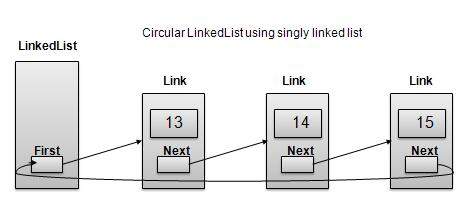
環形連結串列是連結串列的一種變體,其中第一個元素指向最後一個元素,最後一個元素指向第一個元素。單鏈表和雙向連結串列都可以轉換為環形連結串列。
單鏈表作為環形連結串列
雙向連結串列作為環形連結串列
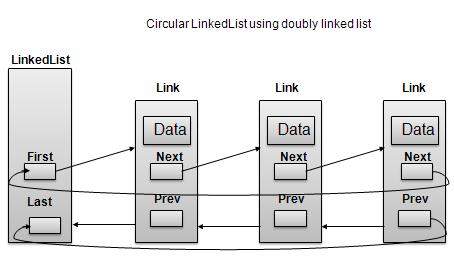
根據以上所示圖例,需要考慮以下重要事項。
在單鏈表和雙向連結串列兩種情況下,最後一個連結的“next”都指向列表的第一個連結。
在雙向連結串列中,第一個連結的“prev”指向列表的最後一個連結。
基本操作
以下是環形連結串列支援的重要操作。
插入 − 在列表開頭插入元素。
刪除 − 從列表開頭刪除元素。
顯示 − 顯示列表。
長度操作
以下程式碼演示了基於單鏈表的環形連結串列中的插入操作。
//insert link at the first location
public void insertFirst(int key, int data){
   //create a link
   Link link = new Link(key,data);
   if (isEmpty()) {
      first  = link;
      first.next = first;
   }
   else{
      //point it to old first node
      link.next = first;
      //point first to new first node
      first = link;
   }
}
刪除操作
以下程式碼演示了基於單鏈表的環形連結串列中的刪除操作。
//delete link at the first location
public Link deleteFirst(){
   //save reference to first link
   Link tempLink = first;
   //if only one link
   if(first.next == null){
      last = null;
   }else {
      first.next.prev = null;
   }
   first = first.next;
   //return the deleted link
   return tempLink;
}
顯示列表操作
以下程式碼演示了環形連結串列中的顯示列表操作。
public void display(){
   //start from the beginning
   Link current = first;
   //navigate till the end of the list
   System.out.print("[ ");
   if(first != null){
      while(current.next != current){
         //print data
         current.display();
         //move to next item
         current = current.next;
         System.out.print(" ");
      }
   }
   System.out.print(" ]");
}
演示
Link.java
package com.tutorialspoint.list;

public class CircularLinkedList {
   //this link always point to first Link
   private Link first;

   // create an empty linked list
   public CircularLinkedList(){
      first = null;
   }

   public boolean isEmpty(){
      return first == null;
   }

   public int length(){
      int length = 0;

      //if list is empty
      if(first == null){
         return 0;
      }

      Link current = first.next;

      while(current != first){
         length++;
         current = current.next;
      }
      return length;
   }

   //insert link at the first location
   public void insertFirst(int key, int data){
   //create a link
   Link link = new Link(key,data);
      if (isEmpty()) {
         first  = link;
         first.next = first;
      }
      else{
         //point it to old first node
         link.next = first;
         //point first to new first node
         first = link;
      }
   }

   //delete first item
   public Link deleteFirst(){
      //save reference to first link
      Link tempLink = first;
      if(first.next == first){
         first = null;
         return tempLink;
      }

      //mark next to first link as first
      first = first.next;
      //return the deleted link
      return tempLink;
   }

   public void display(){

      //start from the beginning
      Link current = first;
      //navigate till the end of the list
      System.out.print("[ ");
      if(first != null){
         while(current.next != current){
            //print data
            current.display();
            //move to next item
            current = current.next;
            System.out.print(" ");
         }
      }
      System.out.print(" ]");
   }
}
DoublyLinkedListDemo.java
package com.tutorialspoint.list;

public class CircularLinkedListDemo {
   public static void main(String args[]){
      CircularLinkedList list = new CircularLinkedList();

      list.insertFirst(1, 10);
      list.insertFirst(2, 20);
      list.insertFirst(3, 30);
      list.insertFirst(4, 1);
      list.insertFirst(5, 40);
      list.insertFirst(6, 56);

      System.out.print("\nOriginal List: ");
      list.display();
      System.out.println("");
      while(!list.isEmpty()){
         Link temp = list.deleteFirst();
         System.out.print("Deleted value:");
         temp.display();
         System.out.println("");
      }
      System.out.print("List after deleting all items: ");
      list.display();
      System.out.println("");
   }
}
如果我們編譯並執行以上程式,則會產生以下結果:
Original List: [ {6,56} {5,40} {4,1} {3,30} {2,20}  ]
Deleted value:{6,56}
Deleted value:{5,40}
Deleted value:{4,1}
Deleted value:{3,30}
Deleted value:{2,20}
Deleted value:{1,10}
List after deleting all items: [  ]
廣告