- AWT 教程
- AWT - 首頁
- AWT - 概述
- AWT - 環境
- AWT - 控制元件
- AWT - 事件處理
- AWT - 事件類
- AWT - 事件監聽器
- AWT - 事件介面卡
- AWT - 佈局
- AWT - 容器
- AWT - 選單
- AWT - 圖形
- AWT 有用資源
- AWT - 快速指南
- AWT - 有用資源
- AWT - 討論
AWT Arc2D 類
介紹
Arc2D 類是所有儲存由框架矩形、起始角度、角度範圍(弧長)和閉合型別(OPEN、CHORD 或 PIE)定義的二維弧的物件的超類。
類宣告
以下是java.awt.Arc2D類的宣告
public abstract class Arc2D
   extends RectangularShape
欄位
以下是java.awt.geom.Arc2D類的欄位
static int CHORD -- 透過繪製從弧段開始到弧段結束的直線段來閉合弧的閉合型別。
static int OPEN -- 沒有連線弧段兩端的路徑段的開放弧的閉合型別。
static int PIE -- 透過繪製從弧段開始到完整橢圓中心的直線段以及從該點到弧段結束的直線段來閉合弧的閉合型別。
類建構函式
| 序號 | 建構函式 & 描述 |
|---|---|
| 1 | protected Arc2D(int type) 這是一個抽象類,不能直接例項化。 |
類方法
| 序號 | 方法 & 描述 |
|---|---|
| 1 | boolean contains(double x, double y) 確定指定點是否在弧的邊界內。 |
| 2 | boolean contains(double x, double y, double w, double h) 確定弧的內部是否完全包含指定的矩形。 |
| 3 | boolean contains(Rectangle2D r) 確定弧的內部是否完全包含指定的矩形。 |
| 4 | boolean containsAngle(double angle) 確定指定角度是否在弧的角度範圍內。 |
| 5 | boolean equals(Object obj) 確定指定的 Object 是否等於此 Arc2D。 |
| 6 | abstract double getAngleExtent() 返回弧的角度範圍。 |
| 7 | abstract double getAngleStart() 返回弧的起始角度。 |
| 8 | int getArcType() 返回弧的弧閉合型別:OPEN、CHORD 或 PIE。 |
| 9 | Rectangle2D getBounds2D() 返回弧的高精度框架矩形。 |
| 10 | Point2D getEndPoint() 返回弧的結束點。 |
| 11 | PathIterator getPathIterator(AffineTransform at) 返回一個迭代物件,該物件定義弧的邊界。 |
| 12 | Point2D getStartPoint() 返回弧的起始點。 |
| 13 | int hashCode() 返回此 Arc2D 的雜湊碼。 |
| 14 | boolean intersects(double x, double y, double w, double h) 確定弧的內部是否與指定矩形的內部相交。 |
| 15 | protected abstract Rectangle2D makeBounds(double x, double y, double w, double h) 構造一個適當精度的 Rectangle2D,以容納計算為該弧的框架矩形的引數。 |
| 16 | abstract void setAngleExtent(double angExt) 將此弧的角度範圍設定為指定雙精度值。 |
| 17 | void setAngles(double x1, double y1, double x2, double y2) 使用兩組座標設定此弧的起始角度和角度範圍。 |
| 18 | void setAngles(Point2D p1, Point2D p2) 使用兩個點設定此弧的起始角度和角度範圍。 |
| 19 | abstract void setAngleStart(double angSt) 將此弧的起始角度設定為指定雙精度值。 |
| 20 | void setAngleStart(Point2D p) 將此弧的起始角度設定為指定點相對於此弧中心的定義角度。 |
| 21 | void setArc(Arc2D a) 將此弧設定為與指定弧相同。 |
| 22 | abstract void setArc(double x, double y, double w, double h, double angSt, double angExt, int closure) 將此弧的位置、大小、角度範圍和閉合型別設定為指定的雙精度值。 |
| 23 | void setArc(Point2D loc, Dimension2D size, double angSt, double angExt, int closure) 將此弧的位置、大小、角度範圍和閉合型別設定為指定的值。 |
| 24 | void setArc(Rectangle2D rect, double angSt, double angExt, int closure) 將此弧的位置、大小、角度範圍和閉合型別設定為指定的值。 |
| 25 | void setArcByCenter(double x, double y, double radius, double angSt, double angExt, int closure) 將此弧的位置、邊界、角度範圍和閉合型別設定為指定的值。 |
| 26 | void setArcByTangent(Point2D p1, Point2D p2, Point2D p3, double radius) 將此弧的位置、邊界和角度範圍設定為指定的值。 |
| 27 | void setArcType(int type) 將此弧的閉合型別設定為指定的值:OPEN、CHORD 或 PIE。 |
| 28 | void setFrame(double x, double y, double w, double h) 將此 Shape 的框架矩形的位置和大小設定為指定的矩形值。 |
繼承的方法
此類繼承自以下類的方法
java.awt.geom.RectangularShape
java.lang.Object
Arc2D 示例
使用您選擇的任何編輯器建立以下 Java 程式,例如在D:/ > AWT > com > tutorialspoint > gui >
AWTGraphicsDemo.javapackage com.tutorialspoint.gui;
import java.awt.*;
import java.awt.event.*;
import java.awt.geom.*;
public class AWTGraphicsDemo extends Frame {
public AWTGraphicsDemo(){
super("Java AWT Examples");
prepareGUI();
}
public static void main(String[] args){
AWTGraphicsDemo awtGraphicsDemo = new AWTGraphicsDemo();
awtGraphicsDemo.setVisible(true);
}
private void prepareGUI(){
setSize(400,400);
addWindowListener(new WindowAdapter() {
public void windowClosing(WindowEvent windowEvent){
System.exit(0);
}
});
}
@Override
public void paint(Graphics g) {
Arc2D.Float arc = new Arc2D.Float(Arc2D.PIE);
arc.setFrame(70, 200, 150, 150);
arc.setAngleStart(0);
arc.setAngleExtent(145);
Graphics2D g2 = (Graphics2D) g;
g2.setColor(Color.gray);
g2.draw(arc);
g2.setColor(Color.red);
g2.fill(arc);
g2.setColor(Color.black);
Font font = new Font("Serif", Font.PLAIN, 24);
g2.setFont(font);
g.drawString("Welcome to TutorialsPoint", 50, 70);
g2.drawString("Arc2D.PIE", 100, 120);
}
}
使用命令提示符編譯程式。轉到D:/ > AWT並鍵入以下命令。
D:\AWT>javac com\tutorialspoint\gui\AwtGraphicsDemo.java
如果沒有任何錯誤,則表示編譯成功。使用以下命令執行程式。
D:\AWT>java com.tutorialspoint.gui.AwtGraphicsDemo
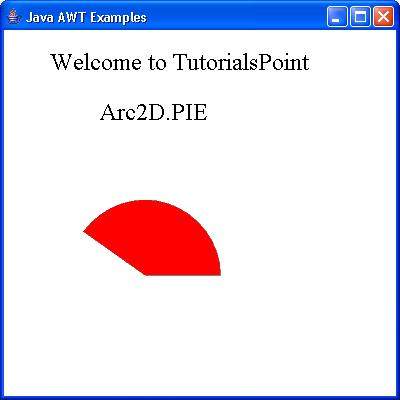
驗證以下輸出