
- AWS Lambda 教程
- AWS Lambda - 首頁
- AWS Lambda - 概述
- AWS Lambda - 環境設定
- AWS Lambda - 簡介
- 構建 Lambda 函式
- Node.js 函式
- Java 函式
- Python 函式
- Go 函式
- C# 函式
- 配置 Lambda 函式
- 使用 AWS 控制檯建立和部署
- 使用 AWS CLI 建立和部署
- 使用 Serverless Framework 建立和部署
- AWS 執行和呼叫 Lambda 函式
- 刪除 Lambda 函式
- 使用 Amazon API Gateway
- Lambda 函式與 Amazon S3
- Lambda 函式與 Amazon DynamoDB
- Lambda 函式與計劃事件
- Lambda 函式與 Amazon SNS
- Lambda 函式與 CloudTrail
- Lambda 函式與 Amazon Kinesis
- Lambda 函式與自定義使用者應用程式
- AWS Lambda@Edge 與 CloudFront
- 使用 CloudWatch 進行監控和故障排除
- AWS Lambda - 附加示例
- AWS Lambda 有用資源
- AWS Lambda - 快速指南
- AWS Lambda - 有用資源
- AWS Lambda - 討論
AWS Lambda – Node.js 函式
Node.js 是 AWS Lambda 函式支援的語言之一。支援的 Node.js 版本為 v6.10 和 v8.10。本章將詳細講解 AWS Lambda 函式在 Node.js 中的各種功能。
Node.js 中的處理程式
要在 Node.js 中編寫 AWS Lambda 函式,首先應該宣告一個處理程式。Node.js 中的處理程式是檔名和匯出函式的名稱。例如,檔名是index.js,匯出函式名稱是lambda handler,因此其對應的處理程式是index.lambdahandler
請觀察此處顯示的示例處理程式:
exports.lambdahandler = function(event, context, callback) { //code goes here}
處理程式引數
處理程式是構建 Lambda 函式的核心。處理程式接受三個引數:event、context 和 callback。
Event 引數
它包含觸發事件的所有詳細資訊。例如,如果我們使用 Lambda 函式觸發 S3,則事件將包含 S3 物件的詳細資訊。
Context 引數
它包含上下文詳細資訊,例如 Lambda 函式的屬性和配置詳細資訊。
Callback 函式
它有助於將詳細資訊返回給呼叫者。回撥的結構如下:
callback(error, result);
下面解釋回撥函式的引數:
Error – 如果在 Lambda 函式執行期間發生任何錯誤,則此處將包含詳細資訊。如果 Lambda 函式成功,則可以將null作為回撥函式的第一個引數傳遞。
Result – 這將提供 Lambda 函式成功執行的詳細資訊。如果發生錯誤,則忽略 result 引數。
注意 – 在 AWS Lambda 中,使用回撥函式不是強制性的。如果沒有回撥函式,處理程式將將其返回為 null。
有效的回撥簽名如下:
callback();                // It will return success, but no indication to the caller
callback(null);            // It will return success, but no indication to the caller
callback(null, "success"); // It will return the success indication to the caller
callback(error);           //  It will return the error indication to the caller
每當 AWS Lambda 執行時,回撥詳細資訊(例如錯誤或成功)都會記錄在 AWS CloudWatch 中,以及任何控制檯訊息。
在 Node.js 8.10 中使用 AWS Lambda
讓我們瞭解如何在 Node.js 8.10 中使用 AWS Lambda,以及如何以同步和非同步方式呼叫函式。
以同步方式呼叫 Lambda 函式
以下示例說明了以同步方式呼叫 Lambda 函式:
exports.handler = function(event, context, callback) {
   let arrItems = [4,5,6,8,9,10,35,70,80,31];
   function countevennumbers (items) {
      return new Promise(resolve => {
         setTimeout(() => {
            let a = 0;
            for (var i in items) {
               if (items[i] % 2 == 0) {
                  a++;
               }
            }
            resolve(a);
         },2000);
      });
   }
   let evennumber = countevennumbers(arrItems);
   callback(null,'even numbers equals ='+evennumber);
};
在 AWS 控制檯中測試此程式碼後,您可以觀察到以下輸出:
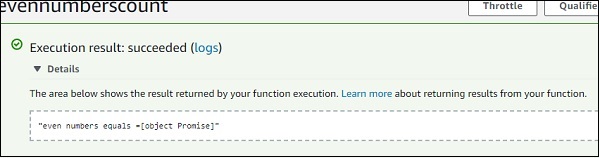
請注意,以上程式碼的輸出是一個 Promise 物件。它不會給出計數,因為計數是在 setTimeout 內遞增的,並且函式呼叫不會等待 setTimeout 內部的執行並返回 Promise 物件。
如果我們在處理程式函式中使用async/await,將獲得 Lambda 函式的準確輸出。
以非同步方式呼叫處理程式
以下示例說明了以非同步方式呼叫 Lambda 函式:
exports.handler = async function(event, context, callback) {
   let arrItems = [4,5,6,8,9,10,35,70,80,31];
   function countevennumbers (items) {
      return new Promise(resolve => {
         setTimeout(() => {
            let a = 0;
            for (var i in items) {
               if (items[i] % 2 == 0) {
                  a++;
               }
            }
            resolve(a);
         }, 2000);
      });
   }
   let evennumber = await countevennumbers(arrItems);
   callback(null,'even numbers equals ='+evennumber);
};
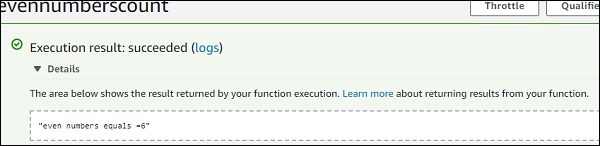
我們在以上程式碼中添加了async 和 await。當我們在函式呼叫旁邊使用await 時,執行將暫停,直到函式內的 Promise 解析。請注意,await 僅對async 函式有效。
在 AWS 控制檯中測試此程式碼後,您可以觀察到以下輸出:
Node.js 中的 ContextDetails
Context 物件提供詳細資訊,例如 Lambda 函式的名稱、剩餘毫秒數、請求 ID、CloudWatch 組名稱、超時詳細資訊等。
下表顯示了 Context 物件可用的方法和屬性列表:
Context 物件可用的方法
| 序號 | 方法名稱和說明 |
|---|---|
| 1 | getRemainingTimeInMillis() 此方法以毫秒為單位提供 Lambda 函式終止函式之前剩餘的時間 |
Context 物件可用的屬性
| 序號 | 屬性名稱和說明 |
|---|---|
| 1 | functionName 這將提供 AWS Lambda 函式名稱 |
| 2 | functionVersion 這將提供正在執行的 AWS Lambda 函式的版本 |
| 3 | invokedFunctionArn 這將提供 ARN 詳細資訊。 |
| 4 | memoryLimitInMB 這顯示了建立 Lambda 函式時新增的記憶體限制 |
| 5 | awsRequestId 這將提供 AWS 請求 ID。 |
| 6 | logGroupName 這將提供 CloudWatch 組名稱 |
| 7 | logStreamName 這將提供寫入日誌的 CloudWatch 日誌流名稱。 |
| 8 | identity 當與 AWS Mobile SDK 一起使用時,這將提供有關 Amazon Cognito 身份提供程式的詳細資訊。 提供的詳細資訊如下:
|
| 9 | clientContext 當與 AWS Mobile SDK 一起使用時,這將提供客戶端應用程式的詳細資訊。提供的詳細資訊如下:
|
請檢視以下示例,以更好地瞭解 Context 物件:
exports.handler = (event, context, callback) => {
   // TODO implement
   console.log('Remaining time =>', context.getRemainingTimeInMillis());
   console.log('functionName =>', context.functionName);
   console.log('AWSrequestID =>', context.awsRequestId);
   console.log('logGroupName =>', context.log_group_name);
   console.log('logStreamName =>', context.log_stream_name);
   console.log('clientContext =>', context.clientContext);
   callback(null, 'Name of aws Lambda is=>'+context.functionName);
};
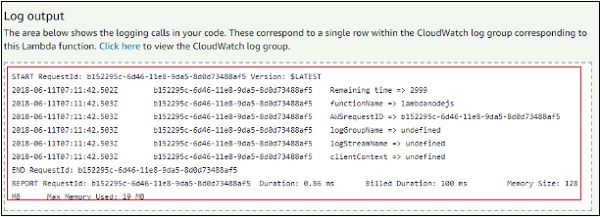
在 AWS 控制檯中測試此程式碼後,您可以觀察到以下輸出:

在 AWS 控制檯中測試此程式碼後,您可以觀察到以下日誌輸出:
Node.js 中的日誌記錄
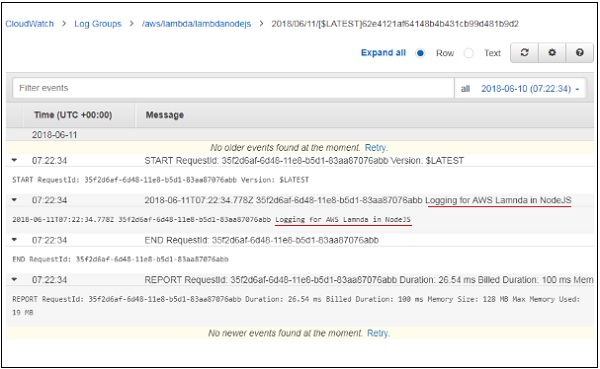
我們可以在 Node.js 中使用 console.log 進行日誌記錄。日誌詳細資訊可以從 CloudWatch 服務中針對 Lambda 函式獲取。
請觀察以下示例以更好地理解:
exports.handler = (event, context, callback) => {
   // TODO implement
   console.log('Logging for AWS Lamnda in NodeJS');
   callback(null, 'Name of aws Lambda is=>'+context.functionName);
};
在 AWS 控制檯中測試此程式碼後,您可以觀察到以下輸出:
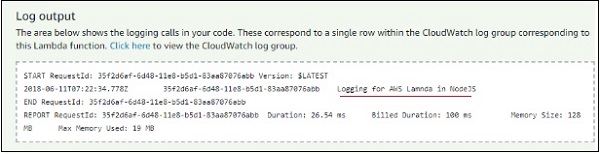
您可以從 CloudWatch 中觀察到以下螢幕截圖:
Node.js 中的錯誤處理
讓我們瞭解如何在 Node.js 中完成錯誤通知。請觀察以下程式碼:
exports.handler = function(event, context, callback) {
   // This Source code only throws error.
   var error = new Error("something is wrong");
   callback(error);
};
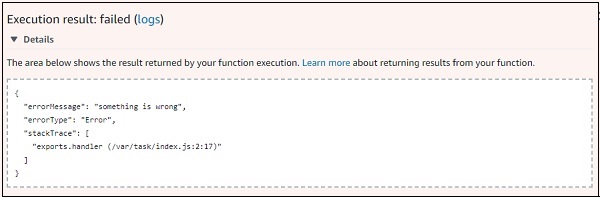
您可以在日誌輸出中觀察到以下內容:
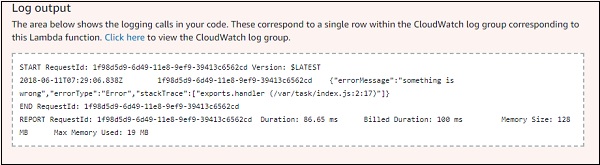
錯誤詳細資訊在回撥中提供如下:
{
   "errorMessage": "something is wrong",
   "errorType": "Error",
   "stackTrace": [    "exports.handler (/var/task/index.js:2:17)"  ]
}