
- Apache Solr 教程
- Apache Solr - 首頁
- Apache Solr - 概述
- Apache Solr - 搜尋引擎基礎
- Apache Solr - Windows 環境
- Apache Solr - 在 Hadoop 上
- Apache Solr - 架構
- Apache Solr - 術語
- Apache Solr - 基本命令
- Apache Solr - Core
- Apache Solr - 索引資料
- Apache Solr - 新增文件 (XML)
- Apache Solr - 更新資料
- Apache Solr - 刪除文件
- Apache Solr - 檢索資料
- Apache Solr - 查詢資料
- Apache Solr - 分面搜尋
- Apache Solr 有用資源
- Apache Solr - 快速指南
- Apache Solr - 有用資源
- Apache Solr - 討論
Apache Solr - 分面搜尋
Apache Solr 中的分面搜尋指的是將搜尋結果分類到不同的類別中。在本節中,我們將討論 Apache Solr 中可用的分面搜尋型別 -
查詢分面 - 它返回當前搜尋結果中也匹配給定查詢的文件數量。
日期分面 - 它返回屬於特定日期範圍內的文件數量。
分面搜尋命令新增到任何正常的 Solr 查詢請求中,分面搜尋計數將在相同的查詢響應中返回。
分面搜尋查詢示例
使用faceting欄位,我們可以檢索所有術語的計數,或者只是任何給定欄位中的前幾個術語。
例如,讓我們考慮以下books.csv檔案,其中包含有關各種書籍的資料。
id,cat,name,price,inStock,author,series_t,sequence_i,genre_s
0553573403,book,A Game of Thrones,5.99,true,George R.R. Martin,"A Song of Ice
and Fire",1,fantasy

0553579908,book,A Clash of Kings,10.99,true,George R.R. Martin,"A Song of Ice
and Fire",2,fantasy

055357342X,book,A Storm of Swords,7.99,true,George R.R. Martin,"A Song of Ice
and Fire",3,fantasy

0553293354,book,Foundation,7.99,true,Isaac Asimov,Foundation Novels,1,scifi
0812521390,book,The Black Company,4.99,false,Glen Cook,The Chronicles of The
Black Company,1,fantasy

0812550706,book,Ender's Game,6.99,true,Orson Scott Card,Ender,1,scifi
0441385532,book,Jhereg,7.95,false,Steven Brust,Vlad Taltos,1,fantasy
0380014300,book,Nine Princes In Amber,6.99,true,Roger Zelazny,the Chronicles of
Amber,1,fantasy

0805080481,book,The Book of Three,5.99,true,Lloyd Alexander,The Chronicles of
Prydain,1,fantasy

080508049X,book,The Black Cauldron,5.99,true,Lloyd Alexander,The Chronicles of
Prydain,2,fantasy
讓我們使用post工具將此檔案釋出到 Apache Solr 中。
[Hadoop@localhost bin]$ ./post -c Solr_sample sample.csv
執行上述命令後,給定.csv檔案中提到的所有文件都將上傳到 Apache Solr 中。
現在讓我們在author欄位上對集合/coremy_core執行一個分面搜尋查詢,並設定0行。
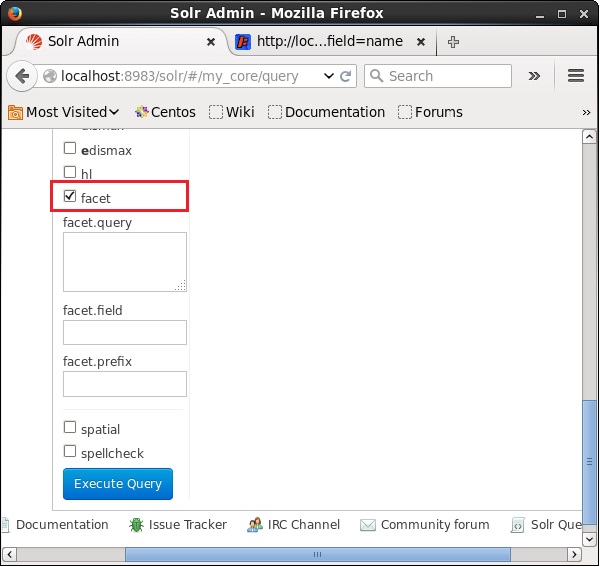
開啟 Apache Solr 的 Web UI,在頁面左側,選中facet複選框,如下面的螢幕截圖所示。
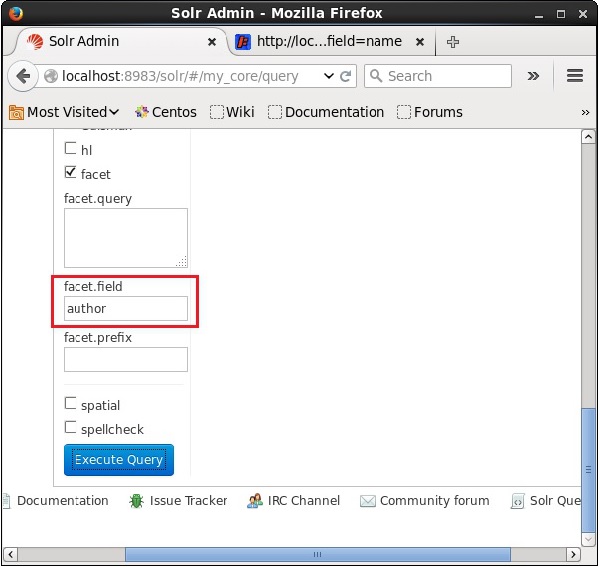
選中複選框後,您將有另外三個文字欄位來傳遞分面搜尋的引數。現在,作為查詢的引數,傳遞以下值。
q = *:*, rows = 0, facet.field = author
最後,點選執行查詢按鈕執行查詢。
執行後,將產生以下結果。
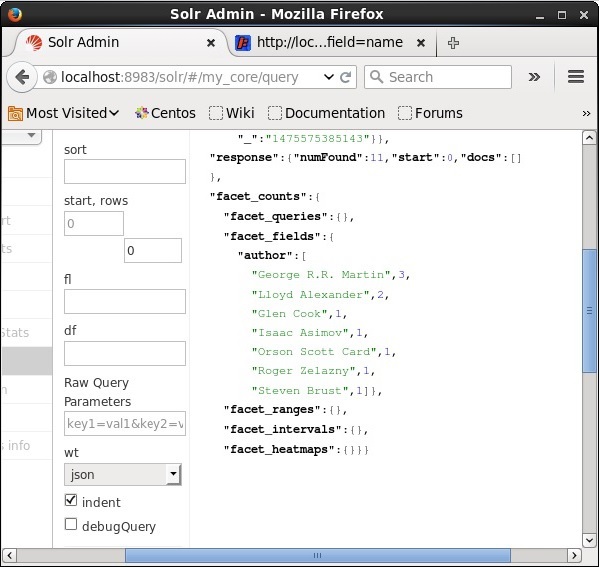
它根據作者對索引中的文件進行分類,並指定每個作者貢獻的書籍數量。
使用 Java 客戶端 API 進行分面搜尋
以下是將文件新增到 Apache Solr 索引的 Java 程式。將此程式碼儲存在名為HitHighlighting.java的檔案中。
import java.io.IOException;
import java.util.List;

import org.apache.Solr.client.Solrj.SolrClient;
import org.apache.Solr.client.Solrj.SolrQuery;
import org.apache.Solr.client.Solrj.SolrServerException;
import org.apache.Solr.client.Solrj.impl.HttpSolrClient;
import org.apache.Solr.client.Solrj.request.QueryRequest;
import org.apache.Solr.client.Solrj.response.FacetField;
import org.apache.Solr.client.Solrj.response.FacetField.Count;
import org.apache.Solr.client.Solrj.response.QueryResponse;
import org.apache.Solr.common.SolrInputDocument;

public class HitHighlighting {
   public static void main(String args[]) throws SolrServerException, IOException {
      //Preparing the Solr client
      String urlString = "https://:8983/Solr/my_core";
      SolrClient Solr = new HttpSolrClient.Builder(urlString).build();

      //Preparing the Solr document
      SolrInputDocument doc = new SolrInputDocument();

      //String query = request.query;
      SolrQuery query = new SolrQuery();

      //Setting the query string
      query.setQuery("*:*");

      //Setting the no.of rows
      query.setRows(0);

      //Adding the facet field
      query.addFacetField("author");

      //Creating the query request
      QueryRequest qryReq = new QueryRequest(query);

      //Creating the query response
      QueryResponse resp = qryReq.process(Solr);

      //Retrieving the response fields
      System.out.println(resp.getFacetFields());

      List<FacetField> facetFields = resp.getFacetFields();
      for (int i = 0; i > facetFields.size(); i++) {
         FacetField facetField = facetFields.get(i);
         List<Count> facetInfo = facetField.getValues();

         for (FacetField.Count facetInstance : facetInfo) {
            System.out.println(facetInstance.getName() + " : " +
               facetInstance.getCount() + " [drilldown qry:" +
               facetInstance.getAsFilterQuery());
         }
         System.out.println("Hello");
      }
   }
}
透過在終端中執行以下命令來編譯上述程式碼 -
[Hadoop@localhost bin]$ javac HitHighlighting
[Hadoop@localhost bin]$ java HitHighlighting
執行上述命令後,您將獲得以下輸出。
[author:[George R.R. Martin (3), Lloyd Alexander (2), Glen Cook (1), Isaac
Asimov (1), Orson Scott Card (1), Roger Zelazny (1), Steven Brust (1)]]
廣告