
- Angular Highcharts 教程
- Angular Highcharts - 主頁
- Angular Highcharts - 概述
- 環境設定
- 配置語法
- Angular Highcharts - 折線圖
- Angular Highcharts - 區域圖
- Angular Highcharts - 條形圖
- Angular Highcharts - 柱狀圖
- Angular Highcharts - 餅狀圖
- Angular Highcharts - 散點圖
- Angular Highcharts - 動態圖表
- Angular Highcharts - 組合圖
- Angular Highcharts - 3D 圖表
- Angular Highcharts - 地圖圖表
- Angular Highcharts 資源
- Angular Highcharts - 快速指南
- Angular Highcharts - 資源
- Angular Highcharts - 論壇
Angular Highcharts - 基本條形圖
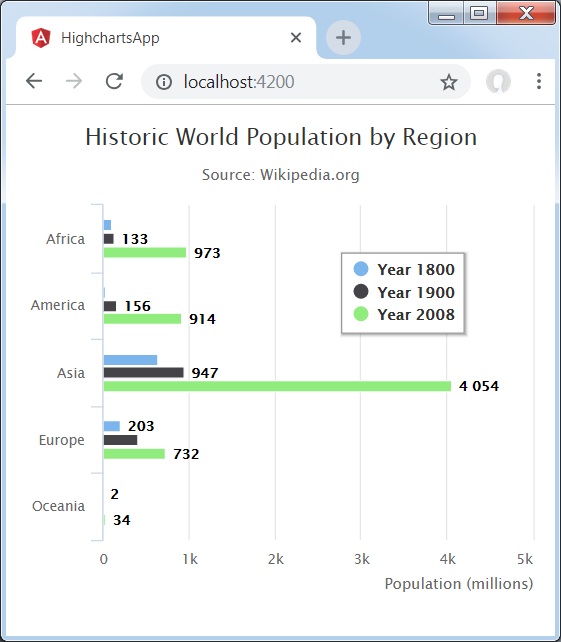
以下為條形圖示例。
我們已經看過了用於在 Highcharts 配置語法 章節中繪製圖表所使用的配置。現在,讓我們來看一個基本條形圖示例。我們還將瞭解其他配置。我們已經改變了圖表中的型別屬性。
圖表
配置圖表型別為“基於條形圖”。chart.type 決定圖表的系列型別。這裡,預設值為“折線”。
var chart = {
   type: 'bar'
};
示例
app.component.ts
import { Component } from '@angular/core';
import * as Highcharts from 'highcharts';
@Component({
   selector: 'app-root',
   templateUrl: './app.component.html',
   styleUrls: ['./app.component.css']
})
export class AppComponent {
   highcharts = Highcharts;
   chartOptions = {
      chart: {
         type: 'bar'
      },
      title: {
         text: 'Historic World Population by Region'
      },
      subtitle : {
         text: 'Source: Wikipedia.org'
      },
      legend : {
         layout: 'vertical',
         align: 'left',
         verticalAlign: 'top',
         x: 250,
         y: 100,
         floating: true,
         borderWidth: 1,

         backgroundColor: (
            (Highcharts.theme && Highcharts.theme.legendBackgroundColor) ||
              '#FFFFFF'), shadow: true
         },
         xAxis:{
            categories: ['Africa', 'America', 'Asia', 'Europe', 'Oceania'], title: {
            text: null
         }
      },
      yAxis : {
         min: 0, title: {
            text: 'Population (millions)', align: 'high'
         },
         labels: {
            overflow: 'justify'
         }
      },
      tooltip : {
         valueSuffix: ' millions'
      },
      plotOptions : {
         bar: {
            dataLabels: {
               enabled: true
            }
         }
      },
      credits:{
         enabled: false
      },
      series: [
         {
            name: 'Year 1800',
            data: [107, 31, 635, 203, 2]
         },
         {
            name: 'Year 1900',
            data: [133, 156, 947, 408, 6]
         },
         {
            name: 'Year 2008',
            data: [973, 914, 4054, 732, 34]
         }
      ]
   };
}
結果
驗證結果。
angular_highcharts_bar_charts.htm
廣告