
- Angular Highcharts 教程
- Angular Highcharts - 首頁
- Angular Highcharts - 概述
- 環境設定
- 配置語法
- Angular Highcharts - 折線圖
- Angular Highcharts - 區域圖
- Angular Highcharts - 柱狀圖
- Angular Highcharts - 條形圖
- Angular Highcharts - 餅圖
- Angular Highcharts - 散點圖
- Angular Highcharts - 動態圖表
- Angular Highcharts - 組合
- Angular Highcharts - 3D 圖表
- Angular Highcharts - 地圖圖表
- Angular Highcharts 資源
- Angular Highcharts - 快速指南
- Angular Highcharts - 資源
- Angular Highcharts - 討論
Angular Highcharts - 堆疊面積圖
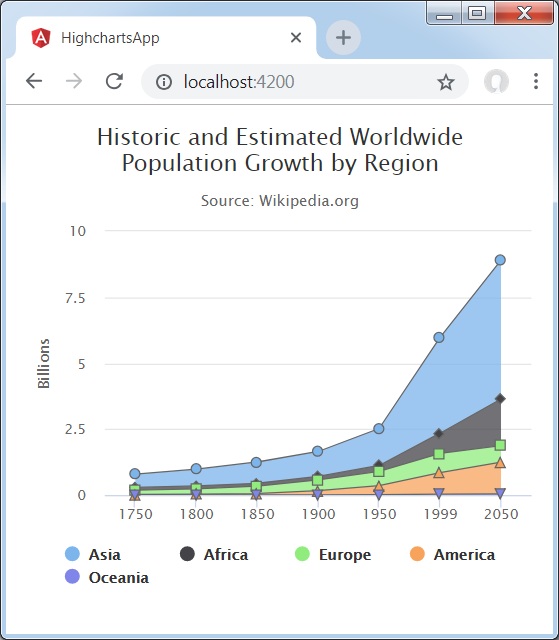
以下是一個堆疊區域圖示例。
我們已經在 Highcharts 配置語法 章節中學習了繪製圖表所使用的配置。現在,讓我們來看一個堆疊區域圖示例。
plotOptions
plotOptions 是每個序列型別配置物件的包裝物件。配置物件可以針對序列陣列中給出的每個序列項進行改寫。這樣做是為了將每個序列的值彼此堆疊。
使用 plotOptions.area.stacking 將圖表堆疊配置為“普通”。可能的值為 null(停用堆疊)、“普通”(按值堆疊)和“百分比”(按百分比堆疊圖表)。
var plotOptions = {
   area: {
      stacking: 'normal',
      lineColor: '#666666',
      lineWidth: 1,
      marker: {
         lineWidth: 1,
         lineColor: '#666666'
      }
   }
};
示例
app.component.ts
import { Component } from '@angular/core';
import * as Highcharts from 'highcharts';
@Component({
   selector: 'app-root',
   templateUrl: './app.component.html',
   styleUrls: ['./app.component.css']
})
export class AppComponent {
   highcharts = Highcharts;
   chartOptions = {
      chart: {
         type: "area"
      },
      title: {
        text: 'Historic and Estimated Worldwide Population Growth by Region'
      },
      subtitle : {
        text: 'Source: Wikipedia.org'
      },
      xAxis:{
        categories: ['1750', '1800', '1850', '1900', '1950', '1999', '2050'],
        tickmarkPlacement: 'on',
        title: {
           enabled: false
        }
      },
      yAxis : {
        title: {
           text: 'Billions'
        },
        labels: {
           formatter: function () {
              return this.value / 1000;
           }
        }
      },
      tooltip : {
        shared: true,
        valueSuffix: ' millions'
      },
      plotOptions : {
        area: {
           stacking: 'normal',
           lineColor: '#666666',
           lineWidth: 1,

           marker: {
              lineWidth: 1,
              lineColor: '#666666'
           }
        }
      },
      credits:{
        enabled: false
      },
      series: [
         {
            name: 'Asia',
            data: [502, 635, 809, 947, 1402, 3634, 5268]
         },
         {
            name: 'Africa',
            data: [106, 107, 111, 133, 221, 767, 1766]
         },
         {
            name: 'Europe',
            data: [163, 203, 276, 408, 547, 729, 628]
         },
         {
            name: 'America',
            data: [18, 31, 54, 156, 339, 818, 1201]
         },
         {
            name: 'Oceania',
            data: [2, 2, 2, 6, 13, 30, 46]
         }
      ]
   };
}
結果
驗證結果。
angular_highcharts_area_charts.htm
廣告