
 資料結構
資料結構 網路
網路 關係資料庫管理系統 (RDBMS)
 作業系統
作業系統 Java
Java MS Excel
 iOS
iOS HTML
HTML CSS
CSS Android
 Python
 C 程式設計
 C++
C++ C#
C# MongoDB
 MySQL
MySQL Javascript
 PHP
PHP 物理學
物理學 化學
化學 生物學
生物學 數學
數學 英語
英語 經濟學
經濟學 心理學
心理學 社會研究
社會研究 服裝研究
服裝研究 法律研究
法律研究JavaFX 提供了哪些不同的二維形狀?
以下是您可以使用 JavaFX 繪製的各種幾何形狀:
直線 - 直線是連線兩點的幾何結構。`javafx.scene.shape` 中的 `Line` 類表示 XY 平面上的直線。
矩形 - 矩形是一個四邊形,具有兩對平行且相交的邊,所有內角都是直角。`javafx.scene.` 中的 `Rectangle` 類表示 XY 平面上的矩形。
圓形 - 圓形是由一條閉合曲線形成的形狀,曲線上的每個點到中心點的距離都相等。`javafx.scene.` 中的 `Circle` 類表示 XY 平面上的圓形。
橢圓 - 橢圓由兩個焦點定義。如果取橢圓上的任意一點,則到這兩個焦點的距離之和為常數。`javafx.scene.` 中的 `Ellipse` 類表示 XY 平面上的橢圓。
多邊形 - 由若干個共面的線段首尾相連組成的封閉圖形稱為多邊形。`javafx.scene.Polygon` 類表示 XY 平面上的多邊形。
折線 - 折線與多邊形相同,只是折線末端沒有閉合。或者說,是由一個或多個線段組成的連續線。`javafx.scene.` 中的 `Polyline` 類表示 XY 平面上的折線。
三次貝塞爾曲線 - 三次貝塞爾曲線是 XY 平面上的三次貝塞爾引數曲線。`javafx.scene.` 中的 `CubicCurve` 類表示 XY 平面上的三次貝塞爾曲線。
二次貝塞爾曲線 - 二次貝塞爾曲線是 XY 平面上的二次貝塞爾引數曲線。`javafx.scene.` 中的 `QuadCurve` 類表示 XY 平面上的二次貝塞爾曲線。
弧 - 弧是曲線的一部分。`javafx.scene.` 中的 `Arc` 類表示 XY 平面上的弧。
要建立所需的形狀,您需要:
例項化相應的類。
設定其屬性。
將建立的物件新增到 Group。
示例
下面的 JavaFX 示例演示了所有可用二維形狀的建立:
import javafx.application.Application;
import javafx.scene.Group;
import javafx.scene.Scene;
import javafx.stage.Stage;
import javafx.scene.shape.Arc;
import javafx.scene.shape.ArcType;
import javafx.scene.shape.Circle;
import javafx.scene.shape.CubicCurve;
import javafx.scene.shape.Ellipse;
import javafx.scene.shape.Line;
import javafx.scene.shape.Polygon;
import javafx.scene.shape.Polyline;
import javafx.scene.shape.QuadCurve;
import javafx.scene.shape.Rectangle;
import javafx.scene.text.Font;
import javafx.scene.text.FontPosture;
import javafx.scene.text.FontWeight;
import javafx.scene.text.Text;
public class JavaFXShapes extends Application {
   public void start(Stage stage) {
      Font font = Font.font("verdana", FontWeight.BOLD, FontPosture.REGULAR, 12);
      Text cirText = new Text("Circle");
      cirText.setFont(font);
      cirText.setX(50);
      cirText.setY(130);
      Text rectText = new Text("Rectangle");
      rectText.setFont(font);
      rectText.setX(170);
      rectText.setY(130);
      Text ellipseText = new Text("Ellipse");
      ellipseText.setFont(font);
      ellipseText.setX(310);
      ellipseText.setY(130);
      Text polyText = new Text("Polygon");
      polyText.setFont(font);
      polyText.setX(425);
      polyText.setY(130);
      Text lineText = new Text("Line");
      lineText.setFont(font);
      lineText.setX(530);
      lineText.setY(130);
      Text polyLineText = new Text("Poly Line");
      polyLineText.setFont(font);
      polyLineText.setX(40);
      polyLineText.setY(260);
      Text cubicCurveText = new Text("Cubic Curve");
      cubicCurveText.setFont(font);
      cubicCurveText.setX(140);
      cubicCurveText.setY(260);
      Text quadCurveText = new Text("Quad Curve");
      quadCurveText.setFont(font);
      quadCurveText.setX(340);
      quadCurveText.setY(260);
      Text arcText = new Text("Arc");
      arcText.setFont(font);
      arcText.setX(490);
      arcText.setY(260);
      //Drawing a circle
      Circle circle = new Circle(75.0f, 65.0f, 40.0f );
      //Drawing a Rectangle
      Rectangle rect = new Rectangle(150, 30, 100, 65);
      //Drawing an ellipse
      Ellipse ellipse = new Ellipse(330, 60, 60, 35);
      //Drawing Polygon
      Polygon poly = new Polygon(410, 60, 430, 30, 470, 30, 490, 60, 470, 100, 430, 100 );
      //Drawing a Line
      Line line = new Line(540, 30, 540, 90);
      line.setStrokeWidth(5.0);
      //Drawing a Poly line
      Polyline polyLine = new Polyline(25, 210, 100, 210, 50, 180, 50, 230);
      polyLine.setStrokeWidth(5.0);
      //Drawing a cubic curve
      CubicCurve cubicCurve = new CubicCurve(150.0, 210.0, 200.0, 70.0, 200.0, 290.0, 270.0, 210.0);
      //Drawing Quadratic curve
      QuadCurve quadCurve = new QuadCurve(400.0, 200.0, 440.0, 250.0, 330.0, 170.0);
      //Drawing an arc
      Arc arc = new Arc(490, 240, 50, 80, 30, 70);
      arc.setType(ArcType.ROUND);
      //Setting the stage
      Group root = new Group(
      circle, ellipse, rect, poly, line,
      polyLine, cubicCurve, quadCurve, arc,
      cirText, rectText, ellipseText, polyText, lineText,
      polyLineText, cubicCurveText, quadCurveText, arcText);
      Scene scene = new Scene(root, 600, 300);
      stage.setTitle("2D shapes Example");
      stage.setScene(scene);
      stage.show();
   }
   public static void main(String args[]){
      launch(args);
   }
}
輸出
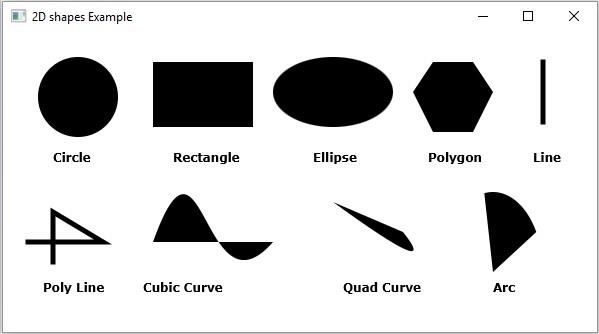

160 次檢視
