
 資料結構
資料結構 網路技術
網路技術 RDBMS
RDBMS 作業系統
作業系統 Java
Java MS Excel
 iOS
iOS HTML
HTML CSS
CSS Android
 Python
 C 程式設計
 C++
C++ C#
C# MongoDB
 MySQL
MySQL Javascript
 PHP
PHP 物理
物理 化學
化學 生物學
生物學 數學
數學 英語
英語 經濟學
經濟學 心理學
心理學 社會學
社會學 時尚研究
時尚研究 法律研究
法律研究解釋 JavaFX 中二維圖形的平滑屬性
smooth 屬性指定是否使用抗鋸齒提示。可以使用 javafx.scene.shape.Shape 類的 setSmooth() 方法將值設為該屬性。
此方法接受一個布林值,如果傳遞 true,則形狀的邊緣將被平滑化。
示例
import javafx.application.Application;
import javafx.scene.Group;
import javafx.scene.Scene;
import javafx.scene.paint.Color;
import javafx.scene.shape.Polygon;
import javafx.scene.shape.StrokeLineJoin;
import javafx.scene.text.Font;
import javafx.scene.text.FontPosture;
import javafx.scene.text.FontWeight;
import javafx.scene.text.Text;
import javafx.stage.Stage;
public class SmoothExample extends Application {
   public void start(Stage stage) {
      Font font = Font.font("verdana", FontWeight.BOLD, FontPosture.REGULAR, 12);
      Text label2 = new Text("Smooth: true");
      label2.setFont(font);
      label2.setX(80.0);
      label2.setY(250.0);
      Polygon shape1 = new Polygon(100.0, 75.0, 50.0, 200.0, 200.0, 200.0);
      shape1.setStroke(Color.BLUE);
      shape1.setStrokeWidth(20);
      shape1.setStrokeLineJoin(StrokeLineJoin.MITER);
      shape1.setSmooth(true);
      Text label3 = new Text("Smooth: false");
      label3.setFont(font);
      label3.setX(370.0);
      label3.setY(250.0);
      Polygon shape2 = new Polygon(450.0, 75.0, 350.0, 200.0, 500.0, 200.0);
      shape2.setStroke(Color.BLUE);
      shape2.setStrokeWidth(20.0);
      shape2.setStrokeLineJoin(StrokeLineJoin.MITER);
      shape2.setSmooth(false);
      //Creating a Group object
      Group root = new Group(label2, label3, shape1, shape2);
      //Creating a scene object
      Scene scene = new Scene(root, 595, 310);
      //Setting title to the Stage
      stage.setTitle("Smooth Example");
      //Adding scene to the stage
      stage.setScene(scene);
      //Displaying the contents of the stage
      stage.show();
   }
   public static void main(String args[]){
      launch(args);
   }
}
輸出
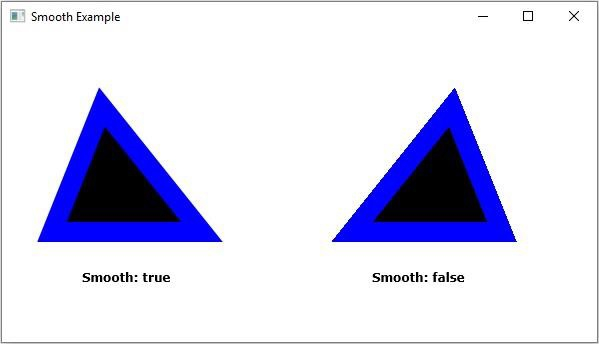

更新日期: 2020-4-14
251 瀏覽量

廣告