
 資料結構
資料結構 網路
網路 RDBMS
RDBMS 作業系統
作業系統 Java
Java MS Excel
 iOS
iOS HTML
HTML CSS
CSS Android
 Python
 C 程式設計
 C++
C++ C#
C# MongoDB
 MySQL
MySQL Javascript
 PHP
PHP 物理
物理 化學
化學 生物
生物 數學
數學 英語
英語 經濟學
經濟學 心理學
心理學 社會學
社會學 時尚研究
時尚研究 法律研究
法律研究解釋 JavaFX 中 3D 形狀的面繪製模式屬性
此繪製模式屬性定義/指定用於繪製 3D 形狀的模式。可以使用 **setDrawMode()** 方法(Shape 類)將值設定為 3D 物件的 draw mode 屬性。
JavaFX 支援兩種繪製模式,由名為 **DrawMode** 的列舉常量表示——FILL 和 LINE。
示例
import javafx.application.Application;
import javafx.scene.Group;
import javafx.scene.PerspectiveCamera;
import javafx.scene.Scene;
import javafx.scene.paint.Color;
import javafx.stage.Stage;
import javafx.scene.shape.DrawMode;
import javafx.scene.shape.Sphere;
import javafx.scene.text.Font;
import javafx.scene.text.FontPosture;
import javafx.scene.text.FontWeight;
import javafx.scene.text.Text;
public class DrawModeProperty extends Application {
   public void start(Stage stage) {
      //Drawing a Sphere
      Sphere sphere1 = new Sphere(100);
      sphere1.setTranslateX(80.0);
      sphere1.setTranslateY(180.0);
      sphere1.setTranslateZ(150.0);
      //Setting the property "draw mode"
      sphere1.setDrawMode(DrawMode.LINE);
      //Drawing a Sphere
      Sphere sphere2 = new Sphere(100);
      sphere2.setTranslateX(380.0);
      sphere2.setTranslateY(180.0);
      sphere2.setTranslateZ(150.0);
      //Setting the property "draw mode"
      sphere2.setDrawMode(DrawMode.FILL);
      //Setting the perspective camera
      PerspectiveCamera cam = new PerspectiveCamera();
      cam.setTranslateX(-50);
      cam.setTranslateY(50);
      cam.setTranslateZ(0);
      Font font = Font.font("verdana", FontWeight.BOLD, FontPosture.REGULAR, 15);
      Text label1 = new Text("Draw Mode: LINE");
      label1.setFont(font);
      label1.setX(40);
      label1.setY(300);
      Text label2 = new Text("Draw Mode: FILL");
      label2.setFont(font);
      label2.setX(280);
      label2.setY(300);
      //Setting the Scene
      Group root = new Group(sphere1, sphere2, label1, label2);
      Scene scene = new Scene(root, 595, 300, Color.BEIGE);
      scene.setCamera(cam);
      stage.setTitle("3D Shape Property: Draw Mode");
      stage.setScene(scene);
      stage.show();
   }
   public static void main(String args[]){
      launch(args);
   }
}
輸出
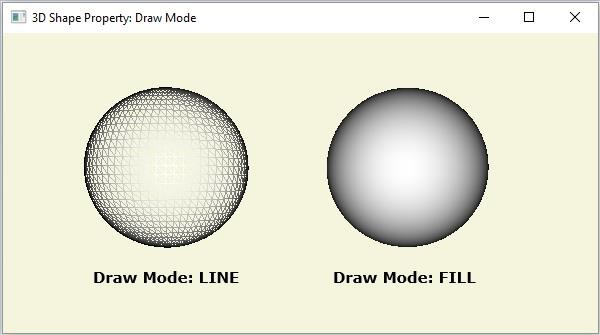

更新時間:2020 年 5 月 16 日
175 次瀏覽

廣告