
 資料結構
資料結構 網路
網路 關係資料庫管理系統
 作業系統
作業系統 Java
Java MS Excel
 iOS
iOS HTML
HTML CSS
CSS Android
 Python
 C 程式設計
 C++
C++ C#
C# MongoDB
 MySQL
MySQL Javascript
 PHP
PHP 物理學
物理學 化學
化學 生物學
生物學 數學
數學 英語
英語 經濟學
經濟學 心理學
心理學 社會學
社會學 時尚研究
時尚研究 法律研究
法律研究解釋 JavaFX 中 2D 形狀的 Stroke 屬性
Stroke 屬性指定/定義了形狀邊界的顏色。您可以使用 javafx.scene.shape.Shape 類的**setStroke()**方法設定邊界的顏色。
此方法接受一個 Color 值作為引數,並將給定的顏色設定到形狀的邊界。
預設情況下,線條、路徑和折線等形狀(物件)的此屬性值為 null,而對於所有其他形狀,此屬性的預設值為 Color.BLACK。
示例
import javafx.application.Application;
import javafx.scene.Group;
import javafx.scene.Scene;
import javafx.scene.paint.Color;
import javafx.scene.shape.Line;
import javafx.scene.shape.Polygon;
import javafx.scene.text.Font;
import javafx.scene.text.FontPosture;
import javafx.scene.text.FontWeight;
import javafx.scene.text.Text;
import javafx.stage.Stage;
public class StrokeExample extends Application {
   public void start(Stage stage) {
      Font font = Font.font("verdana", FontWeight.BOLD, FontPosture.REGULAR, 12);
      Text label1 = new Text("Original Image");
      label1.setFont(font);
      label1.setX(250.0);
      label1.setY(125.0);
      Polygon rhombus1 = new Polygon(300.0, 0.0, 250.0, 50.0, 300.0, 100.0, 350.0, 50.0);
      Text label2 = new Text("Stroke for a line");
      label2.setFont(font);
      label2.setX(50.0);
      label2.setY(275.0);
      //Constructing a line
      Line line = new Line();
      line.setStartX(50.0);
      line.setStartY(200.0);
      line.setEndX(150.0);
      line.setEndY(200.0);
      line.setStrokeWidth(10.0);
      line.setStroke(Color.DARKBLUE);
      Text label3 = new Text("Stroke: Blue");
      label3.setFont(font);
      label3.setX(250.0);
      label3.setY(275.0);
      Polygon rhombus3 = new Polygon(300.0, 150.0, 250.0, 200.0, 300.0, 250.0, 350.0, 200.0);
      rhombus3.setStroke(Color.BLUE);
      rhombus3.setStrokeWidth(7.0);
      Text label4 = new Text("Stroke: Red");
      label4.setFont(font);
      label4.setX(450.0);
      label4.setY(275.0);
      Polygon rhombus4 = new Polygon(490.0, 150.0, 440, 200.0, 490.0, 250.0, 540.0, 200.0);
      rhombus4.setStroke(Color.RED);
      rhombus4.setStrokeWidth(7.0);
      //Creating a Group object
      Group root = new Group(label1, label2, label3, label4, rhombus1, line, rhombus3, rhombus4);
      //Creating a scene object
      Scene scene = new Scene(root, 595, 310);
      //Setting title to the Stage
      stage.setTitle("Stroke Example");
      //Adding scene to the stage
      stage.setScene(scene);
      //Displaying the contents of the stage
      stage.show();
   }
   public static void main(String args[]){
      launch(args);
   }
}
輸出
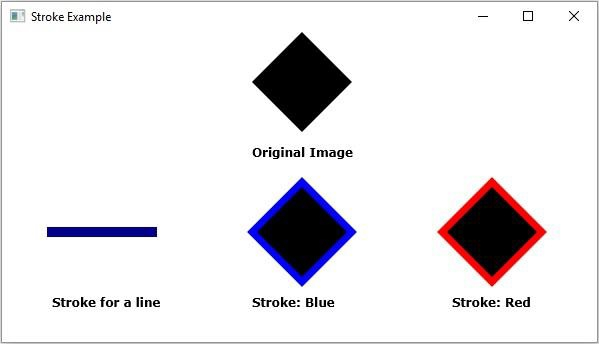

上次更新日期: 2020 年 4 月 14 日
頁面瀏覽數 848

廣告