
- WCF 教程
- WCF - 首頁
- WCF - 概述
- WCF - 與網路服務比較
- WCF - 開發工具
- WCF - 架構
- WCF - 建立 WCF 服務
- WCF - 託管 WCF 服務
- WCS - IIS 主機
- WCF - 自我託管
- WCF - WAS 託管
- WCF - Windows 服務託管
- WCF - 使用 WCF 服務
- WCF - 服務繫結
- WCF - 例項管理
- WCF - 事務
- WCF - RIA 服務
- WCF - 安全
- WCF - 異常處理
- WCF 資源
- WCF - 快速指南
- WCF - 有用資源
- WCF - 討論
WCF - IIS 主機
在 IIS(Internet 資訊服務)中託管 WCF 服務是一個分步過程。IIS 主機如下所示,詳細說明了所需的編碼以及螢幕截圖,以瞭解此過程。
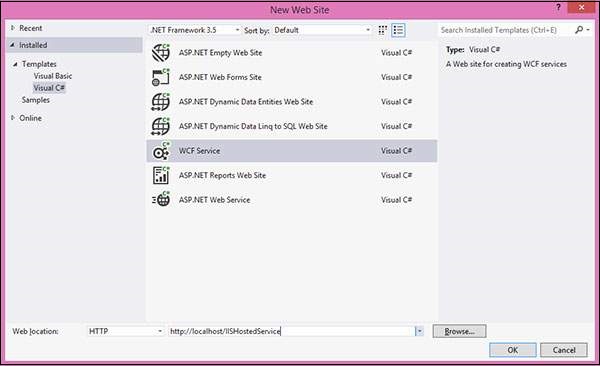
步驟 1 - 啟動 Visual Studio 2012 並單擊檔案 → 新建 → 網站。選擇“WCF 服務”和位置,如 http。這將在 IIS 中託管服務。單擊確定。
步驟 2 - 以下是介面後面的程式碼。
using System;
using System.Collections.Generic;
using System.Linq;
using System.Runtime.Serialization;
using System.ServiceModel;
using System.ServiceModel.Web;
using System.Text;

// NOTE: You can use the "Rename" command on the "Refactor" menu to
// change the interface name "IService" in both code and config file
// together.

[ServiceContract]
Public interface IService {
   [OperationContract]
   String GetData(int value);

   [OperationContract]
   CompositeType GetDataUsingDataContract(CompositeType composite);

   // TODO: Add your service operations here
}

// Use a data contract as illustrated in the sample below to add
// composite types to service operations.

[DataContract]
Public class CompositeType {
   Bool boolValue = true;
   String stringValue = "Hello ";

   [DataMember]
   Public bool BoolValue {
      get { return boolValue; }
      set { boolValue = value; }
   }

   [DataMember]
   Public string StringValue {
      get { return stringValue; }
      set { stringValue = value; }
   }
}
步驟 3 - 以下是類檔案後面的程式碼。
using System;
using System.Collections.Generic;
using System.Linq;
using System.Runtime.Serialization;
using System.ServiceModel;
using System.ServiceModel.Web;
using System.Text;

// NOTE: You can use the "Rename" command on the "Refactor" menu to
// change the class name "Service" in code, svc and config file
// together.

Public class Service : IService {
   Public string GetData(int value) {
      Return string.Format("You entered: {0}", value);
   }

   Public CompositeType GetDataUsingDataContract(CompositeType composite) {
      if(composite == null) {
         thrownewArgumentNullException("composite");
      }

      if(composite.BoolValue) {
         composite.StringValue += "Suffix";
      }
      return composite;
   }
}
步驟 4 - 服務檔案 (.svc) 包含服務名稱和檔名稱後面的程式碼。此檔案用於瞭解服務。

<%@ ServiceHost Language = "C#" Debug = "true" Service = "Service"
   CodeBehind = "~/App_Code/Service.cs" %>
步驟 5 - 伺服器端配置在配置檔案中提及。在此處,僅提及配置為“wsHttpBinding”的一個終結點;我們還可以使用不同的繫結來擁有多個終結點。由於我們將在 IIS 中託管,因此我們必須僅使用 http 繫結。
<?xml version = "1.0"?>
<configuration>
   <!--
      Note: As an alternative to hand editing this file you can use the
         web admin tool to configure settings for your application. Use
         the Website->Asp.Net Configuration option in Visual Studio.
         A full list of settings and comments can be found in
         machine.config.comments usually located in
         \Windows\Microsoft.Net\Framework\vx.x\Config
   -->
   <configSections>
      <sectionGroup name = "system.web.extensions"
         ype = "System.Web.Configuration.SystemWebExtensionsSectionGroup,
         System.Web.Extensions, Version = 3.5.0.0, Culture = neutral,
         PublicKeyToken = 31BF3856AD364E35">

         <sectionGroup name = "scripting"
            type = "System.Web.Configuration.ScriptingSectionGroup,
            System.Web.Extensions, Version = 3.5.0.0, Culture = neutral,
            PublicKeyToken = 31BF3856AD364E35">

            <section name = "scriptResourceHandler"
               type = "System.Web.Configuration.ScriptingScriptResourceHandlerSection,
               System.Web.Extensions, Version = 3.5.0.0,
               Culture = neutral, PublicKeyToken = 31BF3856AD364E35"
               requirePermission = "false"
               allowDefinition = "MachineToApplication"/>

            <sectionGroup name = "webServices"
               type = "System.Web.Configuration.ScriptingWebServicesSectionGroup,
               System.Web.Extensions, Version = 3.5.0.0,
               Culture = neutral, PublicKeyToken = 31BF3856AD364E35">

               <section name = "jsonSerialization"
                  type = "System.Web.Configuration.ScriptingJsonSerializationSection,
                  System.Web.Extensions, Version = 3.5.0.0,
                  Culture = neutral, PublicKeyToken = 31BF3856AD364E35"
                  requirePermission = "false" allowDefinition = "Everywhere"/>

               <section name = "profileService"
                  type = "System.Web.Configuration.ScriptingProfileServiceSection,
                  System.Web.Extensions, Version = 3.5.0.0,
                  Culture = neutral, PublicKeyToken = 31BF3856AD364E35"
                  requirePermission = "false"
                  allowDefinition = "MachineToApplication"/>

               <section name = "authenticationService"
                  type = "System.Web.Configuration.ScriptingAuthenticationServiceSection,
                  System.Web.Extensions, Version = 3.5.0.0,
                  Culture = neutral, PublicKeyToken = 31BF3856AD364E35"
                  requirePermission = "false"
                  allowDefinition = "MachineToApplication"/>

               <section name = "roleService"
                  type = "System.Web.Configuration.ScriptingRoleServiceSection,
                  System.Web.Extensions, Version = 3.5.0.0,
                  Culture = neutral, PublicKeyToken = 31BF3856AD364E35"
                  requirePermission = "false"
                  allowDefinition = "MachineToApplication"/>

            </sectionGroup>
         </sectionGroup>
      </sectionGroup>
   </configSections>

<appSettings/>
   <connectionStrings/>
   <system.web>
      <!--
         Set compilation debug="true" to insert debugging
         symbols into the compiled page. Because this
         affects performance, set this value to true only
         during development.
      -->

      <compilation debug = "true">
         <assemblies>

            <add assembly = "System.Core, Version = 3.5.0.0, Culture = neutral,
               PublicKeyToken = B77A5C561934E089"/>

            <add assembly = "System.Web.Extensions, Version = 3.5.0.0,
               Culture = neutral, PublicKeyToken = 31BF3856AD364E35"/>

            <add assembly = "System.Data.DataSetExtensions, Version = 3.5.0.0,
               Culture = neutral, PublicKeyToken = B77A5C561934E089"/>

            <add assembly = "System.Web.Extensions, Version = 3.5.0.0,
               Culture = neutral, PublicKeyToken = 31BF3856AD364E35"/>

            <add assembly = "System.Xml.Linq, Version = 3.5.0.0, Culture = neutral,
               PublicKeyToken = B77A5C561934E089"/>

         </assemblies>
      </compilation>

         <!--
            The <authentication> section enables configuration
            of the security authentication mode used by
            ASP.NET to identify an incoming user.
         -->

      <authentication mode="Windows"/>
         <!--
            The <customErrors> section enables configuration
            of what to do if/when an unhandled error occurs
            during the execution of a request. Specifically,
            it enables developers to configure html error pages
            to be displayed in place of a error stack trace.

            <customErrors mode = "RemoteOnly" defaultRedirect = "GenericErrorPage.htm">
               <error statusCode = "403" redirect = "NoAccess.htm" />
               <error statusCode = "404" redirect = "FileNotFound.htm" />
            </customErrors>
         -->

         <pages>
            <controls>
               <add tagPrefix = "asp" namespace = "System.Web.UI"
                  assembly = "System.Web.Extensions, Version = 3.5.0.0,
                  Culture = neutral, PublicKeyToken = 31BF3856AD364E35"/>

               <add tagPrefix = "asp" namespace = "System.Web.UI.WebControls"
                  assembly = "System.Web.Extensions, Version = 3.5.0.0,
                  Culture = neutral, PublicKeyToken = 31BF3856AD364E35"/>

            </controls>
         </pages>

         <httpHandlers>
            <remove verb = "*" path = "*.asmx"/>

            <add verb = "*" path = "*.asmx" validate = "false"
               type = "System.Web.Script.Services.ScriptHandlerFactory,
               System.Web.Extensions, Version = 3.5.0.0, Culture = neutral,
               PublicKeyToken = 31BF3856AD364E35"/>

            <add verb = "*" path = "*_AppService.axd" validate = "false"
               type = "System.Web.Script.Services.ScriptHandlerFactory,
               System.Web.Extensions, Version = 3.5.0.0, Culture = neutral,
               PublicKeyToken = 31BF3856AD364E35"/>

            <add verb = "GET,HEAD" path = "ScriptResource.axd"
               type = "System.Web.Handlers.ScriptResourceHandler,
               System.Web.Extensions, Version = 3.5.0.0, Culture = neutral,
               PublicKeyToken = 31BF3856AD364E35" validate = "false"/>
         </httpHandlers>

         <httpModules>
            <add name = "ScriptModule"
               type = "System.Web.Handlers.ScriptModule,
               System.Web.Extensions, Version = 3.5.0.0, Culture = neutral,
               PublicKeyToken = 31BF3856AD364E35"/>
         </httpModules>
   </system.web>

   <system.codedom>
      <compilers>

         <compiler language = "c#;cs;csharp" extension = ".cs"
            warningLevel = "4" type = "Microsoft.CSharp.CSharpCodeProvider,
            System, Version = 2.0.0.0, Culture = neutral,
            PublicKeyToken = b77a5c561934e089">

            <providerOption name = "CompilerVersion" value = "v3.5"/>
            <providerOption name = "WarnAsError" value = "false"/>

         </compiler>

         <compiler language = "vb;vbs;visualbasic;vbscript" extension = ".vb"
            warningLevel = "4" type = "Microsoft.VisualBasic.VBCodeProvider,
            System, Version = 2.0.0.0, Culture = neutral,
            PublicKeyToken = b77a5c561934e089">

            <providerOption name = "CompilerVersion" value = "v3.5"/>
            <providerOption name = "OptionInfer" value = "true"/>
            <providerOption name = "WarnAsError" value = "false"/>

         </compiler>
      </compilers>

   </system.codedom>
   <!--
      The system.webServer section is required for running ASP.NET AJAX
      under Internet Information Services 7.0.
      It is not necessary for previous version of IIS.
   -->
   <system.webServer>
      <validation validateIntegratedModeConfiguration="false"/>

      <modules>
         <remove name = "ScriptModule"/>
         <add name = "ScriptModule" preCondition = "managedHandler"
            type = "System.Web.Handlers.ScriptModule,
            System.Web.Extensions, Version = 3.5.0.0, Culture = neutral,
            PublicKeyToken = 31BF3856AD364E35"/>
      </modules>

      <handlers>
         <remove name = "WebServiceHandlerFactory-Integrated"/>
         <remove name = "ScriptHandlerFactory"/>
         <remove name = "ScriptHandlerFactoryAppServices"/>
         <remove name = "ScriptResource"/>

         <add name = "ScriptHandlerFactory" verb = "*" path = "*.asmx"
            preCondition = "integratedMode"
            type = "System.Web.Script.Services.ScriptHandlerFactory,
            System.Web.Extensions, Version = 3.5.0.0, Culture = neutral,
            PublicKeyToken = 31BF3856AD364E35"/>

         <add name = "ScriptHandlerFactoryAppServices"
            verb = "*" path = "*_AppService.axd" preCondition = "integratedMode"
            type = "System.Web.Script.Services.ScriptHandlerFactory,
            System.Web.Extensions, Version = 3.5.0.0, Culture = neutral,
            PublicKeyToken = 31BF3856AD364E35"/>

         <add name = "ScriptResource" preCondition = "integratedMode"
            verb = "GET,HEAD" path = "ScriptResource.axd"
            type = "System.Web.Handlers.ScriptResourceHandler,
            System.Web.Extensions, Version = 3.5.0.0, Culture = neutral,
            PublicKeyToken = 31BF3856AD364E35"/>
      </handlers>

      <!--To browse web app root directory during debugging,
         set the value below to true. Set to false before deployment to
         avoid disclosing web app folder information.-->

      <directoryBrowse enabled = "true"/>
   </system.webServer>

   <runtime>
      <assemblyBinding appliesTo = "v2.0.05727" xmlns =" urn:schemas-microsoft-com:asm.v1">

         <dependentAssembly>
            <assemblyIdentity name = "System.Web.Extensions" publicKeyToken = "31bf3856ad364e35"/>
            <bindingRedirect oldVersion = "1.0.0.0-1.1.0.0" newVersion = "3.5.0.0"/>
         </dependentAssembly>

         <dependentAssembly>
            <assemblyIdentity name = "System.Web.Extensions.Design" publicKeyToken =" 31bf3856ad364e35"/>
            <bindingRedirect oldVersion = "1.0.0.0-1.1.0.0" newVersion = "3.5.0.0"/>
         </dependentAssembly>

      </assemblyBinding>
   </runtime>

   <system.serviceModel>
      <services>
         <service name = "Service" behaviorConfiguration = "ServiceBehavior">
         <!-- Service Endpoints -->
            <endpoint address = "" binding = "basicHttpBinding" contract = "IService">
               <!--
                  Upon deployment, the following identity element should be removed or replaced
                  to reflect the identity under which the deployed service runs. If removed,
                  WCF will infer an appropriate identity automatically.
               -->

               <identity>
                  <dns value="localhost"/>
               </identity>

            </endpoint>
            <endpoint address = "mex" binding = "mexHttpBinding" contract = "IMetadataExchange"/>

         </service>
      </services>

      <behaviors>
         <serviceBehaviors>
            <behavior name = "ServiceBehavior">
               <!-- To avoid disclosing metadata information, set the value below
                  to false before deployment -->

               <serviceMetadata httpGetEnabled = "true"/>

               <!-- To receive exception details in faults for debugging purposes,
                  set the value below to true.
                  Set to false before deployment to false avoid
                  disclosing exception information -->

               <serviceDebug includeExceptionDetailInFaults = "false"/>
            </behavior>
         </serviceBehaviors>
      </behaviors>

   </system.serviceModel>
</configuration>
步驟 6 - 您需要提及服務檔名以及在配置檔案中提到的地址。此處給出了 IIS 的螢幕截圖。
單擊開始 → 執行 → inetmgr,它將開啟以下視窗。

步驟 7 - 執行將生成以下螢幕的應用程式。

廣告