
 資料結構
資料結構 網路
網路 RDBMS
RDBMS 作業系統
作業系統 Java
Java MS Excel
 iOS
iOS HTML
HTML CSS
CSS Android
 Python
 C 程式設計
 C++
C++ C#
C# MongoDB
 MySQL
MySQL Javascript
 PHP
PHP 物理
物理 化學
化學 生物
生物 數學
數學 英語
英語 經濟學
經濟學 心理學
心理學 社會學
社會學 時尚研究
時尚研究 法律研究
法律研究Tkinter 小部件上的垂直和水平捲軸
捲軸有助於為應用程式提供動態行為。在 Tkinter 應用程式中,我們可以建立垂直捲軸和水平捲軸。捲軸是透過初始化Scrollbar() 小部件的物件建立的。
要建立一個水平捲軸,我們必須提供方向,即“水平”或“垂直”。一旦我們使用捲軸對特定小部件進行配置,就可以訪問捲軸。
示例
#Import the required libraries
from tkinter import *

#Create an instance of Tkinter Frame
win = Tk()

#Set the geometry of Tkinter Frame
win.geometry("700x350")

#Create some dummy Text
text_v = "Python is dynamically-typed and garbage-collected. It supports multiple programming paradigms, including structured (particularly, procedural), object-oriented and functional programming."
text_h = ("\nNASA \n Google \nNokia \nFacebook \n Netflix \n Expedia \n Reddit \n Quora \n MIT\n Udemy \n Shutterstock \nSpotify\nAmazon\nMozilla\nDropbox")

#Add a Vertical Scrollbar
scroll_v = Scrollbar(win)
scroll_v.pack(side= RIGHT,fill="y")

#Add a Horizontal Scrollbar
scroll_h = Scrollbar(win, orient= HORIZONTAL)
scroll_h.pack(side= BOTTOM, fill= "x")
#Add a Text widget
text = Text(win, height= 500, width= 350, yscrollcommand= scroll_v.set,
xscrollcommand = scroll_h.set, wrap= NONE, font= ('Helvetica 15'))
text.pack(fill = BOTH, expand=0)
text.insert(END, text_v)
text.insert(END, text_h)

#Attact the scrollbar with the text widget
scroll_h.config(command = text.xview)
scroll_v.config(command = text.yview)

win.mainloop()
輸出
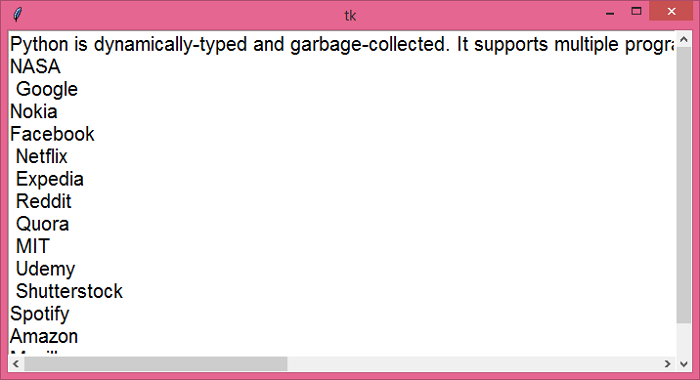
執行上面的程式碼將顯示一個視窗,其中包含有關 Python 程式語言的上下文。可以使用水平和垂直捲軸動態檢視上下文。

更新於: 2021 年 5 月 26 日
4K + 閱讀量

廣告