
 資料結構
資料結構 網路
網路 RDBMS
RDBMS 作業系統
作業系統 Java
Java MS Excel
 iOS
iOS HTML
HTML CSS
CSS Android
 Python
 C 程式設計
 C++
C++ C#
C# MongoDB
 MySQL
MySQL Javascript
 PHP
PHP 物理
物理 化學
化學 生物學
生物學 數學
數學 英語
英語 經濟學
經濟學 心理學
心理學 社會學
社會學 時裝研究
時裝研究 法學
法學如何在 Tkinter 中單擊 Entry 元件本身時清除文字元件內容?
Tkinter 文字元件是一個輸入元件,支援多行使用者輸入。它也被稱為文字編輯器,允許使用者在其內部編寫內容和資料。可以使用delete(0,END)命令來清除文字元件的內容。同樣,我們還可以透過單擊 Entry 小元件本身來清除內容。 這可以透過將函式繫結到單擊事件來實現。
舉例
#Import the required libraries
from tkinter import *

#Create an instance of Tkinter Frame
win = Tk()

#Set the geometry of Tkinter Frame
win.geometry("700x250")

#Define a function to clear the content of the text widget
def click(event):
   name.configure(state=NORMAL)
   name.delete(0, END)
   name.unbind('<Button-1>', clicked)

#Create a Label widget
label = Label(win, text= "Enter Your Name", font= ('Helvetica 13 bold'))
label.pack(pady= 10)

#Create an Entry widget
name = Entry(win, width=45)
name.insert(0, 'Enter Your Name Here...')
name.pack(pady=10)

#Bind the Entry widget with Mouse Button to clear the content
clicked = name.bind('<Button-1>', click)
win.mainloop()
輸出
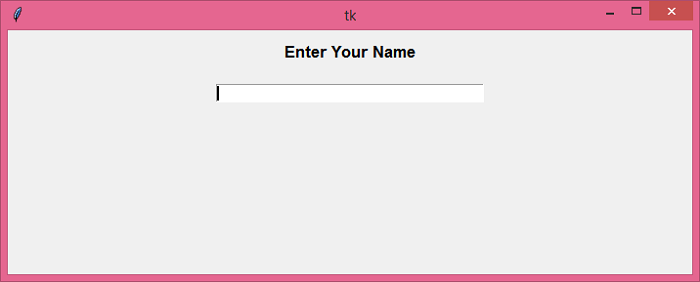
執行上面的程式碼將顯示一個帶有 Entry 元件的視窗。

當我們單擊 Entry 欄位時,它會自動清除其內容。

更新於: 2021 年 5 月 26 日
4K+ 瀏覽

廣告