
 資料結構
資料結構 網路
網路 關係資料庫管理系統
 作業系統
作業系統 Java
Java MS Excel
 iOS
iOS HTML
HTML CSS
CSS Android
 Python
 C 程式設計
 C++
C++ C#
C# MongoDB
 MySQL
MySQL Javascript
 PHP
PHP 物理
物理 化學
化學 生物
生物 數學
數學 英語
英語 經濟學
經濟學 心理學
心理學 社會學
社會學 時裝研究
時裝研究 法律研究
法律研究在 Tkinter 中的 Notebook 視窗小部件
Notebook 視窗小部件是 Tkinter 中 ttk 庫的一個內建視窗小部件。它允許使用者在視窗應用程式中建立標籤頁。標籤頁通常用於分隔工作空間並在同一時間對應用程式中的操作組進行專門設定。
示例
在此示例中,我們將使用 Notebook 視窗小部件建立兩個標籤頁,然後為其新增一些上下文。
#Import the required library
from tkinter import *
from tkinter import ttk
#Create an instance of tkinter frame
win = Tk()
win.geometry("750x250")
#Create a Notebook widget
my_notebook= ttk.Notebook(win)
my_notebook.pack(expand=1,fill=BOTH)
#Create Tabs
tab1= ttk.Frame(my_notebook)
my_notebook.add(tab1, text= "Tab 1")
tab2= ttk.Frame(my_notebook)
my_notebook.add(tab2, text= "Tab2")
#Create a Label in Tabs
Label(tab1, text= "Hello, Howdy?", font= ('Helvetica 20 bold')).pack()
Label(tab2, text= "This is a New Tab Context", font=('Helvetica
20 bold')).pack()
win.mainloop()
輸出
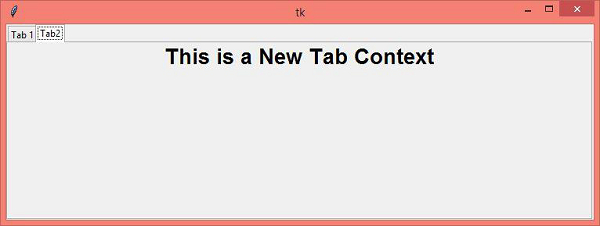
執行上述程式碼會顯示一個包含兩個標籤頁的視窗,分別是 tab1 和 tab2。這些標籤頁包含一些文字標籤。
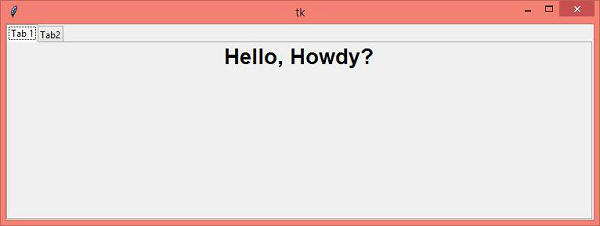
現在,切換到“tab1”然後“tab2”檢視兩個標籤頁之間的更改。

更新日期: 16-4-2021
4000+ 次瀏覽

廣告