
- VB.Net 基礎教程
- VB.Net - 首頁
- VB.Net - 概述
- VB.Net - 環境設定
- VB.Net - 程式結構
- VB.Net - 基本語法
- VB.Net - 資料型別
- VB.Net - 變數
- VB.Net - 常量
- VB.Net - 修飾符
- VB.Net - 語句
- VB.Net - 指令
- VB.Net - 運算子
- VB.Net - 決策制定
- VB.Net - 迴圈
- VB.Net - 字串
- VB.Net - 日期和時間
- VB.Net - 陣列
- VB.Net - 集合
- VB.Net - 函式
- VB.Net - 子過程
- VB.Net - 類和物件
- VB.Net - 異常處理
- VB.Net - 檔案處理
- VB.Net - 基本控制元件
- VB.Net - 對話方塊
- VB.Net - 高階窗體
- VB.Net - 事件處理
- VB.Net 高階教程
- VB.Net - 正則表示式
- VB.Net - 資料庫訪問
- VB.Net - Excel 表格
- VB.Net - 傳送郵件
- VB.Net - XML 處理
- VB.Net - Web 程式設計
- VB.Net 有用資源
- VB.Net - 快速指南
- VB.Net - 有用資源
- VB.Net - 討論
VB.Net - If...Then...Else 語句
一個If語句可以後跟一個可選的Else語句,當布林表示式為假時執行。
語法
VB.Net中If...Then... Else語句的語法如下:
If(boolean_expression)Then
   'statement(s) will execute if the Boolean expression is true
Else
  'statement(s) will execute if the Boolean expression is false
End If
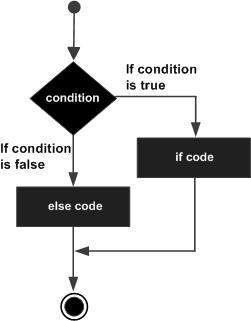
如果布林表示式計算結果為true,則將執行if程式碼塊,否則將執行else程式碼塊。
流程圖
示例
Module decisions
   Sub Main()
       'local variable definition '
      Dim a As Integer = 100

      ' check the boolean condition using if statement
      If (a < 20) Then
          ' if condition is true then print the following
          Console.WriteLine("a is less than 20")
      Else
          ' if condition is false then print the following
          Console.WriteLine("a is not less than 20")
      End If
      Console.WriteLine("value of a is : {0}", a)
      Console.ReadLine()
   End Sub
End Module
當以上程式碼編譯並執行時,會產生以下結果:
a is not less than 20
value of a is : 100
If...Else If...Else 語句
一個If語句可以後跟一個可選的Else if...Else語句,這對於使用單個If...Else If語句測試各種條件非常有用。
使用If... Else If... Else語句時,需要注意以下幾點。
一個If可以有零個或一個Else,並且它必須出現在Else If之後。
一個If可以有零到多個Else If,並且它們必須出現在Else之前。
一旦一個Else if成功,則不會測試任何剩餘的Else If或Else。
語法
VB.Net中if...else if...else語句的語法如下:
If(boolean_expression 1)Then
   ' Executes when the boolean expression 1 is true
ElseIf( boolean_expression 2)Then
   ' Executes when the boolean expression 2 is true
ElseIf( boolean_expression 3)Then
   ' Executes when the boolean expression 3 is true
Else
   ' executes when the none of the above condition is true
End If
示例
Module decisions
   Sub Main()
      'local variable definition '
      Dim a As Integer = 100
      ' check the boolean condition '
      If (a = 10) Then
          ' if condition is true then print the following '
          Console.WriteLine("Value of a is 10") '
      ElseIf (a = 20) Then
          'if else if condition is true '
          Console.WriteLine("Value of a is 20") '
      ElseIf (a = 30) Then
          'if else if condition is true
          Console.WriteLine("Value of a is 30")
      Else
          'if none of the conditions is true
          Console.WriteLine("None of the values is matching")
      End If
      Console.WriteLine("Exact value of a is: {0}", a)
      Console.ReadLine()
   End Sub
End Module
當以上程式碼編譯並執行時,會產生以下結果:
None of the values is matching
Exact value of a is: 100
vb.net_decision_making.htm
廣告