- VB.Net 基礎教程
- VB.Net - 首頁
- VB.Net - 概述
- VB.Net - 環境設定
- VB.Net - 程式結構
- VB.Net - 基本語法
- VB.Net - 資料型別
- VB.Net - 變數
- VB.Net - 常量
- VB.Net - 修飾符
- VB.Net - 語句
- VB.Net - 指令
- VB.Net - 運算子
- VB.Net - 決策制定
- VB.Net - 迴圈
- VB.Net - 字串
- VB.Net - 日期和時間
- VB.Net - 陣列
- VB.Net - 集合
- VB.Net - 函式
- VB.Net - 子過程
- VB.Net - 類和物件
- VB.Net - 異常處理
- VB.Net - 檔案處理
- VB.Net - 基本控制元件
- VB.Net - 對話方塊
- VB.Net - 高階窗體
- VB.Net - 事件處理
- VB.Net 高階教程
- VB.Net - 正則表示式
- VB.Net - 資料庫訪問
- VB.Net - Excel 表格
- VB.Net - 傳送電子郵件
- VB.Net - XML 處理
- VB.Net - Web 程式設計
- VB.Net 有用資源
- VB.Net - 快速指南
- VB.Net - 有用資源
- VB.Net - 討論
VB.Net - 事件處理
事件基本上是使用者操作,例如按鍵、點選、滑鼠移動等,或某些事件,例如系統生成的通知。應用程式需要在事件發生時對其做出響應。
單擊按鈕、在文字框中輸入某些文字或單擊選單項,這些都是事件的示例。事件是呼叫函式或可能導致其他事件的操作。事件處理程式是指示如何響應事件的函式。
VB.Net 是一種事件驅動的語言。主要有兩種型別的事件:
滑鼠事件
鍵盤事件
處理滑鼠事件
滑鼠事件發生在窗體和控制元件中的滑鼠移動時。以下是與 Control 類相關的各種滑鼠事件:
MouseDown - 當按下滑鼠按鈕時發生
MouseEnter - 當滑鼠指標進入控制元件時發生
MouseHover - 當滑鼠指標懸停在控制元件上時發生
MouseLeave - 當滑鼠指標離開控制元件時發生
MouseMove - 當滑鼠指標在控制元件上移動時發生
MouseUp - 當滑鼠指標位於控制元件上並釋放滑鼠按鈕時發生
MouseWheel - 當滑鼠滾輪移動且控制元件具有焦點時發生
滑鼠事件的事件處理程式獲取型別為MouseEventArgs的引數。MouseEventArgs 物件用於處理滑鼠事件。它具有以下屬性:
Buttons - 指示按下的滑鼠按鈕
Clicks - 指示點選次數
Delta - 指示滑鼠滾輪旋轉的棘爪數
X - 指示滑鼠點選的 x 座標
Y - 指示滑鼠點選的 y 座標
示例
以下是一個示例,它展示瞭如何處理滑鼠事件。請按照以下步驟操作:
在窗體中新增三個標籤、三個文字框和一個按鈕控制元件。
將標籤的 Text 屬性分別更改為 - 客戶 ID、姓名和地址。
將文字框的 Name 屬性分別更改為 txtID、txtName 和 txtAddress。
將按鈕的 Text 屬性更改為“提交”。
在程式碼編輯器視窗中新增以下程式碼:
Public Class Form1
   Private Sub Form1_Load(sender As Object, e As EventArgs) Handles MyBase.Load
      ' Set the caption bar text of the form.
      Me.Text = "tutorialspont.com"
   End Sub

   Private Sub txtID_MouseEnter(sender As Object, e As EventArgs)_
      Handles txtID.MouseEnter
      'code for handling mouse enter on ID textbox
      txtID.BackColor = Color.CornflowerBlue
      txtID.ForeColor = Color.White
   End Sub

   Private Sub txtID_MouseLeave(sender As Object, e As EventArgs) _
      Handles txtID.MouseLeave
      'code for handling mouse leave on ID textbox
      txtID.BackColor = Color.White
      txtID.ForeColor = Color.Blue
   End Sub

   Private Sub txtName_MouseEnter(sender As Object, e As EventArgs) _
      Handles txtName.MouseEnter
      'code for handling mouse enter on Name textbox
      txtName.BackColor = Color.CornflowerBlue
      txtName.ForeColor = Color.White
   End Sub

   Private Sub txtName_MouseLeave(sender As Object, e As EventArgs) _
      Handles txtName.MouseLeave
      'code for handling mouse leave on Name textbox
      txtName.BackColor = Color.White
      txtName.ForeColor = Color.Blue
   End Sub

   Private Sub txtAddress_MouseEnter(sender As Object, e As EventArgs) _
      Handles txtAddress.MouseEnter
      'code for handling mouse enter on Address textbox
      txtAddress.BackColor = Color.CornflowerBlue
      txtAddress.ForeColor = Color.White
   End Sub

   Private Sub txtAddress_MouseLeave(sender As Object, e As EventArgs) _
      Handles txtAddress.MouseLeave
      'code for handling mouse leave on Address textbox
      txtAddress.BackColor = Color.White
      txtAddress.ForeColor = Color.Blue
   End Sub

   Private Sub Button1_Click(sender As Object, e As EventArgs) _
      Handles Button1.Click
      MsgBox("Thank you " & txtName.Text & ", for your kind cooperation")
   End Sub
End Class
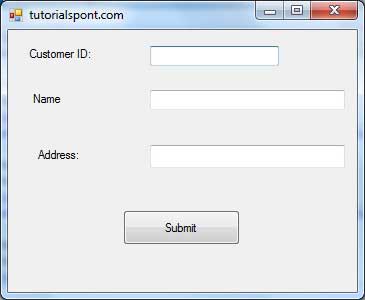
當上述程式碼執行並使用 Microsoft Visual Studio 工具欄中的啟動按鈕執行時,它將顯示以下視窗:
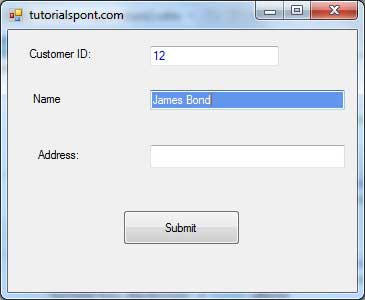
嘗試在文字框中輸入文字並檢查滑鼠事件:
處理鍵盤事件
以下是與 Control 類相關的各種鍵盤事件:
KeyDown - 當按下某個鍵且控制元件具有焦點時發生
KeyPress - 當按下某個鍵且控制元件具有焦點時發生
KeyUp - 當釋放某個鍵且控制元件具有焦點時發生
KeyDown 和 KeyUp 事件的事件處理程式獲取型別為KeyEventArgs的引數。此物件具有以下屬性:
Alt - 指示是否按下了 ALT 鍵
Control - 指示是否按下了 CTRL 鍵
Handled - 指示是否處理了事件
KeyCode - 儲存事件的鍵盤程式碼
KeyData - 儲存事件的鍵盤資料
KeyValue - 儲存事件的鍵盤值
Modifiers - 指示按下了哪些修飾鍵(Ctrl、Shift 和/或 Alt)
Shift - 指示是否按下了 Shift 鍵
KeyDown 和 KeyUp 事件的事件處理程式獲取型別為KeyEventArgs的引數。此物件具有以下屬性:
Handled - 指示是否處理了 KeyPress 事件
KeyChar - 儲存對應於所按鍵的字元
示例
讓我們繼續使用前面的示例來演示如何處理鍵盤事件。程式碼將驗證使用者是否為其客戶 ID 和年齡輸入了一些數字。
新增一個標籤,其 Text 屬性為“年齡”,並新增一個名為 txtAge 的相應文字框。
新增以下程式碼以處理文字框 txtID 的 KeyUP 事件。
Private Sub txtID_KeyUP(sender As Object, e As KeyEventArgs) _
   Handles txtID.KeyUp

   If (Not Char.IsNumber(ChrW(e.KeyCode))) Then
      MessageBox.Show("Enter numbers for your Customer ID")
      txtID.Text = " "
   End If
End Sub
新增以下程式碼以處理文字框 txtID 的 KeyUP 事件。
Private Sub txtAge_KeyUP(sender As Object, e As KeyEventArgs) _
   Handles txtAge.KeyUp

   If (Not Char.IsNumber(ChrW(e.keyCode))) Then
      MessageBox.Show("Enter numbers for age")
      txtAge.Text = " "
   End If
End Sub
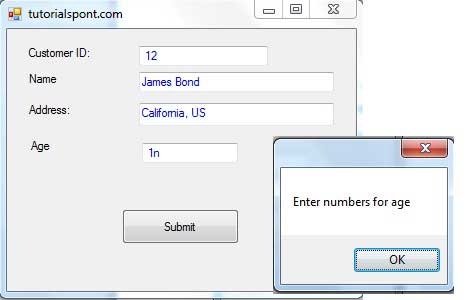
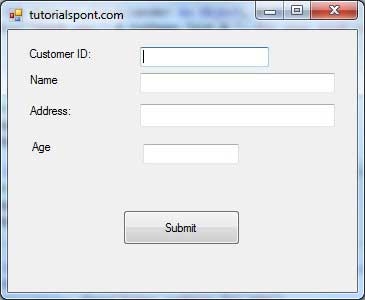
當上述程式碼執行並使用 Microsoft Visual Studio 工具欄中的啟動按鈕執行時,它將顯示以下視窗:
如果您將年齡或 ID 的文字留空或輸入了一些非數字資料,它會顯示一個警告訊息框並清除相應的文字: