
- Rust 教程
- Rust - 首頁
- Rust - 簡介
- Rust - 環境搭建
- Rust - HelloWorld 示例
- Rust - 資料型別
- Rust - 變數
- Rust - 常量
- Rust - 字串
- Rust - 運算子
- Rust - 決策語句
- Rust - 迴圈
- Rust - 函式
- Rust - 元組
- Rust - 陣列
- Rust - 所有權
- Rust - 借用
- Rust - 切片
- Rust - 結構體
- Rust - 列舉
- Rust - 模組
- Rust - 集合
- Rust - 錯誤處理
- Rust - 泛型
- Rust - 輸入輸出
- Rust - 檔案輸入/輸出
- Rust - 包管理器
- Rust - 迭代器和閉包
- Rust - 智慧指標
- Rust - 併發
- Rust 有用資源
- Rust - 快速指南
- Rust - 有用資源
- Rust - 討論
Rust - HelloWorld 示例
本章透過一個HelloWorld示例解釋了 Rust 語言的基本語法。
建立一個HelloWorld-App資料夾,並在終端中導航到該資料夾。
C:\Users\Admin>mkdir HelloWorld-App
C:\Users\Admin>cd HelloWorld-App
C:\Users\Admin\HelloWorld-App>
要建立 Rust 檔案,請執行以下命令:
C:\Users\Admin\HelloWorld-App>notepad Hello.rs
Rust 程式副檔名為 .rs。以上命令建立了一個空檔案Hello.rs並在記事本中開啟它。將下面給出的程式碼新增到此檔案中:
fn
main(){
   println!("Rust says Hello to TutorialsPoint !!");
}
以上程式定義了一個函式 main fn main()。fn關鍵字用於定義函式。main()是一個預定義函式,充當程式的入口點。println!是 Rust 中的預定義宏。它用於將字串(此處為 Hello)列印到控制檯。宏呼叫始終用感嘆號 - !標記。
使用rustc編譯Hello.rs檔案。
C:\Users\Admin\HelloWorld-App>rustc Hello.rs
程式成功編譯後,會生成一個可執行檔案(file_name.exe)。要驗證是否生成了.exe檔案,請執行以下命令。
C:\Users\Admin\HelloWorld-App>dir
//lists the files in folder
Hello.exe
Hello.pdb
Hello.rs
- 執行 Hello.exe 檔案並驗證輸出。
什麼是宏?
Rust 提供了一個強大的宏系統,允許超程式設計。正如您在前面的示例中看到的,宏看起來像函式,除了它們的名稱以感嘆號(!)結尾,但宏不是生成函式呼叫,而是擴充套件成原始碼,並與程式的其餘部分一起編譯。因此,與函式不同,它們為程式提供了更多執行時功能。宏是函式的擴充套件版本。
使用 println! 宏 - 語法
println!(); // prints just a newline
println!("hello ");//prints hello
println!("format {} arguments", "some"); //prints format some arguments
Rust 中的註釋
註釋是提高程式可讀性的一種方法。註釋可以用來包含有關程式的其他資訊,例如程式碼作者、關於函式/結構的提示等。編譯器會忽略註釋。
Rust 支援以下型別的註釋:
單行註釋 ( // ) - // 和行尾之間的任何文字都被視為註釋
多行註釋 (/* */) - 這些註釋可以跨越多行。
示例
//this is single line comment

/* This is a
   Multi-line comment
*/
線上執行
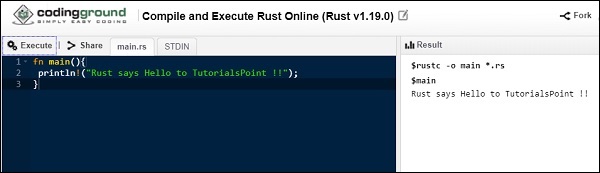
Rust 程式可以透過 Tutorialspoint Coding Ground 線上執行。在編輯器選項卡中編寫HelloWorld程式,然後單擊執行以檢視結果。
廣告