
- PyQt5 教程
- PyQt5 - 首頁
- PyQt5 - 簡介
- PyQt5 - 新特性
- PyQt5 - Hello World
- PyQt5 - 主要類
- PyQt5 - 使用 Qt Designer
- PyQt5 - 訊號與槽
- PyQt5 - 佈局管理
- PyQt5 - 基本控制元件
- PyQt5 - QDialog 類
- PyQt5 - QMessageBox
- PyQt5 - 多文件介面
- PyQt5 - 拖放
- PyQt5 - 資料庫處理
- PyQt5 - 繪圖 API
- PyQt5 - BrushStyle 常量
- PyQt5 - QClipboard
- PyQt5 - QPixmap 類
- PyQt5 有用資源
- PyQt5 - 快速指南
- PyQt5 - 有用資源
- PyQt5 - 討論
PyQt5 - QComboBox 控制元件
一個QComboBox物件提供了一個下拉列表供使用者選擇。它在表單上佔用最少的螢幕空間,只顯示當前選中的專案。
組合框可以設定為可編輯的;它還可以儲存畫素圖物件。以下方法通常使用:
| 序號 | 方法及描述 |
|---|---|
| 1 |
addItem() 將字串新增到集合中 |
| 2 |
addItems() 將列表物件中的專案新增到集合中 |
| 3 |
Clear() 刪除集合中的所有專案 |
| 4 |
count() 獲取集合中專案的數量 |
| 5 |
currentText() 獲取當前選中專案的文字 |
| 6 |
itemText() 顯示屬於特定索引的文字 |
| 7 |
currentIndex() 返回選中專案的索引 |
| 8 |
setItemText() 更改指定索引的文字 |
QComboBox 訊號
以下方法通常用於 QComboBox 訊號:
| 序號 | 方法及描述 |
|---|---|
| 1 |
activated() 當用戶選擇一個專案時 |
| 2 |
currentIndexChanged() 無論何時當前索引被使用者或程式更改 |
| 3 |
highlighted() 當列表中的專案被高亮顯示時 |
示例
讓我們看看以下示例中如何實現 QComboBox 控制元件的一些功能。
專案可以透過 addItem() 方法逐個新增到集合中,或者透過addItems()方法將列表物件中的專案新增到集合中。
self.cb.addItem("C++")
self.cb.addItems(["Java", "C#", "Python"])
QComboBox 物件發出 currentIndexChanged() 訊號。它連線到selectionchange()方法。
組合框中的專案使用 itemText() 方法列出每個專案。當前選中專案的標籤可以透過currentText()方法訪問。
def selectionchange(self,i):
   print "Items in the list are :"

   for count in range(self.cb.count()):
      print self.cb.itemText(count)
   print "Current index",i,"selection changed ",self.cb.currentText()
完整程式碼如下:
import sys
from PyQt5.QtCore import *
from PyQt5.QtGui import *
from PyQt5.QtWidgets import *

class combodemo(QWidget):
   def __init__(self, parent = None):
      super(combodemo, self).__init__(parent)

      layout = QHBoxLayout()
      self.cb = QComboBox()
      self.cb.addItem("C")
      self.cb.addItem("C++")
      self.cb.addItems(["Java", "C#", "Python"])
      self.cb.currentIndexChanged.connect(self.selectionchange)

      layout.addWidget(self.cb)
      self.setLayout(layout)
      self.setWindowTitle("combo box demo")

   def selectionchange(self,i):
      print "Items in the list are :"

      for count in range(self.cb.count()):
         print self.cb.itemText(count)
      print "Current index",i,"selection changed ",self.cb.currentText()

def main():
   app = QApplication(sys.argv)
   ex = combodemo()
   ex.show()
   sys.exit(app.exec_())

if __name__ == '__main__':
   main()
輸出
以上程式碼產生以下輸出:
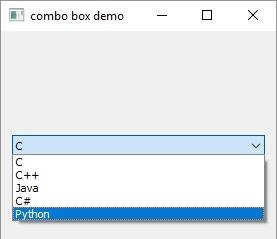
列表中的專案:
C
C++
Java
C#
Python
Current selection index 4 selection changed Python
pyqt_basic_widgets.htm
廣告