
- PyQt5 教程
- PyQt5 - 首頁
- PyQt5 - 簡介
- PyQt5 - 新特性
- PyQt5 - Hello World
- PyQt5 - 主要類
- PyQt5 - 使用Qt Designer
- PyQt5 - 訊號與槽
- PyQt5 - 佈局管理
- PyQt5 - 基本控制元件
- PyQt5 - QDialog 類
- PyQt5 - QMessageBox
- PyQt5 - 多文件介面
- PyQt5 - 拖放
- PyQt5 - 資料庫處理
- PyQt5 - 繪圖 API
- PyQt5 - BrushStyle 常量
- PyQt5 - QClipboard
- PyQt5 - QPixmap 類
- PyQt5 有用資源
- PyQt5 - 快速指南
- PyQt5 - 有用資源
- PyQt5 - 討論
PyQt5 - 拖放
拖放功能對使用者來說非常直觀。在許多桌面應用程式中都可以找到它,使用者可以將物件從一個視窗複製或移動到另一個視窗。
基於 MIME 的拖放資料傳輸基於QDrag類。QMimeData物件將資料與其對應的 MIME 型別關聯起來。它儲存在剪貼簿中,然後用於拖放過程。
以下 QMimeData 類函式允許方便地檢測和使用 MIME 型別。
| 測試器 | 獲取器 | 設定器 | MIME 型別 |
|---|---|---|---|
| hasText() | text() | setText() | text/plain |
| hasHtml() | html() | setHtml() | text/html |
| hasUrls() | urls() | setUrls() | text/uri-list |
| hasImage() | imageData() | setImageData() | image/* |
| hasColor() | colorData() | setColorData() | application/x-color |
許多 QWidget 物件支援拖放操作。允許拖動其資料的物件具有 setDragEnabled() 方法,該方法必須設定為 true。另一方面,小部件應該響應拖放事件以便儲存拖放到其中的資料。
DragEnterEvent 提供了一個事件,該事件在拖動操作進入目標小部件時傳送。
DragMoveEvent 用於拖放操作正在進行時。
DragLeaveEvent 在拖放操作離開小部件時生成。
DropEvent 另一方面,在放下操作完成時發生。可以有條件地接受或拒絕事件的建議操作。
示例
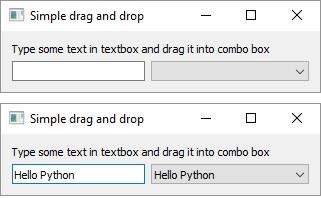
在下面的程式碼中,DragEnterEvent 驗證事件的 MIME 資料是否包含文字。如果是,則接受事件的建議操作,並將文字作為新專案新增到 ComboBox 中。
import sys
from PyQt5.QtCore import *
from PyQt5.QtGui import *
from PyQt5.QtWidgets import *

class combo(QComboBox):
   def __init__(self, title, parent):
      super(combo, self).__init__( parent)
      self.setAcceptDrops(True)

   def dragEnterEvent(self, e):
      print (e)

      if e.mimeData().hasText():
         e.accept()
      else:
         e.ignore()

   def dropEvent(self, e):
      self.addItem(e.mimeData().text())

class Example(QWidget):
   def __init__(self):
      super(Example, self).__init__()

      self.initUI()

   def initUI(self):
      lo = QFormLayout()
      lo.addRow(QLabel("Type some text in textbox and drag it into combo box"))

      edit = QLineEdit()
      edit.setDragEnabled(True)
      com = combo("Button", self)
      lo.addRow(edit,com)
      self.setLayout(lo)
      self.setWindowTitle('Simple drag and drop')
def main():
   app = QApplication(sys.argv)
   ex = Example()
   ex.show()
   app.exec_()

if __name__ == '__main__':
   main()
以上程式碼產生以下輸出:
廣告