
- Phalcon 教程
- Phalcon - 首頁
- Phalcon - 概述
- Phalcon - 環境設定
- Phalcon - 應用程式結構
- Phalcon - 功能
- Phalcon - 配置
- Phalcon - 控制器
- Phalcon - 模型
- Phalcon - 檢視
- Phalcon - 路由
- Phalcon - 資料庫連線
- Phalcon - 切換資料庫
- Phalcon - 腳手架應用程式
- Phalcon - 查詢語言
- Phalcon - 資料庫遷移
- Phalcon - Cookie 管理
- Phalcon - Session 管理
- Phalcon - 多語言支援
- Phalcon - 資源管理
- Phalcon - 使用表單
- Phalcon - 物件文件對映器 (ODM)
- Phalcon - 安全特性
- Phalcon 有用資源
- Phalcon - 快速指南
- Phalcon - 有用資源
- Phalcon - 討論
Phalcon - 腳手架應用程式
腳手架通常指一種程式碼生成,我們將它指向一個 web 應用程式資料庫,從而建立一個基本的 CRUD(建立、讀取、更新、刪除)應用程式。
在設計 CRUD 應用程式之前,務必根據應用程式的需要設計資料庫表。
步驟 1 - 建立一個腳手架應用程式,其中將包含所有 CRUD 操作。
Command: phalcon scaffold <table-name>
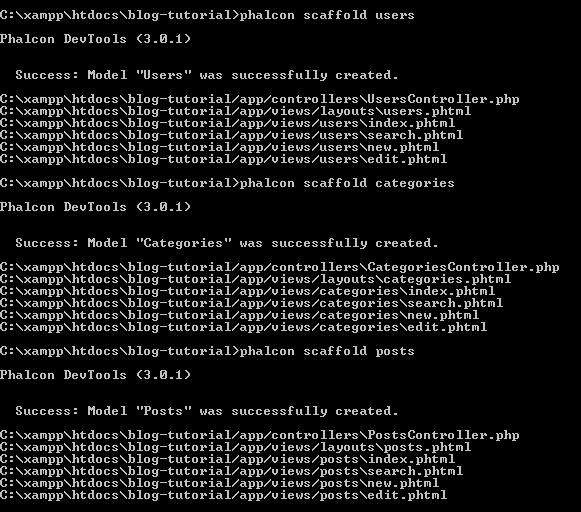
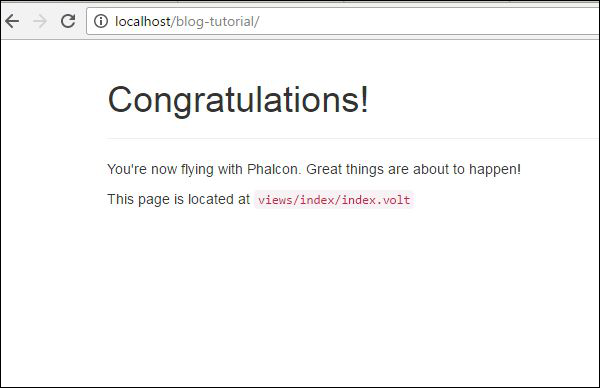
Phalcon 的腳手架生成器一旦執行,就會建立以下表格中描述的檔案和資料夾。
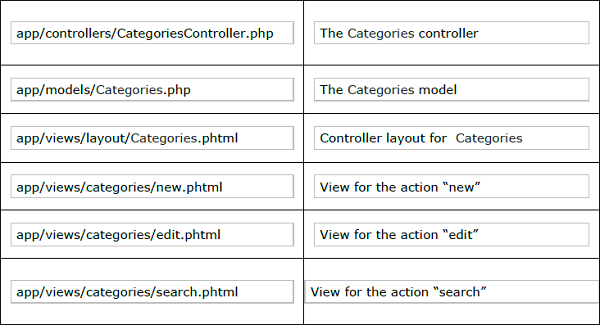
步驟 2 - 建立一個索引頁面(phtml 和 volt 的組合)。
要包含在 users 資料夾中 index.phtml 的程式碼。
<?php use Phalcon\Tag as Tag ?>
<!DOCTYPE html>
<html>
   <head>
      <meta charset = "utf-8">
      <title>Blog Tutorial</title>
      <link rel = "stylesheet" type = "text/css"
         href = "http://netdna.bootstrapcdn.com/twitter-bootstrap/2.2.1/css/bootstrapcombined.min.css"/>
      <meta name = "viewport" content = "width = device-width, initial-scale = 1.0">
   </head>

   <body>
      <div class = "navbar navbar-fixed-top">
         <div class = "navbar-inner">
            <div class = "container">
               <a class = "btn btn-navbar" data-toggle = "collapse" datatarget = ".nav-collapse">
                  <span class = "icon-bar"></span>
                  <span class = "icon-bar"></span>
                  <span class = "icon-bar"></span>
               </a>
               <a class = "brand" href = "#">Blog Collection</a>

               <div class = "nav-collapse">
                  <ul class = "nav pull-left">
                     <li>
                        <?php echo Phalcon\Tag::linkTo('index', 'Home Page') ?>
                     </li>

                     <?php if ($this->session->has('auth')) { ?>
                        <li>
                           <?php echo Phalcon\Tag::linkTo('posts/index', '+Posts') ?>
                        </li>

                        <li>
                           <?php echo Phalcon\Tag::linkTo('categories/index', '+Categories') ?>
                        </li>

                        <li>
                           <?php echo Phalcon\Tag::linkTo('users/logout', 'Log out') ?>
                        </li>
                     <?php } else { ?>
                        <li>
                           <?php echo Phalcon\Tag::linkTo('users/index', 'Log in') ?>
                        </li>
                     <?php } ?>
                  </ul>
               </div>

            </div>
         </div>
      </div>
      <?php echo $this->getContent() ?>

      <script src = "http://netdna.bootstrapcdn.com/twitterbootstrap/2.2.1/js/bootstrap.min.js"></script>
   </body>
</html>
預設檔案index.volt將包含以下程式碼。
<?php echo $this->getContent() ?>

<div align = "center">
   <h1>Welcome!</h1>
   <p>Welcome to the blog collection of Phalcon</p>
</div>
上述程式碼成功執行後,將產生以下輸出。
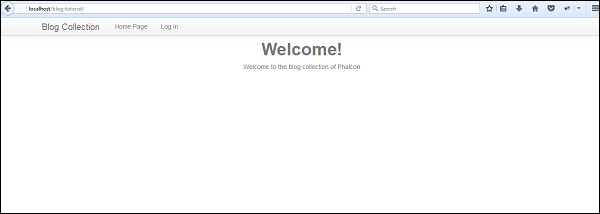
步驟 3 - 使用相應的模型進行更改。
Users.php
<?php

class Users extends \Phalcon\Mvc\Model {
   /**
      * @var integer
      *
   */

   public $id;
   /**
      * @var string
      *
   */

   public $login;
   /**
      * @var string
      *
   */

   public $password;
   /**
      * Initializer method for model.
   */

   public function initialize() {
      $this->hasMany("id", "Posts", "users_id");
   }
}
名為“initialize” 的函式有助於實現 Posts 表中 id 和 users_id 之間的關聯,這意味著每個唯一使用者在表中都有許多關聯的帖子。
Posts.php
<?php

class Posts extends \Phalcon\Mvc\Model {
   /**
      * @var integer
      *
   */

   public $id;
   /**
      * @var string
      *
   */

   public $title;
   /**
      * @var string
      *
   */

   public $slug;
   /**
      * @var string
      *
   */

   public $content;
   /**
      * @var string
      *
   */

   public $created;
   /**
      * @var integer
      *
   */

   public $users_id;
   /**
      * @var integer
      *
   */

   public $categories_id;
   /**
      * Initializer method for model.
      */

   public function initialize() {
      $this->belongsTo("users_id", "Users", "id");
      $this->belongsTo("categories_id", "Categories", "id");
   }
}
“initialize” 函式包含關係約束,提到外部索引鍵和主鍵與表的關係。
users_id 指的是“Users”表中的 id。
categories_id 指的是“Categories”表中的 id。
Categories.php
<?php

class Categories extends \Phalcon\Mvc\Model {
   /**
      * @var integer
      *
   */

   public $id;
   /**
      * @var string
      *
   */

   public $name;
   /**
      * @var string
      *
   */

   public $slug;
   /**
      * Initializer method for model.
   */

   public function initialize() {
      $this->hasMany("id", "Posts", "categories_id");
   }
}
與 Users 模型類似,“initialize” 函式指定它包含給定帖子的許多categories_id。
建立檢視
以下是 Blog-tutorial-master 專案的完整結構。
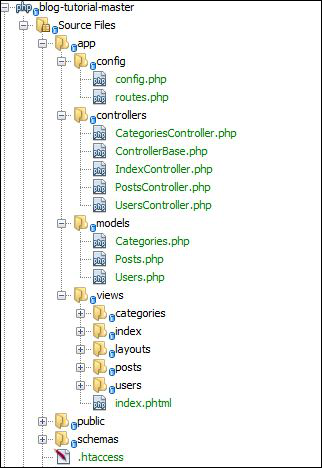
用於在使用者成功登入後顯示主頁的關聯檢視是“index.phtml”。
<?php use Phalcon\Tag as Tag ?>
<!DOCTYPE html>
<html>
   <head>
      <meta charset = "utf-8">
      <title>Blog Tutorial</title>
      <link rel = "stylesheet" type = "text/css" href = "http://netdna.bootstrapcdn.com/twitter-bootstrap/2.2.1/css/bootstrapcombined.min.css"/>
      <meta name = "viewport" content = "width = device-width, initial-scale = 1.0">
   </head>

   <body>
      <div class = "navbar navbar-fixed-top">
         <div class = "navbar-inner">
            <div class = "container">
               <a class = "btn btn-navbar" data-toggle = "collapse" datatarget = ".nav-collapse">
                  <span class = "icon-bar"></span>
                  <span class = "icon-bar"></span>
                  <span class = "icon-bar"></span>
               </a>
               <a class = "brand" href = "#">Blog Collection</a>

               <div class = "nav-collapse">
                  <ul class = "nav pull-left">
                     <li>
                        <?php echo Phalcon\Tag::linkTo('index', 'Home Page') ?>
                     </li>
                     <?php if ($this->session->has('auth')) { ?>
                        <li>
                           <?php echo Phalcon\Tag::linkTo('posts/index', '+Posts') ?>
                        </li>

                        <li>
                           <?php echo Phalcon\Tag::linkTo('categories/index', '+Categories') ?>
                        </li>

                        <li>
                           <?php echo Phalcon\Tag::linkTo('users/logout', 'Log out') ?>
                        </li>
                     <?php } else { ?>
                        <li>
                           <?php echo Phalcon\Tag::linkTo('users/index', 'Log in') ?>
                        </li>
                     <?php } ?>
                  </ul>
               </div>

            </div>
         </div>
      </div>
      <?php echo $this->getContent() ?>
      <script src = "http://netdna.bootstrapcdn.com/twitterbootstrap/2.2.1/js/bootstrap.min.js"></script>
   </body>
</html>
廣告