
- Phalcon 教程
- Phalcon - 首頁
- Phalcon - 概述
- Phalcon - 環境設定
- Phalcon - 應用結構
- Phalcon - 功能
- Phalcon - 配置
- Phalcon - 控制器
- Phalcon - 模型
- Phalcon - 檢視
- Phalcon - 路由
- Phalcon - 資料庫連線
- Phalcon - 切換資料庫
- Phalcon - 腳手架應用
- Phalcon - 查詢語言
- Phalcon - 資料庫遷移
- Phalcon - Cookie 管理
- Phalcon - Session 管理
- Phalcon - 多語言支援
- Phalcon - 資源管理
- Phalcon - 使用表單
- Phalcon - 物件文件對映器
- Phalcon - 安全特性
- Phalcon 有用資源
- Phalcon - 快速指南
- Phalcon - 有用資源
- Phalcon - 討論
Phalcon - 模型
MVC 架構中的模型包含應用程式的邏輯。模型是與資料庫的核心互動。它應該能夠根據使用者的請求管理更新、刪除、插入和獲取記錄。
為了理解 Phalcon PHP 框架中的模型互動,應遵循以下步驟。
步驟 1 - 建立資料庫。
對於任何LAMP、WAMP、XAMPP軟體棧,都可以輕鬆地使用phpmyadmin資料庫工具建立資料庫。
以下是建立資料庫的 SQL 查詢。
create database <database-name>
步驟 2 - 在phpmyadmin部分,單擊“資料庫”選項卡,輸入資料庫名稱,然後單擊“建立”按鈕,如下面的螢幕截圖所示。
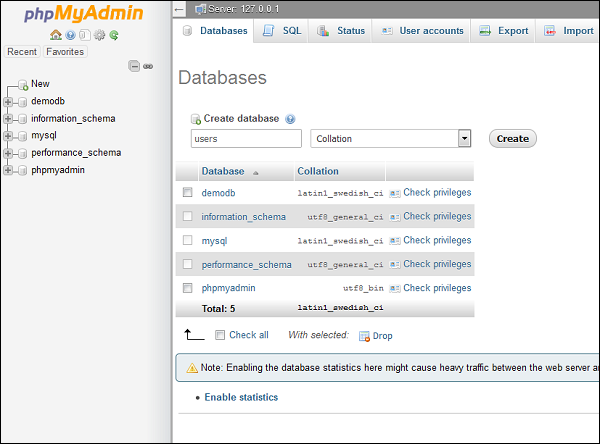
步驟 3 - 成功建立資料庫後,建立一個表,這將有助於其與在 Phalcon 框架中建立模型相關聯。
使用以下查詢建立一個名為“users”的新表。
DROP TABLE IF EXISTS `users`;

CREATE TABLE `users` (
   `id` int(11) NOT NULL AUTO_INCREMENT,
   `name` varchar(25),
   `emailid` varchar(50),
   `contactNumber` number
   PRIMARY KEY (`id`)
)
ENGINE = InnoDB DEFAULT CHARSET = utf8;
建立表後,其結構如下面的螢幕截圖所示。
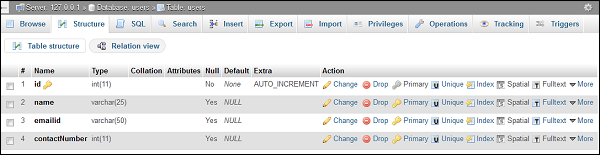
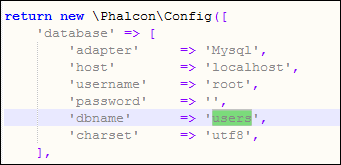
步驟 4 - 要建立與我們在上一步中建立的“Users”表關聯的模型,請開啟命令提示符例項。必須重定向到相應的專案路徑。在此之前,至關重要的是要檢查資料庫配置是否已正確設定,如下面的螢幕截圖所示。
步驟 5 - 使用以下命令在 Phalcon 框架中建立任何模型。
phalcon model <model-name>
以下是執行上述命令後的輸出。
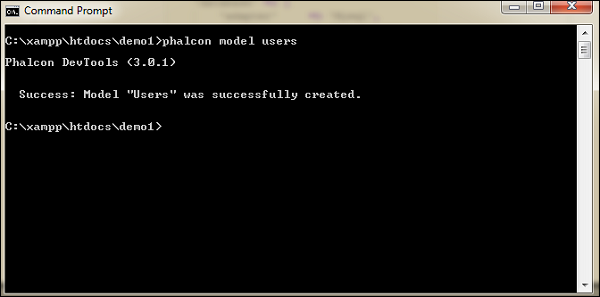
這意味著模型已成功建立。
步驟 6 - 成功建立的模型位於 models 資料夾中。使用以下路徑檢視模型的建立位置。
C:\xampp\htdocs\demo1\app\models
以下是Users.php的完整程式碼。
<?php

class Users extends \Phalcon\Mvc\Model {
   /**
      *
      * @var integer
      * @Primary
      * @Identity
      * @Column(type = "integer", length = 11, nullable = false)
   */

   public $id;
   /**
      *
      * @var string
      * @Column(type = "string", length = 25, nullable = true)
   */

   public $name;
   /**
      *
      * @var string
      * @Column(type = "string", length = 50, nullable = true)
   */

   public $emailid;
   /**
      *
      * @var integer
      * @Column(type = "integer", length = 11, nullable = true)
   */

   public $contactNumber;
   /**
      * Returns table name mapped in the model.
      *
      * @return string
   */

   public function getSource() {
      return 'users';
   }
   /**
      * Allows to query a set of records that match the specified conditions
      *
      * @param mixed $parameters
      * @return Users[]
   */

   public static function find($parameters = null) {
      return parent::find($parameters);
   }
   /**
      * Allows to query the first record that match the specified conditions
      *
      * @param mixed $parameters
      * @return Users
   */

   public static function findFirst($parameters = null) {
      return parent::findFirst($parameters);
   }
}
步驟 7 - 控制器與模型和檢視互動以獲取必要的輸出。與模型一樣,使用以下命令終端建立控制器。
Phalcon controller <controller-name>
成功執行上述命令後,輸出如下。
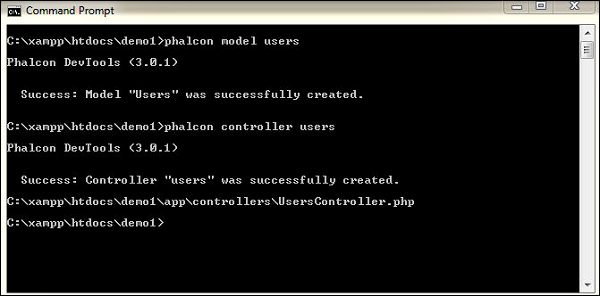
以下是UserController.php的程式碼。
<?php

class UsersController extends \Phalcon\Mvc\Controller {
   public function indexAction() {
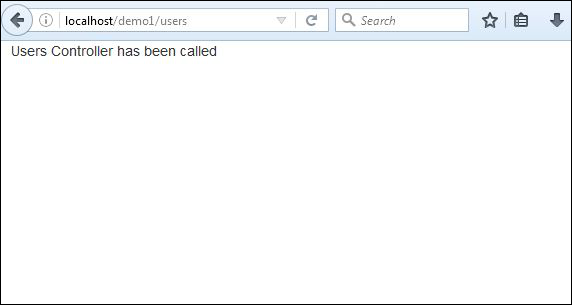
      echo "Users Controller has been called";
   }
}
如果我們訪問以下 URL,將顯示輸出 - https:///demo1/users
廣告