
 資料結構
資料結構 網路
網路 關係資料庫管理系統
 作業系統
作業系統 Java
Java MS Excel
 iOS
iOS HTML
HTML CSS
CSS Android
 Python
 C語言程式設計
 C++
C++ C#
C# MongoDB
 MySQL
MySQL Javascript
 PHP
PHP 物理學
物理學 化學
化學 生物學
生物學 數學
數學 英語
英語 經濟學
經濟學 心理學
心理學 社會學
社會學 時尚研究
時尚研究 法律研究
法律研究OpenCV Python – 使用ORB和BFmatcher匹配兩張影像的關鍵點
為了匹配兩張影像的關鍵點,我們使用ORB(Oriented FAST 和 Rotated BRIEF)來檢測和計算特徵關鍵點和描述符,並使用蠻力匹配器來匹配兩張影像中的描述符。
步驟
要使用ORB特徵檢測器和蠻力匹配器匹配兩張影像的關鍵點,您可以按照以下步驟操作:
匯入所需的庫OpenCV、Matplotlib和NumPy。確保您已經安裝了它們。
使用cv2.imread()方法讀取兩張輸入影像作為灰度影像。指定影像的完整路徑。
使用orb=cv2.ORB_create()使用預設值初始化ORB物件orb。
使用orb.detectAndCompute()檢測並計算兩張輸入影像中的關鍵點'kp1'和'kp2'以及描述符'des1'和'des2'。
建立一個BFmatcher物件,如bf = cv2.BFMatcher(),並使用此BFmatcher物件匹配描述符,如bf.match(des1, des2)。它返回匹配項。按距離順序對匹配項進行排序。
使用cv2.drawMatches()在原始輸入影像上繪製匹配項。
視覺化關鍵點匹配。
讓我們看一些使用ORB特徵檢測器和蠻力匹配器匹配兩張影像的關鍵點的示例。
輸入影像
我們在下面的示例中使用以下影像作為輸入檔案。
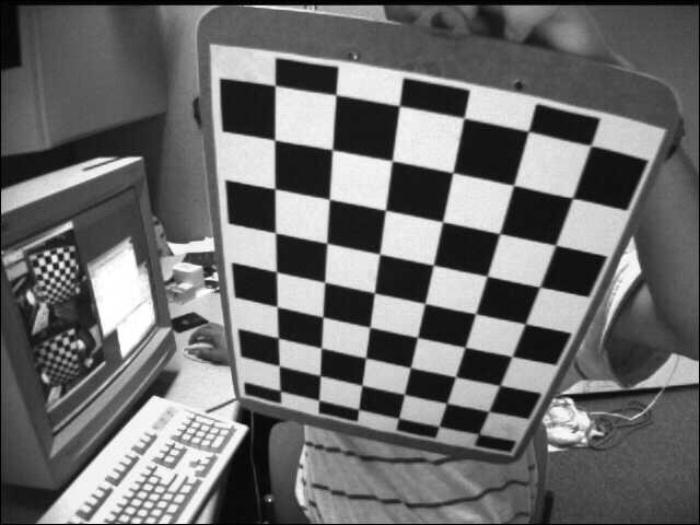
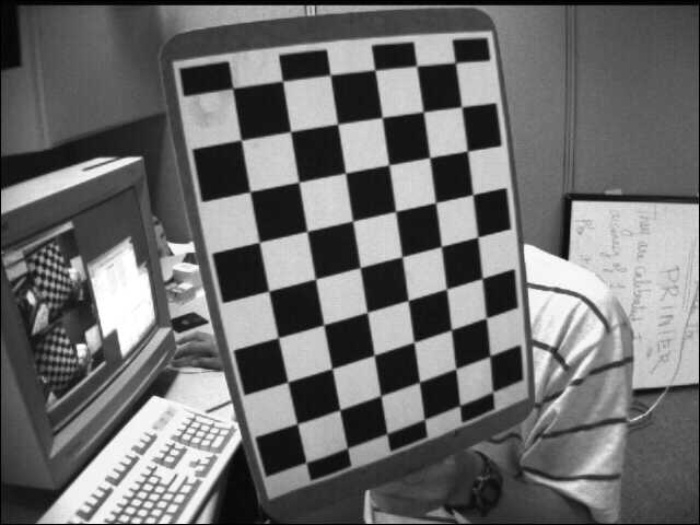
示例
在此示例中,我們使用ORB演算法檢測兩張輸入影像的關鍵點和描述符,並使用蠻力匹配器匹配描述符。我們還繪製了最佳的50個關鍵點匹配。在此示例中,我們將flags=2傳遞給drawMatches()以繪製匹配項。
# import required libraries
import numpy as np
import cv2
from matplotlib import pyplot as plt

# read two input images as grayscale
img1 = cv2.imread('left02.jpg',0)
img2 = cv2.imread('left14.jpg',0)

# Initiate ORB detector
orb = cv2.ORB_create()

# detect and compute the keypoints and descriptors with ORB
kp1, des1 = orb.detectAndCompute(img1,None)
kp2, des2 = orb.detectAndCompute(img2,None)

# create BFMatcher object
bf = cv2.BFMatcher(cv2.NORM_HAMMING, crossCheck=True)

# Match descriptors.
matches = bf.match(des1,des2)

# print(matches)

# Sort them in the order of their distance.
matches = sorted(matches, key = lambda x:x.distance)

# Draw first 50 matches.
img3 = cv2.drawMatches(img1,kp1,img2,kp2,matches[:50], None, flags=2)
plt.imshow(img3),plt.show()
輸出
執行後,將產生以下輸出:

示例
在此示例中,我們使用ORB演算法檢測兩張輸入影像的關鍵點和描述符,並使用蠻力匹配器匹配描述符。我們還繪製了最佳的50個關鍵點匹配。在此示例中,我們將flags=0傳遞給drawMatches()以繪製匹配項。
# import required libraries
import numpy as np
import cv2
import matplotlib.pyplot as plt

# read two input images as grayscale
img1 = cv2.imread('left02.jpg', 0)
img2 = cv2.imread('left14.jpg', 0)

# Initiate ORB detector
orb = cv2.ORB_create()

# detect and compute the keypoints and descriptors with ORB
(kp1,des1) = orb.detectAndCompute(img1, None)
(kp2,des2) = orb.detectAndCompute(img2, None)

# create BFMatcher object
bf = cv2.BFMatcher(cv2.NORM_HAMMING, crossCheck=True)

# Match descriptors.
matches = bf.match(des1,des2)

# Sort them in the order of their distance. Least distance is better
matches = sorted(matches, key=lambda val: val.distance)

# Draw first 50 matches.
out = cv2.drawMatches(img1, kp1, img2, kp2, matches[:50], None, flags=0)
plt.imshow(out), plt.show()
輸出
執行後,將產生以下輸出:
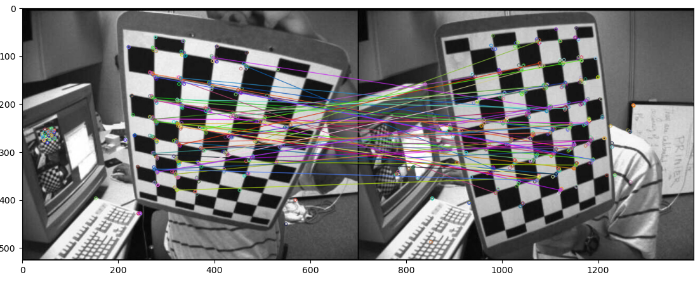
請注意兩個示例中輸出影像中繪製的關鍵點之間的差異。

4K+ 瀏覽量
