
 資料結構
資料結構 網路
網路 RDBMS
RDBMS 作業系統
作業系統 Java
Java MS Excel
 iOS
iOS HTML
HTML CSS
CSS Android
 Python
 C 程式設計
 C++
C++ C#
C# MongoDB
 MySQL
MySQL Javascript
 PHP
PHP 物理
物理 化學
化學 生物
生物 數學
數學 英語
英語 經濟學
經濟學 心理學
心理學 社會研究
社會研究 時尚研究
時尚研究 法律研究
法律研究如何使用 Java OpenCV 庫比較兩張影像?
比較兩張影像 −
使用 Image.IO.read() 方法讀取兩張影像。
獲取兩張影像的高度和寬度以確保它們相等。
獲取兩張影像的畫素值,並獲取 RGB 值。
獲取這兩個影像的 RGB 值的差值的總和。
使用以下公式計算差值的百分比 −
Average = difference/weight*height*3;
Percentage = (Average/255)*100;
示例
import java.awt.Color;
import java.awt.image.BufferedImage;
import javax.imageio.ImageIO;
import java.io.File;
public class ComparingImages {
   public static void main(String[] args) throws Exception {
      BufferedImage img1 = ImageIO.read(new File("D:\Images\test1.jpg"));
      BufferedImage img2 = ImageIO.read(new File("D:\Images\test2.jpg"));
      int w1 = img1.getWidth();
      int w2 = img2.getWidth();
      int h1 = img1.getHeight();
      int h2 = img2.getHeight();
      if ((w1!=w2)||(h1!=h2)) {
         System.out.println("Both images should have same dimwnsions");
      } else {
         long diff = 0;
         for (int j = 0; j < h1; j++) {
            for (int i = 0; i < w1; i++) {
               //Getting the RGB values of a pixel
               int pixel1 = img1.getRGB(i, j);
               Color color1 = new Color(pixel1, true);
               int r1 = color1.getRed();
               int g1 = color1.getGreen();
               int b1 = color1.getBlue();
               int pixel2 = img2.getRGB(i, j);
               Color color2 = new Color(pixel2, true);
               int r2 = color2.getRed();
               int g2 = color2.getGreen();
               int b2= color2.getBlue();
               //sum of differences of RGB values of the two images
               long data = Math.abs(r1-r2)+Math.abs(g1-g2)+ Math.abs(b1-b2);
               diff = diff+data;
            }
         }
         double avg = diff/(w1*h1*3);
         double percentage = (avg/255)*100;
         System.out.println("Difference: "+percentage);
      }
   }
}
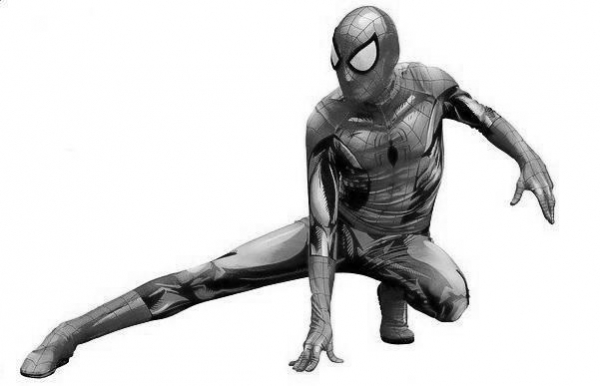
輸入 1
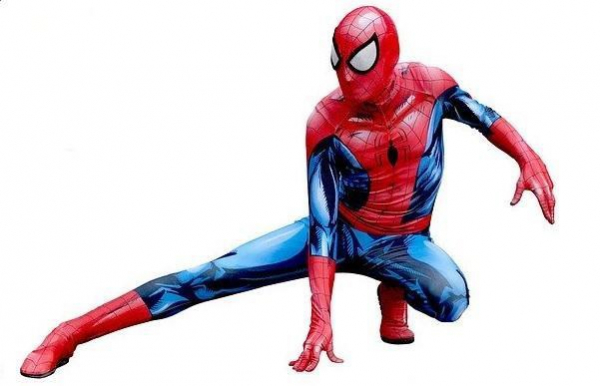
輸入 2
輸出
Difference: 92.54901960784314

更新日期:2020 年 04 月 09 日
6K+ 次瀏覽

廣告