- Node.js 教程
- Node.js - 首頁
- Node.js - 簡介
- Node.js - 環境設定
- Node.js - 第一個應用程式
- Node.js - REPL 終端
- Node.js - 命令列選項
- Node.js - 包管理器 (NPM)
- Node.js - 回撥函式概念
- Node.js - 上傳檔案
- Node.js - 傳送郵件
- Node.js - 事件
- Node.js - 事件迴圈
- Node.js - 事件發射器
- Node.js - 偵錯程式
- Node.js - 全域性物件
- Node.js - 控制檯
- Node.js - 程序
- Node.js - 應用程式擴充套件
- Node.js - 打包
- Node.js - Express 框架
- Node.js - RESTFul API
- Node.js - 緩衝區
- Node.js - 流
- Node.js - 檔案系統
- Node.js MySQL
- Node.js - MySQL 入門
- Node.js - MySQL 建立資料庫
- Node.js - MySQL 建立表
- Node.js - MySQL 插入資料
- Node.js - MySQL 從表中選擇資料
- Node.js - MySQL Where 條件
- Node.js - MySQL Order By 排序
- Node.js - MySQL 刪除資料
- Node.js - MySQL 更新資料
- Node.js - MySQL 聯接
- Node.js MongoDB
- Node.js - MongoDB 入門
- Node.js - MongoDB 建立資料庫
- Node.js - MongoDB 建立集合
- Node.js - MongoDB 插入資料
- Node.js - MongoDB 查詢資料
- Node.js - MongoDB 查詢
- Node.js - MongoDB 排序
- Node.js - MongoDB 刪除資料
- Node.js - MongoDB 更新資料
- Node.js - MongoDB 限制結果
- Node.js - MongoDB 聯接
- Node.js 模組
- Node.js - 模組
- Node.js - 內建模組
- Node.js - 實用程式模組
- Node.js - Web 模組
- Node.js 有用資源
- Node.js - 快速指南
- Node.js - 有用資源
- Node.js - 討論
NodeJS - 新建 Console() 方法
Node.js 的 Console 模組提供了一個簡單的除錯控制檯,它與 Web 瀏覽器提供的 JavaScript 控制檯機制相同。Node.js 的 new Console() 方法用於建立一個新的控制檯物件,以將輸出列印到 stdout 流,該流可以透過全域性 process 物件的 process.stdout 屬性訪問。console 物件提供了諸如 log()、error()、warn() 和 info() 等方法,允許開發人員以簡單有效的方式將訊息寫入標準輸出。它還包括其他功能,例如分組和計數,允許程式碼執行計時等,使其成為除錯用 Node.js 編寫的應用程式的寶貴工具。
console 模組有兩個組成部分,如下所述。
Console 類可以使用一些方法寫入任何 Node.js 流。這些方法包括 console.log()、console.error() 和 console.warn() 等。
全域性 console 類例項配置為寫入 process.stdout(此屬性返回連線到 stdout 的流)和 process.stderr(此屬性返回連線到 stderr 的流)。無需使用 require('console'),即可使用全域性 console。
Node.js 的 new Console() 方法將建立一個新的 Console,幷包含一個或兩個可寫流例項,它們分別是 stdout 和 stderr。stdout 是一個可寫流,將用於列印日誌或資訊輸出。
stderr 用於警告和錯誤輸出。如果未提供 stderr,則 stdout 將用作 stderr。
語法
以下是 Node.js new Console() 方法的語法:
new console(options);
此方法接受多個引數。
引數
options <object>
stdout <stream.Writable> - 這將接受從 fs 模組匯入的可寫流。
stderr <stream.Writable> - 這也將接受從 fs 模組匯入的可寫流。
ignoreErrors <boolean> - 這將忽略寫入底層流時的錯誤,預設值為 true。
colorMode <boolean> | <string> - 用於設定此 Console 例項的顏色支援。如果值為 true,則在檢查值時啟用顏色。如果值為 false,則在檢查值時停用顏色。預設值為 auto。
inspectOptions <Object> - 這將指定傳遞給 util.inspect() 的選項。
groupIndentation <number> - 用於設定組縮排。預設值為 2。
返回值
執行後,輸出將透過 <stream.Writable> 傳送到 fs 模組建立的 process.stdout 和 process.stderr 檔案。
此方法僅在 options 為物件時才接受 options。為了更好地理解這一點,請檢視下面的程式碼片段。
new Console({
   stdout: WritableStream,
   stderr: WritableStream,
   colorMode: true,
   groupIndentation: 3,
});
首先,我們需要使用 (new Console()) 方法建立一個控制檯,並在編寫程式碼時需要匯入兩個模組。這兩個模組是 Node.js 的 console 和 fs。
現在讓我們深入瞭解 Node.js 的 new Console() 方法的示例。
示例
在下面的示例中,
我們匯入了兩個模組 console 和 fs,並建立了兩個輸出流 (stdout 和 stderr)。
然後我們建立了 new Console() 方法並向其傳遞了一些引數。
然後我們呼叫了 Console 類的某些方法。
const fs = require('fs');
const console = require('console');
const { Console } = console;
const output = fs.createWriteStream('./stdout.log');
const error = fs.createWriteStream('./stderr.log');
const obj = new Console({ stdout: output, stderr: error, colorMode: true, ignoreErrors: true});
const name = "Tutorialspoint";
obj.log('Welcome to %s', name);
obj.warn('This is a warning text');
obj.error('This is an Error text');
輸出
開啟命令提示符並導航到檔案 (Nodefile.js) 所在的資料夾,如下圖所示。
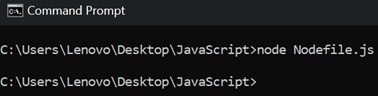
現在,透過在命令提示符中鍵入 (node Nodefile.js) 來執行檔案。
根據我們在檔案中編寫的程式碼,它將在 (Nodefile.js) 所在的相同檔案中建立兩個日誌檔案 (stdout 和 stderr)
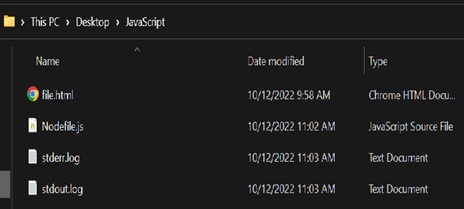
如果我們嘗試開啟 (stderr.log) 檔案,它將包含 obj.warn() 和 obj.error() 的訊息。
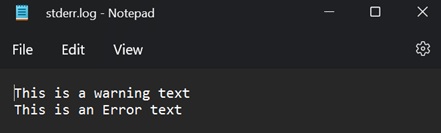
如果我們嘗試開啟 (stdout.log) 檔案,它將包含 obj.log() 的訊息。
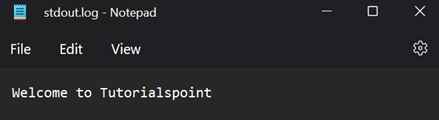
示例
在下面的示例中,
我們匯入了兩個模組 console 和 fs,並且只建立了一個輸出流,即 stdout。
然後我們建立了 new Console() 方法並向其傳遞了一些引數。
然後我們呼叫了 Console 類的某些方法。
const fs = require('fs');
const console = require('console');
const { Console } = console;
const output = fs.createWriteStream('./stdout.log');
const obj = new Console({ stdout: output, colorMode: true, ignoreErrors: true});
const name = "India vs Pakistan";
obj.log('Welcome to %s match', name);
obj.warn('This is a warning text');
obj.error('This is an Error text');
輸出
開啟命令提示符並導航到檔案 (Nodefile.js) 所在的資料夾,如下圖所示。
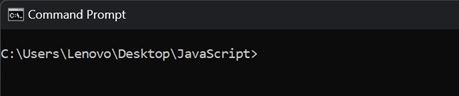
現在,透過在命令提示符中鍵入 (node Nodefile.htm) 來執行檔案。
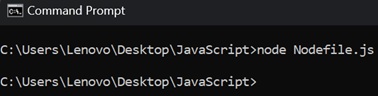
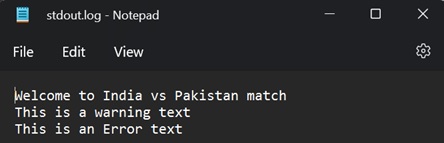
現在,根據我們在檔案中編寫的程式碼,它將在 (Nodefile.js) 所在的相同檔案中僅建立一個日誌檔案 stdout。
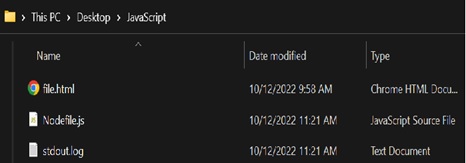
如果我們嘗試開啟 (stdout.log) 檔案,它將包含 obj.log()、obj.warn()、obj.error() 的訊息。
注意 - stderr 用於警告和錯誤輸出。在這種情況下,未提供 stderr,則 stdout 將用作 stderr。