

- Node.js 教程
- Node.js - 首頁
- Node.js - 簡介
- Node.js - 環境搭建
- Node.js - 第一個應用程式
- Node.js - REPL 終端
- Node.js - 命令列選項
- Node.js - 包管理器 (NPM)
- Node.js - 回撥函式概念
- Node.js - 上傳檔案
- Node.js - 傳送郵件
- Node.js - 事件
- Node.js - 事件迴圈
- Node.js - 事件發射器
- Node.js - 偵錯程式
- Node.js - 全域性物件
- Node.js - 控制檯
- Node.js - 程序
- Node.js - 應用程式擴充套件
- Node.js - 打包
- Node.js - Express 框架
- Node.js - RESTful API
- Node.js - 緩衝區
- Node.js - 流
- Node.js - 檔案系統
- Node.js MySQL
- Node.js - MySQL 快速入門
- Node.js - MySQL 建立資料庫
- Node.js - MySQL 建立表
- Node.js - MySQL 插入資料
- Node.js - MySQL 查詢資料
- Node.js - MySQL 條件查詢
- Node.js - MySQL 排序
- Node.js - MySQL 刪除資料
- Node.js - MySQL 更新資料
- Node.js - MySQL 連線查詢
- Node.js MongoDB
- Node.js - MongoDB 快速入門
- Node.js - MongoDB 建立資料庫
- Node.js - MongoDB 建立集合
- Node.js - MongoDB 插入資料
- Node.js - MongoDB 查詢資料
- Node.js - MongoDB 查詢
- Node.js - MongoDB 排序
- Node.js - MongoDB 刪除資料
- Node.js - MongoDB 更新資料
- Node.js - MongoDB 資料限制
- Node.js - MongoDB 連線查詢
- Node.js 模組
- Node.js - 模組
- Node.js - 內建模組
- Node.js - 實用程式模組
- Node.js - Web 模組
- Node.js 有用資源
- Node.js - 快速指南
- Node.js - 有用資源
- Node.js - 討論
Node.js - MySQL 連線查詢
本章將學習如何在 Node.js 應用程式中,針對 MySQL 資料庫中的表實現 JOIN 查詢。關係型資料庫由多個相關的表組成,這些表透過公共列(稱為外部索引鍵列)連結在一起。MySQL 支援 JOIN 查詢,可以使用它從 Node.js 應用程式中的多個表中提取和使用資料。與之前的示例一樣,我們應該呼叫 mysql.query() 方法,並將 SQL 查詢字串傳遞給 mysql.query() 方法,該字串應表示 MySQL JOIN 查詢語法。
本章將使用以下表格:
Members 表
CREATE TABLE members (
   member_id INT AUTO_INCREMENT,
   name VARCHAR(100),
   PRIMARY KEY (member_id)
);

INSERT INTO members(name)
VALUES('John'),('Jane'),('Mary'),('David'),('Amelia');
Members 表資料:
mysql> select * from members;
+-----------+--------+
| member_id | name   |
+-----------+--------+
|         1 | John   |
|         2 | Jane   |
|         3 | Mary   |
|         4 | David  |
|         5 | Amelia |
+-----------+--------+
Committees 表
CREATE TABLE committees (
   committee_id INT AUTO_INCREMENT,
   name VARCHAR(100),
   PRIMARY KEY (committee_id)
);
INSERT INTO committees(name)
VALUES('John'),('Mary'),('Amelia'),('Joe');
Committees 表資料:
mysql> select * from committees;
+--------------+--------+
| committee_id | name   |
+--------------+--------+
|            1 | John   |
|            2 | Mary   |
|            3 | Amelia |
|            4 | Joe    |
+--------------+--------+
一些成員是委員會成員,而一些成員不是。另一方面,一些委員會成員在 members 表中,而一些成員不在。
MySQL INNER JOIN (內連線)
在 SELECT 語句中使用 inner join 子句的語法如下:
SELECT column_list
FROM table_1
INNER JOIN table_2 ON join_condition;
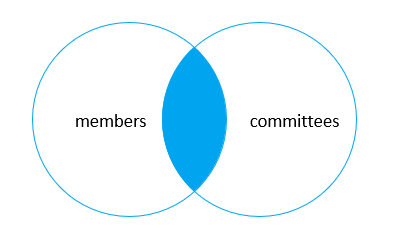
inner join 子句將第一個表中的每一行與第二個表中的每一行進行比較。如果兩行的值滿足連線條件,則在結果集中建立一個新行,其列包含來自兩個表的兩行的所有列,並將此新行包含在結果集中。換句話說,inner join 子句只包含來自兩個表的匹配行。
如果連線條件使用等號 (=) 並且兩個表中匹配的列名相同,則可以使用 USING 子句代替 ON 子句。
SELECT column_list
FROM table_1
INNER JOIN table_2 USING (column_name);
示例
在下面的 Node.js 程式碼中,我們將使用 members 和 Committees 表並獲取它們的內連線。
var mysql = require('mysql');
var con = mysql.createConnection({
   host: "localhost",
   user: "root",
   password: "mypassword",
   database: "mydb"
});

var qry =`
SELECT
   m.member_id,
   m.name AS member,
   c.committee_id,
   c.name AS committee
FROM
   members m
INNER JOIN committees c ON c.name = m.name;
`;
con.connect(function (err) {
   if (err) throw err;
   console.log("Connected!");
   con.query(qry, function (err, results) {
      if (err) throw err;
      results.forEach((row) => {
         console.log(JSON.stringify(row));
      });
   });

   con.end();
});
輸出
{"member_id":1,"member":"John","committee_id":1,"committee":"John"}
{"member_id":3,"member":"Mary","committee_id":2,"committee":"Mary"}
{"member_id":5,"member":"Amelia","committee_id":3,"committee":"Amelia"}
MySQL LEFT JOIN (左連線)
左連線類似於內連線。使用左連線連線兩個表時,左連線從左表開始選擇資料。對於左表中的每一行,左連線都會與右表中的每一行進行比較。如果兩行的值滿足連線條件,則左連線子句將建立一個新行,其列包含兩個表中兩行的所有列,並將此行包含在結果集中。
如果兩行的值不匹配,左連線子句仍然會建立一個新行,其列包含左表中行的列,而右表中行的列則為 NULL。
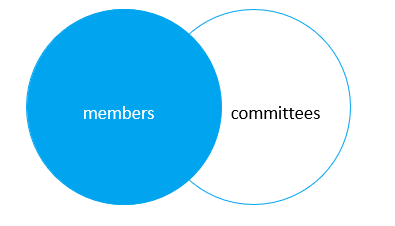
因此,左連線會選擇左表中的所有資料,無論右表中是否存在匹配的行。
如果找不到右表中的匹配行,則左連線在結果集中使用來自右表的行的列的 NULL 值。
左連線子句的語法如下:
SELECT column_list
FROM table_1
LEFT JOIN table_2 USING (column_name);
讓我們將 Node.js 程式碼中的查詢字串更改為以下語句:
示例
var qry =`
SELECT
   m.member_id,
   m.name AS member,
   c.committee_id,
   c.name AS committee
FROM
   members m
LEFT JOIN committees c USING(name);
`;
輸出
{"member_id":1,"member":"John","committee_id":1,"committee":"John"}
{"member_id":2,"member":"Jane","committee_id":null,"committee":null}
{"member_id":3,"member":"Mary","committee_id":2,"committee":"Mary"}
{"member_id":4,"member":"David","committee_id":null,"committee":null}
{"member_id":5,"member":"Amelia","committee_id":3,"committee":"Amelia"}
不匹配的列將填充 NULL 資料。
要查詢不是委員會成員的成員,您可以新增 WHERE 子句和 IS NULL 運算子。
SELECT
   m.member_id,
   m.name AS member,
   c.committee_id,
   c.name AS committee
FROM
   members m
LEFT JOIN committees c USING(name)
WHERE c.committee_id IS NULL;
MySQL RIGHT JOIN (右連線)
右連線子句類似於左連線子句,只是左表和右表的處理方式相反。右連線從右表開始選擇資料,而不是從左表開始。
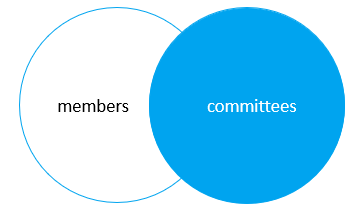
右連線子句選擇右表中的所有行,並匹配左表中的行。如果右表中的一行沒有左表中的匹配行,則左表的列在最終結果集中將為 NULL。
SELECT column_list
FROM table_1
RIGHT JOIN table_2 USING (column_name);
讓我們修改查詢字串變數如下:
var qry =`
SELECT
   m.member_id,
   m.name AS member,
   c.committee_id,
   c.name AS committee
FROM
   members m
RIGHT JOIN committees c on c.name = m.name;
`;
結果返回兩個表的 RIGHT JOIN:
{"member_id":1,"member":"John","committee_id":1,"committee":"John"}
{"member_id":3,"member":"Mary","committee_id":2,"committee":"Mary"}
{"member_id":5,"member":"Amelia","committee_id":3,"committee":"Amelia"}
{"member_id":null,"member":null,"committee_id":4,"committee":"Joe"}