

- Node.js 教程
- Node.js - 首頁
- Node.js - 簡介
- Node.js - 環境搭建
- Node.js - 第一個應用程式
- Node.js - REPL 終端
- Node.js - 命令列選項
- Node.js - 包管理器 (NPM)
- Node.js - 回撥函式概念
- Node.js - 上傳檔案
- Node.js - 傳送郵件
- Node.js - 事件
- Node.js - 事件迴圈
- Node.js - 事件發射器
- Node.js - 偵錯程式
- Node.js - 全域性物件
- Node.js - 控制檯
- Node.js - 程序
- Node.js - 應用程式擴充套件
- Node.js - 打包
- Node.js - Express 框架
- Node.js - RESTful API
- Node.js - 緩衝區
- Node.js - 流
- Node.js - 檔案系統
- Node.js MySQL
- Node.js - MySQL 入門
- Node.js - MySQL 建立資料庫
- Node.js - MySQL 建立表
- Node.js - MySQL 插入資料
- Node.js - MySQL 查詢資料
- Node.js - MySQL 條件查詢
- Node.js - MySQL 排序
- Node.js - MySQL 刪除資料
- Node.js - MySQL 更新資料
- Node.js - MySQL 連線查詢
- Node.js MongoDB
- Node.js - MongoDB 入門
- Node.js - MongoDB 建立資料庫
- Node.js - MongoDB 建立集合
- Node.js - MongoDB 插入資料
- Node.js - MongoDB 查詢資料
- Node.js - MongoDB 查詢
- Node.js - MongoDB 排序
- Node.js - MongoDB 刪除資料
- Node.js - MongoDB 更新資料
- Node.js - MongoDB 資料限制
- Node.js - MongoDB 連線查詢
- Node.js 模組
- Node.js - 模組
- Node.js - 內建模組
- Node.js - 實用程式模組
- Node.js - Web 模組
- Node.js 有用資源
- Node.js - 快速指南
- Node.js - 有用資源
- Node.js - 討論
Node.js - 傳送郵件
傳送郵件是任何 Node.js 應用程式(特別是 Express 應用程式)中所需的功能之一。NPM 倉庫中有各種第三方模組可以實現此功能。Node.js 應用程式可以透過 Mailgun、MailTrap、Mailjet 等電子郵件 API 整合電子郵件功能。
在本章中,我們將學習如何使用 nodemailer 模組和 MailTrap API 傳送電子郵件。
Nodemailer
Nodemailer 是一個使 Node.js 應用程式能夠傳送電子郵件的模組。您可以傳送純文字和 HTML 內容的電子郵件。它還支援新增附件、安全的 TLS 傳輸、內建 SMTP 支援、OAUTH2 身份驗證以及許多其他功能。
首先,安裝 nodemailer 模組。
npm install nodemailer
為了測試我們的支援電子郵件的 Node.js 應用程式,我們將使用 Mailtrap 服務,它提供一個虛擬 SMTP 伺服器。當應用程式進入生產階段時,您可以使用真實的 SMTP 伺服器 URL。建立一個 Mailtrap 帳戶,並從儀表板的“整合”下拉選單中獲取 API 憑據,選擇 Nodemailer。
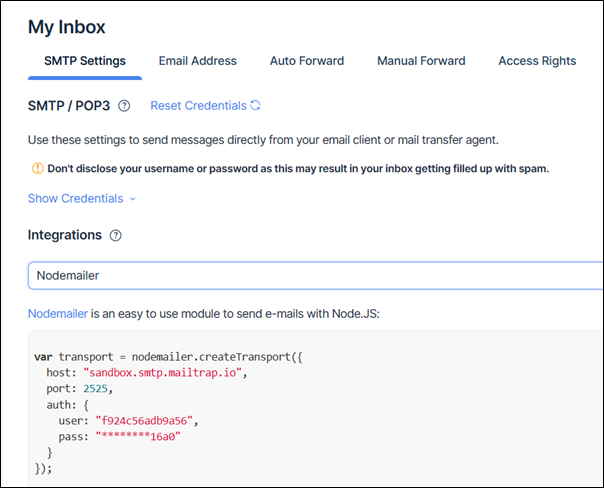
將以上程式碼與下面提供的其餘程式碼一起儲存 -
const nodemailer = require('nodemailer');
var transport = nodemailer.createTransport({
   host: "sandbox.smtp.mailtrap.io",
   port: 2525,
   auth: {
      user: "f924c******a56",
      pass: "******1b5516a0"
   }
});

message = {
   from: "from-example@email.com",
   to: "to-example@email.com",
   subject: "Subject",
   text: "Hello SMTP Email"
}
transport.sendMail(message, function(err, info) {
   if (err) {
      console.log(err);
   } else {
   console.log(info);
   }
});
Nodemailer 的 createTransport 函式指定您要使用哪種方法傳送電子郵件。它將連線資料和憑據作為引數。在本例中,由於 SMTP 是首選傳輸方式,您需要定義一個 SMTP 主機、埠和用於訪問主機 SMTP 伺服器的憑據密碼。
createTrsnsport() 函式返回一個傳輸物件。它的 sendMail() 方法使用憑據和訊息詳細資訊並將訊息傳送到所需的收件人。按如下方式執行上述程式碼 -
PS D:\nodejs\emailapp> node main.js
{
   accepted: [ 'to-example@email.com' ],
   rejected: [],
   ehlo: [
      'SIZE 5242880',
      'PIPELINING',
      'ENHANCEDSTATUSCODES',
      '8BITMIME',
      'DSN',
      'AUTH PLAIN LOGIN CRAM-MD5'
   ],
   envelopeTime: 749,
   messageTime: 529,
   messageSize: 291,
   response: '250 2.0.0 Ok: queued',
   envelope: { from: 'from-example@email.com', to: [ 'to-example@email.com' ] },
   messageId: '<1d29decd-7903-f5e4-3578-15b1e88f239a@email.com>'
}
MailTrap 提供的虛擬 SMTP 伺服器為您提供了一個收件箱,可以在其中驗證電子郵件事務。
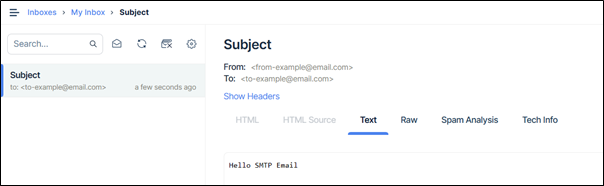
您還可以使用流行的 Gmail 服務透過您的 Node.js 程式碼傳送電子郵件。請注意,您可能需要啟用 Gmail 帳戶的“安全性較低的應用”設定,或者如果帳戶使用 OAuth2 身份驗證,則使用身份驗證令牌。
var transport = nodemailer.createTransport({
   service: 'gmail',
   auth: {
      user: 'youremail@gmail.com',
      pass: 'yourpassword'
   }
});
Mailgun
您還可以使用 Mailgun API 金鑰在您的 Node.js 應用程式中整合電子郵件功能。要新增此功能,請安裝以下模組:
npm i mailgun.js form-data
訪問 URL signup.mailgun.com 註冊免費 Mailgun 帳戶並獲取公共和私有 API 金鑰。
然後,我們初始化 Mailgun 客戶端例項並傳入 MAILGUN_API_KEY。然後我們定義了一個 sendMail 函式來處理使用 mailgun-js 庫傳送電子郵件。
const formData = require("form-data");
const Mailgun = require("mailgun.js");

const mailgun = new Mailgun(formData);

const mg = mailgun.client({
   username: "api",
   key: process.env.MAILGUN_API_KEY,
});
exports.sendMail = (req, res) => {
   const { toEmail, fromEmail, subject, message } = req.body;

      mg.messages.create(process.env.MAILGUN_DOMAIN, {
      from: fromEmail,
      to: [toEmail],
      subject: subject,
      text: message,
   });
};