- Node.js 教程
- Node.js - 首頁
- Node.js - 簡介
- Node.js - 環境搭建
- Node.js - 第一個應用程式
- Node.js - REPL 終端
- Node.js - 命令列選項
- Node.js - 包管理器 (NPM)
- Node.js - 回撥函式概念
- Node.js - 上傳檔案
- Node.js - 傳送電子郵件
- Node.js - 事件
- Node.js - 事件迴圈
- Node.js - 事件發射器
- Node.js - 偵錯程式
- Node.js - 全域性物件
- Node.js - 控制檯
- Node.js - 程序
- Node.js - 應用程式擴充套件
- Node.js - 打包
- Node.js - Express 框架
- Node.js - RESTful API
- Node.js - 緩衝區
- Node.js - 流
- Node.js - 檔案系統
- Node.js MySQL
- Node.js - MySQL 快速入門
- Node.js - MySQL 建立資料庫
- Node.js - MySQL 建立表
- Node.js - MySQL 插入資料
- Node.js - MySQL 查詢資料
- Node.js - MySQL 條件查詢
- Node.js - MySQL 排序
- Node.js - MySQL 刪除資料
- Node.js - MySQL 更新資料
- Node.js - MySQL 連線查詢
- Node.js MongoDB
- Node.js - MongoDB 快速入門
- Node.js - MongoDB 建立資料庫
- Node.js - MongoDB 建立集合
- Node.js - MongoDB 插入資料
- Node.js - MongoDB 查詢資料
- Node.js - MongoDB 查詢
- Node.js - MongoDB 排序
- Node.js - MongoDB 刪除資料
- Node.js - MongoDB 更新資料
- Node.js - MongoDB 資料限制
- Node.js - MongoDB 連線查詢
- Node.js 模組
- Node.js - 模組
- Node.js - 內建模組
- Node.js - 實用程式模組
- Node.js - Web 模組
- Node.js 有用資源
- Node.js - 快速指南
- Node.js - 有用資源
- Node.js - 討論
NodeJS - console.group() 方法
Node.js 的console.group()方法會將方法中給定的資訊以分組的形式返回。它通常用於根據一個或多個指定的列對查詢結果進行分組。您可以使用此方法聚合資料並在組上執行計算,例如總計、平均值和計數等。它還可以用於按升序或降序對分組記錄的輸出進行排序。
一個組包含一個合適的標題,標題下面會有一些合適的資訊或訊息。因此,我們在console.group()方法中傳遞的訊息將作為組標題。在組內,我們可以使用Node.js的console.log()函式編寫訊息。
語法
以下是 Node.js console.group() 方法的語法:
console.group([label)];]);
引數
label − 這是組的標籤。這將充當我們在控制檯上分組的組的標題。這不是必需引數;我們也可以不帶引數(標籤)使用此方法。
返回值
如果傳遞了label,此方法將在控制檯上將內容與label一起分組。否則,它將不帶標籤進行分組。
示例
Node.js 的console.group()方法只接受一個label引數(可選引數)。
注意 − 預設情況下,組將在控制檯中展開。
在這個例子中:
我們使用console.group()建立一個組並傳遞一個引數(label)。此標籤將作為組標題。
然後我們使用console.log()函式在組內編寫一些訊息。
然後我們使用 Node.js 的console.groupEnd()方法結束組。
console.group("GROUP 1");
console.log("Knock knock....first message in Group 1");
console.log("Knock knock....second message in Group 1")
console.log("Done with the messages, closing the group now");
console.groupEnd();
輸出
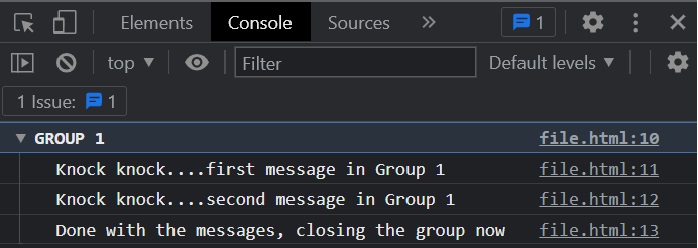
正如我們在下圖的輸出中看到的,我們建立了一個帶有傳遞給console.group()方法的標籤的組,編寫了一些訊息,並關閉了該組。
GROUP 1
Knock knock....first message in Group 1
Knock knock....second message in Group 1
Done with the messages, closing the group now
為了更好地理解,請在瀏覽器的控制檯中執行上述程式碼。以下是上述程式在瀏覽器控制檯中的輸出。
示例
在這個例子中,我們透過在一個組內呼叫一個組來建立巢狀組,然後我們相應地關閉這些組。
console.group("GROUP 1");
console.log("Knock knock....first message in Group 1");
console.log("Knock knock....second message in Group 1")
console.log("Done with the messages, closing the group now");

console.group("Nested group 1");
console.log("Knock knock....first message in Nested group 1");
console.log("Knock knock....second message in Nested group 1")
console.log("Now we are entering into another group inside nested group");

console.group("inner nested group");
console.log("OOPS! no messages here.");
console.groupEnd();
console.log("inner nested group ended");
console.groupEnd();
console.log("Nested group ended");
console.groupEnd();
console.log("GROUP 1 ended");
輸出
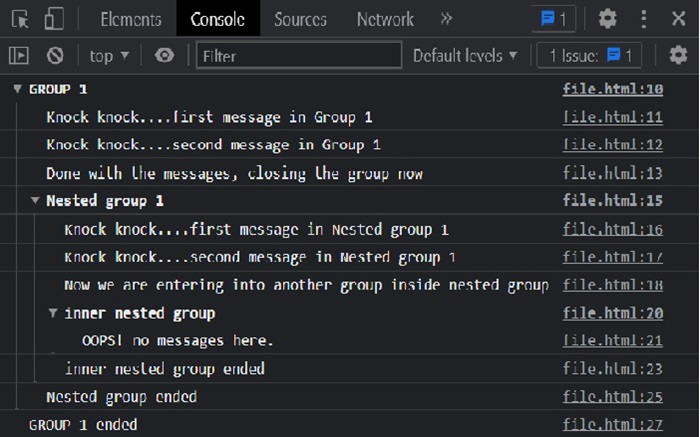
正如我們在下面的輸出中看到的,我們建立了主組,然後是子組,以及子組內的組。
GROUP 1
Knock knock....first message in Group 1
Knock knock....second message in Group 1
   Done with the messages, closing the group now
Nested group 1
   Knock knock....first message in Nested group 1
Knock knock....second message in Nested group 1
Now we are entering into another group inside nested group
   inner nested group
      OOPS! no messages here.
inner nested group ended
   Nested group ended
GROUP 1 ended
為了更好地理解,請在瀏覽器的控制檯中執行上述程式碼。以下是我們在瀏覽器控制檯中執行時的輸出。