

- Node.js 教程
- Node.js - 首頁
- Node.js - 簡介
- Node.js - 環境設定
- Node.js - 第一個應用程式
- Node.js - REPL 終端
- Node.js - 命令列選項
- Node.js - 包管理器 (NPM)
- Node.js - 回撥函式概念
- Node.js - 上傳檔案
- Node.js - 傳送電子郵件
- Node.js - 事件
- Node.js - 事件迴圈
- Node.js - 事件發射器
- Node.js - 偵錯程式
- Node.js - 全域性物件
- Node.js - 控制檯
- Node.js - 程序
- Node.js - 應用程式擴充套件
- Node.js - 打包
- Node.js - Express 框架
- Node.js - RESTFul API
- Node.js - 緩衝區
- Node.js - 流
- Node.js - 檔案系統
- Node.js MySQL
- Node.js - MySQL 入門
- Node.js - MySQL 建立資料庫
- Node.js - MySQL 建立表
- Node.js - MySQL 插入資料
- Node.js - MySQL 從表中選擇資料
- Node.js - MySQL Where 條件
- Node.js - MySQL 排序
- Node.js - MySQL 刪除資料
- Node.js - MySQL 更新資料
- Node.js - MySQL 聯接
- Node.js MongoDB
- Node.js - MongoDB 入門
- Node.js - MongoDB 建立資料庫
- Node.js - MongoDB 建立集合
- Node.js - MongoDB 插入資料
- Node.js - MongoDB 查詢資料
- Node.js - MongoDB 查詢
- Node.js - MongoDB 排序
- Node.js - MongoDB 刪除資料
- Node.js - MongoDB 更新資料
- Node.js - MongoDB 限制結果
- Node.js - MongoDB 聯接
- Node.js 模組
- Node.js - 模組
- Node.js - 內建模組
- Node.js - 實用程式模組
- Node.js - Web 模組
- Node.js 有用資源
- Node.js - 快速指南
- Node.js - 有用資源
- Node.js - 討論
NodeJS - console.clear() 方法
Node.js 的 console.clear() 方法用於清除 stdout(標準輸出),如果它是 TTY(Teletype),則呼叫 console.clear() 會嘗試清除 TTY。當 stdout 不是 TTY 時,此方法將不執行任何操作。
console.clear() 方法的具體操作可能因不同的作業系統和終端型別而異。
在 Linux 作業系統中,console.clear() 方法的操作類似於終端中的 clear shell 命令。
在 Windows 上,console.clear() 方法僅清除 Node.js 二進位制檔案當前終端視口中的輸出。
語法
以下是 Node.js console.clear() 方法的語法:
console.clear()
引數
此方法不接受任何引數。
返回值
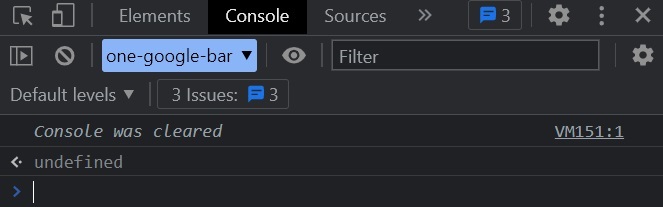
此方法不返回任何內容,而是清除控制檯。
示例
在瀏覽器的 檢查器 視窗(如 google chrome、edge 等)中執行以下程式以檢視結果。
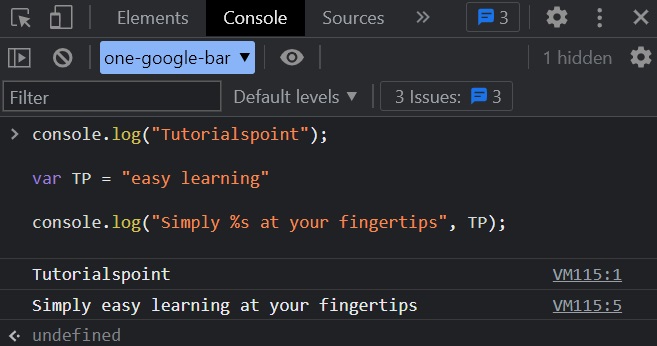
console.log("Tutorialspoint");
var TP = "easy learning"
console.log("Simply %s at your fingertips", TP);
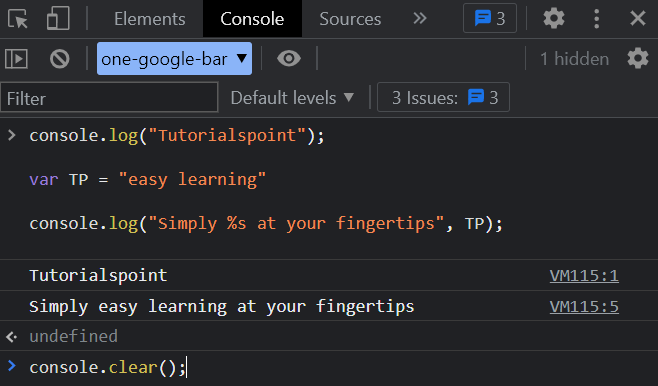
console.clear();
輸出
執行後,它將列印以下輸出:
Tutorialspoint
Simply easy learning at your fingertips
為了更清楚地理解這一點,讓我們看看上述程式在瀏覽器控制檯中的執行情況。
我們呼叫了 console.clear() 方法。
在終端中呼叫 console.clear() 方法後,它將清除控制檯螢幕,如下面的圖所示。
nodejs_console_module.htm
廣告