
- Lucene 教程
- Lucene - 首頁
- Lucene - 概述
- Lucene - 環境設定
- Lucene - 第一個應用程式
- Lucene - 索引類
- Lucene - 搜尋類
- Lucene - 索引過程
- Lucene - 索引操作
- Lucene - 搜尋操作
- Lucene - 查詢程式設計
- Lucene - 分析
- Lucene - 排序
- Lucene 有用資源
- Lucene - 快速指南
- Lucene - 有用資源
- Lucene - 討論
Lucene - 第一個應用程式
在本章中,我們將學習使用 Lucene 框架進行實際程式設計。在開始使用 Lucene 框架編寫第一個示例之前,您必須確保已正確設定了 Lucene 環境,如 Lucene - 環境設定 教程中所述。建議您具備 Eclipse IDE 的使用經驗。
現在讓我們繼續編寫一個簡單的搜尋應用程式,該應用程式將列印找到的搜尋結果數量。我們還將檢視在此過程中建立的索引列表。
步驟 1 - 建立 Java 專案
第一步是使用 Eclipse IDE 建立一個簡單的 Java 專案。選擇 檔案 > 新建 -> 專案 選項,然後從嚮導列表中選擇 Java 專案 嚮導。現在使用嚮導視窗將您的專案命名為 LuceneFirstApplication,如下所示:

專案建立成功後,您將在 專案資源管理器 中看到以下內容:
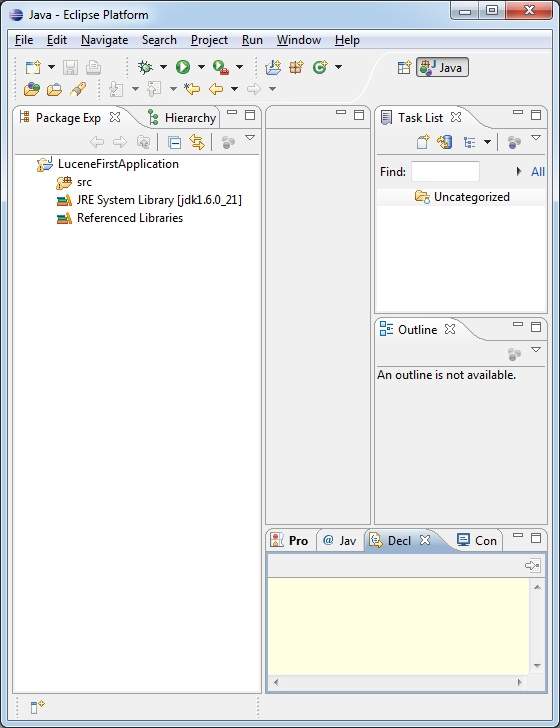
步驟 2 - 新增所需的庫
現在讓我們在專案中新增 Lucene 核心框架庫。為此,右鍵單擊您的專案名稱 LuceneFirstApplication,然後選擇上下文選單中提供的以下選項:構建路徑 -> 配置構建路徑 以顯示 Java 構建路徑視窗,如下所示:
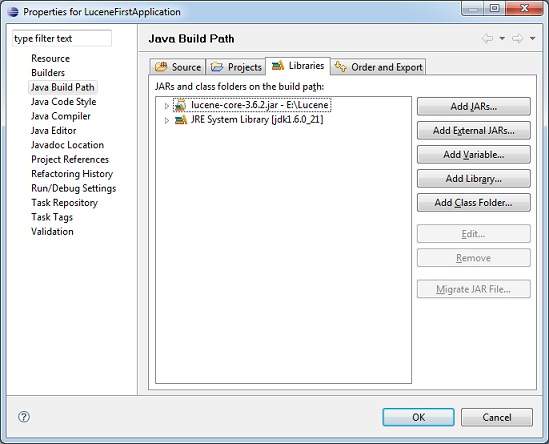
現在使用 庫 選項卡下可用的 新增外部 JAR 按鈕,從 Lucene 安裝目錄新增以下核心 JAR 檔案:
- lucene-core-3.6.2
步驟 3 - 建立原始檔
現在讓我們在 LuceneFirstApplication 專案下建立實際的原始檔。首先,我們需要建立一個名為 com.tutorialspoint.lucene. 的包。為此,右鍵單擊包資源管理器部分中的 src,然後選擇選項:新建 -> 包。
接下來,我們將在 com.tutorialspoint.lucene 包下建立 LuceneTester.java 和其他 Java 類。
LuceneConstants.java
此類用於提供將在整個示例應用程式中使用的各種常量。
package com.tutorialspoint.lucene;

public class LuceneConstants {
   public static final String CONTENTS = "contents";
   public static final String FILE_NAME = "filename";
   public static final String FILE_PATH = "filepath";
   public static final int MAX_SEARCH = 10;
}
TextFileFilter.java
此類用作 .txt 檔案 過濾器。
package com.tutorialspoint.lucene;

import java.io.File;
import java.io.FileFilter;

public class TextFileFilter implements FileFilter {

   @Override
   public boolean accept(File pathname) {
      return pathname.getName().toLowerCase().endsWith(".txt");
   }
}
Indexer.java
此類用於索引原始資料,以便我們可以使用 Lucene 庫對其進行搜尋。
package com.tutorialspoint.lucene;

import java.io.File;
import java.io.FileFilter;
import java.io.FileReader;
import java.io.IOException;

import org.apache.lucene.analysis.standard.StandardAnalyzer;
import org.apache.lucene.document.Document;
import org.apache.lucene.document.Field;
import org.apache.lucene.index.CorruptIndexException;
import org.apache.lucene.index.IndexWriter;
import org.apache.lucene.store.Directory;
import org.apache.lucene.store.FSDirectory;
import org.apache.lucene.util.Version;

public class Indexer {

   private IndexWriter writer;

   public Indexer(String indexDirectoryPath) throws IOException {
      //this directory will contain the indexes
      Directory indexDirectory =
         FSDirectory.open(new File(indexDirectoryPath));

      //create the indexer
      writer = new IndexWriter(indexDirectory,
         new StandardAnalyzer(Version.LUCENE_36),true,
         IndexWriter.MaxFieldLength.UNLIMITED);
   }

   public void close() throws CorruptIndexException, IOException {
      writer.close();
   }

   private Document getDocument(File file) throws IOException {
      Document document = new Document();

      //index file contents
      Field contentField = new Field(LuceneConstants.CONTENTS, new FileReader(file));
      //index file name
      Field fileNameField = new Field(LuceneConstants.FILE_NAME,
         file.getName(),Field.Store.YES,Field.Index.NOT_ANALYZED);
      //index file path
      Field filePathField = new Field(LuceneConstants.FILE_PATH,
         file.getCanonicalPath(),Field.Store.YES,Field.Index.NOT_ANALYZED);

      document.add(contentField);
      document.add(fileNameField);
      document.add(filePathField);

      return document;
   }

   private void indexFile(File file) throws IOException {
      System.out.println("Indexing "+file.getCanonicalPath());
      Document document = getDocument(file);
      writer.addDocument(document);
   }

   public int createIndex(String dataDirPath, FileFilter filter)
      throws IOException {
      //get all files in the data directory
      File[] files = new File(dataDirPath).listFiles();

      for (File file : files) {
         if(!file.isDirectory()
            && !file.isHidden()
            && file.exists()
            && file.canRead()
            && filter.accept(file)
         ){
            indexFile(file);
         }
      }
      return writer.numDocs();
   }
}
Searcher.java
此類用於搜尋 Indexer 建立的索引以搜尋請求的內容。
package com.tutorialspoint.lucene;

import java.io.File;
import java.io.IOException;

import org.apache.lucene.analysis.standard.StandardAnalyzer;
import org.apache.lucene.document.Document;
import org.apache.lucene.index.CorruptIndexException;
import org.apache.lucene.queryParser.ParseException;
import org.apache.lucene.queryParser.QueryParser;
import org.apache.lucene.search.IndexSearcher;
import org.apache.lucene.search.Query;
import org.apache.lucene.search.ScoreDoc;
import org.apache.lucene.search.TopDocs;
import org.apache.lucene.store.Directory;
import org.apache.lucene.store.FSDirectory;
import org.apache.lucene.util.Version;

public class Searcher {

   IndexSearcher indexSearcher;
   QueryParser queryParser;
   Query query;

   public Searcher(String indexDirectoryPath)
      throws IOException {
      Directory indexDirectory =
         FSDirectory.open(new File(indexDirectoryPath));
      indexSearcher = new IndexSearcher(indexDirectory);
      queryParser = new QueryParser(Version.LUCENE_36,
         LuceneConstants.CONTENTS,
         new StandardAnalyzer(Version.LUCENE_36));
   }

   public TopDocs search( String searchQuery)
      throws IOException, ParseException {
      query = queryParser.parse(searchQuery);
      return indexSearcher.search(query, LuceneConstants.MAX_SEARCH);
   }

   public Document getDocument(ScoreDoc scoreDoc)
      throws CorruptIndexException, IOException {
      return indexSearcher.doc(scoreDoc.doc);
   }

   public void close() throws IOException {
      indexSearcher.close();
   }
}
LuceneTester.java
此類用於測試 lucene 庫的索引和搜尋功能。
package com.tutorialspoint.lucene;

import java.io.IOException;

import org.apache.lucene.document.Document;
import org.apache.lucene.queryParser.ParseException;
import org.apache.lucene.search.ScoreDoc;
import org.apache.lucene.search.TopDocs;

public class LuceneTester {

   String indexDir = "E:\\Lucene\\Index";
   String dataDir = "E:\\Lucene\\Data";
   Indexer indexer;
   Searcher searcher;

   public static void main(String[] args) {
      LuceneTester tester;
      try {
         tester = new LuceneTester();
         tester.createIndex();
         tester.search("Mohan");
      } catch (IOException e) {
         e.printStackTrace();
      } catch (ParseException e) {
         e.printStackTrace();
      }
   }

   private void createIndex() throws IOException {
      indexer = new Indexer(indexDir);
      int numIndexed;
      long startTime = System.currentTimeMillis();
      numIndexed = indexer.createIndex(dataDir, new TextFileFilter());
      long endTime = System.currentTimeMillis();
      indexer.close();
      System.out.println(numIndexed+" File indexed, time taken: "
         +(endTime-startTime)+" ms");
   }

   private void search(String searchQuery) throws IOException, ParseException {
      searcher = new Searcher(indexDir);
      long startTime = System.currentTimeMillis();
      TopDocs hits = searcher.search(searchQuery);
      long endTime = System.currentTimeMillis();

      System.out.println(hits.totalHits +
         " documents found. Time :" + (endTime - startTime));
      for(ScoreDoc scoreDoc : hits.scoreDocs) {
         Document doc = searcher.getDocument(scoreDoc);
            System.out.println("File: "
            + doc.get(LuceneConstants.FILE_PATH));
      }
      searcher.close();
   }
}
步驟 4 - 資料和索引目錄建立
我們使用了從 record1.txt 到 record10.txt 的 10 個文字檔案,其中包含學生姓名和其他詳細資訊,並將它們放在 E:\Lucene\Data 目錄中。 測試資料。應建立索引目錄路徑為 E:\Lucene\Index。執行此程式後,您可以在該資料夾中看到建立的索引檔案列表。
步驟 5 - 執行程式
完成原始碼、原始資料、資料目錄和索引目錄的建立後,您就可以編譯和執行程式了。為此,保持 LuceneTester.Java 檔案選項卡處於活動狀態,然後使用 Eclipse IDE 中可用的 執行 選項或使用 Ctrl + F11 編譯並執行您的 LuceneTester 應用程式。如果應用程式成功執行,它將在 Eclipse IDE 的控制檯中列印以下訊息:
Indexing E:\Lucene\Data\record1.txt
Indexing E:\Lucene\Data\record10.txt
Indexing E:\Lucene\Data\record2.txt
Indexing E:\Lucene\Data\record3.txt
Indexing E:\Lucene\Data\record4.txt
Indexing E:\Lucene\Data\record5.txt
Indexing E:\Lucene\Data\record6.txt
Indexing E:\Lucene\Data\record7.txt
Indexing E:\Lucene\Data\record8.txt
Indexing E:\Lucene\Data\record9.txt
10 File indexed, time taken: 109 ms
1 documents found. Time :0
File: E:\Lucene\Data\record4.txt
成功執行程式後,您的 索引目錄 中將包含以下內容:
