- Laravel 教程
- Laravel - 首頁
- Laravel - 概述
- Laravel - 安裝
- Laravel - 應用結構
- Laravel - 配置
- Laravel - 路由
- Laravel - 中介軟體
- Laravel - 名稱空間
- Laravel - 控制器
- Laravel - 請求
- Laravel - Cookie
- Laravel - 響應
- Laravel - 檢視
- Laravel - Blade 模板
- Laravel - 重定向
- Laravel - 資料庫操作
- Laravel - 錯誤與日誌
- Laravel - 表單
- Laravel - 本地化
- Laravel - Session
- Laravel - 驗證
- Laravel - 檔案上傳
- Laravel - 傳送郵件
- Laravel - Ajax
- Laravel - 錯誤處理
- Laravel - 事件處理
- Laravel - 門面 (Facades)
- Laravel - 契約 (Contracts)
- Laravel - CSRF 保護
- Laravel - 身份驗證
- Laravel - 授權
- Laravel - Artisan 命令列
- Laravel - 加密
- Laravel - 雜湊
- 理解發布流程
- Laravel - 遊客使用者許可權
- Laravel - Artisan 命令
- Laravel - 分頁自定義
- Laravel - Dump Server
- Laravel - Action URL
- Laravel 有用資源
- Laravel - 快速指南
- Laravel - 有用資源
- Laravel - 討論
Laravel - 門面 (Facades)
門面提供了一個靜態介面,用於訪問應用服務容器中提供的類。Laravel 的門面充當服務容器中底層類的靜態代理,在保持比傳統靜態方法更高的可測試性和靈活性的同時,提供了簡潔、富有表現力的語法。
如何建立門面
以下是建立 Laravel 門面的步驟:
步驟 1 - 建立 PHP 類檔案。
步驟 2 - 將該類繫結到服務提供者。
步驟 3 - 將服務提供者註冊到
Config\app.php 作為提供者。
步驟 4 - 建立一個類,該類繼承自
Illuminate\Support\Facades\Facade。
步驟 5 - 將步驟 4 中的類註冊到 Config\app.php 作為別名。
門面類參考
Laravel 自帶許多門面。下表顯示了內建的門面類參考:
| 門面 | 類 | 服務容器繫結 |
|---|---|---|
| App | Illuminate\Foundation\Application | app |
| Artisan | Illuminate\Contracts\Console\Kernel | artisan |
| Auth | Illuminate\Auth\AuthManager | auth |
| Auth (例項) | Illuminate\Auth\Guard | |
| Blade | Illuminate\View\Compilers\BladeCompiler | blade.compiler |
| Bus | Illuminate\Contracts\Bus\Dispatcher | |
| Cache | Illuminate\Cache\Repository | cache |
| Config | Illuminate\Config\Repository | config |
| Cookie | Illuminate\Cookie\CookieJar | cookie |
| Crypt | Illuminate\Encryption\Encrypter | encrypter |
| DB | Illuminate\Database\DatabaseManager | db |
| DB (例項) | Illuminate\Database\Connection | |
| Event | Illuminate\Events\Dispatcher | events |
| File | Illuminate\Filesystem\Filesystem | files |
| Gate | Illuminate\Contracts\Auth\Access\Gate | |
| Hash | Illuminate\Contracts\Hashing\Hasher | hash |
| Input | Illuminate\Http\Request | request |
| Lang | Illuminate\Translation\Translator | translator |
| Log | Illuminate\Log\Writer | log |
| Illuminate\Mail\Mailer | mailer | |
| Password | Illuminate\Auth\Passwords\PasswordBroker | auth.password |
| Queue | Illuminate\Queue\QueueManager | queue |
| Queue (例項) | Illuminate\Queue\QueueInterface | |
| Queue (基類) | Illuminate\Queue\Queue | |
| Redirect | Illuminate\Routing\Redirector | redirect |
| Redis | Illuminate\Redis\Database | redis |
| Request | Illuminate\Http\Request | request |
| Response | Illuminate\Contracts\Routing\ResponseFactory | |
| Route | Illuminate\Routing\Router | router |
| Schema | Illuminate\Database\Schema\Blueprint | |
| Session | Illuminate\Session\SessionManager | session |
| Session (例項) | Illuminate\Session\Store | |
| Storage | Illuminate\Contracts\Filesystem\Factory | filesystem |
| URL | Illuminate\Routing\UrlGenerator | url |
| Validator | Illuminate\Validation\Factory | validator |
| Validator (例項) | Illuminate\Validation\Validator | |
| View | Illuminate\View\Factory | view |
| View (例項) | Illuminate\View\View |
示例
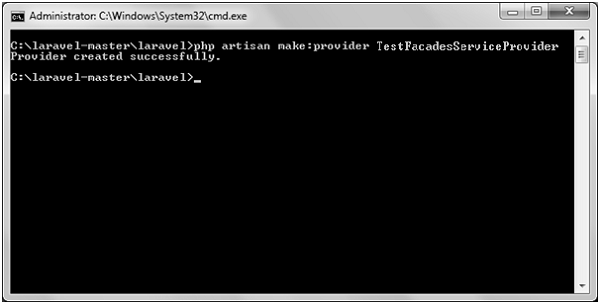
步驟 1 - 透過執行以下命令建立名為TestFacadesServiceProvider的服務提供者。
php artisan make:provider TestFacadesServiceProvider
步驟 2 - 成功執行後,您將收到以下輸出:
步驟 3 - 在App/Test目錄下建立名為TestFacades.php的類。
App/Test/TestFacades.php
<?php
   namespace App\Test;
   class TestFacades{
      public function testingFacades() {
         echo "Testing the Facades in Laravel.";
      }
   }
?>
步驟 4 - 在“App/Test/Facades”目錄下建立名為“TestFacades.php”的門面類。
App/Test/Facades/TestFacades.php
<?php

namespace app\Test\Facades;

use Illuminate\Support\Facades\Facade;

class TestFacades extends Facade {
   protected static function getFacadeAccessor() { return 'test'; }
}
步驟 5 - 在App/Test/Facades目錄下建立名為TestFacadesServiceProviders.php的門面類。
App/Providers/TestFacadesServiceProviders.php
<?php

namespace App\Providers;

use App;
use Illuminate\Support\ServiceProvider;

class TestFacadesServiceProvider extends ServiceProvider {
   public function boot() {
      //
   }
   public function register() {
      App::bind('test',function() {
         return new \App\Test\TestFacades;
      });
   }
}
步驟 6 - 在config/app.php檔案中新增服務提供者,如下圖所示。
config/app.php

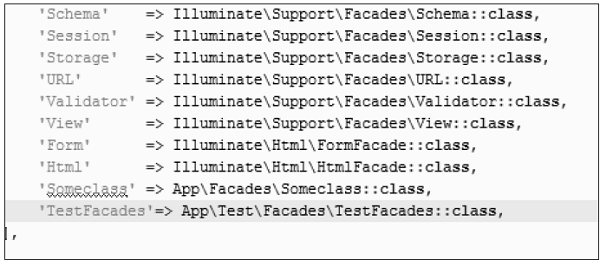
步驟 7 - 在config/app.php檔案中新增別名,如下圖所示。
config/app.php
步驟 8 - 在app/Http/routes.php檔案中新增以下程式碼。
app/Http/routes.php
Route::get('/facadeex', function() {
   return TestFacades::testingFacades();
});
步驟 9 - 訪問以下 URL 來測試門面。
https://:8000/facadeex
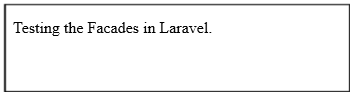
步驟 10 - 訪問 URL 後,您將收到以下輸出: