
- JSF 教程
- JSF - 首頁
- JSF - 概述
- JSF - 環境設定
- JSF - 架構
- JSF - 生命週期
- JSF - 第一個應用程式
- JSF - 託管 Bean
- JSF - 頁面導航
- JSF - 基本標籤
- JSF - Facelet 標籤
- JSF - 轉換器標籤
- JSF - 驗證器標籤
- JSF - DataTable
- JSF - 複合元件
- JSF - Ajax
- JSF - 事件處理
- JSF - JDBC 整合
- JSF - Spring 整合
- JSF - 表示式語言
- JSF - 國際化
- JSF 有用資源
- JSF - 快速指南
- JSF - 有用資源
- JSF - 討論
JSF - ui:param 標籤
使用ui:param 標籤,我們可以將引數傳遞給模板檔案或包含的檔案。
在JSF - 模板標籤章節中,我們學習瞭如何建立和使用模板標籤。我們定義了各種部分,如頁首、頁尾、內容以及組合所有部分的模板。
現在我們將學習 -
如何將引數傳遞到模板的各個部分
如何將引數傳遞到模板
模板部分的引數
建立引數:common.xhtml
將引數新增到 ui:include 標籤。使用ui:param標籤定義一個包含要傳遞到 Header 部分的值的引數。
<ui:insert name = "header" >
   <ui:include src = "/templates/header.xhtml" >
      <ui:param name = "defaultHeader" value = "Default Header" />
   </ui:include>
</ui:insert>
使用引數:header.xhtml
<ui:composition>
   <h1>#{defaultHeader}</h1>
</ui:composition>
模板引數
建立引數:home.xhtml
將引數新增到 ui:composition 標籤。使用ui:param標籤定義一個包含要傳遞到模板的值的引數。
<ui:composition template = "templates/common.xhtml">
   <ui:param name = "title" value = "Home" />
</ui:composition>
使用引數:common.xhtml
<h:body>
   <h2>#{title}</h2>
</h:body>
示例應用程式
讓我們建立一個測試 JSF 應用程式來測試 JSF 中的模板標籤。
| 步驟 | 描述 |
|---|---|
| 1 | 在JSF - 模板標籤章節中說明的包com.tutorialspoint.test下建立一個名為helloworld的專案。 |
| 2 | 修改src → main → webapp → templates資料夾下的header.xhtml和common.xhtml檔案。根據以下說明修改它們。 |
| 3 | 根據以下說明修改home.xhtml。保持其餘檔案不變。 |
| 4 | 編譯並執行應用程式以確保業務邏輯按要求工作。 |
| 5 | 最後,將應用程式構建成 war 檔案並將其部署到 Apache Tomcat Web 伺服器中。 |
| 6 | 使用以下步驟中說明的適當 URL 啟動您的 Web 應用程式。 |
header.xhtml
<?xml version = "1.0" encoding = "UTF-8"?>
<!DOCTYPE html PUBLIC "-//W3C//DTD XHTML 1.0 Transitional//EN"
"http://www.w3.org/TR/xhtml1/DTD/xhtml1-transitional.dtd">

<html xmlns = "http://www.w3.org/1999/xhtml"
   xmlns:ui = "http://java.sun.com/jsf/facelets">

   <body>
      <ui:composition>
         <h1>#{defaultHeader}</h1>
      </ui:composition>
   </body>
</html>
common.xhtml
<?xml version = "1.0" encoding = "UTF-8"?>
<!DOCTYPE html PUBLIC "-//W3C//DTD XHTML 1.0 Transitional//EN"
"http://www.w3.org/TR/xhtml1/DTD/xhtml1-transitional.dtd">

<html xmlns = "http://www.w3.org/1999/xhtml"
   xmlns:h = "http://java.sun.com/jsf/html"
   xmlns:ui = "http://java.sun.com/jsf/facelets">

   <h:head></h:head>
   <h:body>
      <h2>#{title}</h2>

      <div style = "border-width:2px; border-color:green; border-style:solid;">
         <ui:insert name = "header" >
            <ui:include src = "/templates/header.xhtml" >
               <ui:param name = "defaultHeader" value = "Default Header" />
            </ui:include>
         </ui:insert>
      </div>
      <br/>

      <div style = "border-width:2px; border-color:black; border-style:solid;">
         <ui:insert name = "content" >
            <ui:include src = "/templates/contents.xhtml" />
         </ui:insert>
      </div>
      <br/>

      <div style = "border-width:2px; border-color:red; border-style:solid;">
         <ui:insert name = "footer" >
            <ui:include src = "/templates/footer.xhtml" />
         </ui:insert>
      </div>

   </h:body>
</html>
home.xhtml
<?xml version = "1.0" encoding = "UTF-8"?>
<!DOCTYPE html PUBLIC "-//W3C//DTD XHTML 1.0 Transitional//EN"
"http://www.w3.org/TR/xhtml1/DTD/xhtml1-transitional.dtd">

<html xmlns = "http://www.w3.org/1999/xhtml"
   xmlns:h = "http://java.sun.com/jsf/html"
   xmlns:ui = "http://java.sun.com/jsf/facelets">

   <h:body>
      <ui:composition template = "templates/common.xhtml">
         <ui:param name = "title" value = "Home" />

         <ui:define name = "content">
            <br/><br/>
             <h:link value = "Page 1" outcome = "page1" />
             <h:link value = "Page 2" outcome = "page2" />
            <br/><br/>
         </ui:define>
      </ui:composition>
   </h:body>
</html>
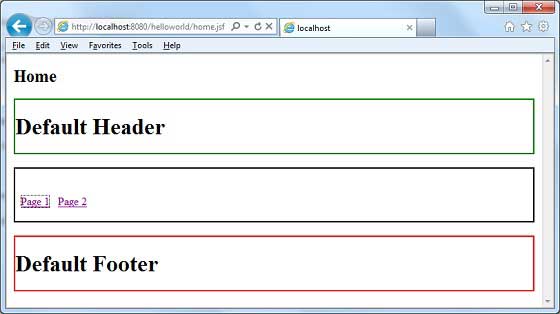
完成所有更改後,讓我們像在 JSF - 第一個應用程式章節中所做的那樣編譯並執行應用程式。如果應用程式一切正常,這將產生以下結果。
jsf_facelets_tags.htm
廣告