
- JSF 教程
- JSF - 首頁
- JSF - 概述
- JSF - 環境設定
- JSF - 架構
- JSF - 生命週期
- JSF - 第一個應用程式
- JSF - 託管Bean
- JSF - 頁面導航
- JSF - 基本標籤
- JSF - Facelet 標籤
- JSF - 轉換器標籤
- JSF - 驗證器標籤
- JSF - DataTable
- JSF - 複合元件
- JSF - Ajax
- JSF - 事件處理
- JSF - JDBC 整合
- JSF - Spring 整合
- JSF - 表示式語言
- JSF - 國際化
- JSF 有用資源
- JSF - 快速指南
- JSF - 有用資源
- JSF - 討論
JSF - 自定義標籤
JSF 為開發者提供了強大的能力來定義自己的自定義標籤,這些標籤可用於呈現自定義內容。
在 JSF 中定義自定義標籤是一個三步過程。
| 步驟 | 描述 |
|---|---|
| 1a | 建立一個 xhtml 檔案,並使用ui:composition標籤在其中定義內容 |
| 1b | 建立一個標籤庫描述符(.taglib.xml 檔案),並在其中宣告上述自定義標籤。 |
| 1c | 在 web.xml 中註冊標籤庫描述符 |
步驟 1a:定義自定義標籤內容:buttonPanel.xhtml
<h:body>
   <ui:composition>
      <h:commandButton type = "submit" value = "#{okLabel}" />
      <h:commandButton type = "reset" value = "#{cancelLabel}" />
   </ui:composition>
</h:body>
步驟 1b:定義標籤庫:tutorialspoint.taglib.xml
顧名思義,標籤庫是一個標籤庫。下表描述了標籤庫的重要屬性。
| 序號 | 節點及描述 |
|---|---|
| 1 | facelet-taglib 包含所有標籤。 |
| 2 | namespace 標籤庫的名稱空間,必須唯一。 |
| 3 | tag 包含單個標籤 |
| 4 | tag-name 標籤名稱 |
| 5 | source 標籤實現 |
<facelet-taglib>
   <namespace>https://tutorialspoint.tw/facelets</namespace>
   <tag>
      <tag-name>buttonPanel</tag-name>
      <source>com/tutorialspoint/buttonPanel.xhtml</source>
   </tag>
</facelet-taglib>
步驟 1c:註冊標籤庫:web.xml
<context-param>
   <param-name>javax.faces.FACELETS_LIBRARIES</param-name>
   <param-value>/WEB-INF/tutorialspoint.taglib.xml</param-value>
</context-param>
在 JSF 中使用自定義標籤是一個兩步過程。
| 步驟 | 描述 |
|---|---|
| 2a | 建立一個 xhtml 檔案並使用自定義標籤庫的名稱空間 |
| 2b | 像使用普通的 JSF 標籤一樣使用自定義標籤 |
步驟 2a:使用自定義名稱空間:home.xhtml
<html xmlns = "http://www.w3.org/1999/xhtml"
   xmlns:h = "http://java.sun.com/jsf/html"
   xmlns:ui = "http://java.sun.com/jsf/facelets">
   xmlns:tp = "https://tutorialspoint.tw/facelets">
步驟 2b:使用自定義標籤:home.xhtml
<h:body>
   <tp:buttonPanel okLabel = "Ok" cancelLabel = "Cancel" />
</h:body>
示例應用程式
讓我們建立一個測試 JSF 應用程式來測試 JSF 中的模板標籤。
| 步驟 | 描述 |
|---|---|
| 1 | 建立一個名為helloworld的專案,放在com.tutorialspoint.test包下,如JSF - 第一個應用程式章節所述。 |
| 2 | 在WEB-INF目錄下建立com資料夾。 |
| 3 | 在WEB-INF > com目錄下建立tutorialspoint資料夾。 |
| 4 | 在WEB-INF > com > tutorialspoint資料夾下建立buttonPanel.xhtml檔案。按如下說明修改它。 |
| 5 | 在WEB-INF資料夾下建立tutorialspoint.taglib.xml檔案。按如下說明修改它。 |
| 6 | 按如下說明修改WEB-INF資料夾下的web.xml檔案。 |
| 7 | 按如下說明修改home.xhtml。保持其餘檔案不變。 |
| 8 | 編譯並執行應用程式以確保業務邏輯按要求工作。 |
| 9 | 最後,將應用程式構建成 war 檔案並將其部署到 Apache Tomcat Web伺服器。 |
| 10 | 使用最後一步中說明的適當 URL 啟動您的 Web 應用程式。 |
buttonPanel.xhtml
<?xml version = "1.0" encoding = "UTF-8"?>
<!DOCTYPE html PUBLIC "-//W3C//DTD XHTML 1.0 Transitional//EN"
"http://www.w3.org/TR/xhtml1/DTD/xhtml1-transitional.dtd">

<html xmlns = "http://www.w3.org/1999/xhtml"
   xmlns:h = "http://java.sun.com/jsf/html"
   xmlns:ui = "http://java.sun.com/jsf/facelets">

   <h:body>
      <ui:composition>
         <h:commandButton type = "submit" value = "#{okLabel}" />
         <h:commandButton type = "reset" value = "#{cancelLabel}" />
      </ui:composition>
   </h:body>
</html>
tutorialspoint.taglib.xml
<?xml version = "1.0"?>
<!DOCTYPE facelet-taglib PUBLIC
"-//Sun Microsystems, Inc.//DTD Facelet Taglib 1.0//EN"
"http://java.sun.com/dtd/facelet-taglib_1_0.dtd">

<facelet-taglib>
   <namespace>https://tutorialspoint.tw/facelets</namespace>

   <tag>
      <tag-name>buttonPanel</tag-name>
      <source>com/tutorialspoint/buttonPanel.xhtml</source>
   </tag>
</facelet-taglib>
web.xml
<!DOCTYPE web-app PUBLIC
"-//Sun Microsystems, Inc.//DTD Web Application 2.3//EN"
"http://java.sun.com/dtd/web-app_2_3.dtd" >

<web-app>
   <display-name>Archetype Created Web Application</display-name>
   <context-param>
      <param-name>javax.faces.PROJECT_STAGE</param-name>
      <param-value>Development</param-value>
   </context-param>

   <context-param>
      <param-name>javax.faces.FACELETS_LIBRARIES</param-name>
      <param-value>/WEB-INF/tutorialspoint.taglib.xml</param-value>
   </context-param>

   <servlet>
      <servlet-name>Faces Servlet</servlet-name>
      <servlet-class>javax.faces.webapp.FacesServlet</servlet-class>
   </servlet>

   <servlet-mapping>
      <servlet-name>Faces Servlet</servlet-name>
      <url-pattern>*.jsf</url-pattern>
   </servlet-mapping>
</web-app>
home.xhtml
<?xml version = "1.0" encoding = "UTF-8"?>
<!DOCTYPE html PUBLIC "-//W3C//DTD XHTML 1.0 Transitional//EN"
"http://www.w3.org/TR/xhtml1/DTD/xhtml1-transitional.dtd">

<html xmlns = "http://www.w3.org/1999/xhtml"
   xmlns:h = "http://java.sun.com/jsf/html"
   xmlns:ui = "http://java.sun.com/jsf/facelets"
   xmlns:tp = "https://tutorialspoint.tw/facelets">

   <h:head>
      <title>JSF tutorial</title>
   </h:head>

   <h:body>
      <h1>Custom Tags Example</h1>
      <tp:buttonPanel okLabel = "Ok" cancelLabel = "Cancel" />
   </h:body>
</html>
完成所有更改後,讓我們像在 JSF - 第一個應用程式章節中那樣編譯並執行應用程式。如果您的應用程式一切正常,這將產生以下結果。
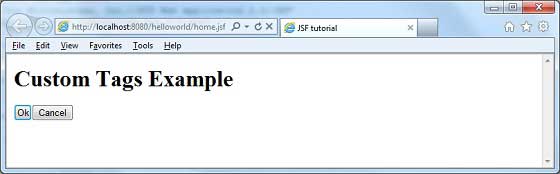
jsf_facelets_tags.htm
廣告