
- JSF 教程
- JSF - 首頁
- JSF - 概述
- JSF - 環境設定
- JSF - 架構
- JSF - 生命週期
- JSF - 第一個應用程式
- JSF - 託管Bean
- JSF - 頁面導航
- JSF - 基本標籤
- JSF - Facelet 標籤
- JSF - 轉換器標籤
- JSF - 驗證器標籤
- JSF - DataTable
- JSF - 複合元件
- JSF - Ajax
- JSF - 事件處理
- JSF - JDBC 整合
- JSF - Spring 整合
- JSF - 表示式語言
- JSF - 國際化
- JSF 有用資源
- JSF - 快速指南
- JSF - 有用資源
- JSF - 討論
JSF - 應用事件
JSF 提供系統事件監聽器,用於在 JSF 應用程式生命週期中執行特定於應用程式的任務。
| 序號 | 系統事件及描述 |
|---|---|
| 1 | PostConstructApplicationEvent 應用程式啟動時觸發。可在應用程式啟動後執行初始化任務。 |
| 2 | PreDestroyApplicationEvent 應用程式即將關閉時觸發。可在應用程式即將關閉之前執行清理任務。 |
| 3 | PreRenderViewEvent 在顯示 JSF 頁面之前觸發。可用於驗證使用者身份併為 JSF 檢視提供受限訪問。 |
系統事件可以按以下方式處理。
| 序號 | 技術及描述 |
|---|---|
| 1 | SystemEventListener 實現 SystemEventListener 介面並在 faces-config.xml 中註冊系統事件監聽器類。 |
| 2 | 方法繫結 在 f:event 的 listener 屬性中傳遞託管 Bean 方法的名稱。 |
SystemEventListener
實現 SystemEventListener 介面。
public class CustomSystemEventListener implements SystemEventListener {

   @Override
   public void processEvent(SystemEvent event) throws
      AbortProcessingException {

      if(event instanceof PostConstructApplicationEvent) {
         System.out.println("Application Started.
            PostConstructApplicationEvent occurred!");
      }
   }
}
在 faces-config.xml 中為系統事件註冊自定義系統事件監聽器。
<system-event-listener>
   <system-event-listener-class>
      com.tutorialspoint.test.CustomSystemEventListener
   </system-event-listener-class>

   <system-event-class>
      javax.faces.event.PostConstructApplicationEvent
   </system-event-class>
</system-event-listener>
方法繫結
定義一個方法
public void handleEvent(ComponentSystemEvent event) {
   data = "Hello World";
}
使用上述方法。
<f:event listener = "#{user.handleEvent}" type = "preRenderView" />
示例應用程式
讓我們建立一個測試 JSF 應用程式來測試 JSF 中的系統事件。
| 步驟 | 描述 |
|---|---|
| 1 | 建立一個名為 helloworld 的專案,位於 com.tutorialspoint.test 包下,如JSF - 第一個應用程式章節中所述。 |
| 2 | 修改 UserData.java 檔案,如下所述。 |
| 3 | 在 com.tutorialspoint.test 包下建立 CustomSystemEventListener.java 檔案。修改它,如下所述。 |
| 4 | 修改 home.xhtml,如下所述。 |
| 5 | 在 WEB-INF 資料夾中建立 faces-config.xml。修改它,如下所述。保持其餘檔案不變。 |
| 6 | 編譯並執行應用程式,以確保業務邏輯按要求工作。 |
| 7 | 最後,將應用程式構建成 war 檔案,並將其部署到 Apache Tomcat Web 伺服器。 |
| 8 | 使用最後一步中說明的適當 URL 啟動您的 Web 應用程式。 |
UserData.java
package com.tutorialspoint.test;

import java.io.Serializable;

import javax.faces.bean.ManagedBean;
import javax.faces.bean.SessionScoped;
import javax.faces.event.ComponentSystemEvent;

@ManagedBean(name = "userData", eager = true)
@SessionScoped
public class UserData implements Serializable {
   private static final long serialVersionUID = 1L;
   private String data = "sample data";

   public void handleEvent(ComponentSystemEvent event) {
      data = "Hello World";
   }

   public String getData() {
      return data;
   }

   public void setData(String data) {
      this.data = data;
   }
}
CustomSystemEventListener.java
package com.tutorialspoint.test;

import javax.faces.application.Application;
import javax.faces.event.AbortProcessingException;
import javax.faces.event.PostConstructApplicationEvent;
import javax.faces.event.PreDestroyApplicationEvent;
import javax.faces.event.SystemEvent;
import javax.faces.event.SystemEventListener;

public class CustomSystemEventListener implements SystemEventListener {

   @Override
   public boolean isListenerForSource(Object value) {

      //only for Application
      return (value instanceof Application);
   }

   @Override
   public void processEvent(SystemEvent event)
      throws AbortProcessingException {

      if(event instanceof PostConstructApplicationEvent) {
         System.out.println("Application Started.
            PostConstructApplicationEvent occurred!");
      }

      if(event instanceof PreDestroyApplicationEvent) {
         System.out.println("PreDestroyApplicationEvent occurred.
            Application is stopping.");
      }
   }
}
home.xhtml
<?xml version = "1.0" encoding = "UTF-8"?>
<!DOCTYPE html PUBLIC "-//W3C//DTD XHTML 1.0 Transitional//EN"
"http://www.w3.org/TR/xhtml1/DTD/xhtml1-transitional.dtd">

<html xmlns = "http://www.w3.org/1999/xhtml"
   xmlns:h = "http://java.sun.com/jsf/html"
   xmlns:f = "http://java.sun.com/jsf/core">

   <h:head>
      <title>JSF tutorial</title>
   </h:head>

   <h:body>
      <h2>Application Events Examples</h2>
      <f:event listener = "#{userData.handleEvent}" type = "preRenderView" />
      #{userData.data}
   </h:body>
</html>
faces-config.xhtml
<?xml version = "1.0" encoding = "UTF-8"?>
<faces-config
   xmlns = "http://java.sun.com/xml/ns/javaee"
   xmlns:xsi = "http://www.w3.org/2001/XMLSchema-instance"
   xsi:schemaLocation = "http://java.sun.com/xml/ns/javaee
   http://java.sun.com/xml/ns/javaee/web-facesconfig_2_0.xsd"
   version = "2.0">

   <application>
      <!-- Application Startup -->
      <system-event-listener>
         <system-event-listener-class>
            com.tutorialspoint.test.CustomSystemEventListener
         </system-event-listener-class>
         <system-event-class>
            javax.faces.event.PostConstructApplicationEvent
         </system-event-class>
      </system-event-listener>

      <!-- Before Application is to shut down -->
      <system-event-listener>
         <system-event-listener-class>
            com.tutorialspoint.test.CustomSystemEventListener
         </system-event-listener-class>
         <system-event-class>
            javax.faces.event.PreDestroyApplicationEvent
         </system-event-class>
      </system-event-listener>
   </application>
</faces-config>
完成所有更改後,讓我們像在 JSF - 第一個應用程式章節中那樣編譯並執行應用程式。如果您的應用程式一切正常,這將產生以下結果。
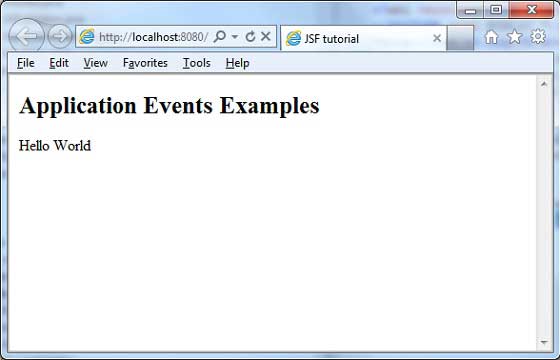
檢視您的 Web 伺服器控制檯輸出。您將看到以下結果。
INFO: Deploying web application archive helloworld.war
Dec 6, 2012 8:21:44 AM com.sun.faces.config.ConfigureListener contextInitialized

INFO: Initializing Mojarra 2.1.7 (SNAPSHOT 20120206) for context '/helloworld'
Application Started. PostConstructApplicationEvent occurred!
Dec 6, 2012 8:21:46 AM com.sun.faces.config.ConfigureListener
$WebConfigResourceMonitor$Monitor <init>

INFO: Monitoring jndi:/localhost/helloworld/WEB-INF/faces-config.xml
for modifications
Dec 6, 2012 8:21:46 AM org.apache.coyote.http11.Http11Protocol start

INFO: Starting Coyote HTTP/1.1 on http-8080
Dec 6, 2012 8:21:46 AM org.apache.jk.common.ChannelSocket init
INFO: JK: ajp13 listening on /0.0.0.0:8009

Dec 6, 2012 8:21:46 AM org.apache.jk.server.JkMain start
INFO: Jk running ID = 0 time = 0/24  config = null
Dec 6, 2012 8:21:46 AM org.apache.catalina.startup.Catalina start
INFO: Server startup in 44272 ms
jsf_event_handling.htm
廣告