
- Java RMI 有用資源
- Java RMI - 快速指南
- Java RMI - 有用資源
- Java RMI - 討論
Java RMI 應用程式
要編寫一個 RMI Java 應用程式,您需要按照以下步驟操作:
- 定義遠端介面
- 開發實現類(遠端物件)
- 開發伺服器程式
- 開發客戶端程式
- 編譯應用程式
- 執行應用程式
定義遠端介面
遠端介面提供特定遠端物件所有方法的描述。客戶端透過此遠端介面進行通訊。
建立遠端介面:
建立一個擴充套件預定義介面Remote的介面,該介面屬於該包。
在此介面中宣告客戶端可以呼叫的所有業務方法。
由於遠端呼叫過程中存在網路問題的可能性,可能會發生名為RemoteException的異常;請丟擲該異常。
以下是一個遠端介面示例。在這裡,我們定義了一個名為Hello的介面,它有一個名為printMsg()的方法。
import java.rmi.Remote;
import java.rmi.RemoteException;

// Creating Remote interface for our application
public interface Hello extends Remote {
   void printMsg() throws RemoteException;
}
開發實現類(遠端物件)
我們需要實現前面步驟中建立的遠端介面。(我們可以單獨編寫實現類,也可以直接讓伺服器程式實現此介面。)
開發實現類:
- 實現上一步中建立的介面。
- 為遠端介面的所有抽象方法提供實現。
以下是一個實現類示例。在這裡,我們建立了一個名為ImplExample的類,並實現了上一步中建立的Hello介面,併為該方法提供了主體,該主體列印一條訊息。
// Implementing the remote interface
public class ImplExample implements Hello {

   // Implementing the interface method
   public void printMsg() {
      System.out.println("This is an example RMI program");
   }
}
開發伺服器程式
RMI 伺服器程式應實現遠端介面或擴充套件實現類。在這裡,我們應該建立一個遠端物件並將其繫結到RMIregistry。
開發伺服器程式:
建立一個客戶端類,從中您可以呼叫遠端物件。
建立遠端物件,方法是例項化實現類,如下所示。
使用名為UnicastRemoteObject的類的exportObject()方法匯出遠端物件,該類屬於java.rmi.server包。
使用java.rmi.registry包中的LocateRegistry類的getRegistry()方法獲取 RMI 登錄檔。
使用名為Registry類的bind()方法將建立的遠端物件繫結到登錄檔。為此方法傳遞一個表示繫結名稱的字串和匯出的物件作為引數。
以下是一個 RMI 伺服器程式示例。
import java.rmi.registry.Registry;
import java.rmi.registry.LocateRegistry;
import java.rmi.RemoteException;
import java.rmi.server.UnicastRemoteObject;

public class Server extends ImplExample {
   public Server() {}
   public static void main(String args[]) {
      try {
         // Instantiating the implementation class
         ImplExample obj = new ImplExample();

         // Exporting the object of implementation class
         // (here we are exporting the remote object to the stub)
         Hello stub = (Hello) UnicastRemoteObject.exportObject(obj, 0);

         // Binding the remote object (stub) in the registry
         Registry registry = LocateRegistry.getRegistry();

         registry.bind("Hello", stub);
         System.err.println("Server ready");
      } catch (Exception e) {
         System.err.println("Server exception: " + e.toString());
         e.printStackTrace();
      }
   }
}
開發客戶端程式
在其中編寫一個客戶端程式,獲取遠端物件並使用此物件呼叫所需的方法。
開發客戶端程式:
建立一個客戶端類,您打算從中呼叫遠端物件。
使用java.rmi.registry包中的LocateRegistry類的getRegistry()方法獲取 RMI 登錄檔。
使用java.rmi.registry包中的Registry類的lookup()方法從登錄檔中獲取物件。
為此方法,您需要傳遞一個表示繫結名稱的字串值作為引數。這將返回遠端物件。
lookup()返回遠端型別的物件,將其向下轉換為Hello型別。
最後使用獲得的遠端物件呼叫所需的方法。
以下是一個 RMI 客戶端程式示例。
import java.rmi.registry.LocateRegistry;
import java.rmi.registry.Registry;

public class Client {
   private Client() {}
   public static void main(String[] args) {
      try {
         // Getting the registry
         Registry registry = LocateRegistry.getRegistry(null);

         // Looking up the registry for the remote object
         Hello stub = (Hello) registry.lookup("Hello");

         // Calling the remote method using the obtained object
         stub.printMsg();

         // System.out.println("Remote method invoked");
      } catch (Exception e) {
         System.err.println("Client exception: " + e.toString());
         e.printStackTrace();
      }
   }
}
編譯應用程式
編譯應用程式:
- 編譯遠端介面。
- 編譯實現類。
- 編譯伺服器程式。
- 編譯客戶端程式。
或者:
開啟您已儲存所有程式的資料夾,並編譯所有 Java 檔案,如下所示。
Javac *.java
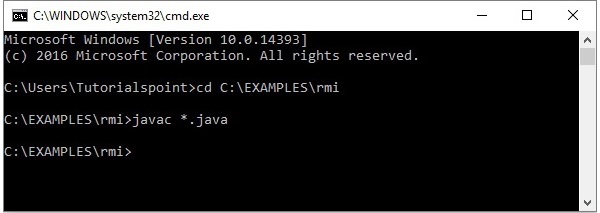
執行應用程式
步驟 1 - 使用以下命令啟動rmi登錄檔。
start rmiregistry
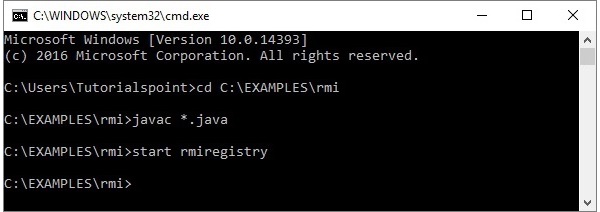
這將在單獨的視窗中啟動一個rmi登錄檔,如下所示。
步驟 2 - 執行伺服器類檔案,如下所示。
Java Server
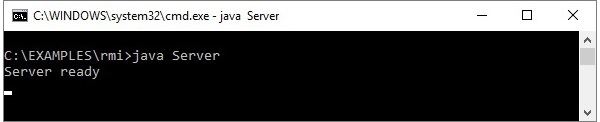
步驟 3 - 執行客戶端類檔案,如下所示。
java Client

驗證 - 啟動客戶端後,您將在伺服器中看到以下輸出。
