
 資料結構
資料結構 網路
網路 關係資料庫管理系統
 作業系統
作業系統 Java
Java MS Excel
 iOS
iOS HTML
HTML CSS
CSS Android
 Python
 C 程式設計
 C++
C++ C#
C# MongoDB
 MySQL
MySQL Javascript
 PHP
PHP 物理學
物理學 化學
化學 生物
生物 數學
數學 英語
英語 經濟
經濟 心理
心理 社會學
社會學 時尚研究
時尚研究 法律研究
法律研究如何使用 JavaFX 建立單選框?
單選框包含一小套多項選擇,並且允許你只選擇其中一項。它將有兩個狀態:顯示和不顯示。在顯示時,你可以在單選框中看到選擇列表,而在不顯示時,則顯示當前選擇。預設情況下,單選框中沒有選擇任何選項。
在 JavaFX 中,單選框由類javafx.scene.control.ChoiceBox<T>表示。你可以透過例項化此類來建立單選框。
此類有一個名為items的屬性,它屬於ObservableList<T>型別,並且包含要在單選框中顯示的選擇列表。你可以使用getItems()方法檢索此列表。
例項化ChoiceBox 類後,你需要獲取可觀察列表,並使用add()或addAll()方法向其中新增所有必需的選擇。
示例
import javafx.application.Application;
import javafx.collections.ObservableList;
import javafx.scene.Group;
import javafx.scene.Scene;
import javafx.scene.control.ChoiceBox;
import javafx.scene.control.Label;
import javafx.scene.paint.Color;
import javafx.scene.text.Font;
import javafx.scene.text.FontPosture;
import javafx.scene.text.FontWeight;
import javafx.stage.Stage;
public class ChoiceBoxExample extends Application {
   public void start(Stage stage) {
      //Creating a choice box
      ChoiceBox<String> choiceBox = new ChoiceBox<String>();
      choiceBox.setValue("English");
      //Retrieving the observable list
      ObservableList<String> list = choiceBox.getItems();
      //Adding items to the list
      list.add("English");
      list.add("Hindi");
      list.add("Telugu");
      list.add("Tamil");
      //Setting the position of the choice box
      choiceBox.setTranslateX(200);
      choiceBox.setTranslateY(15);
      //Setting the label
      Label label = new Label("Select Display Language:");
      Font font = Font.font("verdana", FontWeight.BOLD, FontPosture.REGULAR, 12);
      label.setFont(font);
      label.setTranslateX(20);
      label.setTranslateY(20);
      //Adding the choice box to the group
      Group root = new Group(choiceBox, label);
      //Setting the stage
      Scene scene = new Scene(root, 595, 170, Color.BEIGE);
      stage.setTitle("Choice Box Example");
      stage.setScene(scene);
      stage.show();
   }
   public static void main(String args[]){
      launch(args);
   }
}
輸出
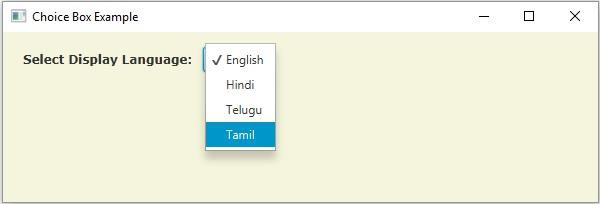

更新於: 18-May-2020
761 次瀏覽

廣告