
 資料結構
資料結構 網路
網路 關係型資料庫管理系統
 作業系統
作業系統 Java
Java MS Excel
 iOS
iOS HTML
HTML CSS
CSS Android
 Python
 C 程式設計
 C++
C++ C#
C# MongoDB
 MySQL
MySQL Javascript
 PHP
PHP 物理
物理 化學
化學 生物
生物 數學
數學 英語
英語 經濟學
經濟學 心理學
心理學 社會學
社會學 時尚研究
時尚研究 法律研究
法律研究如何在 Python 中使用 Matplotlib 迭代建立多個圖表?
Matplotlib 是一個流行的 Python 包,用於資料視覺化。視覺化資料是一個關鍵步驟,因為它有助於理解資料中正在發生的事情,而無需實際檢視數字並執行復雜的計算。它有助於有效地將定量見解傳達給受眾。
Matplotlib 用於使用資料建立二維圖表。它帶有一個面向物件的 API,有助於將圖表嵌入 Python 應用程式中。Matplotlib 可與 IPython shell、Jupyter notebook、Spyder IDE 等一起使用。
它是用 Python 編寫的。它是使用 Numpy 建立的,Numpy 是 Python 中的數值 Python 包。
可以使用以下命令在 Windows 上安裝 Python:
pip install matplotlib
Matplotlib 的依賴項為:
Python ( greater than or equal to version 3.4)
NumPy
Setuptools
Pyparsing
Libpng
Pytz
Free type
Six
Cycler
Dateutil
讓我們瞭解如何使用 Matplotlib 在同一圖表中迭代建立多個圖表:
示例
import numpy as np
import matplotlib.pyplot as plt

fig = plt.figure()
fig.subplots_adjust(top=0.8)
ax1 = fig.add_subplot(211)
ax1.set_ylabel('Y−axis')
ax1.set_title('A simple plot')

t = np.arange(0.0, 1.0, 0.01)
s = np.sin(2*np.pi*t)
line, = ax1.plot(t, s, color='blue', lw=2)
np.random.seed(4567232)

ax2 = fig.add_axes([0.15, 0.1, 0.8, 0.3])
n, bins, patches = ax2.hist(np.random.randn(1000), 50,
                  facecolor='yellow', edgecolor='green')
ax2.set_xlabel('x−label')
plt.show()
輸出
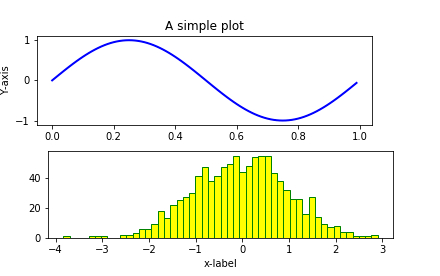
解釋
匯入所需的包併為方便使用定義其別名。
使用“figure”函式建立一個空圖形。
“subplot”函式用於建立繪製圖形的區域。
使用 NumPy 庫建立資料值。
“random”庫的“seed”函式用於建立資料點。
“add_subplot”用於在新建立的圖表中建立另一個新的子圖。
使用“plot”函式繪製資料。
set_xlabel、set_ylabel 和 set_title 函式用於為“X”軸、“Y”軸和標題提供標籤。
它使用“show”函式在控制檯上顯示。

更新於: 2021年1月18日
428 次檢視

廣告