
- Flask 教程
- Flask - 首頁
- Flask - 概述
- Flask - 環境
- Flask - 應用程式
- Flask - 路由
- Flask - 變數規則
- Flask - URL 構建
- Flask - HTTP 方法
- Flask - 模板
- Flask - 靜態檔案
- Flask - 請求物件
- 將表單資料傳送到模板
- Flask - Cookie
- Flask - 會話
- Flask - 重定向和錯誤
- Flask - 訊息閃現
- Flask - 檔案上傳
- Flask - 擴充套件
- Flask - 郵件
- Flask - WTF
- Flask - SQLite
- Flask - SQLAlchemy
- Flask - Sijax
- Flask - 部署
- Flask - FastCGI
- Flask 有用資源
- Flask - 快速指南
- Flask - 有用資源
- Flask - 討論
Flask – SQLite
Python 內建支援 **SQLite**。SQLite3 模組隨 Python 發行版一起提供。有關在 Python 中使用 SQLite 資料庫的詳細教程,請參閱 此連結。在本節中,我們將瞭解 Flask 應用程式如何與 SQLite 互動。
建立一個 SQLite 資料庫 **‘database.db’** 並在其內部建立一個學生表。
import sqlite3

conn = sqlite3.connect('database.db')
print "Opened database successfully";

conn.execute('CREATE TABLE students (name TEXT, addr TEXT, city TEXT, pin TEXT)')
print "Table created successfully";
conn.close()
我們的 Flask 應用程式有三個 **檢視** 函式。
第一個 **new_student()** 函式繫結到 URL 規則 **(‘/addnew’)**。它呈現一個包含學生資訊表單的 HTML 檔案。
@app.route('/enternew')
def new_student():
   return render_template('student.html')
**‘student.html’** 的 HTML 指令碼如下所示:
<html>
   <body>
      <form action = "{{ url_for('addrec') }}" method = "POST">
         <h3>Student Information</h3>
         Name<br>
         <input type = "text" name = "nm" /></br>

         Address<br>
         <textarea name = "add" ></textarea><br>

         City<br>
         <input type = "text" name = "city" /><br>

         PINCODE<br>
         <input type = "text" name = "pin" /><br>
         <input type = "submit" value = "submit" /><br>
      </form>
   </body>
</html>
可以看出,表單資料被髮布到繫結 **addrec()** 函式的 **‘/addrec’** URL。
此 **addrec()** 函式透過 **POST** 方法檢索表單資料並將其插入學生表中。插入操作成功或失敗的訊息將呈現到 **‘result.html’** 中。
@app.route('/addrec',methods = ['POST', 'GET'])
def addrec():
   if request.method == 'POST':
      try:
         nm = request.form['nm']
         addr = request.form['add']
         city = request.form['city']
         pin = request.form['pin']

         with sql.connect("database.db") as con:
            cur = con.cursor()
            cur.execute("INSERT INTO students (name,addr,city,pin)
               VALUES (?,?,?,?)",(nm,addr,city,pin) )

            con.commit()
            msg = "Record successfully added"
      except:
         con.rollback()
         msg = "error in insert operation"

      finally:
         return render_template("result.html",msg = msg)
         con.close()
**result.html** 的 HTML 指令碼包含一個轉義語句 **{{msg}}**,該語句顯示 **插入** 操作的結果。
<!doctype html>
<html>
   <body>
      result of addition : {{ msg }}
      <h2><a href = "\">go back to home page</a></h2>
   </body>
</html>
該應用程式包含另一個由 **‘/list’** URL 表示的 **list()** 函式。它將 **rows** 填充為包含學生表中所有記錄的 **MultiDict** 物件。此物件傳遞給 **list.html** 模板。
@app.route('/list')
def list():
   con = sql.connect("database.db")
   con.row_factory = sql.Row

   cur = con.cursor()
   cur.execute("select * from students")

   rows = cur.fetchall();
   return render_template("list.html",rows = rows)
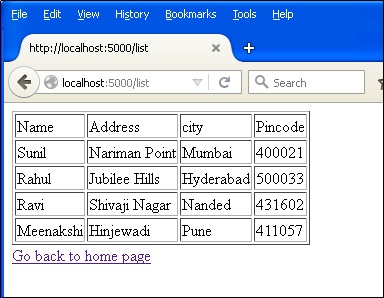
此 **list.html** 是一個模板,它迭代行集並在 HTML 表格中呈現資料。
<!doctype html>
<html>
   <body>
      <table border = 1>
         <thead>
            <td>Name</td>
            <td>Address>/td<
            <td>city</td>
            <td>Pincode</td>
         </thead>

         {% for row in rows %}
            <tr>
               <td>{{row["name"]}}</td>
               <td>{{row["addr"]}}</td>
               <td> {{ row["city"]}}</td>
               <td>{{row['pin']}}</td>
            </tr>
         {% endfor %}
      </table>

      <a href = "/">Go back to home page</a>
   </body>
</html>
最後,**‘/’** URL 規則呈現一個 **‘home.html’**,它充當應用程式的入口點。
@app.route('/')
def home():
   return render_template('home.html')
以下是 **Flask-SQLite** 應用程式的完整程式碼。
from flask import Flask, render_template, request
import sqlite3 as sql
app = Flask(__name__)

@app.route('/')
def home():
   return render_template('home.html')

@app.route('/enternew')
def new_student():
   return render_template('student.html')

@app.route('/addrec',methods = ['POST', 'GET'])
def addrec():
   if request.method == 'POST':
      try:
         nm = request.form['nm']
         addr = request.form['add']
         city = request.form['city']
         pin = request.form['pin']

         with sql.connect("database.db") as con:
            cur = con.cursor()

            cur.execute("INSERT INTO students (name,addr,city,pin)
               VALUES (?,?,?,?)",(nm,addr,city,pin) )

            con.commit()
            msg = "Record successfully added"
      except:
         con.rollback()
         msg = "error in insert operation"

      finally:
         return render_template("result.html",msg = msg)
         con.close()

@app.route('/list')
def list():
   con = sql.connect("database.db")
   con.row_factory = sql.Row

   cur = con.cursor()
   cur.execute("select * from students")

   rows = cur.fetchall();
   return render_template("list.html",rows = rows)

if __name__ == '__main__':
   app.run(debug = True)
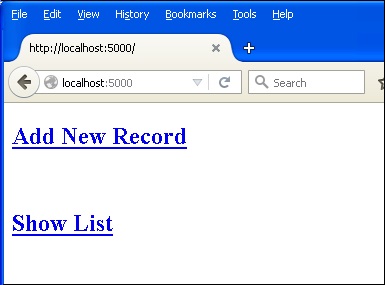
從 Python shell 執行此指令碼,並啟動開發伺服器。在瀏覽器中訪問 **https://:5000/**,它將顯示一個簡單的選單,如下所示:
單擊 **‘新增新記錄’** 連結以開啟 **學生資訊** 表單。
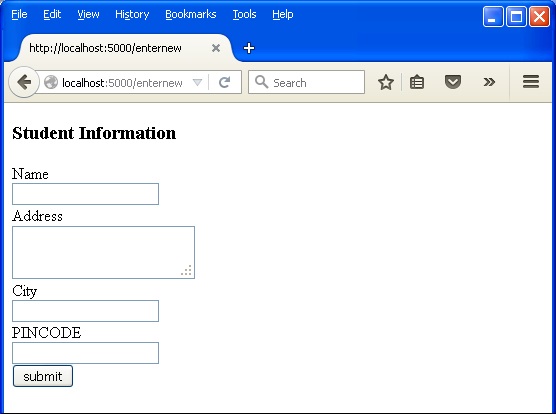
填寫表單欄位並提交。底層函式將記錄插入學生表中。

返回主頁並單擊 **‘顯示列表’** 連結。將顯示顯示示例資料的表格。