

- Flask 教程
- Flask - 主頁
- Flask - 概覽
- Flask - 環境
- Flask - 應用程式
- Flask - 路由
- Flask - 變數規則
- Flask - 構建 URL
- Flask - HTTP 方法
- Flask - 模板
- Flask - 靜態檔案
- Flask - 請求物件
- 將表單資料傳送到模板
- Flask - Cookie
- Flask - 會話
- Flask - 重定向與錯誤
- Flask - 訊息閃爍
- Flask - 檔案上傳
- Flask - 擴充套件
- Flask - 郵件
- Flask - WTF
- Flask - SQLite
- Flask - SQLAlchemy
- Flask - Sijax
- Flask - 部署
- Flask - FastCGI
- Flask 有用資源
- Flask - 快速指南
- Flask - 有用資源
- Flask - 討論
Flask – 將表單資料傳送到模板
我們已瞭解到可在 URL 規則中指定 http 方法。被觸發函式接收到的表單資料可以以字典物件的格式進行收集並將其轉發到模板,以將其渲染到相應的網頁上。
在以下示例中,'/' URL 將渲染網頁 (student.html)(它有一個表單)。其中填入的資料將被提交到'/result' URL,此 URL 將觸發result() 函式。
results() 函式會收集request.form 中存在的表單資料(以字典物件的形式顯示)並將其傳送到result.html進行渲染。
模板會動態渲染表單資料的 HTML 表格。
以下是該應用程式的 Python 程式碼 −
from flask import Flask, render_template, request
app = Flask(__name__)

@app.route('/')
def student():
   return render_template('student.html')

@app.route('/result',methods = ['POST', 'GET'])
def result():
   if request.method == 'POST':
      result = request.form
      return render_template("result.html",result = result)

if __name__ == '__main__':
   app.run(debug = True)
以下是student.html 的 HTML 指令碼。
<html>
   <body>
      <form action = "https://:5000/result" method = "POST">
         <p>Name <input type = "text" name = "Name" /></p>
         <p>Physics <input type = "text" name = "Physics" /></p>
         <p>Chemistry <input type = "text" name = "chemistry" /></p>
         <p>Maths <input type ="text" name = "Mathematics" /></p>
         <p><input type = "submit" value = "submit" /></p>
      </form>
   </body>
</html>
(result.html) 模板程式碼如下所示 −
<!doctype html>
<html>
   <body>
      <table border = 1>
         {% for key, value in result.items() %}
            <tr>
               <th> {{ key }} </th>
               <td> {{ value }} </td>
            </tr>
         {% endfor %}
      </table>
   </body>
</html>
執行 Python 指令碼並在瀏覽器中輸入 URL https://:5000/。
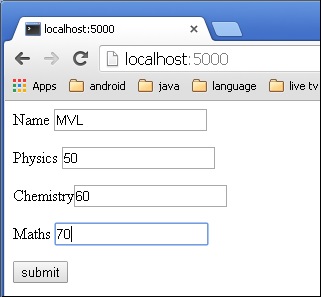
單擊提交按鈕後,表單資料將以 HTML 表格形式在result.html 上渲染。

廣告