
- Espresso測試框架教程
- Espresso測試 - 首頁
- 介紹
- 設定說明
- 在Android Studio中執行測試
- JUnit概述
- 架構
- 檢視匹配器
- 自定義檢視匹配器
- 檢視斷言
- 檢視操作
- 測試AdapterView
- 測試WebView
- 測試非同步操作
- 測試Intent
- 測試多個應用程式的UI
- 測試錄製器
- 測試UI效能
- 測試可訪問性
- Espresso測試資源
- Espresso測試 - 快速指南
- Espresso測試 - 有用資源
- Espresso測試 - 討論
在Android Studio中執行測試
在本章中,讓我們看看如何使用Android Studio執行測試。
每個Android應用程式都有兩種型別的測試:
功能/單元測試
Instrumentation測試
功能測試不需要在裝置或模擬器上安裝和啟動實際的Android應用程式,並測試其功能。它可以在控制檯本身啟動,而無需呼叫實際的應用程式。但是,Instrumentation測試需要啟動實際的應用程式來測試功能,例如使用者介面和使用者互動。預設情況下,單元測試寫在src/test/java/資料夾中,Instrumentation測試寫在src/androidTest/java/資料夾中。Android Studio為測試類提供了執行上下文選單,以執行在選定的測試類中編寫的測試。預設情況下,一個Android應用程式有兩個類:ExampleUnitTest在src/test資料夾中,ExampleInstrumentedTest在src/androidTest資料夾中。
要執行預設的單元測試,請在Android Studio中選擇ExampleUnitTest,右鍵單擊它,然後單擊執行'ExampleUnitTest',如下所示:
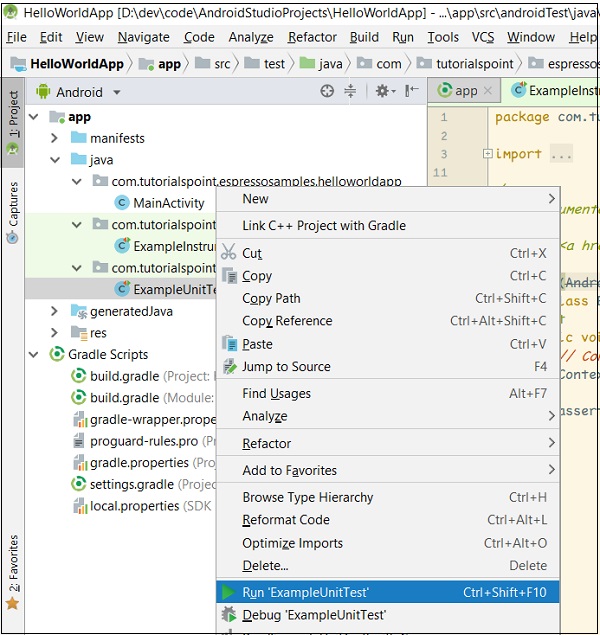
執行單元測試
這將執行單元測試並在控制檯中顯示結果,如下面的螢幕截圖所示:

單元測試成功
要執行預設的Instrumentation測試,請在Android Studio中選擇ExampleInstrumentationTest,右鍵單擊它,然後單擊執行'ExampleInstrumentationTest',如下所示:
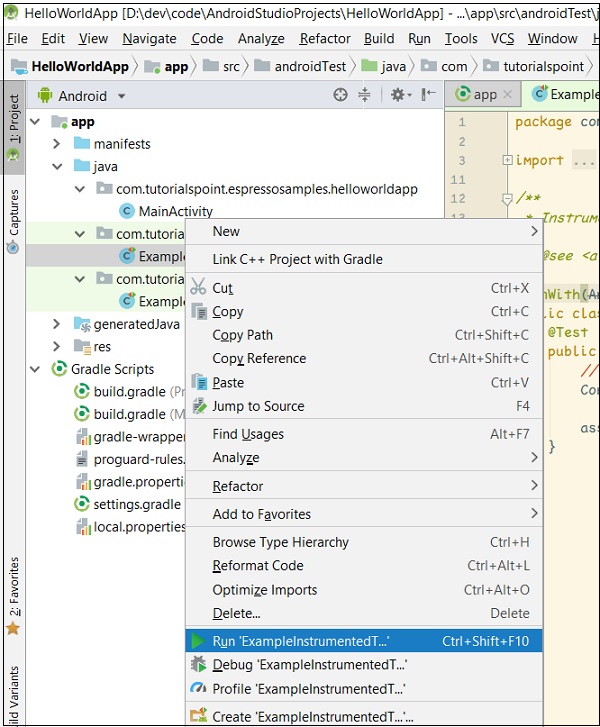
執行Instrumentation測試
這將透過在裝置或模擬器中啟動應用程式來執行單元測試,並在控制檯中顯示結果,如下面的螢幕截圖所示:

Instrumentation測試執行成功。
廣告