
- Espresso 測試框架教程
- Espresso 測試 - 首頁
- 簡介
- 安裝指南
- 在 Android Studio 中執行測試
- JUnit概述
- 架構
- 檢視匹配器
- 自定義檢視匹配器
- 檢視斷言
- 檢視操作
- 測試 AdapterView
- 測試 WebView
- 測試非同步操作
- 測試意圖
- 測試多個應用程式的UI
- 測試錄製器
- 測試UI效能
- 測試輔助功能
- Espresso 測試資源
- Espresso 測試 - 快速指南
- Espresso 測試 - 有用資源
- Espresso 測試 - 討論
非同步操作
本章將學習如何使用 Espresso Idling Resources 測試非同步操作。
現代應用程式面臨的挑戰之一是提供流暢的使用者體驗。提供流暢的使用者體驗需要在後臺進行大量工作,以確保應用程式程序的耗時不超過幾毫秒。後臺任務範圍從簡單的任務到從遠端 API/資料庫獲取資料的複雜且耗時的任務。
如果開發多執行緒應用程式很複雜,那麼為其編寫測試用例就更加複雜。例如,在從資料庫載入必要資料之前,我們不應該測試 AdapterView。如果在單獨的執行緒中完成資料獲取,則測試需要等到執行緒完成。因此,需要在後臺執行緒和 UI 執行緒之間同步測試環境。Espresso 為測試多執行緒應用程式提供了極好的支援。應用程式以以下方式使用執行緒,Espresso 支援每種場景。
使用者介面執行緒
Android SDK 內部使用它來為複雜的 UI 元素提供流暢的使用者體驗。Espresso 透明地支援此場景,不需要任何配置和特殊編碼。
非同步任務
現代程式語言支援非同步程式設計,可以在不增加執行緒程式設計複雜性的情況下進行輕量級執行緒處理。Espresso 框架也透明地支援非同步任務。
使用者執行緒
開發者可以啟動一個新執行緒來從資料庫獲取複雜或大型資料。為了支援這種情況,Espresso 提供了空閒資源的概念。
讓我們學習本章中的空閒資源概念以及如何使用它。
概述
空閒資源的概念非常簡單直觀。其基本思想是在單獨的執行緒中啟動任何長時間執行的程序時建立一個變數(布林值),以識別該程序是否正在執行,並在測試環境中註冊它。在測試期間,測試執行器將檢查註冊的變數(如果找到),然後查詢其執行狀態。如果執行狀態為 true,測試執行器將等待直到狀態變為 false。
Espresso 提供了一個介面 IdlingResources 用於維護執行狀態。主要實現方法是 isIdleNow()。如果 isIdleNow() 返回 true,Espresso 將恢復測試過程;否則,將等待直到 isIdleNow() 返回 false。我們需要實現 IdlingResources 並使用派生類。Espresso 還提供了一些內建的 IdlingResources 實現,以減輕我們的工作量。它們如下:
CountingIdlingResource
它維護一個內部執行任務計數器。它公開了 increment() 和 decrement() 方法。increment() 將計數器加一,decrement() 將計數器減一。只有在沒有活動任務時,isIdleNow() 才返回 true。
UriIdlingResource
這類似於 CountingIdlingResource,只是計數器需要為零一段時間才能考慮網路延遲。
IdlingThreadPoolExecutor
這是 ThreadPoolExecutor 的自定義實現,用於維護當前執行緒池中活動執行任務的數量。
IdlingScheduledThreadPoolExecutor
這類似於 IdlingThreadPoolExecutor,但它也排程任務,並且是 ScheduledThreadPoolExecutor 的自定義實現。
如果在應用程式中使用了上述任何 IdlingResources 實現或自定義實現,我們需要在使用 IdlingRegistry 類測試應用程式之前將其註冊到測試環境中,如下所示:
IdlingRegistry.getInstance().register(MyIdlingResource.getIdlingResource());
此外,測試完成後可以將其移除,如下所示:
IdlingRegistry.getInstance().unregister(MyIdlingResource.getIdlingResource());
Espresso 在一個單獨的包中提供此功能,需要在 app.gradle 中進行如下配置。
dependencies {
   implementation 'androidx.test.espresso:espresso-idling-resource:3.1.1'
   androidTestImplementation "androidx.test.espresso.idling:idlingconcurrent:3.1.1"
}
示例應用程式
讓我們建立一個簡單的應用程式,透過在單獨的執行緒中從 Web 服務獲取水果列表,然後使用空閒資源的概念對其進行測試。
啟動 Android Studio。
建立新專案(如前所述),並將其命名為 MyIdlingFruitApp
使用“重構”→“遷移到 AndroidX”選項選單將應用程式遷移到 AndroidX 框架。
在 app/build.gradle 中新增 Espresso 空閒資源庫(並同步),如下所示:
dependencies {
   implementation 'androidx.test.espresso:espresso-idling-resource:3.1.1'
   androidTestImplementation "androidx.test.espresso.idling:idlingconcurrent:3.1.1"
}
刪除主活動中的預設設計並新增 ListView。activity_main.xml 的內容如下所示:
<?xml version = "1.0" encoding = "utf-8"?>
<RelativeLayout xmlns:android = "http://schemas.android.com/apk/res/android"
   xmlns:app = "http://schemas.android.com/apk/res-auto"
   xmlns:tools = "http://schemas.android.com/tools"
   android:layout_width = "match_parent"
   android:layout_height = "match_parent"
   tools:context = ".MainActivity">
   <ListView
      android:id = "@+id/listView"
      android:layout_width = "wrap_content"
      android:layout_height = "wrap_content" />
</RelativeLayout>
新增新的佈局資源 item.xml 來指定列表檢視的專案模板。item.xml 的內容如下所示:
<?xml version = "1.0" encoding = "utf-8"?>
<TextView xmlns:android = "http://schemas.android.com/apk/res/android"
   android:id = "@+id/name"
   android:layout_width = "fill_parent"
   android:layout_height = "fill_parent"
   android:padding = "8dp"
/>
建立一個新類 – MyIdlingResource。MyIdlingResource 用於在一個地方儲存我們的 IdlingResource,並在需要時獲取它。在本例中,我們將使用
CountingIdlingResource。
package com.tutorialspoint.espressosamples.myidlingfruitapp;
import androidx.test.espresso.IdlingResource;
import androidx.test.espresso.idling.CountingIdlingResource;

public class MyIdlingResource {
   private static CountingIdlingResource mCountingIdlingResource =
      new CountingIdlingResource("my_idling_resource");
   public static void increment() {
      mCountingIdlingResource.increment();
   }
   public static void decrement() {
      mCountingIdlingResource.decrement();
   }
   public static IdlingResource getIdlingResource() {
      return mCountingIdlingResource;
   }
}
在 MainActivity 類中宣告一個全域性變數 mIdlingResource,型別為 CountingIdlingResource,如下所示:
@Nullable
private CountingIdlingResource mIdlingResource = null;
編寫一個私有方法,從 Web 獲取水果列表,如下所示:
private ArrayList<String> getFruitList(String data) {
   ArrayList<String> fruits = new ArrayList<String>();
   try {
      // Get url from async task and set it into a local variable
      URL url = new URL(data);
      Log.e("URL", url.toString());

      // Create new HTTP connection
      HttpURLConnection conn = (HttpURLConnection) url.openConnection();

      // Set HTTP connection method as "Get"
      conn.setRequestMethod("GET");

      // Do a http request and get the response code
      int responseCode = conn.getResponseCode();

      // check the response code and if success, get response content
      if (responseCode == HttpURLConnection.HTTP_OK) {
         BufferedReader in = new BufferedReader(new InputStreamReader(conn.getInputStream()));
         String line;
         StringBuffer response = new StringBuffer();
         while ((line = in.readLine()) != null) {
            response.append(line);
         }
         in.close();
         JSONArray jsonArray = new JSONArray(response.toString());
         Log.e("HTTPResponse", response.toString());
         for(int i = 0; i < jsonArray.length(); i++) {
            JSONObject jsonObject = jsonArray.getJSONObject(i);
            String name = String.valueOf(jsonObject.getString("name"));
            fruits.add(name);
         }
      } else {
         throw new IOException("Unable to fetch data from url");
      }
      conn.disconnect();
   } catch (IOException | JSONException e) {
      e.printStackTrace();
   }
   return fruits;
}
在 onCreate() 方法中建立一個新任務,使用我們的 getFruitList 方法從 Web 獲取資料,然後建立一個新介面卡並將其設定到列表檢視。一旦我們的工作線上程中完成,也減少空閒資源。程式碼如下所示:
// Get data
class FruitTask implements Runnable {
   ListView listView;
   CountingIdlingResource idlingResource;
   FruitTask(CountingIdlingResource idlingRes, ListView listView) {
      this.listView = listView;
      this.idlingResource = idlingRes;
   }
   public void run() {
      //code to do the HTTP request
      final ArrayList<String> fruitList = getFruitList("http://<your domain or IP>/fruits.json");
      try {
         synchronized (this){
            runOnUiThread(new Runnable() {
               @Override
               public void run() {
                  // Create adapter and set it to list view
                  final ArrayAdapter adapter = new
                     ArrayAdapter(MainActivity.this, R.layout.item, fruitList);
                  ListView listView = (ListView)findViewById(R.id.listView);
                  listView.setAdapter(adapter);
               }
            });
         }
      } catch (Exception e) {
         e.printStackTrace();
      }
      if (!MyIdlingResource.getIdlingResource().isIdleNow()) {
         MyIdlingResource.decrement(); // Set app as idle.
      }
   }
}
此處,水果 URL 被視為 http://<你的域名或IP/fruits.json,並格式化為 JSON。內容如下所示:
[
   {
      "name":"Apple"
   },
   {
      "name":"Banana"
   },
   {
      "name":"Cherry"
   },
   {
      "name":"Dates"
   },
   {
      "name":"Elderberry"
   },
   {
      "name":"Fig"
   },
   {
      "name":"Grapes"
   },
   {
      "name":"Grapefruit"
   },
   {
      "name":"Guava"
   },
   {
      "name":"Jack fruit"
   },
   {
      "name":"Lemon"
   },
   {
      "name":"Mango"
   },
   {
      "name":"Orange"
   },
   {
      "name":"Papaya"
   },
   {
      "name":"Pears"
   },
   {
      "name":"Peaches"
   },
   {
      "name":"Pineapple"
   },
   {
      "name":"Plums"
   },
   {
      "name":"Raspberry"
   },
   {
      "name":"Strawberry"
   },
   {
      "name":"Watermelon"
   }
]
注意 – 將檔案放在本地 Web 伺服器上並使用它。
現在,查詢檢視,透過傳遞 FruitTask 建立一個新執行緒,增加空閒資源,最後啟動任務。
// Find list view
ListView listView = (ListView) findViewById(R.id.listView);
Thread fruitTask = new Thread(new FruitTask(this.mIdlingResource, listView));
MyIdlingResource.increment();
fruitTask.start();
MainActivity 的完整程式碼如下所示:
package com.tutorialspoint.espressosamples.myidlingfruitapp;

import androidx.annotation.NonNull;
import androidx.annotation.Nullable;
import androidx.annotation.VisibleForTesting;
import androidx.appcompat.app.AppCompatActivity;
import androidx.test.espresso.idling.CountingIdlingResource;

import android.os.Bundle;
import android.util.Log;
import android.widget.ArrayAdapter;
import android.widget.ListView;

import org.json.JSONArray;
import org.json.JSONException;
import org.json.JSONObject;

import java.io.BufferedReader;
import java.io.IOException;
import java.io.InputStreamReader;
import java.net.HttpURLConnection;
import java.net.URL;
import java.util.ArrayList;

public class MainActivity extends AppCompatActivity {
   @Nullable
   private CountingIdlingResource mIdlingResource = null;
   @Override
   protected void onCreate(Bundle savedInstanceState) {
      super.onCreate(savedInstanceState);
      setContentView(R.layout.activity_main);

      // Get data
      class FruitTask implements Runnable {
         ListView listView;
         CountingIdlingResource idlingResource;
         FruitTask(CountingIdlingResource idlingRes, ListView listView) {
            this.listView = listView;
            this.idlingResource = idlingRes;
         }
         public void run() {
            //code to do the HTTP request
            final ArrayList<String> fruitList = getFruitList(
               "http://<yourdomain or IP>/fruits.json");
            try {
               synchronized (this){
                  runOnUiThread(new Runnable() {
                     @Override
                     public void run() {
                        // Create adapter and set it to list view
                        final ArrayAdapter adapter = new ArrayAdapter(
                           MainActivity.this, R.layout.item, fruitList);
                        ListView listView = (ListView) findViewById(R.id.listView);
                        listView.setAdapter(adapter);
                     }
                  });
               }
            } catch (Exception e) {
               e.printStackTrace();
            }
            if (!MyIdlingResource.getIdlingResource().isIdleNow()) {
               MyIdlingResource.decrement(); // Set app as idle.
            }
         }
      }
      // Find list view
      ListView listView = (ListView) findViewById(R.id.listView);
      Thread fruitTask = new Thread(new FruitTask(this.mIdlingResource, listView));
      MyIdlingResource.increment();
      fruitTask.start();
   }
   private ArrayList<String> getFruitList(String data) {
      ArrayList<String> fruits = new ArrayList<String>();
      try {
         // Get url from async task and set it into a local variable
         URL url = new URL(data);
         Log.e("URL", url.toString());

         // Create new HTTP connection
         HttpURLConnection conn = (HttpURLConnection) url.openConnection();

         // Set HTTP connection method as "Get"
         conn.setRequestMethod("GET");

         // Do a http request and get the response code
         int responseCode = conn.getResponseCode();

         // check the response code and if success, get response content
         if (responseCode == HttpURLConnection.HTTP_OK) {
            BufferedReader in = new BufferedReader(new InputStreamReader(conn.getInputStream()));
            String line;
            StringBuffer response = new StringBuffer();
            while ((line = in.readLine()) != null) {
               response.append(line);
            }
            in.close();
            JSONArray jsonArray = new JSONArray(response.toString());
            Log.e("HTTPResponse", response.toString());

            for(int i = 0; i < jsonArray.length(); i++) {
               JSONObject jsonObject = jsonArray.getJSONObject(i);
               String name = String.valueOf(jsonObject.getString("name"));
               fruits.add(name);
            }
         } else {
            throw new IOException("Unable to fetch data from url");
         }
         conn.disconnect();
      } catch (IOException | JSONException e) {
         e.printStackTrace();
      }
      return fruits;
   }
}
現在,在應用程式清單檔案 AndroidManifest.xml 中新增以下配置
<uses-permission android:name = "android.permission.INTERNET" />
現在,編譯上述程式碼並執行應用程式。“我的空閒水果應用程式”的螢幕截圖如下所示:
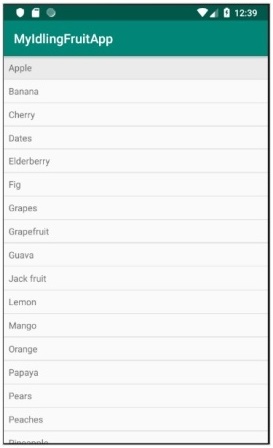
現在,開啟 ExampleInstrumentedTest.java 檔案,並新增如下所示的 ActivityTestRule:
@Rule
public ActivityTestRule<MainActivity> mActivityRule =
   new ActivityTestRule<MainActivity>(MainActivity.class);
Also, make sure the test configuration is done in app/build.gradle
dependencies {
   testImplementation 'junit:junit:4.12'
   androidTestImplementation 'androidx.test:runner:1.1.1'
   androidTestImplementation 'androidx.test:rules:1.1.1'
   androidTestImplementation 'androidx.test.espresso:espresso-core:3.1.1'
   implementation 'androidx.test.espresso:espresso-idling-resource:3.1.1'
   androidTestImplementation "androidx.test.espresso.idling:idlingconcurrent:3.1.1"
}
新增一個新的測試用例來測試列表檢視,如下所示:
@Before
public void registerIdlingResource() {
   IdlingRegistry.getInstance().register(MyIdlingResource.getIdlingResource());
}
@Test
public void contentTest() {
   // click a child item
   onData(allOf())
   .inAdapterView(withId(R.id.listView))
   .atPosition(10)
   .perform(click());
}
@After
public void unregisterIdlingResource() {
   IdlingRegistry.getInstance().unregister(MyIdlingResource.getIdlingResource());
}
最後,使用 Android Studio 的上下文選單執行測試用例,並檢查所有測試用例是否成功。