
- Django 基本概念
- Django - 首頁
- Django - 基礎
- Django - 概述
- Django - 環境
- Django - 建立專案
- Django - 應用生命週期
- Django - 建立檢視
- Django - URL 對映
- Django - 首頁
- Django - 模板系統
- Django - MVT
- Django - 新增主模板
- Django 管理員
- Django 管理員 - 介面
- Django 管理員 - 建立使用者
- Django 管理員 - 包含模型
- Django 管理員 - 設定顯示欄位
- Django 管理員 - 更新物件
- Django 模型
- Django - 模型
- Django - 插入資料
- Django - 更新資料
- Django - 刪除資料
- Django - 更新模型
- Django 靜態檔案
- Django - 新增靜態檔案
- Django - 新增 CSS 檔案
- Django 高階
- Django - 頁面未找到 (404)
- Django - 頁面重定向
- Django - 傳送電子郵件
- Django - 通用檢視
- Django - 表單處理
- Django - 檔案上傳
- Django - Apache 設定
- Django - Cookie 處理
- Django - 會話
- Django - 快取
- Django - 評論
- Django - RSS
- Django - AJAX
- Django 有用資源
- Django - 快速指南
- Django - 有用資源
- Django - 討論
Django – 插入資料
Django 有自己的物件關係模型 (ORM),它將 Python 類與關係資料庫中的表對映起來。ORM 機制有助於以面向物件的方式執行 CRUD 操作。在本章中,我們將學習插入新資料的方法。
預設情況下,Django 使用 SQLite 資料庫。Django 中的模型是從“django.db.models”類繼承的類。
讓我們在“models.py”檔案中使用以下Dreamreal 模型來學習如何在對映的表中插入資料:
from django.db import models

class Dreamreal(models.Model):
   website = models.CharField(max_length=50)
   mail = models.CharField(max_length=50)
   name = models.CharField(max_length=50)
   phonenumber = models.IntegerField()

   class Meta:
      db_table = "dreamreal"
宣告模型後,我們需要執行遷移:
python manage.py makemigrations
python manage.py migrate
從 Shell 插入物件
Django 具有一個有用的功能,您可以使用它在 Django 專案的環境中呼叫 Python shell。使用manage.py指令碼的 shell 命令:
python manage.py shell
在 Python 提示符前,匯入 Dreamreal 模型:
>>> from myapp.models import Dreamreal
我們可以構造此類的物件並呼叫其 save() 方法,以便在表中新增相應的行
>>> obj = Dreamreal(website="www.polo.com", mail="sorex@polo.com", name="sorex", phonenumber="002376970")
>>> obj.save()
我們可以透過在任何 SQLite 檢視器中開啟資料庫來確認這一點。
您還可以使用模型類的物件屬性的 create() 方法插入記錄。
>>> obj = Dreamreal.objects.create(website="www.polo.com",
mail="sorex@polo.com", name="sorex", phonenumber="002376970")
透過呼叫檢視函式執行插入操作
現在讓我們透過呼叫檢視函式來執行插入操作。在views.py檔案中定義addnew()函式,如下所示:
from myapp.models import Dreamreal

def addnew(request):
   obj = Dreamreal(website="www.polo.com", mail="sorex@polo.com", name="sorex", phonenumber="002376970")
   obj.save()
   return HttpResponse("<h2>Record Added Successfully")
我們需要將此檢視註冊到 URLpatterns 列表中。
from django.urls import path
from . import views

urlpatterns = [
   path("", views.index, name="index"),
   path("addnew/", views.addnew, name='addnew')
]
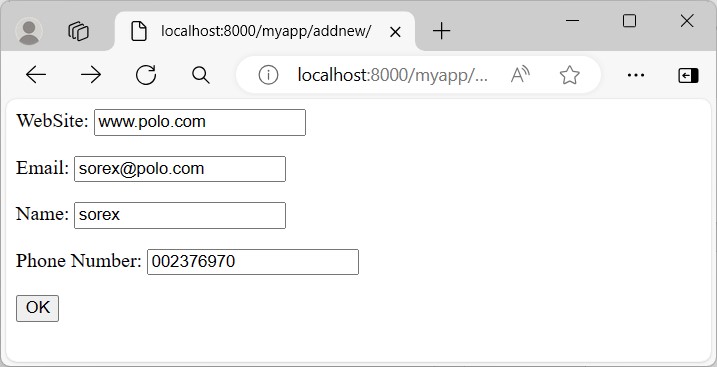
與其像上述示例中那樣使用硬編碼值,不如希望從使用者那裡接受資料。為此,在myform.html檔案中建立一個 HTML 表單。
<html>
<body>
   <form action="../addnew/" method="post">
      {% csrf_token %}
      <p><label for="website">WebSite: </label>
      <input id="website" type="text" name="website"></p>
      <p><label for="mail">Email: </label>
      <input id="mail" type="text" name="mail"></p>
      <p><label for="name">Name: </label>
      <input id="name" type="text" name="name"></p>
      <p><label for="phonenumber">Phone Number: </label>
      <input id="phonenumber" type="text" name="phonenumber"></p>
      <input type="submit" value="OK">
   </form>
</body>
</html>
HTML 模板檔案必須儲存在 TEMPLATES 設定中定義的目錄中:
TEMPLATES = [
   {
      'BACKEND': 'django.template.backends.django.DjangoTemplates',
      'DIRS': [BASE_DIR/'templates'],
   .. . .,
]
讓我們使用 render() 函式顯示錶單模板:
from django.shortcuts import render
from myapp.models import Dreamreal

def addnew(request):
   if request.method == "POST":
      ws = request.POST['website']
      mail = request.POST['mail']
      nm = request.POST['name']
      ph = request.POST['phonenumber']
      obj = Dreamreal(website=ws, mail=mail, name=nm, phonenumber=ph)
      obj.save()
      return HttpResponse("<h2>Record Added Successfully</h2>")
   return render(request, "myform.html")
請注意,表單的 action 屬性也設定為對映 addnew() 函式的相同 URL。因此,我們需要檢查 request.method。如果是 GET 方法,則呈現空白表單。如果是 POST 方法,則解析表單資料並將其用於插入新記錄。
模型表單
Django 有一個ModelForm類,它會自動呈現一個 HTML 表單,其結構與模型類的屬性匹配。
我們在應用資料夾下的forms.py檔案中定義了一個DreamRealForm類,它使用Dreamreal 模型作為基礎。
from django import forms
from .models import Dreamreal

class DreamrealForm(forms.ModelForm):
   class Meta:
      model = Dreamreal
      fields = "__all__"
模型表單的物件在 HTML 表單上呈現。如果請求方法是 POST,則 ModelForm 類的 save() 方法會自動驗證表單並儲存新記錄。
from .forms import DreamrealForm
def addnew(request):
   if request.method == 'POST':
      form = DreamrealForm(request.POST)
      if form.is_valid():
         form.save()
            return HttpResponse("<h2>Book added successfully</h2>")

   context={'form' : DreamrealForm}
   return render(request, "myform.html", context)

CreateView 類
Django 定義了一組通用檢視類。CreateView類專門用於執行 INSERT 查詢操作。
我們定義CreateView類的子類,並將它的template_name屬性設定為我們已經建立的myform.html。
在views.py檔案中新增以下程式碼:
from django.views.generic import CreateView
class DRCreateView(CreateView):
   model = Dreamreal
   fields = "__all__"
   template_name = 'myform.html'
   success_url = '../success/'
插入成功後,瀏覽器將重定向到 success() 檢視函式。
def success(request):
   return HttpResponse("<h2>Book added successfully</h2>")
上述兩個檢視都必須包含在urls.py檔案的 URL 模式列表中。通用檢視類使用它們的 as_view() 方法註冊。
from django.urls import path
from . import views
from .views import DRCreateView

urlpatterns = [
   path("", views.index, name="index"),
   path("addnew/", views.addnew, name='addnew'),
   path("add/", DRCreateView.as_view(), name='add'),
   path("success/", views.success, name='success'),
]
在本章中,我們學習了在 Django 模型中插入資料的不同方法。