
- Django基礎概念
- Django - 首頁
- Django - 基礎知識
- Django - 概述
- Django - 環境搭建
- Django - 建立專案
- Django - 應用生命週期
- Django - 建立檢視
- Django - URL對映
- Django - 首頁頁面
- Django - 模板系統
- Django - MVT
- Django - 新增主模板
- Django Admin後臺
- Django Admin - 介面
- Django Admin - 建立使用者
- Django Admin - 包含模型
- Django Admin - 設定顯示欄位
- Django Admin - 更新物件
- Django 模型
- Django - 模型
- Django - 插入資料
- Django - 更新資料
- Django - 刪除資料
- Django - 更新模型
- Django 靜態檔案
- Django - 新增靜態檔案
- Django - 新增CSS檔案
- Django 高階應用
- Django - 404頁面未找到
- Django - 頁面重定向
- Django - 傳送郵件
- Django - 通用檢視
- Django - 表單處理
- Django - 檔案上傳
- Django - Apache配置
- Django - Cookie處理
- Django - Session會話
- Django - 快取
- Django - 評論功能
- Django - RSS
- Django - AJAX
- Django 有用資源
- Django - 快速指南
- Django - 有用資源
- Django - 討論
Django - 新增CSS檔案
CSS(層疊樣式表)是全球資訊網的重要組成部分,與HTML和JavaScript並列。它是一種樣式表語言,用於指定HTML文件的呈現和樣式。
CSS檔案是靜態資源
在Django中,CSS檔案被稱為靜態資源。它們放置在應用“包”資料夾內建立的static資料夾中。
靜態資源可以使用以下模板標籤訪問:
{% load static %}
通常,CSS檔案使用以下語句包含在HTML程式碼中,通常放置在<head>部分。
<link rel="stylesheet" type="text/css" href="styles.css" />
但是,要將CSS作為靜態資源包含,其路徑應使用{% static %}標籤指定,如下所示:
<link rel="stylesheet" type="text/css" href="{% static 'style.css' %}">
將CSS應用於城市名稱
我們將展示如何將CSS應用於網頁中顯示為無序列表的城市名稱。
讓我們定義以下index()檢視,它將城市列表作為上下文傳遞給“cities.html”模板
from django.shortcuts import render

def index(request):
   cities = ['Mumbai', 'New Delhi', 'Kolkata', 'Bengaluru', 'Chennai', 'Hyderabad']
   return render(request, "cities.html", {"cities":cities})
cities.html
在“cities.html”模板中,我們首先在HEAD部分載入CSS檔案。每個名稱都使用for迴圈模板標籤在<li>…</li>標籤中呈現。
<html>
<head>
   {% load static %}
   <link rel="stylesheet" type="text/css" href="{% static 'style.css' %}">
</head>
<body>
   <h2>List of Cities</h2>
   <ul>
      {% for city in cities %}
         <li>{{ city }} </li>
      {% endfor %}
   </ul>
</body>
</html>
style.css
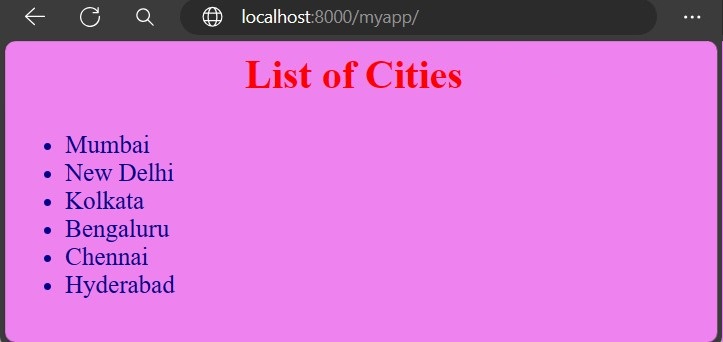
我們將為網頁應用背景顏色,並設定其字型大小和顏色。
將以下程式碼儲存為“style.css”,並將其放入static資料夾。
h2 {
   text-align: center;
   font-size:xx-large;
   color:red;
}

ul li {
   color: darkblue;
   font-size:20;
}

body {
   background-color: violet;
}
註冊index()檢視
index()檢視在Django應用的urlpatterns中註冊,如下所示:
from django.urls import path
from . import views

urlpatterns = [
   path("", views.index, name="index"),
]
https://:8000/myapp/ URL將根據上述樣式顯示城市列表:
廣告