
- CodeIgniter 教程
- CodeIgniter - 首頁
- CodeIgniter - 概述
- CodeIgniter - 安裝 CodeIgniter
- CodeIgniter - 應用架構
- CodeIgniter - MVC 框架
- CodeIgniter - 基本概念
- CodeIgniter - 配置
- CodeIgniter - 資料庫操作
- CodeIgniter - 庫
- CodeIgniter - 錯誤處理
- CodeIgniter - 檔案上傳
- CodeIgniter - 傳送郵件
- CodeIgniter - 表單驗證
- CodeIgniter - 會話管理
- CodeIgniter - Flash 資料
- CodeIgniter - Temp 資料
- CodeIgniter - Cookie 管理
- CodeIgniter - 常用函式
- CodeIgniter - 頁面快取
- CodeIgniter - 頁面重定向
- CodeIgniter - 應用效能分析
- CodeIgniter - 基準測試
- CodeIgniter - 新增JS和CSS
- CodeIgniter - 國際化
- CodeIgniter - 安全性
- CodeIgniter 有用資源
- CodeIgniter - 快速指南
- CodeIgniter - 有用資源
- CodeIgniter - 討論
CodeIgniter - 新增JS和CSS
在 CodeIgniter 中新增 JavaScript 和 CSS(層疊樣式表)檔案非常簡單。您需要在根目錄下建立 JS 和 CSS 資料夾,並將所有 .js 檔案複製到 JS 資料夾,並將 .css 檔案複製到 CSS 資料夾,如圖所示。
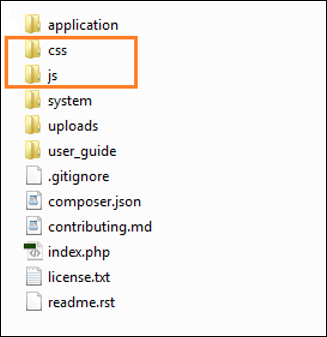
例如,假設您建立了一個 JavaScript 檔案 **sample.js** 和一個 CSS 檔案 **style.css**。現在,要將這些檔案新增到您的檢視中,請在您的控制器中載入 URL 輔助函式,如下所示。
$this->load->helper('url');
在控制器中載入 URL 輔助函式後,只需在檢視檔案中新增以下幾行程式碼,即可在檢視中載入 sample.js 和 style.css 檔案,如下所示。
<link rel = "stylesheet" type = "text/css"
   href = "<?php echo base_url(); ?>css/style.css">

<script type = 'text/javascript' src = "<?php echo base_url();
   ?>js/sample.js"></script>
示例
建立一個名為 **Test.php** 的控制器,並將其儲存到 **application/controller/Test.php**
<?php
   class Test extends CI_Controller {

      public function index() {
         $this->load->helper('url');
         $this->load->view('test');
      }
   }
?>
建立一個名為 **test.php** 的檢視檔案,並將其儲存到 **application/views/test.php**
<!DOCTYPE html>
<html lang = "en">

   <head>
      <meta charset = "utf-8">
      <title>CodeIgniter View Example</title>
      <link rel = "stylesheet" type = "text/css"
         href = "<?php echo base_url(); ?>css/style.css">
      <script type = 'text/javascript' src = "<?php echo base_url();
         ?>js/sample.js"></script>
   </head>

   <body>
      <a href = 'javascript:test()'>Click Here</a> to execute the javascript function.
   </body>

</html>
建立一個名為 **style.css** 的 CSS 檔案,並將其儲存到 **css/style.css**
body {
   background:#000;
   color:#FFF;
}
建立一個名為 **sample.js** 的 JS 檔案,並將其儲存到 **js/sample.js**
function test() {
   alert('test');
}
修改 **application/config/routes.php** 中的 **routes.php** 檔案,為上述控制器新增路由,並在檔案末尾新增以下行。
$route['profiler'] = "Profiler_controller";
$route['profiler/disable'] = "Profiler_controller/disable"
在瀏覽器中使用以下 URL 執行上述示例。
http://yoursite.com/index.php/test
廣告