
- Chart.js 教程
- Chart.js - 首頁
- Chart.js - 簡介
- Chart.js - 安裝
- Chart.js - 語法
- Chart.js - 基礎
- Chart.js - 顏色
- Chart.js - 選項
- Chart.js - 互動
- Chart.js - 圖例
- Chart.js - 標題
- Chart.js - 動畫
- Chart.js - 工具提示
- Chart.js - 折線圖
- Chart.js - 條形圖
- Chart.js - 雷達圖
- Chart.js - 環形圖
- Chart.js - 餅圖
- Chart.js - 極地區域圖
- Chart.js - 氣泡圖
- Chart.js - 散點圖
- Chart.js - 混合圖
- Chart.js - 笛卡爾座標軸
- Chart.js - 分類座標軸
- Chart.js - 極座標軸
- Chart.js 實用資源
- Chart.js - 快速指南
- Chart.js - 實用資源
- Chart.js - 討論
Chart.js - 散點圖
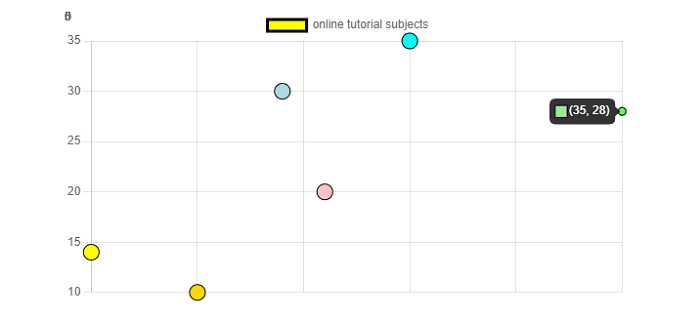
Chart.js 散點圖基本上基於簡單的折線圖,但其 X 軸已更改為線性軸。建立散點圖時,您必須將資料作為物件傳遞,其中包含 X 和 Y 屬性。
以下是氣泡圖中用於資料集屬性的名稱空間 -
data.datasets[index] - 它僅為此資料集提供選項。
options.datasets.scatter - 它為所有散點資料集提供選項。
options.datasets.line - 它為所有折線資料集提供選項。
options.elements.point - 它為所有點元素提供選項。
Options - 它為整個圖表提供選項
我們需要使用 type: "scatter" 來建立散點圖。
例項
讓我們透過一個示例來建立散點狀圖表 -
<!DOCTYPE>
<html>
<head>
   <meta charset- "UTF-8" />
   <meta name="viewport" content="width=device-width, initial-scale=1" />
   <title>chart.js</title>
</head>
<body>
   <canvas id="chartId" aria-label="chart" height="300" width="580"></canvas>
   <script src="https://cdnjs.cloudflare.com/ajax/libs/Chart.js/3.1.1/chart.min.js"></script>
   <script>
      var chrt = document.getElementById("chartId").getContext("2d");
      var chartId = new Chart(chrt, {
         type: 'scatter',
         data: {
            labels: ["HTML", "CSS", "JAVASCRIPT", "CHART.JS", "JQUERY", "BOOTSTRP"],
            datasets: [{
               label: "online tutorial subjects",
               data: [
                  {x:10, y:14},
                  {x:25, y:35},
                  {x:21, y:20},
                  {x:35, y:28},
                  {x:15, y:10},
                  {x:19, y:30},
               ],
               backgroundColor: ['yellow', 'aqua', 'pink', 'lightgreen', 'gold', 'lightblue'],
               borderColor: ['black'],
               radius: 8,
            }],
         },
         options: {
            responsive: false,
            scales: {
               x: {
                  type: 'linear',
                  position: 'bottom,'
               }
            }
         },
      });
   </script>
</body>
</html>
輸出
廣告