- Angular CLI 教程
- Angular CLI - 首頁
- Angular CLI - 概述
- Angular CLI - 環境設定
- Angular CLI 命令
- Angular CLI - ng version
- Angular CLI - ng new
- Angular CLI - ng help
- Angular CLI - ng generate
- Angular CLI - ng build
- Angular CLI - ng run
- Angular CLI - ng serve
- Angular CLI - ng lint
- Angular CLI - ng test
- Angular CLI - ng e2e
- Angular CLI - ng add
- Angular CLI - ng analytics
- Angular CLI - ng config
- Angular CLI - ng doc
- Angular CLI - ng update
- Angular CLI - ng xi18n
- Angular CLI - 程式碼覆蓋率
- Angular CLI 有用資源
- Angular CLI 快速指南
- Angular CLI - 有用資源
- Angular CLI - 討論
Angular CLI 快速指南
Angular CLI - 概述
Angular 命令列介面 (CLI) 使啟動任何 Angular 專案變得容易。它附帶了一些命令,可以幫助我們快速建立和啟動專案。現在讓我們一起了解一下可用於建立專案、元件和服務、更改埠等的命令。
要使用 Angular CLI,我們需要在系統上安裝它。讓我們使用以下命令來完成此操作:
npm install -g @angular/cli
要建立一個新專案,我們可以在命令列中執行以下命令,專案將被建立。
ng new PROJECT-NAME
cd PROJECT-NAME
ng serve //
ng serve // 將編譯專案,您可以在瀏覽器中看到專案的輸出:
https://:4200/
4200 是建立新專案時使用的預設埠。您可以使用以下命令更改埠:
ng serve --host 0.0.0.0 --port 4201
Angular 4 命令
下表列出了一些在使用 Angular 4 專案時需要的一些重要命令。
| 序號 | 命令及描述 |
|---|---|
| 1 | 元件 ng g component new−component |
| 2 | 指令 ng g directive new−directive |
| 3 | 管道 ng g pipe new−pipe |
| 4 | 服務 ng g service new−service |
| 5 | 模組 ng g module my−module |
每當建立新的模組、元件或服務時,其引用都會在父模組 app.module.ts 中更新。
Angular CLI - 環境設定
要使用 Angular CLI,我們需要在系統上安裝 Node。讓我們詳細瞭解 Angular CLI 所需的環境設定。
下載 Node.js 歸檔檔案
從 Node.js 下載(位於 https://nodejs.com.tw/download/)下載最新版本的 Node.js 可安裝歸檔檔案。在撰寫本教程時,不同作業系統上可用的版本如下所示:
| 作業系統 | 歸檔檔名 |
|---|---|
| Windows | node-v6.3.1-x64.msi |
| Linux | node-v6.3.1-linux-x86.tar.gz |
| Mac | node-v6.3.1-darwin-x86.tar.gz |
| SunOS | node-v6.3.1-sunos-x86.tar.gz |
在 UNIX/Linux/Mac OS X 和 SunOS 上安裝
根據您的作業系統架構,下載並解壓縮歸檔檔案 node-v6.3.1-osname.tar.gz 到 /tmp,然後最終將解壓縮的檔案移動到 /usr/local/nodejs 目錄。
例如:
$ cd /tmp
$ wgethttps://nodejs.com.tw/dist/v6.3.1/node-v6.3.1-linux-x64.tar.gz
$ tar xvfz node-v6.3.1-linux-x64.tar.gz
$ mkdir -p /usr/local/nodejs
$ mv node-v6.3.1-linux-x64/*/usr/local/nodejs
將 /usr/local/nodejs/bin 新增到 PATH 環境變數。
| 作業系統 | 輸出 |
|---|---|
| Linux | export PATH=$PATH:/usr/local/nodejs/bin |
| Mac | export PATH=$PATH:/usr/local/nodejs/bin |
| FreeBSD | export PATH=$PATH:/usr/local/nodejs/bin |
在 Windows 上安裝
使用 MSI 檔案並按照提示安裝 Node.js。預設情況下,安裝程式在 C:\Program Files\nodejs 中使用 Node.js 分發版。
安裝程式應在 Windows PATH 環境變數中設定 C:\ProgramFiles\nodejs\bin 目錄。重新啟動任何開啟的命令提示符以使更改生效。
驗證安裝:執行檔案
在您的機器(Windows 或 Linux)上建立一個名為 main.json 的 js 檔案,其中包含以下程式碼:
/* Hello, World! program in node.js */
console.log("Hello, World!")
即時演示連結為 https://tutorialspoint.tw/execute_nodejs_online.php。
現在,使用 Node.js 直譯器執行 main.js 檔案以檢視結果:
$ node main.js
如果您的安裝一切正常,這應該會產生以下結果:
Hello, World!
現在,Node 已安裝。您可以執行以下命令來安裝 Angular CLI。
npm install -g @angular/cli
驗證安裝
現在,執行以下命令以檢視結果:
$ ng --version
如果您的安裝一切正常,這應該會產生以下結果:
     _                      _                 ____ _     ___
    / \   _ __   __ _ _   _| | __ _ _ __     / ___| |   |_ _|
   / ? \ | '_ \ / _` | | | | |/ _` | '__|   | |   | |    | |
  / ___ \| | | | (_| | |_| | | (_| | |      | |___| |___ | |
 /_/   \_\_| |_|\__, |\__,_|_|\__,_|_|       \____|_____|___|
                |___/
Angular CLI: 9.1.0
Node: 12.16.1
OS: win32 x64
Angular:
...
Ivy Workspace:
Package                      Version
------------------------------------------------------
@angular-devkit/architect    0.901.0
@angular-devkit/core         9.1.0
@angular-devkit/schematics   9.1.0
@schematics/angular          9.1.0
@schematics/update           0.901.0
rxjs                         6.5.4
在 Windows 上,如果 ng 未被識別為內部或外部命令,請更新系統路徑變數以包含以下路徑。
C:\Users\<User Directory>\AppData\Roaming\npm
Angular CLI - ng version 命令
本章解釋了 ng version 命令的語法、選項以及示例。
語法
ng version 命令的語法如下:
ng version [options]
ng v [options]
ng version 命令顯示已安裝的 Angular CLI 版本。
選項
選項是可選引數。
| 序號 | 選項及語法 | 描述 |
|---|---|---|
| 1 | --help=true|false|json|JSON | 在控制檯中顯示此命令的幫助訊息。預設值:false |
示例
ng version 命令的示例如下:
\>Node ng version
     _                      _                 ____ _     ___
    / \   _ __   __ _ _   _| | __ _ _ __     / ___| |   |_ _|
   / ? \ | '_ \ / _` | | | | |/ _` | '__|   | |   | |    | |
  / ___ \| | | | (_| | |_| | | (_| | |      | |___| |___ | |
 /_/   \_\_| |_|\__, |\__,_|_|\__,_|_|       \____|_____|___|
                |___/
Angular CLI: 9.1.0
Node: 12.16.1
OS: win32 x64
Angular:
...
Ivy Workspace:
Package                      Version
------------------------------------------------------
@angular-devkit/architect    0.901.0
@angular-devkit/core         9.1.0
@angular-devkit/schematics   9.1.0
@schematics/angular          9.1.0
@schematics/update           0.901.0
rxjs                         6.5.4
Angular CLI - ng new 命令
本章解釋了 ng new 命令的語法、引數和選項以及示例。
語法
ng new 命令的語法如下:
ng new <name> [options]
ng n <name> [options]
ng new 命令建立一個具有給定名稱的工作區,幷包含一個預設的 Angular 應用程式。
它提供互動式提示來設定可選配置。所有提示都具有預設值可供選擇。
引數
ng new 命令的引數如下:
| 序號 | 引數及語法 | 描述 |
|---|---|---|
| 1 | <name> | 新工作區和初始專案的名稱。 |
選項
選項是可選引數。
| 序號 | 選項及語法 | 描述 |
|---|---|---|
| 1 | --collection=collection | 用於生成初始應用程式的架構集合。 別名:-c。 |
| 2 | --commit=true|false | 初始 git 儲存庫提交資訊。 預設值:true。 |
| 3 | --createApplication=true|false | 如果為 true(預設值),則在新工作區的 src 資料夾中建立一個新的初始應用程式專案。如果為 false,則建立一個沒有初始應用程式的空工作區。然後,您可以使用生成應用程式命令,以便所有應用程式都在 projects 資料夾中建立。 預設值:true。 |
| 4 | -defaults=true|false | 如果為 true,則停用具有預設值的選項的互動式輸入提示。 |
| 5 | --directory=directory | 要在其中建立工作區的目錄名稱。 |
| 6 | --dryRun=true|false | 如果為 true,則執行並報告活動,而不寫入結果。 預設值:false。 別名:-d。 |
| 7 | --force=true|false | 如果為 true,則強制覆蓋現有檔案。 預設值:false。 別名:-f。 |
| 8 | --help=true|false|json|JSON | 在控制檯中顯示此命令的幫助訊息。 預設值:false。 |
| 9 | --inlineStyle=true|false | 如果為 true,則在元件 TS 檔案中內聯包含樣式。預設情況下,會建立一個外部樣式檔案並在元件 TS 檔案中引用它。 預設值:false。 |
| 10 | --inlineStyle=true|false | 如果為 true,則在元件 TS 檔案中內聯包含樣式。預設情況下,會建立一個外部樣式檔案並在元件 TS 檔案中引用它。 預設值:false。 別名:-t。 |
| 11 | --interactive=true|false | 如果為 true,則建立一個沒有任何測試框架的專案。(僅用於學習目的。) 預設值:false。 |
| 12 | --newProjectRoot=newProjectRoot | 相對於新工作區根目錄,將在其中建立新專案的路徑。 預設值:projects。 |
| 13 | --packageManager=npm|yarn|pnpm|cnpm | 用於安裝依賴項的包管理器。 |
| 14 | --prefix=prefix | 應用於初始專案的生成選擇器的字首。 預設值:app。 別名:-p。 |
| 15 | --prefix=prefix | 應用於初始專案的生成選擇器的字首。 預設值:app。 別名:-p。 |
| 16 | --routing=true|false | 如果為 true,則為初始專案生成一個路由模組。 |
| 17 | --skipGit=true|false | 如果為 true,則不會初始化 git 儲存庫。 預設值:false。 別名:-g。 |
| 18 | --skipInstall=true|false | 如果為 true,則不會安裝依賴項包。 預設值:false。 |
| 19 | --skipTests=true|false | 如果為 true,則不會為新專案生成“spec.ts”測試檔案。 預設值:false。 別名:-S。 |
| 20 | --strict=true|false | 建立一個具有更嚴格 TypeScript 編譯器選項的工作區。 預設值:false。 |
| 21 | --style=css|scss|sass|less|styl | 用於樣式檔案的副檔名或預處理器。 |
| 22 | --verbose=true|false | 如果為 true,則向輸出日誌新增更多詳細資訊。 預設值:false。 別名:-v。 |
| 23 | -- viewEncapsulation=Emulated|Native|None|ShadowDom | 在初始專案中使用的檢視封裝策略。 |
示例
ng new 命令的示例如下:
\>Node ng new TutorialsPoint
? Would you like to add Angular routing? Yes
? Which stylesheet format would you like to use? CSS
CREATE TutorialsPoint/angular.json (3630 bytes)
CREATE TutorialsPoint/package.json (1291 bytes)
CREATE TutorialsPoint/README.md (1031 bytes)
CREATE TutorialsPoint/tsconfig.json (489 bytes)
CREATE TutorialsPoint/tslint.json (3125 bytes)
CREATE TutorialsPoint/.editorconfig (274 bytes)
CREATE TutorialsPoint/.gitignore (631 bytes)
CREATE TutorialsPoint/browserslist (429 bytes)
CREATE TutorialsPoint/karma.conf.js (1026 bytes)
CREATE TutorialsPoint/tsconfig.app.json (210 bytes)
CREATE TutorialsPoint/tsconfig.spec.json (270 bytes)
CREATE TutorialsPoint/src/favicon.ico (948 bytes)
CREATE TutorialsPoint/src/index.html (300 bytes)
CREATE TutorialsPoint/src/main.ts (372 bytes)
CREATE TutorialsPoint/src/polyfills.ts (2835 bytes)
CREATE TutorialsPoint/src/styles.css (80 bytes)
CREATE TutorialsPoint/src/test.ts (753 bytes)
CREATE TutorialsPoint/src/assets/.gitkeep (0 bytes)
CREATE TutorialsPoint/src/environments/environment.prod.ts (51 bytes)
CREATE TutorialsPoint/src/environments/environment.ts (662 bytes)
CREATE TutorialsPoint/src/app/app-routing.module.ts (246 bytes)
CREATE TutorialsPoint/src/app/app.module.ts (393 bytes)
CREATE TutorialsPoint/src/app/app.component.html (25755 bytes)
CREATE TutorialsPoint/src/app/app.component.spec.ts (1083 bytes)
CREATE TutorialsPoint/src/app/app.component.ts (218 bytes)
CREATE TutorialsPoint/src/app/app.component.css (0 bytes)
CREATE TutorialsPoint/e2e/protractor.conf.js (808 bytes)
CREATE TutorialsPoint/e2e/tsconfig.json (214 bytes)
CREATE TutorialsPoint/e2e/src/app.e2e-spec.ts (647 bytes)
CREATE TutorialsPoint/e2e/src/app.po.ts (301 bytes)
Packages installed successfully.
在這裡,ng new 命令在我們的 Node 目錄中建立了一個 Angular 工作區和一個名為 TutorialsPoint 的專案。
Angular CLI - ng help 命令
本章解釋了 ng help 命令的語法和選項以及示例。
語法
ng help 命令的示例如下:
ng help [options]
ng help 命令列出可用的命令及其簡短描述。
選項
選項是可選引數。
| 序號 | 選項及語法 | 描述 |
|---|---|---|
| 1 | --help= true|false|json|JSON | 在控制檯中顯示此命令的幫助訊息。預設值:false |
示例 1
ng help 命令的示例如下:
\>Node ng help
Available Commands:
   add Adds support for an external library to your project.
   analytics Configures the gathering of Angular CLI usage metrics. See
https://v
8.angular.io/cli/usage-analytics-gathering.
   build (b) Compiles an Angular app into an output directory named dist/ at the
given output path. Must be executed from within a workspace directory.
   deploy Invokes the deploy builder for a specified project or for the default
project in the workspace.
   config Retrieves or sets Angular configuration values in the angular.json
file
   for the workspace.
      doc (d) Opens the official Angular documentation (angular.io) in a browser,
an
d searches for a given keyword.
   e2e (e) Builds and serves an Angular app, then runs end-to-end tests using
Pro
tractor.
   generate (g) Generates and/or modifies files based on a schematic.
   help Lists available commands and their short descriptions.
   lint (l) Runs linting tools on Angular app code in a given project folder.
   new (n) Creates a new workspace and an initial Angular app.
   run Runs an Architect target with an optional custom builder configuration
defined in your project.
   serve (s) Builds and serves your app, rebuilding on file changes.
   test (t) Runs unit tests in a project.
   update Updates your application and its dependencies. See
https://update.angular.io/
   version (v) Outputs Angular CLI version.
   xi18n (i18n-extract) Extracts i18n messages from source code.
For more detailed help run "ng [command name] --help"
對於單個命令,請使用 --help 或 -h 選項與命令一起使用。首先移動到使用 ng new 命令建立的 Angular 專案,然後執行命令。解釋 ng new 命令的章節可在 https://tutorialspoint.tw/angular_cli/angular_cli_ng_new.htm 找到。
示例 2
示例如下:
\>Node\>TutorialsPoint> ng serve --help
Builds and serves your app, rebuilding on file changes.
usage: ng serve <project> [options]
arguments:
   project
      The name of the project to build. Can be an application or a library.
options:
   --allowed-hosts
      Whitelist of hosts that are allowed to access the dev server.
   --aot
      Build using Ahead of Time compilation.
   --base-href
      Base url for the application being built.
   --browser-target
      Target to serve.
   --build-event-log
      **EXPERIMENTAL** Output file path for Build Event Protocol events
   --common-chunk
      Use a separate bundle containing code used across multiple bundles.
   --configuration (-c)
      A named build target, as specified in the "configurations" section of angular.json.
   Each named target is accompanied by a configuration of option defaults for t hat target.
   Setting this explicitly overrides the "--prod" flag
   --deploy-url
      URL where files will be deployed.
   --disable-host-check
      Don't verify connected clients are part of allowed hosts.
   --eval-source-map
      Output in-file eval sourcemaps.
   --help
      Shows a help message for this command in the console.
   --hmr
      Enable hot module replacement.
   --hmr-warning
      Show a warning when the --hmr option is enabled.
   --host
      Host to listen on.
   --live-reload
      Whether to reload the page on change, using live-reload.
   --open (-o)
      Opens the url in default browser.
   --optimization
      Enables optimization of the build output.
   --poll
      Enable and define the file watching poll time period in milliseconds.
   --port
      Port to listen on.
   --prod
      Shorthand for "--configuration=production".
      When true, sets the build configuration to the production target.
      By default, the production target is set up in the workspace
configuration such that all builds make use of bundling, limited tree-shaking, and also
limited
   dead code elimination.
   --progress
      Log progress to the console while building.
   --proxy-config
      Proxy configuration file.
   --public-host
      The URL that the browser client (or live-reload client, if enabled)
should u
see to connect to the development server. Use for a complex dev server setup,
such as one with reverse proxies.
   --serve-path
      The pathname where the app will be served.
   --serve-path-default-warning
      Show a warning when deploy-url/base-href use unsupported serve path
values.
   --source-map
      Output sourcemaps.
   --ssl
      Serve using HTTPS.
   --ssl-cert
      SSL certificate to use for serving HTTPS.
   --ssl-key
      SSL key to use for serving HTTPS.
   --vendor-chunk
      Use a separate bundle containing only vendor libraries.
   --vendor-source-map
      Resolve vendor packages sourcemaps.
   --verbose
      Adds more details to output logging.
   --watch
      Rebuild on change.
Angular CLI - ng generate 命令
本章解釋了 ng generate 命令的語法、引數和選項以及示例。
語法
ng generate 命令的語法如下:
ng generate <schematic> [options]
ng g <schematic> [options]
ng generate 命令根據架構生成和/或修改檔案。
引數
ng help 命令的引數如下:
| 序號 | 引數及語法 | 描述 |
|---|---|---|
| 1 | <schematic> | 要生成的架構或 collection:schematic。此選項可以採用以下子命令之一
|
選項
選項是可選引數。
| 序號 | 選項及語法 | 描述 |
|---|---|---|
| 1 | --defaults=true|false | 如果為 true,則停用具有預設值的選項的互動式輸入提示。 |
| 2 | --dryRun=true|false | 如果為 true,則執行並報告活動,而不寫入結果。 預設值:false。 別名:-d。 |
| 3 | --force=true|false | 如果為 true,則強制覆蓋現有檔案。 預設值:false。 別名:-f。 |
| 4 | --help=true|false|json|JSON | 在控制檯中顯示幫助訊息。 預設值:false。 |
| 5 | --interactive=true|false | 如果為 false,則停用互動式輸入提示。 |
首先移動到使用 ng new 命令建立的 Angular 專案,然後執行命令。此章節可在 https://tutorialspoint.tw/angular_cli/angular_cli_ng_new.htm 找到。
示例
ng generate 命令的示例如下:
\>Node\>TutorialsPoint> ng generate component goals
CREATE src/app/goals/goals.component.html (20 bytes)
CREATE src/app/goals/goals.component.spec.ts (621 bytes)
CREATE src/app/goals/goals.component.ts (271 bytes)
CREATE src/app/goals/goals.component.css (0 bytes)
UPDATE src/app/app.module.ts (471 bytes)
在這裡,ng generate 命令在我們的 TutorialsPoint 專案中建立了一個新元件,並在 app.module.ts 中添加了此新元件條目。
Angular CLI - ng build 命令
本章解釋了 ng build 命令的語法、引數和選項以及示例。
語法
ng build 命令的語法如下:
ng build <project> [options]
ng b <project> [options]
ng build 命令將 Angular 應用程式/庫編譯到指定路徑的 dist 目錄中。
引數
ng build 命令的引數如下:
| 序號 | 引數及語法 | 描述 |
|---|---|---|
| 1 | <project> | 要構建的應用程式或庫的名稱。 |
選項
選項是可選引數。
| 序號 | 選項及語法 | 描述 |
|---|---|---|
| 1 | --aot=true|false |
使用提前編譯構建。 預設值:false。 |
| 2 | --baseHref=baseHref | 正在構建的應用程式的基本 URL。 |
| 3 | --buildEventLog=buildEventLog | 實驗性構建事件協議事件的輸出檔案路徑。 |
| 4 | --buildOptimizer=true|false | 在使用“aot”選項時啟用“@angular-devkit/build-optimizer”最佳化。 預設值:false。 |
| 5 | --commonChunk=true|false |
使用一個單獨的包來包含跨多個包使用的程式碼。 預設值:false。 |
| 6 | --configuration=configuration | 一個命名的構建目標,如 angular.json 的“configurations”部分中指定。每個命名目標都伴隨著該目標的選項預設配置。顯式設定此項會覆蓋“--prod”標誌。 別名:-c。 |
| 7 | --crossOrigin=none|anonymous|use-credentials |
定義提供 CORS 支援的元素的 crossorigin 屬性設定。 預設值:none。 |
| 8 | --deleteOutputPath=true|false |
在構建之前刪除輸出路徑。 預設值:true。 |
| 9 | --deployUrl=deployUrl | 檔案將部署到的 URL。 |
| 10 | --experimentalRollupPass=true|false |
在使用 Webpack 將模組捆綁在一起之前,使用 Rollup 將它們連線起來。 預設值:false。 |
| 11 | --extractCss=true|false |
將全域性樣式中的 CSS 提取到 CSS 檔案中,而不是 JS 檔案中。 預設值:false。 |
| 12 | --extractLicenses=true|false |
將所有許可證提取到一個單獨的檔案中。 預設值:false。 |
| 13 | --forkTypeChecker=true|false |
在 fork 程序中執行 TypeScript 型別檢查器。 預設值:true。 |
| 14 | --help=true|false|json|JSON |
在控制檯中顯示此命令的幫助訊息。 預設值:false。 |
| 15 | --i18nMissingTranslation=warning|error|ignore |
如何處理 i18n 的缺失翻譯。 預設值:warning。 |
| 16 | --index=index | 配置應用程式 HTML index 的生成。 |
| 17 | --localize=true|false | |
| 18 | --main=main | 應用程式主入口點的完整路徑,相對於當前工作區。 |
| 19 | --namedChunks=true|false |
使用檔名作為延遲載入的塊名稱。 預設值:true。 |
| 20 | --ngswConfigPath=ngswConfigPath | ngsw-config.json 檔案的路徑。 |
| 21 | --optimization=true|false | 啟用構建輸出的最佳化。 |
| 22 | --outputHashing=none|all|media|bundles |
定義輸出檔名快取清除雜湊模式。 預設值:none。 |
| 23 | --outputPath=outputPath | 新輸出目錄的完整路徑,相對於當前工作區。預設情況下,將輸出寫入當前專案中名為 dist/ 的資料夾中。 |
| 24 | --poll | 啟用並定義檔案監視輪詢時間段(以毫秒為單位)。 |
| 25 | --polyfills=polyfills | polyfills 檔案的完整路徑,相對於當前工作區。 |
| 26 | --preserveSymlinks=true|false |
在解析模組時不使用真實路徑。 預設值:false。 |
| 27 | --prod=true|false | “--configuration=production”的簡寫。如果為 true,則將構建配置設定為生產目標。預設情況下,生產目標在工作區配置中設定,以便所有構建都使用捆綁、有限的 tree-shaking 以及有限的死程式碼消除。 |
| 28 | --progress=true|false |
在構建過程中將進度日誌輸出到控制檯。 預設值:true。 |
| 27 | --resourcesOutputPath=resourcesOutputPath | 樣式資源將放置到的路徑,相對於 outputPath。 |
| 28 | --serviceWorker=true|false |
為生產構建生成 Service Worker 配置。 預設值:false。 |
| 29 | --showCircularDependencies=true|false |
顯示構建過程中的迴圈依賴警告。 預設值:true。 |
| 30 | --sourceMap=true|false |
輸出 Source Map。 預設值:true。 |
| 31 | --statsJson=true|false |
生成一個“stats.json”檔案,可以使用“webpack-bundle-analyzer”等工具對其進行分析。 預設值:false。 |
| 32 | --subresourceIntegrity=true|false |
啟用子資源完整性驗證。 預設值:false。 |
| 33 | --tsConfig=tsConfig | TypeScript 配置檔案的完整路徑,相對於當前工作區。 |
| 34 | --vendorChunk=true|false |
使用一個單獨的包,其中僅包含供應商庫。 預設值:true。 |
| 35 | --verbose=true|false |
向輸出日誌新增更多詳細資訊。 預設值:true。 |
| 36 | --watch=true|false |
檔案更改時執行構建。 預設值:false。 |
| 37 | --webWorkerTsConfig=webWorkerTsConfig | Web Worker 模組的 TypeScript 配置。 |
首先,移動到使用ng generate命令更新的 Angular 專案。將 app.component.html 的內容替換為以下內容,然後執行該命令。本章可在https://tutorialspoint.tw/angular_cli/angular_cli_ng_generate.htm.找到。
<app-goals></app-goals>
<router-outlet></router-outlet>
示例
下面給出了 ng build 命令的一個示例:
\>Node\>TutorialsPoint> ng build
Compiling @angular/animations : es2015 as esm2015
Compiling @angular/core : es2015 as esm2015
Compiling @angular/compiler/testing : es2015 as esm2015
Compiling @angular/animations/browser : es2015 as esm2015
Compiling @angular/core/testing : es2015 as esm2015
Compiling @angular/common : es2015 as esm2015
Compiling @angular/platform-browser : es2015 as esm2015
Compiling @angular/common/http : es2015 as esm2015
Compiling @angular/common/testing : es2015 as esm2015
Compiling @angular/platform-browser-dynamic : es2015 as esm2015
Compiling @angular/platform-browser/testing : es2015 as esm2015
Compiling @angular/router : es2015 as esm2015
Compiling @angular/animations/browser/testing : es2015 as esm2015
Compiling @angular/common/http/testing : es2015 as esm2015
Compiling @angular/forms : es2015 as esm2015
Compiling @angular/platform-browser/animations : es2015 as esm2015
Compiling @angular/platform-browser-dynamic/testing : es2015 as esm2015
Compiling @angular/router/testing : es2015 as esm2015
Generating ES5 bundles for differential loading...
ES5 bundle generation complete.
chunk {polyfills} polyfills-es2015.js, polyfills-es2015.js.map (polyfills) 141 kB [initial] [rendered]
chunk {runtime} runtime-es2015.js, runtime-es2015.js.map (runtime) 6.16 kB [entry] [rendered]
chunk {runtime} runtime-es5.js, runtime-es5.js.map (runtime) 6.16 kB [entry] [rendered]
chunk {styles} styles-es2015.js, styles-es2015.js.map (styles) 12.4 kB [initial] [rendered]
chunk {styles} styles-es5.js, styles-es5.js.map (styles) 13.9 kB [initial] [rendered]
chunk {main} main-es2015.js, main-es2015.js.map (main) 61.4 kB [initial] [rendered]
chunk {main} main-es5.js, main-es5.js.map (main) 65 kB [initial] [rendered]
chunk {polyfills-es5} polyfills-es5.js, polyfills-es5.js.map (polyfills-es5) 656 kB [initial] [rendered]
chunk {vendor} vendor-es2015.js, vendor-es2015.js.map (vendor) 2.67 MB [initial] [rendered]
chunk {vendor} vendor-es5.js, vendor-es5.js.map (vendor) 3.11 MB [initial] [rendered]
Date: 2020-06-04T01:31:35.612Z - Hash: d5fd9371cdc40ae353bc - Time: 210494ms
這裡 ng build 命令已成功構建了我們的專案 TutorialsPoint。
Angular CLI - ng run 命令
本章解釋了 ng run 命令的語法、引數和選項,並提供了一個示例。
語法
ng run 命令的語法如下:
ng run project:target[:configuration]
ng run 命令執行一個 Architect 目標,並可以選擇在專案中的 angular.json 中定義自定義構建器配置。這裡 project 是在 angular.json 中定義的應用程式的名稱。
引數
ng run 命令的引數如下:
| 序號 | 引數及語法 | 描述 |
|---|---|---|
| 1 | <target> | 要執行的 Architect 目標。 |
選項
選項是可選引數。
| 序號 | 選項及語法 | 描述 |
|---|---|---|
| 1 | --configuration=configuration |
在 angular.json 的“configurations”部分中定義的命名構建器配置。構建器使用命名配置來執行給定的目標。 別名:-c。 |
| 2 | --help=true|false|json|JSON | 在控制檯中顯示此命令的幫助訊息。 預設值:false。 |
首先移動到使用ng generate命令更新的 Angular 專案,然後執行該命令。本章可在https://tutorialspoint.tw/angular_cli/angular_cli_ng_generate.htm.找到。
示例
下面給出了 ng run 命令的一個示例:
\>Node\>TutorialsPoint> ng run TutorialsPoint:build
Generating ES5 bundles for differential loading...
ES5 bundle generation complete.
chunk {polyfills} polyfills-es2015.js, polyfills-es2015.js.map (polyfills) 141 kB [initial] [rendered]
chunk {polyfills-es5} polyfills-es5.js, polyfills-es5.js.map (polyfills-es5) 656 kB [initial] [rendered]
chunk {main} main-es2015.js, main-es2015.js.map (main) 12.9 kB [initial] [rendered]
chunk {main} main-es5.js, main-es5.js.map (main) 15.1 kB [initial] [rendered]
chunk {runtime} runtime-es2015.js, runtime-es2015.js.map (runtime) 6.16 kB [entry] [rendered]
chunk {runtime} runtime-es5.js, runtime-es5.js.map (runtime) 6.16 kB [entry] [rendered]
chunk {styles} styles-es2015.js, styles-es2015.js.map (styles) 12.4 kB [initial] [rendered]
chunk {styles} styles-es5.js, styles-es5.js.map (styles) 13.9 kB [initial] [rendered]
chunk {vendor} vendor-es2015.js, vendor-es2015.js.map (vendor) 2.66 MB [initial] [rendered]
chunk {vendor} vendor-es5.js, vendor-es5.js.map (vendor) 3.11 MB [initial] [rendered]
Date: 2020-06-04T02:31:28.919Z - Hash: dd73885c28e550d01341 - Time: 13742ms
這裡 ng build 命令已成功構建了我們的專案 TutorialsPoint。
Angular CLI - ng serve 命令
本章解釋了 ng serve 命令的語法、引數和選項,並提供了一個示例。
語法
ng serve 命令的語法如下:
ng serve <project> [options]
ng s <project> [options]
ng serve 命令構建並啟動應用程式。如果發生更改,它會重新構建應用程式。這裡 project 是在 angular.json 中定義的應用程式的名稱。
引數
ng serve 命令的引數如下:
| 序號 | 引數及語法 | 描述 |
|---|---|---|
| 1 | <project> | 要構建的專案的名稱。可以是應用程式或庫。 |
選項
選項是可選引數。
| 序號 | 選項及語法 | 描述 |
|---|---|---|
| 1 | --allowedHosts | 允許訪問開發伺服器的主機白名單。 |
| 2 | --aot=true|false | 使用提前編譯構建。 |
| 3 | --baseHref=baseHref | 正在構建的應用程式的基本 URL。 |
| 4 | --buildEventLog=buildEventLog | 實驗性:構建事件協議事件的輸出檔案路徑 |
| 5 | --commonChunk=true|false | 使用一個單獨的包來包含跨多個包使用的程式碼。 |
| 6 | --configuration=configuration |
一個命名的構建目標,如 angular.json 的“configurations”部分中指定。每個命名目標都伴隨著該目標的選項預設配置。顯式設定此項會覆蓋“--prod”標誌。 別名:-c |
| 7 | --deployUrl=deployUrl | 檔案將部署到的 URL。 |
| 8 | --disableHostCheck=true|false |
不驗證連線的客戶端是否屬於允許的主機。 預設值:false |
| 9 | --help=true|false|json|JSON |
在控制檯中顯示此命令的幫助訊息。 預設值:false |
| 10 | --hmr=true|false | 啟用熱模組替換。 預設值:false |
| 11 | --hmrWarning=true|false |
啟用 --hmr 選項時顯示警告。 預設值:true |
| 12 | --host=host |
要監聽的主機。 預設值:localhost |
| 13 | --liveReload=true|false |
是否在更改時使用即時重新載入重新載入頁面。 預設值:true |
| 14 | --open=true|false |
在預設瀏覽器中開啟 URL。 預設值:false 別名:-o |
| 15 | --optimization=true|false | 啟用構建輸出的最佳化。 |
| 16 | --poll | 啟用並定義檔案監視輪詢時間段(以毫秒為單位)。 |
| 17 | --port |
要監聽的埠。 預設值:4200 |
| 18 | --prod=true|false | “--configuration=production”的簡寫。如果為 true,則將構建配置設定為生產目標。預設情況下,生產目標在工作區配置中設定,以便所有構建都使用捆綁、有限的 tree-shaking 以及有限的死程式碼消除。 |
| 19 | --progress=true|false | 在構建過程中將進度日誌輸出到控制檯。 |
| 20 | --proxyConfig=proxyConfig | 代理配置檔案。 |
| 21 | --publicHost=publicHost | 瀏覽器客戶端(或如果啟用則為即時重新載入客戶端)應用來連線到開發伺服器的 URL。用於複雜的開發伺服器設定,例如具有反向代理的設定。 |
| 22 | --servePath=servePath | 提供應用程式的路徑名。 |
| 23 | --servePathDefaultWarning=true|false |
當 deploy-url/base-href 使用不受支援的 serve path 值時顯示警告。 預設值:true |
| 24 | --sourceMap=true|false | 輸出 Source Map。 |
| 25 | --ssl=true|false |
使用 HTTPS 提供服務。 預設值:false |
| 26 | --sslCert=sslCert | 用於提供 HTTPS 的 SSL 證書。 |
| 27 | --sslKey=sslKey | 用於提供 HTTPS 的 SSL 金鑰。 |
| 28 | --vendorChunk=true|false | 使用一個單獨的包,其中僅包含供應商庫。 |
| 29 | --verbose=true|false | 向輸出日誌新增更多詳細資訊。 |
| 30 | --watch=true|false | 更改時重新構建。 預設值:true |
首先移動到使用ng build命令更新的 Angular 專案,然後執行該命令。本章可在https://tutorialspoint.tw/angular_cli/angular_cli_ng_build.htm.找到。
示例
下面給出了 ng serve 命令的一個示例:
\>Node\>TutorialsPoint> ng serve
chunk {main} main.js, main.js.map (main) 14.3 kB [initial] [rendered]
chunk {polyfills} polyfills.js, polyfills.js.map (polyfills) 141 kB [initial] [rendered]
chunk {runtime} runtime.js, runtime.js.map (runtime) 6.15 kB [entry] [rendered]
chunk {styles} styles.js, styles.js.map (styles) 12.4 kB [initial] [rendered]
chunk {vendor} vendor.js, vendor.js.map (vendor) 3 MB [initial] [rendered]
Date: 2020-06-04T04:01:47.562Z - Hash: a90c5fc750c475cdc4d1 - Time: 10164ms
** Angular Live Development Server is listening on localhost:4200, open your browser on https://:4200/ **
: Compiled successfully.
這裡 ng serve 命令已成功構建並啟動了我們的專案 TutorialsPoint。現在在瀏覽器視窗中開啟 https://:4200 並驗證輸出。

Angular CLI - ng lint 命令
本章解釋了 ng lint 命令的語法、引數和選項,並提供了一個示例。
語法
ng lint 命令的語法如下:
ng lint <project> [options]
ng l <project> [options]
ng lint 在 Angular 應用程式程式碼上執行 lint 工具。它檢查指定 Angular 專案的程式碼質量。它使用 TSLint 作為預設的 lint 工具,並使用 tslint.json 檔案中提供的預設配置。
引數
ng lint 命令的引數如下:
| 序號 | 引數及語法 | 描述 |
|---|---|---|
| 1 | <project> | 要 lint 的專案的名稱。 |
選項
選項是可選引數。
| 序號 | 選項及語法 | 描述 |
|---|---|---|
| 1 | --configuration=configuration |
要使用的 lint 配置。 別名:-c |
| 2 | --exclude | 要從 lint 中排除的檔案。 |
| 3 | --files | 要包含在 lint 中的檔案。 |
| 4 | --fix=true|false | 修復 lint 錯誤(可能會覆蓋 lint 檔案)。 預設值:false |
| 5 | --force=true|false |
即使有 lint 錯誤也成功。 預設值:false |
| 6 | --format=format |
輸出格式(prose、json、stylish、verbose、pmd、msbuild、checkstyle、vso、fileslist)。 預設值:prose |
| 7 | --help=true|false|json|JSON |
在控制檯中顯示此命令的幫助訊息。 預設值:false |
| 8 | --silent=true|false | 顯示輸出文字。 預設值:false |
| 9 | --tsConfig=tsConfig | TypeScript 配置檔案的名稱。 |
| 10 | --tslintConfig=tslintConfig | TSLint 配置檔案的名稱。 |
| 11 | --typeCheck=true|false |
控制 lint 的型別檢查。 預設值:false |
首先移動到使用ng build命令更新的 Angular 專案。該章節可在https://tutorialspoint.tw/angular_cli/angular_cli_ng_build.htm.找到。
按如下方式更新 goals.component.html 和 goals.component.ts:
goals.component.ts
import { Component, OnInit } from '@angular/core';
@Component({
   selector: 'app-goals',
   templateUrl: './goals.component.html',
   styleUrls: ['./goals.component.css']
})
export class GoalsComponent implements OnInit {
   title = 'Goal Component'
   constructor() { }
   ngOnInit(): void {
   }
}
goals.component.html
<p>{{title}}</p>
現在執行 lint 命令。
示例
下面給出了 ng lint 命令的一個示例:
\>Node\>TutorialsPoint> ng lint
Linting "TutorialsPoint"...
ERROR: D:/Node/TutorialsPoint/src/app/goals/goals.component.ts:9:27 - Missing semicolon
ERROR: D:/Node/TutorialsPoint/src/app/goals/goals.component.ts:13:2 - file should end with a newline
Lint errors found in the listed files.
這裡 ng lint 命令已檢查了應用程式的程式碼質量並列印了 lint 狀態。
現在更正 goals.component.ts 中的錯誤。
goals.component.ts
import { Component, OnInit } from '@angular/core';
@Component({
   selector: 'app-goals',
   templateUrl: './goals.component.html',
   styleUrls: ['./goals.component.css']
})
export class GoalsComponent implements OnInit {
   title = 'Goal Component';
   constructor() { }
   ngOnInit(): void {
   }
}
現在執行 lint 命令。
示例
下面給出了一個示例:
\>Node\>TutorialsPoint> ng lint
Linting "TutorialsPoint"...
All files pass linting.
Angular CLI - ng test 命令
本章解釋了 ng test 命令的語法、引數和選項,並提供了一個示例。
語法
ng test 命令的語法如下:
ng test <project> [options]
ng t <project> [options]
ng test 在 Angular 應用程式程式碼上執行單元測試用例。
引數
ng test 命令的引數如下:
| 序號 | 引數及語法 | 描述 |
|---|---|---|
| 1 | <project> | 要測試的專案的名稱。 |
選項
選項是可選引數。
| 序號 | 選項及語法 | 描述 |
|---|---|---|
| 1 | --browsers=browsers | 覆蓋測試針對哪些瀏覽器執行。 |
| 2 | --codeCoverage=true|false |
輸出程式碼覆蓋率報告。 預設值:false |
| 3 | --codeCoverageExclude | 要從程式碼覆蓋率中排除的 glob。 |
| 4 | --configuration=configuration |
在 angular.json 的“configurations”部分中指定的命名構建目標。每個命名目標都附帶該目標的選項預設值配置。顯式設定此項會覆蓋“--prod”標誌 別名:-c |
| 5 | --help=true|false|json|JSON |
在控制檯中顯示此命令的幫助訊息。 預設值:false |
| 6 | --include | 要包含的檔案的 glob,相對於工作區或專案根目錄。有兩種特殊情況:
|
| 7 | --karmaConfig=karmaConfig | Karma 配置檔案的名稱。 |
| 8 | --main=main | 主入口點檔案的名稱。 |
| 9 | --poll | 啟用並定義檔案監視輪詢時間段(以毫秒為單位)。 |
| 10 | --polyfills=polyfills | polyfills 檔案的名稱。 |
| 11 | --preserveSymlinks=true|false |
在解析模組時不使用真實路徑。 預設值:false |
| 12 | --prod=true|false | “--configuration=production”的簡寫。如果為 true,則將構建配置設定為生產目標。預設情況下,生產目標在工作區配置中設定,以便所有構建都使用捆綁、有限的 tree-shaking 以及有限的死程式碼消除。 |
| 13 | --progress=true|false | 在構建過程中將進度日誌輸出到控制檯。 |
| 13 | --progress=true|false | 在構建過程中將進度日誌輸出到控制檯。 |
| 14 | --reporters | 要使用的 Karma 報告程式。直接傳遞給 karma 執行程式。 |
| 15 | --sourceMap=true|false |
輸出 Source Map。 預設值:true |
| 16 | --tsConfig=tsConfig | TypeScript 配置檔案的名稱。 |
| 17 | --watch=true|false | 檔案更改時執行構建。 |
| 18 | --webWorkerTsConfig=webWorkerTsConfig | Web Worker 模組的 TypeScript 配置。 |
首先移動到使用ng build命令更新的 Angular 專案。本章的連結為https://tutorialspoint.tw/angular_cli/angular_cli_ng_build.htm.
現在執行測試命令。
示例
下面給出了 ng test 命令的一個示例:
\>Node\>TutorialsPoint> ng test
...
WARN: ''app-goals' is not a known element:
1. If 'app-goals' is an Angular component, then verify that it is part of this module.
2. If 'app-goals' is a Web Component then add 'CUSTOM_ELEMENTS_SCHEMA' to the '@NgModule.schemas' of this component to suppress this message.'
Chrome 83.0.4103 (Windows 7.0.0): Executed 0 of 4 SUCCESS (0 secs / 0 secs)
...
AppComponent should render title FAILED
   TypeError: Cannot read property 'textContent' of null
      at <Jasmine>
      at UserContext.<anonymous> (https://:9876/_karma_webpack_/src/app/app.component.spec.ts:33:51)
            ...
Chrome 83.0.4103 (Windows 7.0.0): Executed 1 of 4 (1 FAILED) (0 secs / 0.203 secs)
...
Chrome 83.0.4103 (Windows 7.0.0): Executed 2 of 4 (1 FAILED) (0 secs / 0.221 secs)
...
Chrome 83.0.4103 (Windows 7.0.0): Executed 4 of 4 (1 FAILED) (0 secs / 0.244 sec
Chrome 83.0.4103 (Windows 7.0.0): Executed 4 of 4 (1 FAILED) (0.282 secs / 0.244
 secs)
TOTAL: 1 FAILED, 3 SUCCESS
現在要修復失敗,請更新 app.component.spec.ts
app.component.spec.ts
import { TestBed, async } from '@angular/core/testing';
import { RouterTestingModule } from '@angular/router/testing';
import { AppComponent } from './app.component';
describe('AppComponent', () => {
   beforeEach(async(() => {
      TestBed.configureTestingModule({
         imports: [
            RouterTestingModule
         ],
         declarations: [
            AppComponent
         ],
      }).compileComponents();
   }));
   it('should create the app', () => {
      const fixture = TestBed.createComponent(AppComponent);
      const app = fixture.componentInstance;
      expect(app).toBeTruthy();
   });
});
現在執行測試命令。
示例
示例如下:
\>Node\>TutorialsPoint> ng test
...
WARN: ''app-goals' is not a known element:
1. If 'app-goals' is an Angular component, then verify that it is part of this m
odule.
2. If 'app-goals' is a Web Component then add 'CUSTOM_ELEMENTS_SCHEMA' to the '@
NgModule.schemas' of this component to suppress this message.'
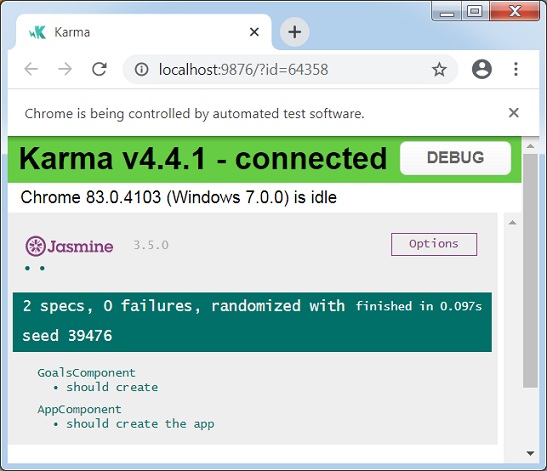
Chrome 83.0.4103 (Windows 7.0.0): Executed 1 of 2 SUCCESS (0 secs / 0.053 secs)
...
Chrome 83.0.4103 (Windows 7.0.0): Executed 2 of 2 SUCCESS (0.097 secs / 0.073 se
cs)
TOTAL: 2 SUCCESS
ng test 還會開啟瀏覽器並顯示測試狀態。
Angular CLI - ng e2e 命令
本章解釋了 ng e2e 命令的語法、引數和選項,並提供了一個示例。這裡,e2e 指的是端到端。
語法
ng e2e 命令的語法如下:
ng e2e <project> [options]
ng e <project> [options]
ng e2e 構建、啟動應用程式,然後使用 protractor 執行端到端測試用例。選項是可選引數。
引數
ng e2e 命令的引數如下:
| 序號 | 引數及語法 | 描述 |
|---|---|---|
| 1 | <project> | 要測試的專案的名稱。 |
選項
選項是可選引數。
| 序號 | 選項及語法 | 描述 |
|---|---|---|
| 1 | --baseUrl=baseUrl | protractor 連線到的基本 URL。 |
| 2 | --configuration=configuration |
在 angular.json 的“configurations”部分中指定的命名構建目標。每個命名目標都附帶該目標的選項預設值配置。顯式設定此項會覆蓋“--prod”標誌 別名:-c |
| 3 | --devServerTarget=devServerTarget | 要針對其執行測試的開發伺服器目標。 |
| 4 | --grep=grep | 執行名稱與模式匹配的規範,該模式在內部編譯為 RegExp。 |
| 5 | --help=true|false|json|JSON |
在控制檯中顯示此命令的幫助訊息。 預設值:false |
| 6 | --host=host | 要監聽的主機。 |
| 7 | --invertGrep=true|false |
反轉“grep”選項指定的選項。 預設值:false |
| 8 | --port | 要用來啟動應用程式的埠。 |
| 9 | --prod=true|false | “--configuration=production”的簡寫。如果為 true,則將構建配置設定為生產目標。預設情況下,生產目標在工作區配置中設定,以便所有構建都使用捆綁、有限的 tree-shaking 以及有限的死程式碼消除。 |
| 10 | --protractorConfig=protractorConfig | Protractor 配置檔案的名稱。 |
| 11 | --specs | 覆蓋 protractor 配置中的規範。 |
| 12 | --suite=suite | 覆蓋 protractor 配置中的套件。 |
| 13 | --webdriverUpdate=true|false |
嘗試更新 webdriver。 預設值:true |
首先移動到使用ng build命令更新的 Angular 專案。該章節可在https://tutorialspoint.tw/angular_cli/angular_cli_ng_build.htm.找到。
現在執行 e2e 命令。
示例
下面給出了 ng e2e 命令的一個示例:
\>Node\>TutorialsPoint> ng e2e
...
chunk {main} main.js, main.js.map (main) 14.3 kB [initial] [rendered]
chunk {polyfills} polyfills.js, polyfills.js.map (polyfills) 141 kB [initial] [rendered]
chunk {runtime} runtime.js, runtime.js.map (runtime) 6.15 kB [entry] [rendered]
chunk {styles} styles.js, styles.js.map (styles) 12.4 kB [initial] [rendered]
chunk {vendor} vendor.js, vendor.js.map (vendor) 3 MB [initial] [rendered]
Date: 2020-06-06T04:20:15.029Z - Hash: 16f321e3d4599af26622 - Time: 20899ms
** Angular Live Development Server is listening on localhost:4200, open your bro
wser on https://:4200/ **
: Compiled successfully.
...
   workspace-project App
    x should display welcome message
      - Failed: No element found using locator: By(css selector, app-root .content span)
   ...
      From: Task: Run it("should display welcome message") in control flow
   ...
**************************************************
*                    Failures                    *
**************************************************
1) workspace-project App should display welcome message
  - Failed: No element found using locator: By(css selector, app-root .content span)
Executed 1 of 1 spec (1 FAILED) in 2 secs.
現在要修復失敗,請更新 app.component.html
app.component.html
<div class="content" role="main">
   <span>{{ title }} app is running!</span>
</div>
<app-goals></app-goals>
<router-outlet></router-outlet>
現在執行 e2e 命令。
示例
下面給出了 ng e2e 命令的一個示例:
\>Node\>TutorialsPoint> ng e2e
...
chunk {main} main.js, main.js.map (main) 14.9 kB [initial] [rendered]
chunk {polyfills} polyfills.js, polyfills.js.map (polyfills) 141 kB [initial] [rendered]
chunk {runtime} runtime.js, runtime.js.map (runtime) 6.15 kB [entry] [rendered]
chunk {styles} styles.js, styles.js.map (styles) 12.4 kB [initial] [rendered]
chunk {vendor} vendor.js, vendor.js.map (vendor) 3 MB [initial] [rendered]
Date: 2020-06-06T04:28:33.514Z - Hash: 5d8bf2fc7ff59fa390b0 - Time: 10529ms
** Angular Live Development Server is listening on localhost:4200, open your browser on https://:4200/ **
: Compiled successfully.
...
   workspace-project App
      √ should display welcome message
Executed 1 of 1 spec SUCCESS in 2 secs.
ng e2e 還會開啟瀏覽器並使用它透過 UI 執行驗收測試用例。
Angular CLI - ng add 命令
本章解釋了 ng add 命令的語法、引數和選項,並提供了一個示例。
語法
ng add 命令的語法如下:
ng add <collection> [options]
ng add 將 npm 包新增到工作區。
引數
ng add 命令的引數如下:
| 序號 | 引數及語法 | 描述 |
|---|---|---|
| 1 | <collection> | 要新增的包的名稱。 |
選項
選項是可選引數。
| 序號 | 選項及語法 | 描述 |
|---|---|---|
| 1 | --defaults=true|false | 如果為 true,則停用具有預設值的選項的互動式輸入提示。 |
| 2 | --help=true|false|json|JSON |
在控制檯中顯示此命令的幫助訊息。 預設值:false |
| 3 | --registry=registry | 要使用的 NPM 登錄檔。 |
| 4 | --verbose=true|false | 在執行期間顯示有關內部操作的更多詳細資訊。 預設值:false |
首先轉到使用ng build命令更新的 Angular 專案,該專案可在https://tutorialspoint.tw/angular_cli/angular_cli_ng_build.htm.找到。
現在執行新增命令。
示例
下面給出了 ng add 命令的示例:
\>Node\>TutorialsPoint> ng add @angular/pwa
Installing packages for tooling via npm.
Installed packages for tooling via npm.
CREATE ngsw-config.json (620 bytes)
CREATE src/manifest.webmanifest (1352 bytes)
CREATE src/assets/icons/icon-128x128.png (1253 bytes)
CREATE src/assets/icons/icon-144x144.png (1394 bytes)
CREATE src/assets/icons/icon-152x152.png (1427 bytes)
CREATE src/assets/icons/icon-192x192.png (1790 bytes)
CREATE src/assets/icons/icon-384x384.png (3557 bytes)
CREATE src/assets/icons/icon-512x512.png (5008 bytes)
CREATE src/assets/icons/icon-72x72.png (792 bytes)
CREATE src/assets/icons/icon-96x96.png (958 bytes)
UPDATE angular.json (3803 bytes)
UPDATE package.json (1332 bytes)
UPDATE src/app/app.module.ts (682 bytes)
UPDATE src/index.html (482 bytes)
√ Packages installed successfully.
Angular CLI - ng analytics 命令
本章解釋了 ng analytics 命令的語法、引數和選項,並提供了一個示例。
語法
ng analytics 命令的語法如下:
ng analytics <settingOrProject> <projectSetting> [options]
ng analytics 命令配置 Angular CLI 使用情況指標。
引數
ng analytics 命令的引數如下:
| 序號 | 引數及語法 | 描述 |
|---|---|---|
| 1 | <settingOrProject>=on|off|ci|project|prompt | 直接啟用或停用使用者的全部使用情況分析,或提示使用者以互動方式設定狀態,或設定專案的預設狀態。以下是選項的詳細資訊。
|
| 2 | <projectSetting>=on|off|prompt | 設定專案的預設分析啟用狀態。 |
選項
選項是可選引數。
| 序號 | 選項及語法 | 描述 |
|---|---|---|
| 1 | --help=true|false|json|JSON |
在控制檯中顯示此命令的幫助訊息。 預設值:false |
首先轉到使用ng build命令更新的 Angular 專案,該專案可在https://tutorialspoint.tw/angular_cli/angular_cli_ng_build.htm.找到。
現在執行 analytics 命令。
示例
下面給出了 ng analytics 命令的示例:
\>Node\>TutorialsPoint> ng analytics off
Angular CLI - ng config 命令
本章解釋了 ng config 命令的語法、引數和選項,並提供了一個示例。
語法
ng config 命令的語法如下:
ng config <jsonPath> <value> [options]
ng config 命令檢索或設定 angular.json 中的 Angular 配置值。
引數
ng config 命令的引數如下:
| 序號 | 引數及語法 | 描述 |
|---|---|---|
| 1 | <jsonPath> | 要設定或查詢的配置鍵,採用 JSON 路徑格式。例如:"a[3].foo.bar[2]"。如果未提供新值,則返回此鍵的當前值。 |
| 2 | <value> | 如果提供,則為給定配置鍵的新值。 |
選項
選項是可選引數。
| 序號 | 選項及語法 | 描述 |
|---|---|---|
| 1 | --global=true|false |
如果為 true,則訪問呼叫者主目錄中的全域性配置。 預設值:false 別名:-g |
| 2 | --help=true|false|json|JSON |
在控制檯中顯示此命令的幫助訊息。 預設值:false |
首先轉到使用ng build命令更新的 Angular 專案。本章可在https://tutorialspoint.tw/angular_cli/angular_cli_ng_build.htm.找到。
現在執行 config 命令。
示例
下面給出了 ng config 命令的示例:
\>Node\>TutorialsPoint> ng config projects.TutorialsPoint.projectType
application
Angular CLI - ng doc 命令
本章解釋了 ng doc 命令的語法、引數和選項,並提供了一個示例。
語法
ng doc 命令的語法如下:
ng doc <keyword> [options]
ng d <keyword> [options]
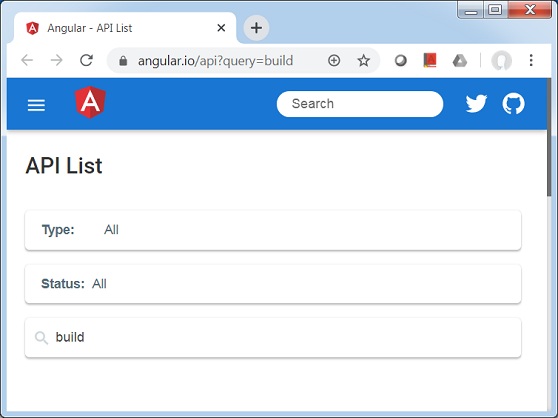
ng doc 命令在瀏覽器中開啟官方 Angular 文件,並搜尋給定的關鍵字。選項是可選引數。
引數
ng doc 命令的引數如下:
| 序號 | 引數及語法 | 描述 |
|---|---|---|
| 1 | <keyword> | 要搜尋的關鍵字,如 angular.io 中搜索欄中提供的那樣。 |
選項
選項是可選引數。
| 序號 | 選項及語法 | 描述 |
|---|---|---|
| 1 | --help=true|false|json|JSON | 在控制檯中顯示此命令的幫助訊息。 預設值:false |
首先轉到使用ng build命令更新的 Angular 專案。本章可在https://tutorialspoint.tw/angular_cli/angular_cli_ng_build.htm.找到。
現在執行 doc 命令。
示例
下面給出了 ng doc 命令的示例:
\>Node\>TutorialsPoint> ng doc build
現在將開啟一個瀏覽器視窗並搜尋相關的關鍵字。
Angular CLI - ng update 命令
本章解釋了 ng update 命令的語法、引數和選項,並提供了一個示例。
語法
ng update 命令的語法如下:
ng update [options]
ng update 命令更新應用程式及其依賴項。
引數
ng update 命令的引數如下:
| 序號 | 引數及語法 | 描述 |
|---|---|---|
| 1 | <keyword> | 要搜尋的關鍵字,如 angular.io 中搜索欄中提供的那樣。 |
選項
選項是可選引數。
| 序號 | 選項及語法 | 描述 |
|---|---|---|
| 1 | --all=true|false | 是否更新 package.json 中的所有包。 預設值:false |
| 2 | --allowDirty=true|false | 儲存庫中包含修改或未跟蹤的檔案時是否允許更新。 |
| 3 | --createCommits=true|false |
為更新和遷移建立原始碼管理提交。 預設值:false 別名:-C |
| 4 | --force=true|false |
如果為 false,則如果已安裝的包與更新不相容,則會出錯。 預設值:false |
| 5 | --from=from | 要從中遷移的版本。僅在更新單個包時可用,並且僅在僅遷移時可用。 |
| 6 | --help=true|false|json|JSON |
在控制檯中顯示此命令的幫助訊息。 預設值:false |
| 7 | --migrateOnly=true|false | 僅執行遷移,不更新已安裝的版本。 |
| 8 | --next=true|false |
使用最大版本,包括 beta 版和 RC 版。 預設值:false |
| 9 | --packages | 要更新的包的名稱。 |
| 10 | --to=to | 應用遷移的版本。僅在更新單個包時可用,並且僅在遷移時可用。需要指定 from。預設為檢測到的已安裝版本。 |
| 11 | --verbose=true|false |
在執行期間顯示有關內部操作的更多詳細資訊。 預設值:false |
首先轉到使用 ng build 命令更新的 Angular 專案。本章可在https://tutorialspoint.tw/angular_cli/angular_cli_ng_build.htm.找到。
現在執行 update 命令。現在 ng 將使用 npm 更新依賴項。
示例
下面給出了 ng update 命令的示例:
\>Node\>TutorialsPoint> ng update
Using package manager: 'npm'
Collecting installed dependencies...
Found 31 dependencies.
   We analyzed your package.json and everything seems to be in order. Good work!
Angular CLI - ng xi18n 命令
本章解釋了 ng xi18n 命令的語法、引數和選項,並提供了一個示例。
語法
ng xi18n 命令的語法如下:
ng xi18n <project> [options]
ng i18n-extract <project> [options]
ng xi18n 命令從原始碼中提取 i18n 訊息。
引數
ng xi18n 命令的引數如下:
| 序號 | 引數及語法 | 描述 |
|---|---|---|
| 1 | <project> | 專案的名稱。它可以是應用程式或庫。 |
選項
選項是可選引數。
| 序號 | 選項及語法 | 描述 |
|---|---|---|
| 1 | --browserTarget=browserTarget | 要從中提取的目標。 |
| 2 | --configuration=configuration | 一個命名的構建目標,如 angular.json 的“configurations”部分中指定。每個命名目標都伴隨著該目標的選項預設配置。顯式設定此項會覆蓋“--prod”標誌。 別名:-c |
| 3 | --createCommits=true|false |
為更新和遷移建立原始碼管理提交。 預設值:false 別名:-C |
| 4 | --format=xmb|xlf|xlif|xliff|xlf2|xliff2 |
生成檔案的輸出格式。 預設值:xlf |
| 5 | --help=true|false|json|JSON |
在控制檯中顯示此命令的幫助訊息。 預設值:false |
| 6 | --outFile=outFile | 要輸出的檔名。 |
| 7 | --outputPath=outputPath | 輸出將放置到的路徑。 |
| 8 | --prod=true|false | “--configuration=production”的簡寫。如果為 true,則將構建配置設定為生產目標。預設情況下,生產目標在工作區配置中設定,以便所有構建都使用捆綁、有限的 tree-shaking 以及有限的死程式碼消除。 |
| 9 | --progress=true|false |
將進度記錄到控制檯。 預設值:true |
首先轉到使用ng build命令更新的 Angular 專案。本章可在https://tutorialspoint.tw/angular_cli/angular_cli_ng_build.htm.找到。
將 app.component.html 更新如下:
app.component.spec.ts
<div class="content" role="main">
   <span i18n>app is running!</span>
</div>
<app-goals></app-goals>
<router-outlet></router-outlet>
現在執行 xi18n 命令。
示例
下面給出了 ng xi18n 命令的示例:
\>Node\>TutorialsPoint> ng xi18n
新增本地化支援。
\>Node\>TutorialsPoint> ng add @angular/localize
Installing packages for tooling via npm.
Installed packages for tooling via npm.
UPDATE src/polyfills.ts (3064 bytes)
現在 ng 將在根資料夾中建立一個 messages.xlf 檔案,這是一個行業標準的翻譯檔案。
messages.xlf
<?xml version="1.0" encoding="UTF-8" ?>
<xliff version="1.2" xmlns="urn:oasis:names:tc:xliff:document:1.2">
   <file source-language="en-US" datatype="plaintext" original="ng2.template">
      <body>
         <trans-unit id="6226cbeebaffaec0342459915ef7d9b0e9e92977" datatype="html">
            <source>app is running!</source>
            <context-group purpose="location">
               <context context-type="sourcefile">src/app/app.component.html</context>
               <context context-type="linenumber">2</context>
            </context-group>
         </trans-unit>
      </body>
   </file>
</xliff>
Angular CLI - 程式碼覆蓋率
本章解釋了程式碼覆蓋率命令的語法,並提供了一個示例。
語法
程式碼覆蓋率命令的語法如下:
ng test <project> --codeCoverage=true
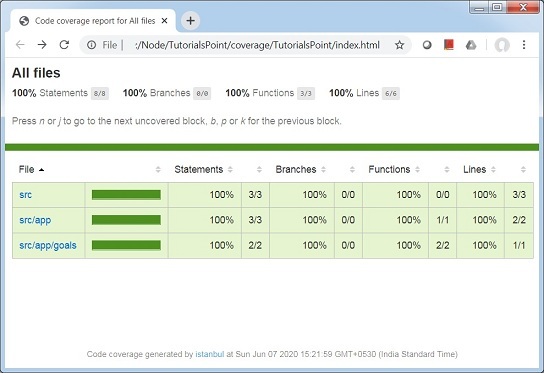
ng test 命令允許使用編寫的測試用例檢查程式碼覆蓋率。請參見下面的示例。
轉到使用ng xi18n命令更新的 Angular 專案。本章可在https://tutorialspoint.tw/angular_cli/angular_cli_ng_xi18n.htm.找到。現在,使用 codeCoverage 命令執行測試。
示例
下面給出了 ng 程式碼覆蓋率命令的示例:
\>Node\>TutorialsPoint> ng test --codeCoverage=true
10% building 2/2 modules 0 active07 06 2020 15:21:46.292:WARN [karma]: No captur
ed browser, open https://:9876/
07 06 2020 15:21:46.299:INFO [karma-server]: Karma v4.4.1 server started at http
://0.0.0.0:9876/
07 06 2020 15:21:46.300:INFO [launcher]: Launching browsers Chrome with concurre
ncy unlimited
07 06 2020 15:21:46.312:INFO [launcher]: Starting browser Chrome
07 06 2020 15:21:55.456:WARN [karma]: No captured browser, open https://
:9876/
07 06 2020 15:21:55.533:INFO [Chrome 83.0.4103 (Windows 7.0.0)]: Connected on so
cket gJgRaX_rXI6ZqoAiAAAA with id 261512
...
Chrome 83.0.4103 (Windows 7.0.0): Executed 1 of 2 SUCCESS (0 secs / 0.053 secs)
...
Chrome 83.0.4103 (Windows 7.0.0): Executed 2 of 2 SUCCESS (0.107 secs / 0.082 se
cs)
TOTAL: 2 SUCCESS
=============================== Coverage summary ===============================
Statements   : 100% ( 8/8 )
Branches     : 100% ( 0/0 )
Functions    : 100% ( 3/3 )
Lines        : 100% ( 6/6 )
================================================================================
現在 ng test 命令已在 TutorialsPoint(專案資料夾)中建立了一個 coverage 資料夾,並已以 html 格式生成了覆蓋率報告,該報告位於>Node>TutorialsPoint>coverage>TutorialsPoint>index.html。