
- Angualr CLI 教程
- Angular CLI - 主頁
- Angular CLI - 概述
- Angular CLI - 環境設定
- Angular CLI 命令
- Angular CLI - ng version
- Angular CLI - ng new
- Angular CLI - ng help
- Angular CLI - ng generate
- Angular CLI - ng build
- Angular CLI - ng run
- Angular CLI - ng serve
- Angular CLI - ng lint
- Angular CLI - ng test
- Angular CLI - ng e2e
- Angular CLI - ng add
- Angular CLI - ng analytics
- Angular CLI - ng config
- Angular CLI - ng doc
- Angular CLI - ng update
- Angular CLI - ng xi18n
- Angular CLI - 程式碼覆蓋率
- Angular CLI 有用資源
- Angular CLI - 快速指南
- Angular CLI - 有用資源
- Angular CLI - 討論
Angular CLI - 程式碼覆蓋率
本章解釋了程式碼覆蓋率命令的語法及其示例。
語法
程式碼覆蓋率命令的語法如下所示 -
ng test <project> --codeCoverage=true
ng test 命令允許使用編寫的測試用例來檢查程式碼覆蓋率。檢視下面的示例。
使用 **ng xi18n** 命令更新一個 Angular 專案。這一章在 https://tutorialspoint.tw/angular_cli/angular_cli_ng_xi18n.htm. 中提供。使用 codeCoverage 命令執行測試。
示例
ng 程式碼覆蓋率命令的例子如下 -
\>Node\>TutorialsPoint> ng test --codeCoverage=true
10% building 2/2 modules 0 active07 06 2020 15:21:46.292:WARN [karma]: No captur
ed browser, open https://:9876/
07 06 2020 15:21:46.299:INFO [karma-server]: Karma v4.4.1 server started at http
://0.0.0.0:9876/
07 06 2020 15:21:46.300:INFO [launcher]: Launching browsers Chrome with concurre
ncy unlimited
07 06 2020 15:21:46.312:INFO [launcher]: Starting browser Chrome
07 06 2020 15:21:55.456:WARN [karma]: No captured browser, open https://
:9876/
07 06 2020 15:21:55.533:INFO [Chrome 83.0.4103 (Windows 7.0.0)]: Connected on so
cket gJgRaX_rXI6ZqoAiAAAA with id 261512
...
Chrome 83.0.4103 (Windows 7.0.0): Executed 1 of 2 SUCCESS (0 secs / 0.053 secs)
...
Chrome 83.0.4103 (Windows 7.0.0): Executed 2 of 2 SUCCESS (0.107 secs / 0.082 se
cs)
TOTAL: 2 SUCCESS

=============================== Coverage summary ===============================

Statements   : 100% ( 8/8 )
Branches     : 100% ( 0/0 )
Functions    : 100% ( 3/3 )
Lines        : 100% ( 6/6 )
================================================================================
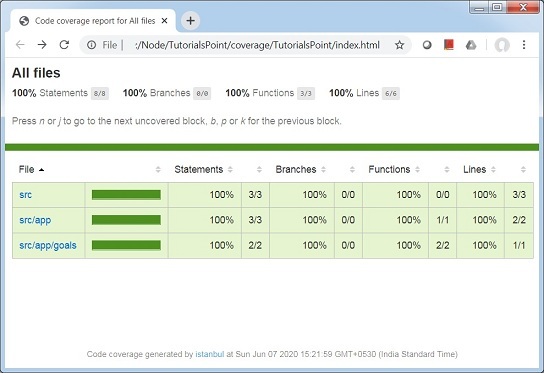
ng test 命令在 TutorialsPoint(專案資料夾)中建立了一個 coverage 資料夾,並將覆蓋率報告以 html 格式生成。報告位置為:\>Node\>TutorialsPoint\>coverage\>TutorialsPoint\>index.html。
廣告