
- Angular CLI 教程
- Angular CLI - 首頁
- Angular CLI - 概述
- Angular CLI - 環境設定
- Angular CLI 命令
- Angular CLI - ng version
- Angular CLI - ng new
- Angular CLI - ng help
- Angular CLI - ng generate
- Angular CLI - ng build
- Angular CLI - ng run
- Angular CLI - ng serve
- Angular CLI - ng lint
- Angular CLI - ng test
- Angular CLI - ng e2e
- Angular CLI - ng add
- Angular CLI - ng analytics
- Angular CLI - ng config
- Angular CLI - ng doc
- Angular CLI - ng update
- Angular CLI - ng xi18n
- Angular CLI - 程式碼覆蓋率
- Angular CLI 有用資源
- Angular CLI - 快速指南
- Angular CLI - 有用資源
- Angular CLI - 討論
Angular CLI - ng test 命令
本章解釋了 ng test 命令的語法、引數和選項,並附帶示例。
語法
ng test 命令的語法如下:
ng test <project> [options]
ng t <project> [options]
ng test 執行 Angular 應用程式碼的單元測試用例。
引數
ng test 命令的引數如下:
| 序號 | 引數 & 語法 | 描述 |
|---|---|---|
| 1 | <project> | 要測試的專案名稱。 |
選項
選項是可選引數。
| 序號 | 選項 & 語法 | 描述 |
|---|---|---|
| 1 | --browsers=browsers | 覆蓋執行測試的瀏覽器。 |
| 2 | --codeCoverage=true|false |
輸出程式碼覆蓋率報告。 預設值:false |
| 3 | --codeCoverageExclude | 要從程式碼覆蓋率中排除的 glob 模式。 |
| 4 | --configuration=configuration |
一個命名的構建目標,如 angular.json 的“configurations”部分中指定。每個命名目標都帶有該目標的選項預設值配置。顯式設定此選項會覆蓋“--prod”標誌 別名:-c |
| 5 | --help=true|false|json|JSON |
在控制檯中顯示此命令的幫助資訊。 預設值:false |
| 6 | --include | 要包含的檔案的 glob 模式,相對於工作區或專案根目錄。有兩種特殊情況:
|
| 7 | --karmaConfig=karmaConfig | Karma 配置檔案的名稱。 |
| 8 | --main=main | 主入口檔案的名稱。 |
| 9 | --poll | 啟用並定義檔案監視輪詢時間段(以毫秒為單位)。 |
| 10 | --polyfills=polyfills | polyfills 檔案的名稱。 |
| 11 | --preserveSymlinks=true|false |
解析模組時不使用真實路徑。 預設值:false |
| 12 | --prod=true|false | “--configuration=production”的簡寫。如果為 true,則將構建配置設定為生產目標。預設情況下,生產目標在工作區配置中設定,以便所有構建都使用捆綁、有限的 tree-shaking 和有限的死程式碼消除。 |
| 13 | --progress=true|false | 在構建時將進度日誌記錄到控制檯。 |
| 13 | --progress=true|false | 在構建時將進度日誌記錄到控制檯。 |
| 14 | --reporters | 要使用的 Karma 報告器。直接傳遞給 karma 執行器。 |
| 15 | --sourceMap=true|false |
輸出源對映。 預設值:true |
| 16 | --tsConfig=tsConfig | TypeScript 配置檔案的名稱。 |
| 17 | --watch=true|false | 檔案更改時執行構建。 |
| 18 | --webWorkerTsConfig=webWorkerTsConfig | Web Worker 模組的 TypeScript 配置。 |
首先移動到使用ng build命令更新的 Angular 專案。本章的連結是 https://tutorialspoint.tw/angular_cli/angular_cli_ng_build.htm.
現在執行測試命令。
示例
下面給出了 ng test 命令的示例:
\>Node\>TutorialsPoint> ng test
...
WARN: ''app-goals' is not a known element:
1. If 'app-goals' is an Angular component, then verify that it is part of this module.
2. If 'app-goals' is a Web Component then add 'CUSTOM_ELEMENTS_SCHEMA' to the '@NgModule.schemas' of this component to suppress this message.'
Chrome 83.0.4103 (Windows 7.0.0): Executed 0 of 4 SUCCESS (0 secs / 0 secs)
...
AppComponent should render title FAILED
   TypeError: Cannot read property 'textContent' of null
      at <Jasmine>
      at UserContext.<anonymous> (https://:9876/_karma_webpack_/src/app/app.component.spec.ts:33:51)
            ...
Chrome 83.0.4103 (Windows 7.0.0): Executed 1 of 4 (1 FAILED) (0 secs / 0.203 secs)
...
Chrome 83.0.4103 (Windows 7.0.0): Executed 2 of 4 (1 FAILED) (0 secs / 0.221 secs)
...
Chrome 83.0.4103 (Windows 7.0.0): Executed 4 of 4 (1 FAILED) (0 secs / 0.244 sec
Chrome 83.0.4103 (Windows 7.0.0): Executed 4 of 4 (1 FAILED) (0.282 secs / 0.244
 secs)
TOTAL: 1 FAILED, 3 SUCCESS
現在要修復失敗,請更新 app.component.spec.ts
app.component.spec.ts
import { TestBed, async } from '@angular/core/testing';
import { RouterTestingModule } from '@angular/router/testing';
import { AppComponent } from './app.component';

describe('AppComponent', () => {
   beforeEach(async(() => {
      TestBed.configureTestingModule({
         imports: [
            RouterTestingModule
         ],
         declarations: [
            AppComponent
         ],
      }).compileComponents();
   }));

   it('should create the app', () => {
      const fixture = TestBed.createComponent(AppComponent);
      const app = fixture.componentInstance;
      expect(app).toBeTruthy();
   });
});
現在執行測試命令。
示例
下面給出了一個示例:
\>Node\>TutorialsPoint> ng test
...
WARN: ''app-goals' is not a known element:
1. If 'app-goals' is an Angular component, then verify that it is part of this m
odule.
2. If 'app-goals' is a Web Component then add 'CUSTOM_ELEMENTS_SCHEMA' to the '@
NgModule.schemas' of this component to suppress this message.'
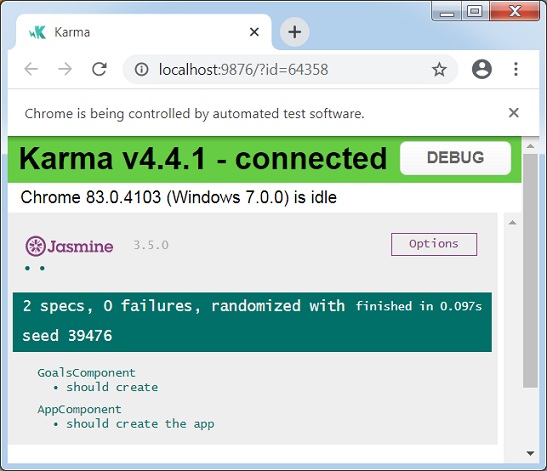
Chrome 83.0.4103 (Windows 7.0.0): Executed 1 of 2 SUCCESS (0 secs / 0.053 secs)
...
Chrome 83.0.4103 (Windows 7.0.0): Executed 2 of 2 SUCCESS (0.097 secs / 0.073 se
cs)
TOTAL: 2 SUCCESS
ng test 還會開啟瀏覽器並顯示測試狀態。
廣告