
- AJAX 教程
- AJAX - 首頁
- AJAX - 什麼是 AJAX?
- AJAX - 歷史
- AJAX - 動態網站與靜態網站
- AJAX - 技術
- AJAX - 操作
- AJAX - XMLHttpRequest
- AJAX - 傳送請求
- AJAX - 請求型別
- AJAX - 處理響應
- AJAX - 處理二進位制資料
- AJAX - 提交表單
- AJAX - 檔案上傳
- AJAX - FormData 物件
- AJAX - 傳送 POST 請求
- AJAX - 傳送 PUT 請求
- AJAX - 傳送 JSON 資料
- AJAX - 傳送資料物件
- AJAX - 監控進度
- AJAX - 狀態碼
- AJAX - 應用
- AJAX - 瀏覽器相容性
- AJAX - 示例
- AJAX - 瀏覽器支援
- AJAX - XMLHttpRequest
- AJAX - 資料庫操作
- AJAX - 安全性
- AJAX - 問題
- Fetch API 基礎
- Fetch API - 基礎
- Fetch API 與 XMLHttpRequest
- Fetch API - 瀏覽器相容性
- Fetch API - 頭資訊
- Fetch API - 請求
- Fetch API - 響應
- Fetch API - 主體資料
- Fetch API - 憑據
- Fetch API - 傳送 GET 請求
- Fetch API - 傳送 POST 請求
- Fetch API - 傳送 PUT 請求
- Fetch API - 傳送 JSON 資料
- Fetch API - 傳送資料物件
- Fetch API - 自定義請求物件
- Fetch API - 上傳檔案
- Fetch API - 處理二進位制資料
- Fetch API - 狀態碼
- Stream API 基礎
- Stream API - 基礎
- Stream API - 可讀流
- Stream API - 可寫流
- Stream API - 變換流
- Stream API - 請求物件
- Stream API - 響應主體
- Stream API - 錯誤處理
- AJAX 有用資源
- AJAX - 快速指南
- AJAX - 有用資源
- AJAX - 討論
Fetch API - 上傳檔案
Fetch API 提供了一種靈活的方式來建立 HTTP 請求,該請求將檔案上傳到伺服器。我們可以使用 fetch() 函式以及 FormData 物件在請求中傳送單個或多個檔案。讓我們藉助以下示例來討論這個概念:
示例 - 上傳單個檔案
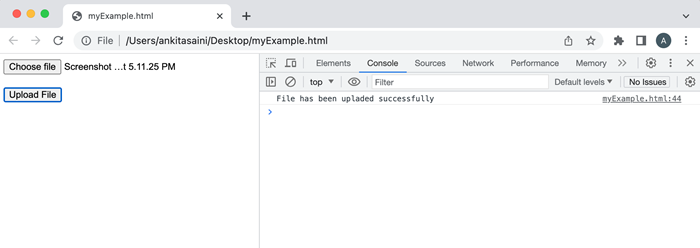
在以下程式中,我們使用 Fetch API 每次上傳一個檔案。這裡我們使用 FormData 物件儲存檔案,然後使用 fetch() 函式將其傳送到給定的 URL,包括 POST 請求方法和 FormData 物件。在將請求傳送到伺服器後,我們現在使用 then() 函式來處理響應。如果遇到錯誤,則 catch() 函式將處理該錯誤。
<!DOCTYPE html>
<html>
<body>
<!-- Creating a form to upload a file-->
<form id = "myForm">
   <input type="file" id="file"><br><br>
   <button type="submit">Upload File</button>
</form>
<script>
   document.getElementById('myForm').addEventListener('submit', function(x){
      // Prevent from page refreshing
      x.preventDefault();

      // Select the file from the system
      // Here we are going to upload one file at a time
      const myFile = document.getElementById('file').files[0];

      // Create a FormData to store the file
      const myData = new FormData();

      // Add file in the FormData
      myData.append("newFiles", myFile);

      // Send the file to the given URL
      fetch("https://httpbin.org/post", {
         // POST request with Fetch API
         method: "POST",

         // Adding FormData to the request
         body: myData
      })
      // Converting the response in JSON
      // using response.json() function
      .then(response => response.json())
      .then(finalData => {
         // Handling the response
         console.log("File has been uploaded successfully");
      })
      .catch(err=>{
         // Handling the error
         console.log("Error Found:", err)
      });
   })
</script>
</body>
</html>
輸出
示例 - 為單個輸入上傳多個檔案
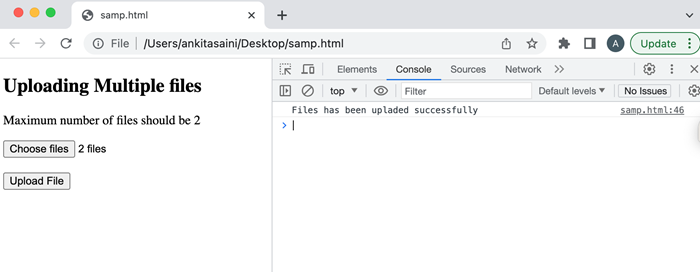
在以下程式中,我們將使用 Fetch API 從單個輸入上傳多個檔案。這裡我們在 <input> 標籤中添加了一個 "multiple" 屬性來新增多個檔案。然後我們使用 FormData 物件儲存多個檔案,然後使用 fetch() 函式將其傳送到給定的 URL,包括 POST 請求方法和 FormData 物件。在將請求傳送到伺服器後,我們現在使用 then() 函式來處理響應。如果遇到錯誤,則 catch() 函式將處理該錯誤。
<!DOCTYPE html>
<html>
<body>
   <!-- Creating a form to upload a file-->
   <h2> Uploading Multiple files</h2>
   <form id = "myForm">
      <p>Maximum number of files should be 2</p>
      <input type="file" id="file" multiple><br><br>
      <button type="submit">Upload File</button>
   </form>
<script>
   document.getElementById('myForm').addEventListener('submit', function(x){
      // Prevent from page refreshing
      x.preventDefault();

      // Select the file from the system
      // Here we are going to upload multiple files at a time
      const myFile = document.getElementById('file').files[0];

      // Create a FormData to store the file
      const myData = new FormData();

      // Add file in the FormData
      myData.append("newFiles", myFile);

      // Send the file to the given URL
      fetch("https://httpbin.org/post", {
         // POST request with Fetch API
         method: "POST",

         // Adding FormData to the request
         body: myData
      })
      // Converting the response in JSON
      // using response.json() function
      .then(response => response.json())
      .then(finalData => {
         // Handling the response
         console.log("Files has been uploaded successfully");
      })
      .catch(err=>{
         // Handling the error
         console.log("Error Found:", err)
      });
   })
</script>
</body>
</html>
輸出
示例 - 上傳多個檔案
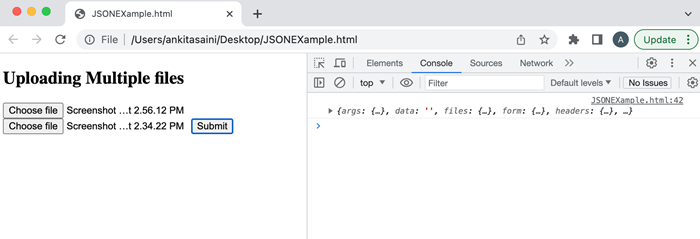
在以下程式中,我們將使用 Fetch API 上傳多個檔案。這裡我們在 DOM 中使用檔案型別的屬性從系統中選擇兩個檔案。然後我們將輸入檔案新增到陣列中。然後我們建立一個 FormData 物件並將輸入檔案附加到該物件。然後我們使用 fetch() 函式將其傳送到給定的 URL,包括 POST 請求方法和 FormData 物件。在將請求傳送到伺服器後,我們現在使用 then() 函式來處理響應。如果遇到錯誤,則 catch() 函式將處理該錯誤。
<!DOCTYPE html>
<html>
<body>
   <!-- Creating a form to upload multiple files-->
   <h2> Uploading Multiple files</h2>
   <input type="file">
   <input type="file">
   <button>Submit</button>
<script>
   const myButton = document.querySelector('button');
   myButton.addEventListener('click', () => {
      // Get all the input files in DOM with attribute type "file":
      const inputFiles = document.querySelectorAll('input[type="file"]');

      // Add input files in the array
      const myfiles = [];
      inputFiles.forEach((inputFiles) => myfiles.push(inputFiles.files[0]));

      // Creating a FormData
      const myformdata = new FormData();

      // Append files in the FormData object
      for (const [index, file] of myfiles.entries()){
         // It contained reference name, file, set file name
         myformdata.append(`file${index}`, file, file.name);
      }
      // Upload the FormData object
      fetch('https://httpbin.org/post', {
         method: "POST",
         body: myformdata,
      })
      // Handle the response
      .then(response => response.json())
      .then(response => console.log(response))

      // Handle the error
      .catch(err => console.log("Error Found:", err))
   })
</script>
</body>
</html>
輸出
結論
因此,這就是我們如何使用 fetch() API 將檔案上傳到給定 URL 的方法。在這裡,我們可以上傳任何型別的檔案,例如 jpg、pdf、word 等,並可以一次上傳任意數量的檔案,例如一次上傳一個檔案或一次上傳多個檔案。現在,在下一篇文章中,我們將學習 Fetch API 如何處理響應。